
The client fills in a form.The paperwork does itself.
Doxtly writes the contract from your own Word template, sends it for e-signature and files the signed PDF. You set it up once, and nobody in the office retypes a name again.
Free plan, no card needed. Send your first document with the messages Doxtly has ready.
Most office hours go to the same small jobs
If someone in your office copies details from one place to another, sends a file and waits, or keeps a mental list of who needs which copy, this is for you.
Typing the same details again
A client emails their company details. Someone pastes them into a Word file and hopes the last client’s name is gone from page four.
Chasing signatures
Printing, scanning and reminding is where contracts go to sleep. And nobody can say who has signed without opening their inbox. With Doxtly a package reminds people by itself, and you see who still has to sign.
Steps that depend on someone remembering
Tell accounting, save a copy, let the account manager know. These fail quietly when the one person who knows them is on holiday.
Data spread across inboxes and drives
Answers, files, sent emails and signed copies sit in different places, and finding one means asking around.
| Who | Before | With Doxtly |
|---|---|---|
| Consulting firm | An associate writes each NDA and service agreement by hand. | The client fills in an onboarding form, and both documents are generated and sent for signature. |
| Training company | Tests are marked by hand and certificates typed one by one after each course. | Attendees take the test online, it marks itself, and everyone who passed gets their certificate by email. |
| Clinic | Paper consent forms are scanned and filed. | The patient fills in and signs online, and the signed PDF goes to the right folder on your drive. |
| Online shop | Orders that need a contract are handled by hand. | The shop sends each order to a webhook, and a workflow takes it from there. |
| HR and office | The same forms and letters are retyped, printed and chased for signatures. | One form fills in your template, people sign online, and the answers and PDFs land in your sheet and folder. |
| Service company | Client feedback arrives by email, now and then, and nobody adds it up. | A short survey goes out when each project ends, and the NPS, its trend and the comments that need a call are on one screen. |
One client, from first form to filed contract
Northbridge Advisory is the example consulting firm from our manual. Here is how it takes on a new client. There is one idea to learn first: a shared name carries a value from a form into a document.
- A field in your form
- company
- A marker in your Word file
- ${company}
- The line in the finished PDF
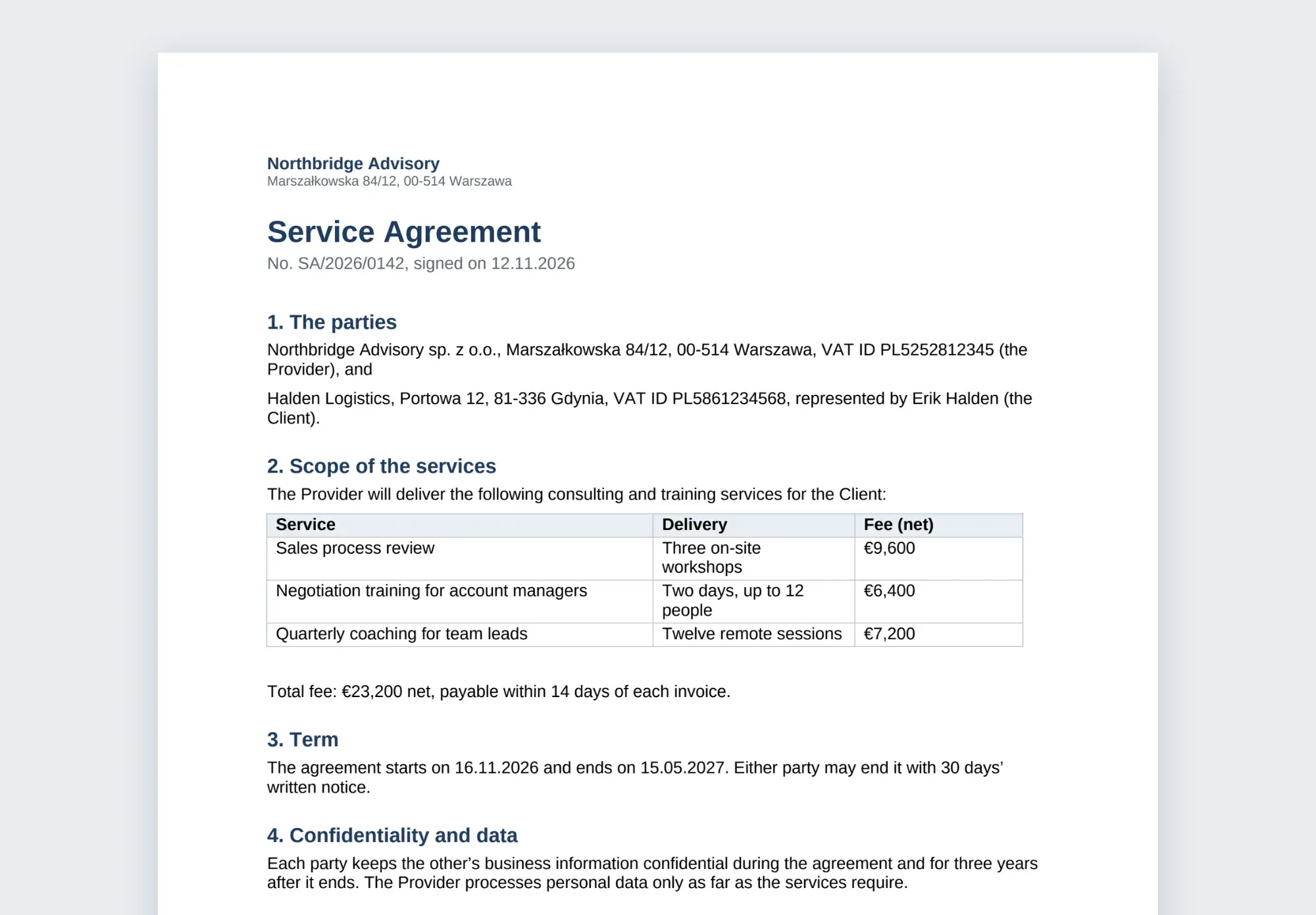
- Halden Logistics
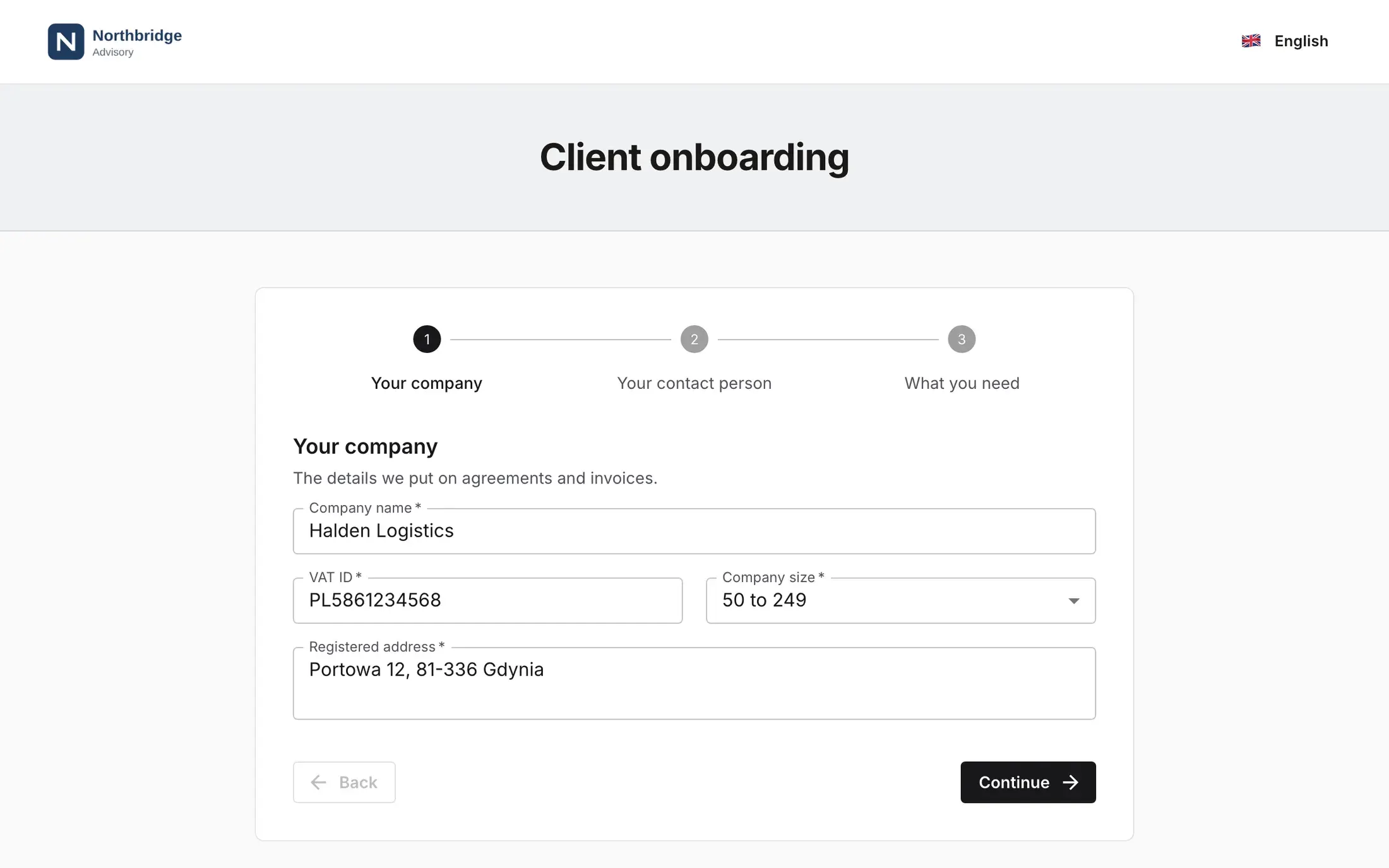
The client fills in one form
They open the form from a link or on Northbridge’s website. Questions that do not apply stay hidden.
Doxtly writes the documents
A workflow starts by itself and fills Northbridge’s own Word templates: an NDA and a service agreement, with this client’s details in every place.
Everyone signs through a link
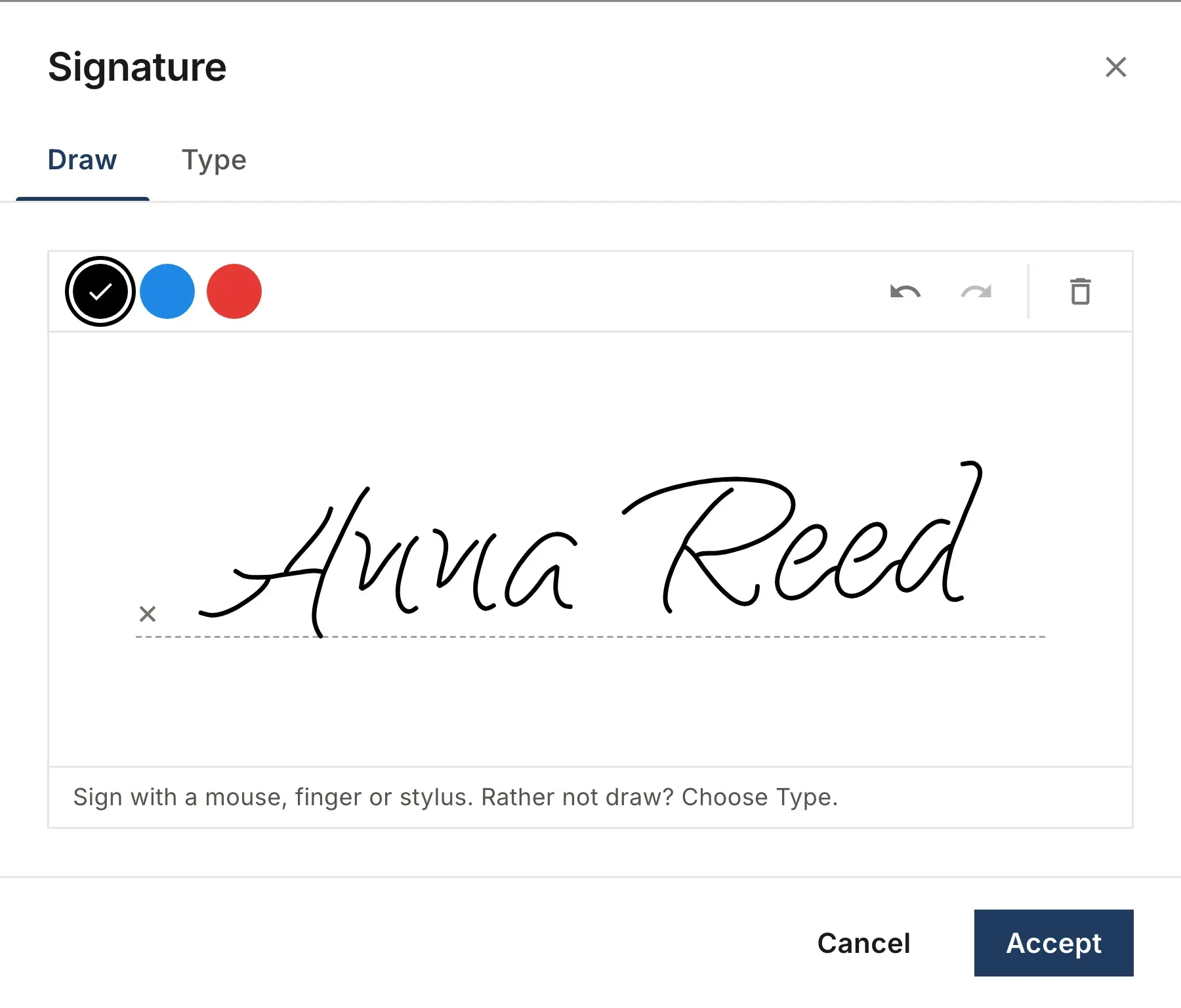
The client goes straight to the signing page, with no account to create. The partner sees the package under Waiting for you on the dashboard, and signs too.
The signed files go where they belong
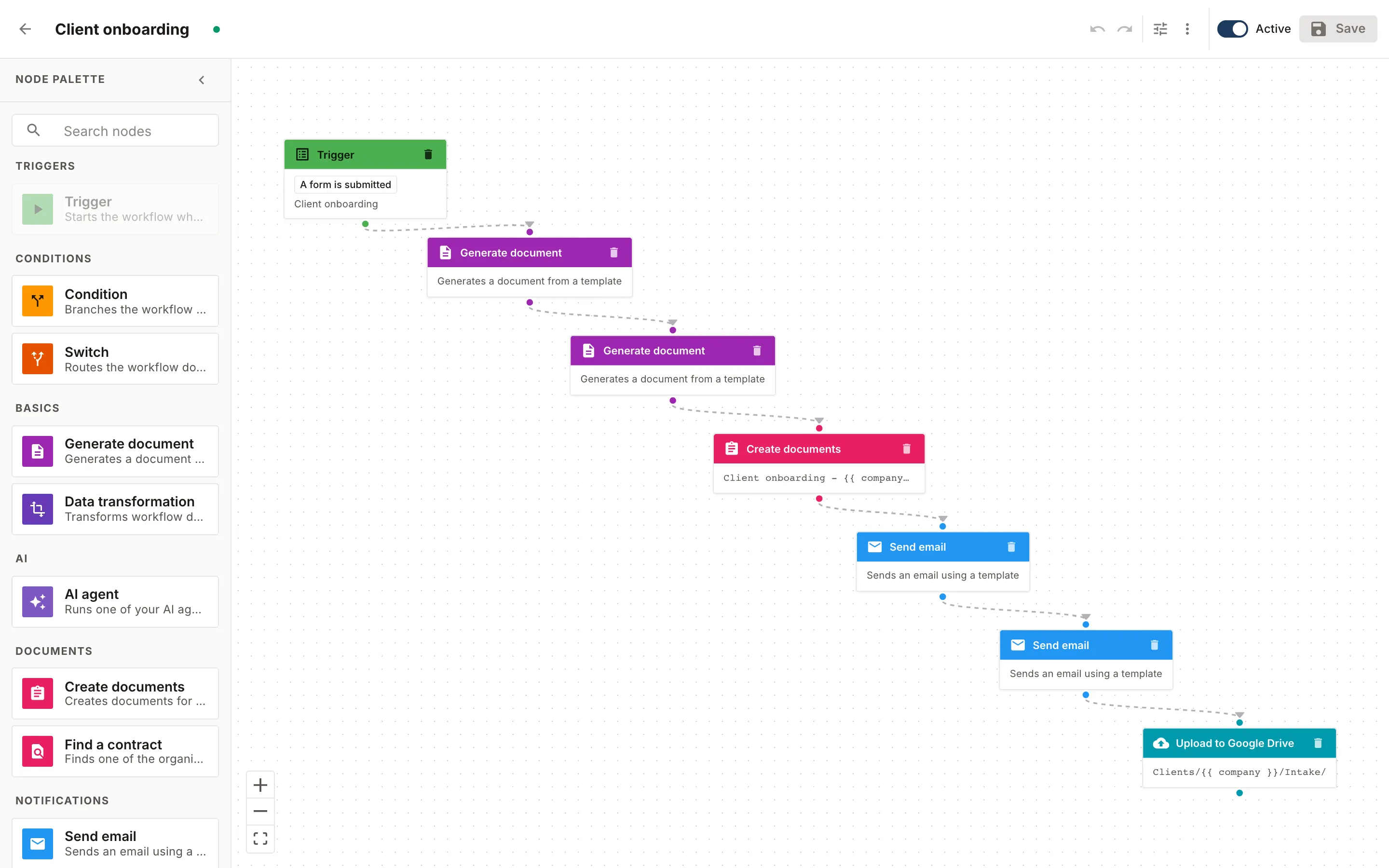
When the last party signs, the PDF is sealed. A second workflow uploads it to the client’s folder on Google Drive and asks accounting for the invoice.
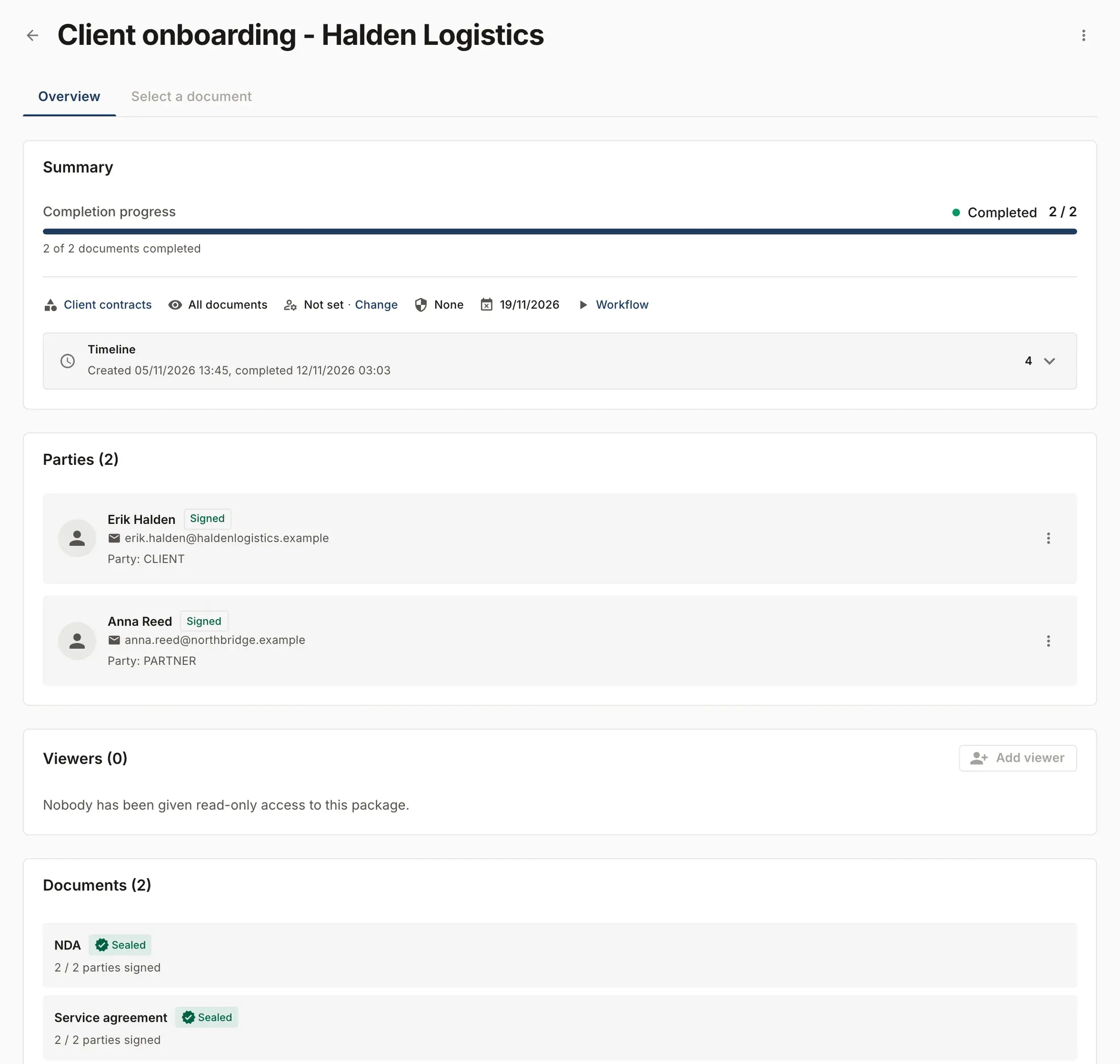
Nobody at Northbridge opened Word, and the partner did one thing: sign.
What is in the box
Each part works alone, and each is better connected to the next.
What people build with it
Real jobs, written down step by step.
Contract generation
A client fills in a form, and your own Word or PDF template becomes a contract ready to sign.
Online document signing
Send documents with a link, see who has signed, and keep a sealed PDF with the proof inside.
Contracts signed on paper
The client fills in the contract online, signs it with a pen and sends a scan, and the package still ends sealed.
Certificate self-service
Trainees fill in a short form, and the right certificate is written and emailed from your spreadsheet.
Surveys into a spreadsheet
Every answer lands as a new row in your Excel or Google Sheets file, with nobody copying it.
Bookings against a spreadsheet
Take bookings through a form and let a sheet on your drive decide what is still free.
What happens to your clients’ data
Here is what the product does. We list only what it does today.
- Two-factor authentication on every plan
- An authenticator app and backup codes, and an administrator can require it of everyone.
- Encrypted where it is stored
- Form answers, workflow data, emails and webhook payloads are encrypted in storage, and so are the passwords and keys of your integrations.
- Roles down to single permissions
- Four built-in roles, or your own. Departments keep one team’s work with that team.
- Signed files that show any change
- A seal over each signed PDF, and a chain of hashes in the audit log, so an entry cannot be slipped in later unnoticed. Anyone you send the file to can check its signature for free, with no account.
- You decide how long data stays
- Set a retention period for each kind of record, from 1 to 3,650 days, or keep it for good.
- Keys that do only what you allow
- Access keys carry the permissions you pick, and you can see and end every session of your account.
Start free, pay when it pays for itself
The Free plan needs no card. E-signing comes with every plan, and no plan limits how many people you invite, so you do not pay per seat.
The plans could not be loaded just now. See the plans in the app
Prices exclude VAT. Monthly limits start again every month on yearly payment too. A year paid in advance runs to its end: if you cancel, the plan works to its last day and does not renew. SMS, WhatsApp and AI agents run on your own provider accounts, and those providers bill you directly. Doxie and the one-click AI tools run on Doxtly AI, included every month on paid plans; top up your Doxtly balance any time from 10 USD; it lasts 12 months from your last top-up. Identity checks are charged per check, with your consent.
Questions people ask
Can I use the Word contracts I already have?
Yes. You keep your file and type markers such as ${client_name} where the values belong. Your layout, clauses and letterhead stay exactly as they are.
Is a Doxtly signature legally binding?
It is a simple electronic signature under the EU’s eIDAS regulation, with evidence recorded and a seal on the PDF. That suits most everyday business documents. Where the law requires a qualified signature, a party can sign with their own qualified certificate. The manual explains which is which.
How can someone check a document signed in Doxtly?
Every sealed PDF carries a short link and a QR code that open its own check. Any copy, also of a PDF signed elsewhere, can be dropped into the free PDF signature check: it says whether the file changed after sealing and who stands behind the certificate, with no account, and the file is not stored.
Do the people signing need an account?
No. They open a link in a browser on a computer or a phone, and nothing has to be installed.
Does Doxtly keep track of contracts after they are signed?
Yes, for the document types you choose. A contract knows when it is in force and when it ends, warns the person responsible before the end, and keeps its annexes, notices and related documents in one contract file. Contracts signed on paper or elsewhere can be added too, one at a time or from a sheet. The manual explains how.
Do I need a developer?
No. Forms, templates and workflows are built by dragging and by typing into your own Word file. The API and webhooks are there if you want your own software involved.
Which address do my emails come from?
Yours, when you connect a mailbox: Gmail, Outlook, your SMTP server, SendGrid, Mailgun or Amazon SES. With none connected, Doxtly’s built-in mailbox sends the messages about a package for you, from Your organization via Doxtly, so you can send your first document without setting anything up. On a paid plan, Doxtly e-mail can send everything else too, workflow emails, form links and reminders, under your organization’s name.
Is AI included?
Yes. Every paid plan includes Doxie, the AI assistant in Doxtly, who answers from the manual and prepares forms, template areas and workflow steps for you to apply, and the AI buttons that turn a Word file into a template or a link into a form. The same Doxtly AI grades open quiz answers and, from the Pro plan up, finds the themes in quiz and survey answers. AI agents in your workflows run on your own Anthropic or OpenAI key, so your provider bills you directly, and Doxtly shows what each one costs.
What languages does it work in?
The app, the signing page and the messages Doxtly sends are in 14 languages: English, Polish, Spanish, German, Portuguese, French, Italian, Ukrainian, Turkish, Arabic, Hindi, Thai, Japanese and simplified Chinese. Arabic runs right to left. There is a light and a dark theme, and a person signing can switch language with one button. Your forms and templates are in whatever language you write them.
What happens when I reach a plan limit?
Monthly limits start again with each billing period. You can upgrade at any time, and paid plans can turn on overage, billed per use up to a cap you set. Plans and limits has the details.
Start with one document.
Take the contract you retype most often and turn it into a template. The Free plan is enough, and you need no card.