
Tests that score themselves and hand out the certificate
A quiz is a set of questions with correct answers, taken through a link. Doxtly keeps the time, scores each attempt, grades open answers with AI and, through a workflow, sends a certificate to everyone who passed.
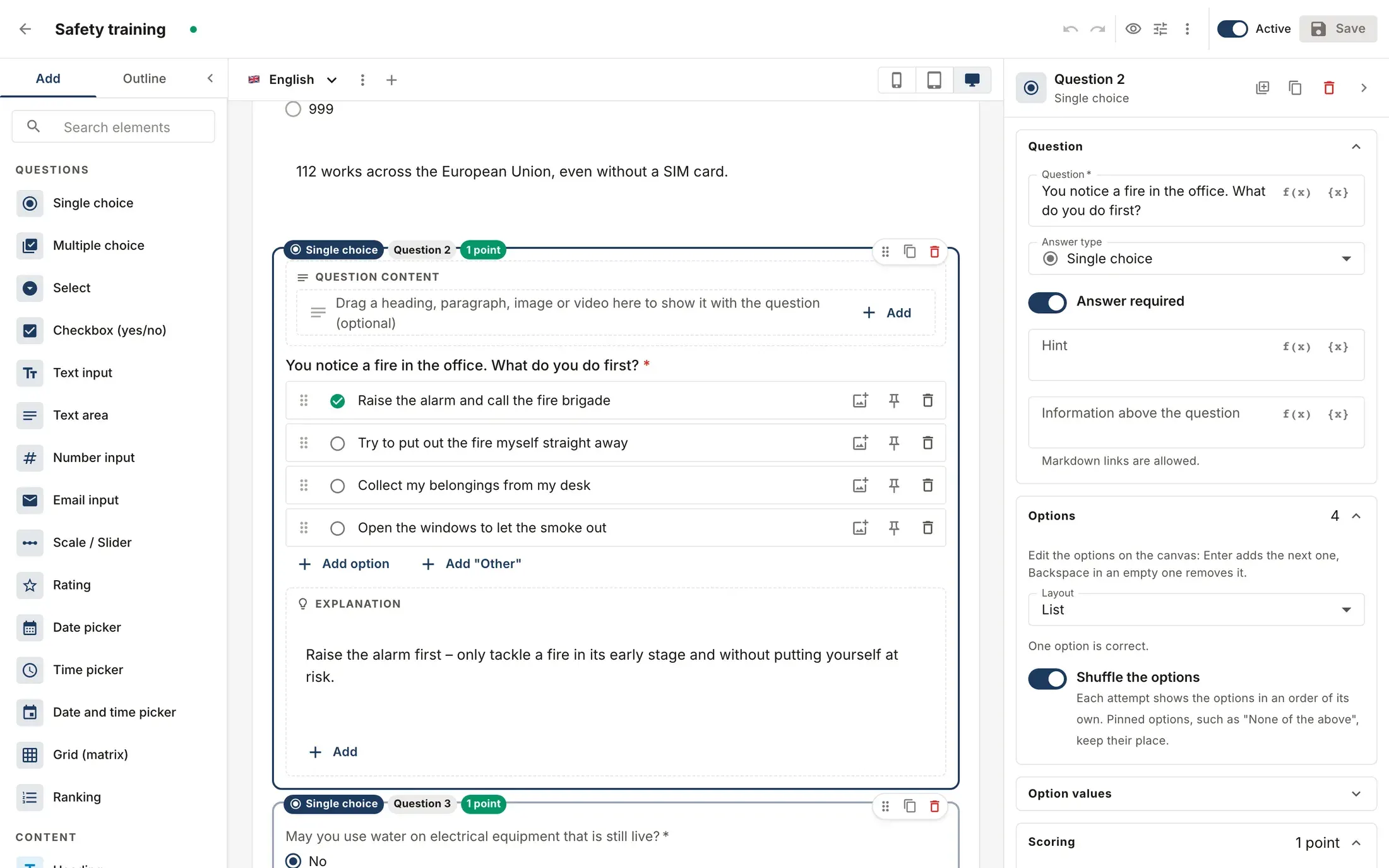
Questions with correct answers
Northbridge Advisory, an example consulting firm, closes its safety training with twelve questions. Each one has its correct answer and its points: a choice, an exact text, a number with a tolerance, the right column in each row of a grid, the right order of a ranking, or an open answer that AI judges against what a good answer contains.
A question can show a picture or a video, and the options of a choice can be picture cards. Sections group the questions, logic shows a question only when an earlier answer calls for it or jumps ahead to a later section, and the quiz runs one question per page, one section per page or all on one page. Language versions give the same quiz in other languages, and each person takes it in their own.
- 15 answer types, Grid (matrix) and Ranking among them
- Partial credit, negative marking and a pass mark
- A section can draw some of its questions at random for each attempt
- Explanations shown with the correct answers, when the result shows them
Start from what you already have
Pick one of Doxtly’s ready tests, such as a health and safety final test or a GDPR awareness test, or one of your organization’s own templates: Save as a template keeps any quiz, without its people and results, for the next course.
Bring questions from a GIFT, Aiken or Moodle XML file, an Excel or CSV sheet, or a Word document that Doxie reads for you, and check each one before it is added. Questions you ask in every course live in the question library, under Resources > Question library, with tags and a difficulty: add them to any quiz, or let a section draw from them for each attempt.
Or ask Doxie for the whole quiz: “a 10-question quiz on fire safety, pass mark 80%, 20 minutes”. She shows it on a card first and creates it switched off when you agree. A finished quiz travels as one file to another organization, with its settings, theme and grading scale; its people and attempts stay with you.
Fair to take, hard to cheat
Open the quiz to anyone with its link, behind a password if you like, or only to the people on its access list, each with a password of their own or a personal link sent by email, now or at a set time, with a deadline and reminders. People come from a file, from your contacts or from a spreadsheet the list keeps following. Share the link or its QR code, or put the quiz on your website.
The server keeps the time, so changing the computer’s clock changes nothing, and the correct answers never reach the page before the attempt is sent. For an exam that matters, Exam safeguards ask for fullscreen, refuse pasted answers and hold an attempt to the device it began on.
- A time limit for the attempt, and one for each section
- Each attempt with its own order of questions and options
- Forward only, with each question sent to the page only once it is reached
- Leaving the tab counted, with a warning, then the attempt sent
- A CAPTCHA, allowed websites and blocked IP addresses
Graded by the key, by AI and by examiners
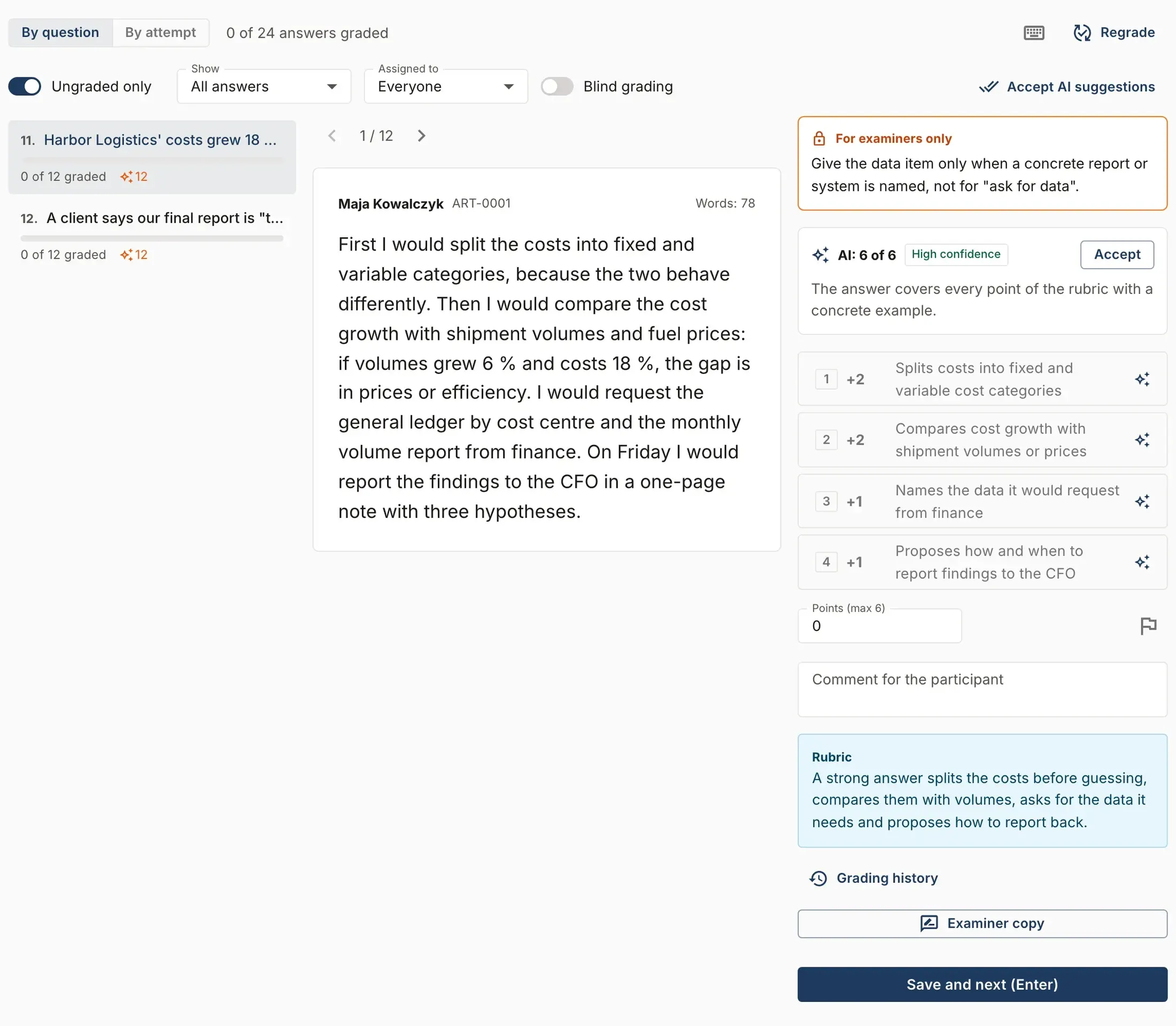
Most answers grade themselves. An open answer goes to AI with your rubric, the examiner notes and any reference material, and you decide what its points are: final when the AI is sure, suggestions only, or always final. Whatever is left waits on the Grading tab, and everyone who may grade is notified.
There an examiner grades one question across every attempt, blind if you like, from the keyboard: rubric items on the number keys, the AI’s suggestion accepted with one key. Share the work out by question or by group, or have each open answer marked twice with Second marking. Every change of a grade is on record, and Regrade applies a corrected key to attempts already finished.
A grading scale turns the score into a grade people recognize, from a school’s 1 to 6 to ECTS A to F, or one of your own. Results show at once, after grading, or only when you release them.
Answer sheets and certificates
Every attempt has a numbered PDF answer sheet: the answers given, the points, the grade, signature lines if you want them, and a QR code that opens the attempt in Doxtly for your own team. Print a class set as one PDF or a ZIP and, if you allow it, people download their own sheet once their result is out.
Two clicks in the quiz’s settings create a certificate workflow and its template, in one of six designs. Each certificate has its number and a QR code anyone can check on your organization’s page, it can carry your organization’s seal, and the result page offers it for download within seconds.
- A4 or Letter, with the explanations and pictures if you like
- An examiner copy with the key, the notes and the history of each grade
- Your own certificate design: a Word, SVG or PDF template
Results that show what to fix
The results open on Overview: completion, median time, average score, pass rate and the spread of scores. Summary is the class list, one row per person with the attempt that counts, the grade and each section’s subtotal, exported to Excel with every answer or kept in a spreadsheet on your drive. Questions adds item analysis, which flags a question that is too easy or may have a wrong key.
Cross-tab sets one answer against another or against a group, and AI analysis sorts the open answers into themes. Save a view as a report and share it by a link, with a password and a date it stops opening. Doxie answers questions such as “Which question was the hardest?” without ever naming a person.
A workflow starts when an attempt is started, needs grading, is finished or is regraded, when a result is released, when the quiz closes, or when someone invited has not finished by the deadline.
Worth knowing before you start
- A quiz checks knowledge; for opinions, use a survey. A quiz cannot be turned into a survey, nor a survey into a quiz.
- Plans limit how many quizzes you keep and how many attempts are started each billing period; the pricing page has the numbers.
- Comparing more than two segments, the significance test of a cross-tab and the AI analysis are part of the Pro and Business plans. The starter certificate uses an SVG template, which the Free plan does not include.
- AI grading of open answers uses Doxtly AI or your own AI integration. Without either, those answers wait for an examiner.
- Counting the times someone leaves the tab deters cheating but proves nothing: a phone beside the laptop is invisible to the page.
- A quiz has no questions that upload a file, a photo, a drawing or a signature.
Questions people ask
Do people need an account to take a quiz?
No. A link is enough, or a password, or a personal link sent to them, when the quiz is only for the people you name.
Can a certificate go only to those who passed?
Yes. The quiz’s certificate workflow starts when an attempt is finished, and its starter version gives a certificate only for a passed attempt.
Can I bring my questions from Moodle?
Yes. Import a Moodle XML, GIFT or Aiken file, an Excel or CSV sheet, or a Word document that Doxie reads, and review the questions before they are added. They can go straight into a quiz or into your question library.
What happens to an open answer the AI is unsure of?
With the default policy, Final when the AI is sure, it goes to an examiner on the Grading tab, with the AI’s suggestion beside it. The person’s result waits for that grade, unless the quiz shows results at once.
Can a quiz look like my brand?
Yes, on every plan. Pick a built-in theme, such as Exam with its high contrast and large type, or make your own with your colours, font and custom CSS, shared with your forms and surveys.
In the manual
Where it is used
Start with one document.
Take the contract you retype most often and turn it into a template. The Free plan is enough, and you need no card.