
A booking form that checks your spreadsheet before it says yes
Keep your slots in Google Sheets or Excel, as you do now. A client picks a time on a form, Doxtly takes that row if it is still free, and the client gets a confirmation by email, or a polite note that the slot has just gone. Two people can’t end up with the same slot.
Is Tuesday at ten still free?
Take Northbridge Advisory, our example firm: a small consultancy that offers new clients a free first consultation. The office keeps the diary in a spreadsheet on the company drive, one row per slot. Each request arrives by email, so someone opens the sheet, finds a gap, writes back and types the name in.
That holds until two requests land in the same hour. Tuesday at ten gets offered twice, or a consultant fills in a row during a phone call, and somebody has to write an awkward email to a client who has already cleared their morning.
A plain online form doesn’t help, because it only collects answers. It has no idea what the sheet says, so two people can pick the same time and both read “thank you”. A booking app would mean moving the diary out of the sheet the whole team reads, filters and prints. Northbridge wanted to keep the sheet and stop typing into it.
What Northbridge built, step by step
The diary stays in the sheet
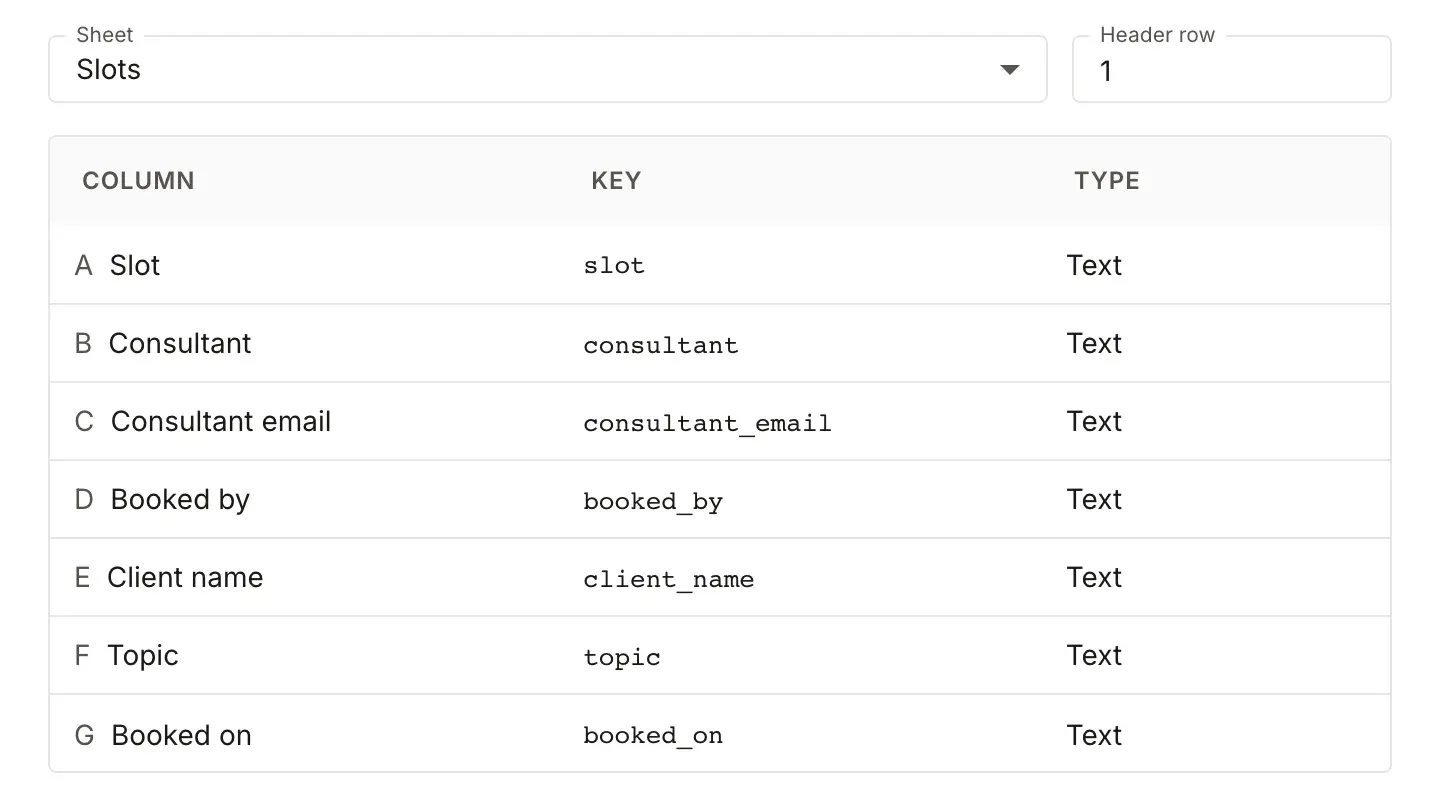
The office connects Google Drive and keeps its file,
Bookings/consultations.xlsx. Each row is a slot, withSlot,ConsultantandConsultant emailfilled in, andBooked by,Client name,TopicandBooked onleft empty.
A form lists the times on offer
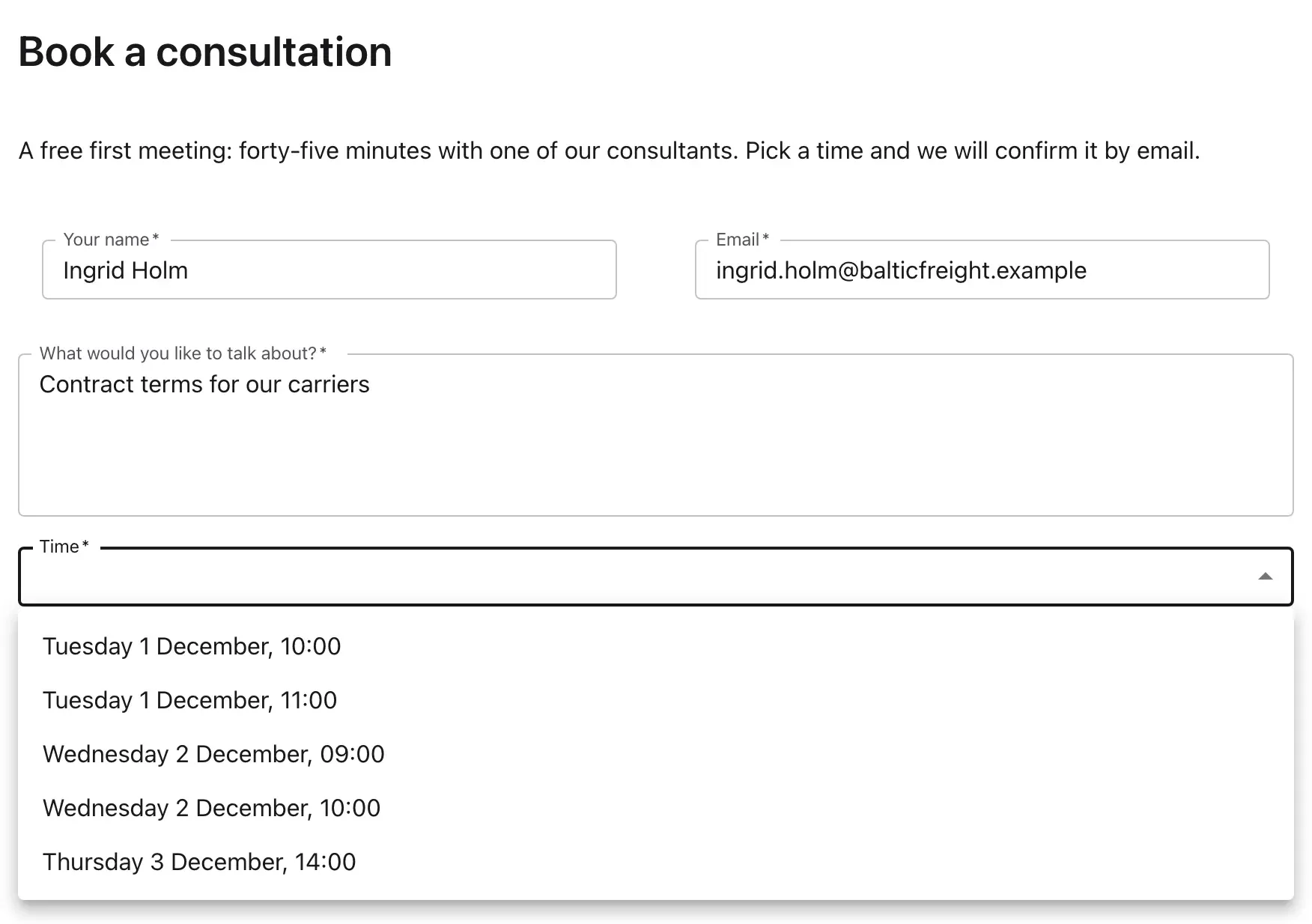
“Book a consultation” asks for a name, an email and a topic, and has a Select field with the slots. The client reads “Tuesday 1 December, 10:00”, and the option’s value,
2026-12-01 10:00, matches the cell in the sheet. The success message says the answer is on its way by email, because at that moment nothing is confirmed yet.
Two email templates
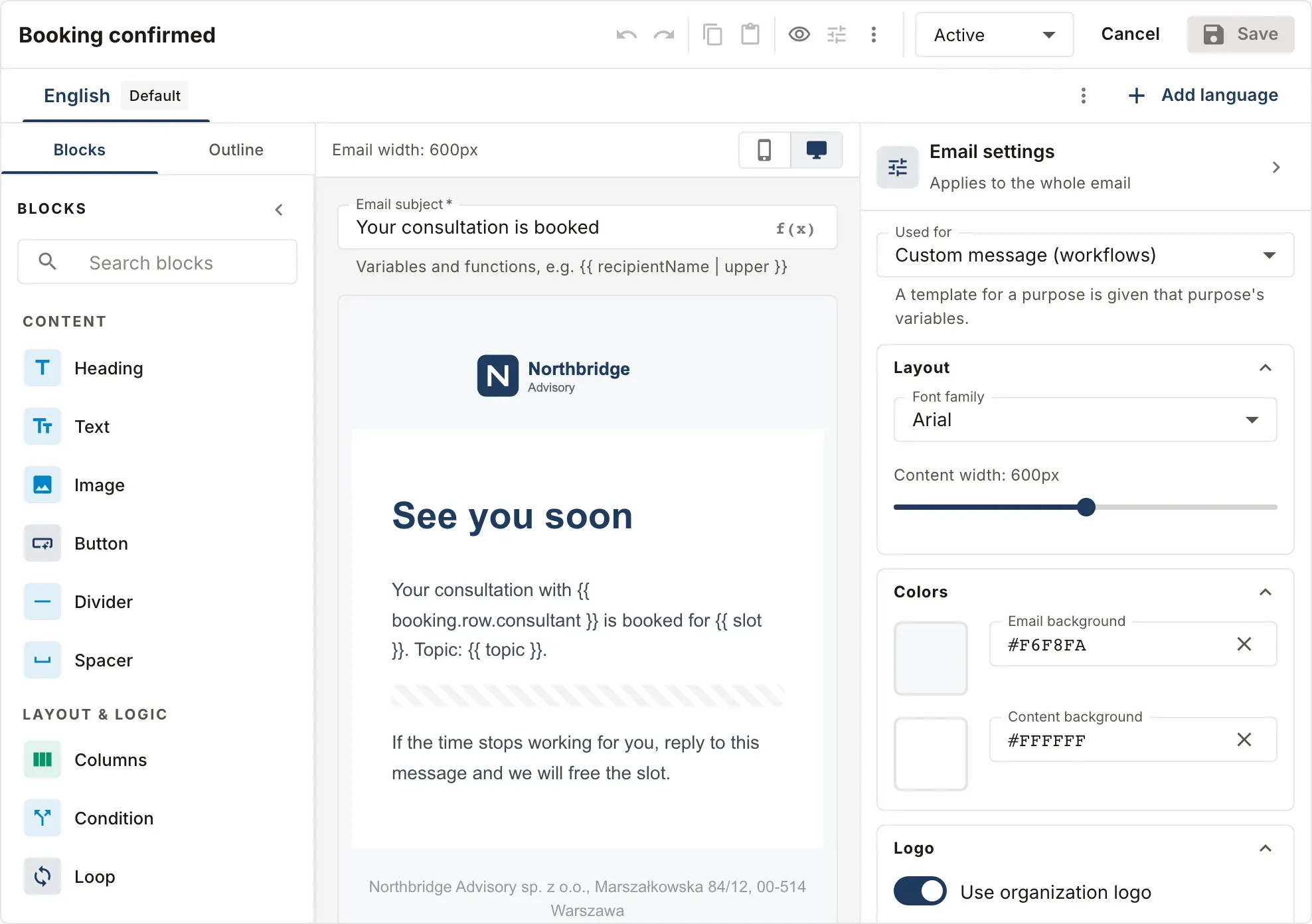
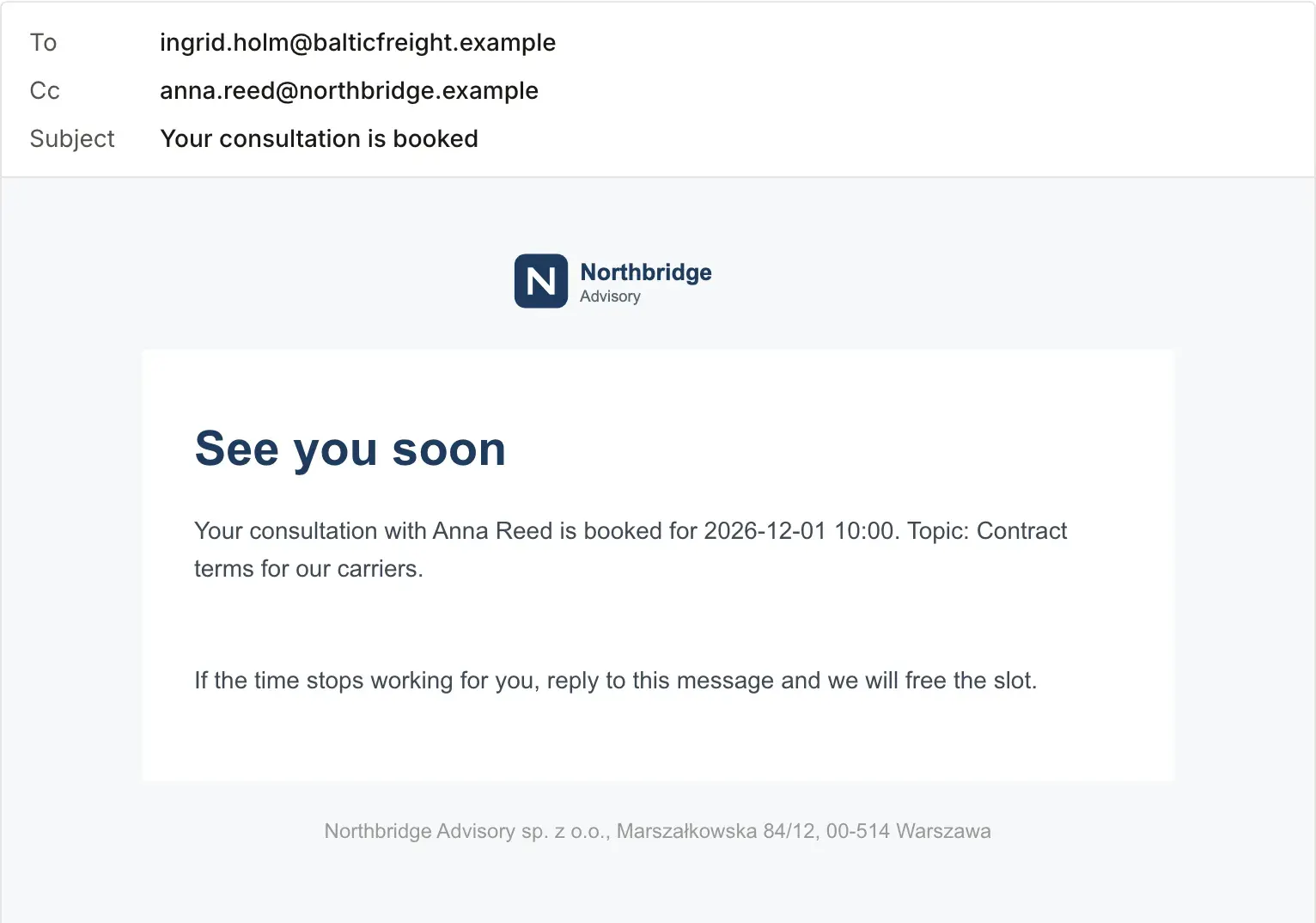
One confirms the time and names the consultant. The other says the slot has just gone and links back to the form.
One step claims the row
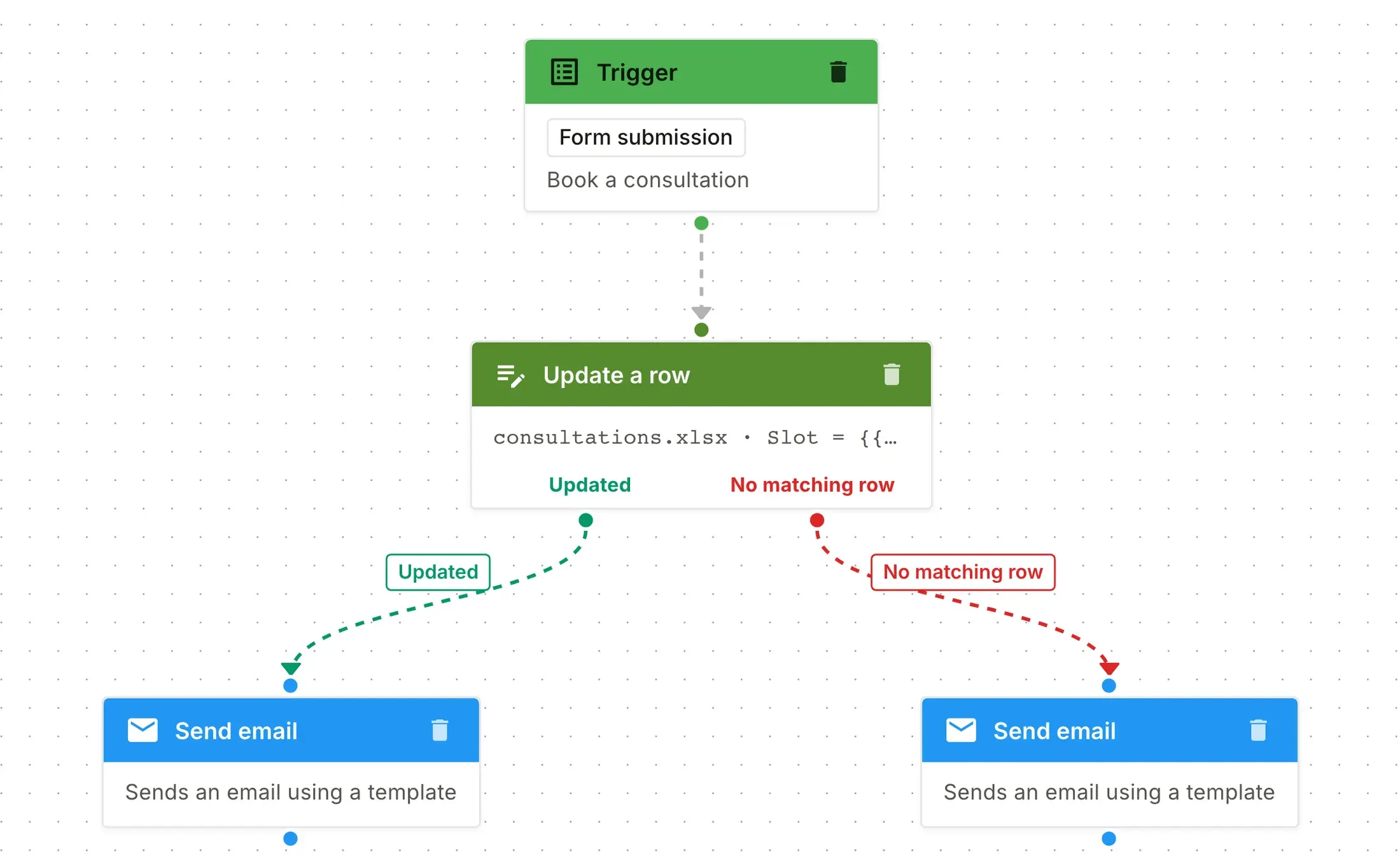
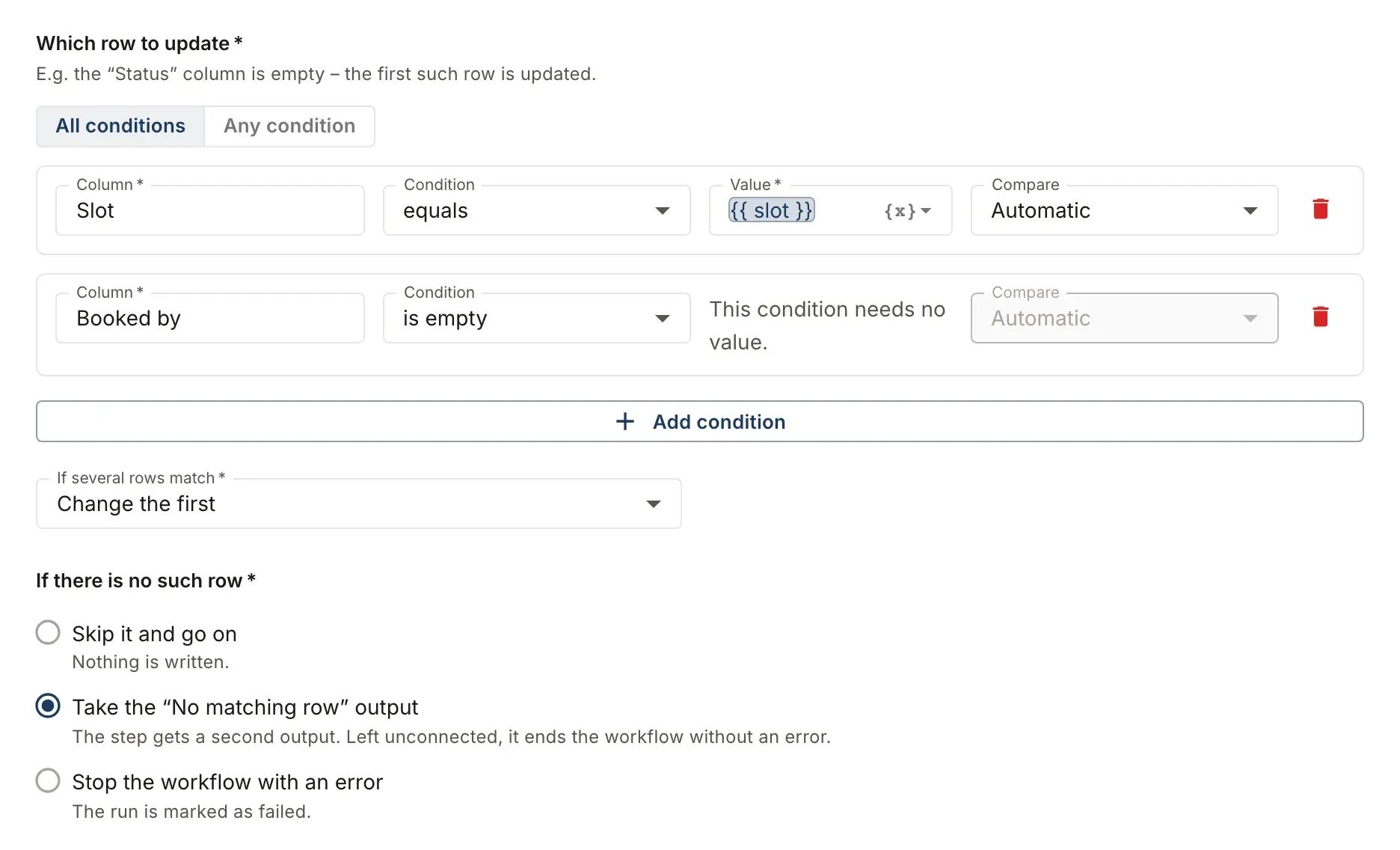
The trigger A form is submitted starts the workflow, and a Write to a sheet step looks for the row where
Slotequals the chosen time andBooked byis empty. It fills in the client’s details in that same step. Writes to one file happen one at a time, so nobody can slip in between the check and the write.
Two ways out of that step
When the row was free, the run leaves through Updated: the confirmation goes out, with the consultant from that row in copy. When it was taken, the run leaves through No matching row, and the client gets the sorry email.
The link goes out
The workflow is switched on, and the form goes on the website and into the newsletter. It can be a link or embedded in a page, which on WordPress takes the plugin and no code.
What Northbridge gets
- Each slot goes to one person, even when two clients press Send in the same second
- An answer by email to every request, at any hour, with nobody at the keyboard
- The same sheet the team always had, now filling in by itself
- A consultant who sees the booking in their inbox, with the client and the topic
- A run for each booking, showing which row was taken or why none was
Ways to adapt it
- A course with limited seats
- Keep one row per course with a
Seats leftcolumn. The step takes a seat only while the number is above zero and lowers it by one. A second write can list the attendees on another tab. The recipe has the settings. - The next free slot, with no list of times
- Ask only which consultant the client wants. The step takes the first empty row for that person, the confirmation prints the time it found, and the form never needs updating.
- One booking per person
- Put a Find a row step first, looking for the client’s email in
Booked by, and go on only from Not found. - A reminder before the meeting
- A second workflow runs at a recurring time, reads the same sheet and emails each client whose
Remind ondate has come. - When a booking app suits you better
- If clients must see free times change live on the page, or the bookings have to appear in Google Calendar or Outlook, this setup won’t do that.
- Taken dates that disappear
- Connect the sheet as a data source, and dates already on the list drop out of the form. The write to the sheet still decides the last second, when two people pick the same date at once.
- Let Doxie set up the step
- Select the Write to a sheet step and tell Doxie, the AI assistant in Doxtly, what it should do, such as “take the row for the chosen time if Booked by is empty”. She fills in the settings from the file’s real columns, tries them on the sheet without writing to it, and tells you how many rows match before you apply them.
Questions people ask
Will Doxtly see a sheet I already have on Google Drive?
It depends on the connection. One that covers only the files added through Doxtly can’t see a file put straight on the drive. Upload the sheet once on the Cloud files page, and your team goes on working in that copy.
How do I stop double bookings with a form and a Google Sheet?
The check and the write have to be one action. In Doxtly a single Write to a sheet step finds the free row and fills it in, and writes to one file wait their turn. The second person finds the row already taken and gets your other email.
Do taken slots disappear from the form?
Not with options you typed: such a Select field doesn’t read the sheet, so a client can still pick a slot that has gone. They find out by email within moments and can come back to the form. To hide taken slots, set the field’s options to From a data source on the sheet, with a filter that keeps only the rows whose Booked by is empty, and turn on Check availability when submitting, which refuses a slot taken in the meantime. Or use the “next free slot” version, where the form lists no times at all.
Does it work with Excel as well as Google Sheets?
Yes. Doxtly writes to XLSX, ODS and CSV files on Google Drive, OneDrive, SharePoint, Dropbox or Box, to old .xls files of up to 4 MB, and to Google Sheets. It can’t write to password-protected files, or to an .xls file with charts, pivot tables, macros or comments, which saving it would lose: save that one as XLSX. Keep formulas out of the columns the step fills in: it stops with an error rather than overwrite one.
Can my team work in the sheet while bookings come in?
Yes. Each write opens the file afresh, so it sees what your colleagues saved. If someone changes the sheet at the very moment of a write, Doxtly notices and plans the write again.
How do I cancel or move a booking?
Clear Booked by in the sheet, and the slot is free for the next person straight away. To move a client, clear their row and type their details into the new one.
Does the booking go into my calendar?
No, Doxtly has no calendar connection, and the sheet stays your diary. If your calendar or CRM has an API, a Webhook step can send it the booking.
What do I need, and which plan?
A connected Google Drive, OneDrive, SharePoint, Dropbox or Box and a connected mailbox, both available on every plan, the Free one included. Each booking uses one form submission, one workflow run and one email, and pricing shows how many of those each plan has per month.
Features behind it
In the manual
Start with one document.
Take the contract you retype most often and turn it into a template. The Free plan is enough, and you need no card.