
Client onboarding in one flow: form, documents, signature and archive
A new client fills in one form. They get a welcome email with the NDA and the service agreement ready to sign, a partner countersigns, and the sealed PDFs land in the client’s folder on your drive. Here is how Northbridge Advisory, a consulting firm, set that up.
The client said yes. Then came the paperwork.
Northbridge Advisory is a small consulting and training firm. When Halden Logistics agreed to work with them, an associate emailed a list of questions, copied the answers into last month’s NDA and service agreement, exported two PDFs, sent them off and waited. Anna Reed, the partner, signed when somebody reminded her.
The signed copies then sat in an inbox until someone had time to file them, and the company’s registration certificate sat in a different thread. Nobody could say at a glance who had signed what. Each of these jobs is small, but they repeat for every client, they depend on one person remembering the next step, and the new client watches it all happen.
What Northbridge built, step by step
One onboarding form
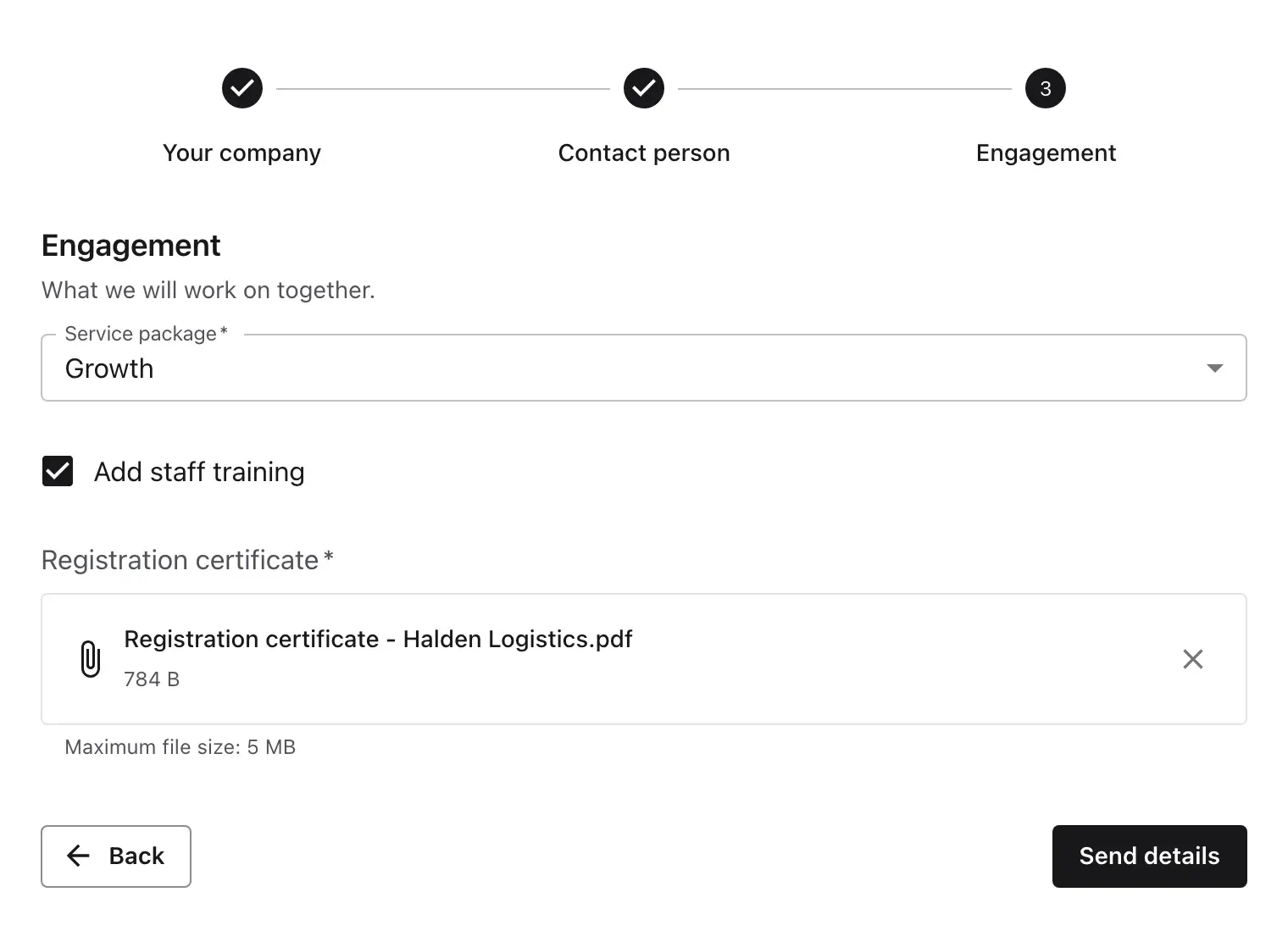
The “Client onboarding” form asks for everything once, in three short steps: the company (name, tax ID, address), the contact person (name, email) and the engagement (service package, a tick box for staff training, the registration certificate as an upload). With Split into pages set to One section per page, it shows one step at a time, with a progress indicator.
Two Word templates, kept in Word
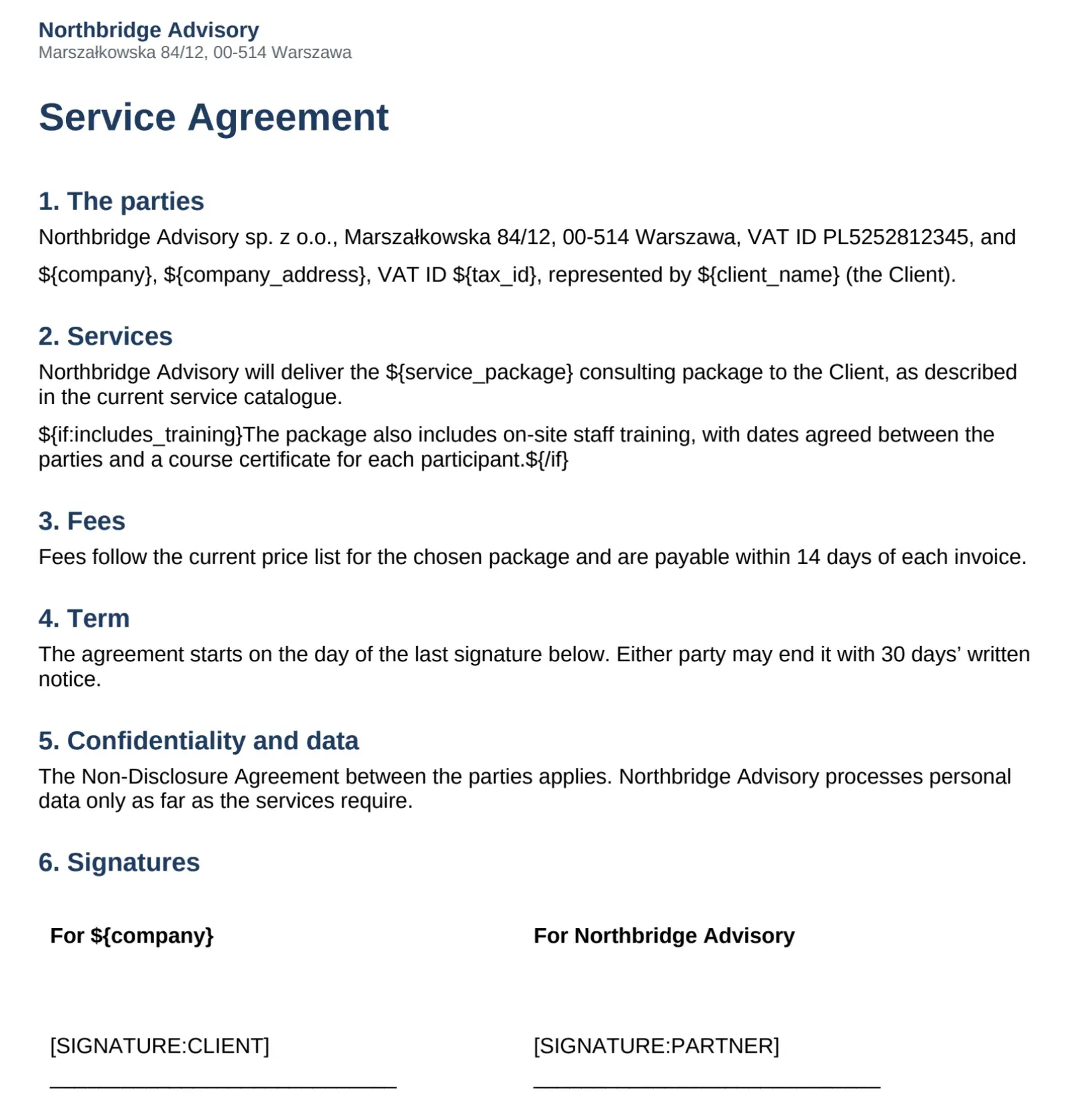
The NDA and the service agreement stay ordinary Word files. Northbridge typed markers into them:
${company}where the client’s name goes,${if:includes_training}around the training clause, and[SIGNATURE:CLIENT]and[SIGNATURE:PARTNER]where each side signs. Word templates covers the rest.
A workflow turns the answers into a signing package
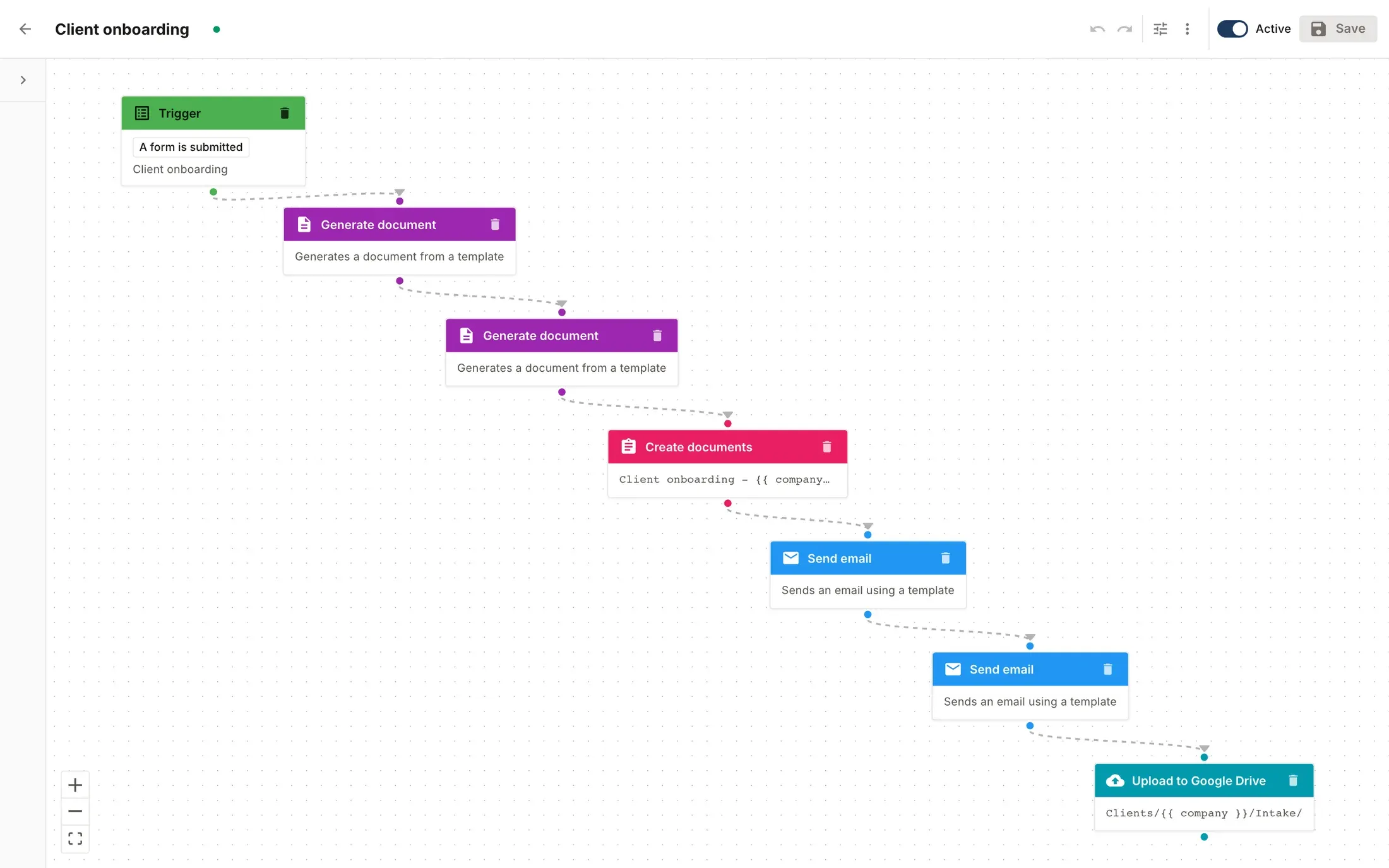
When Halden sends the form, the “Client onboarding” workflow runs two Generate document steps, one per template. Create documents then puts both PDFs into one package, with the client and Anna Reed as its parties and a deadline of 14 days.
The client gets a welcome, with a link to sign
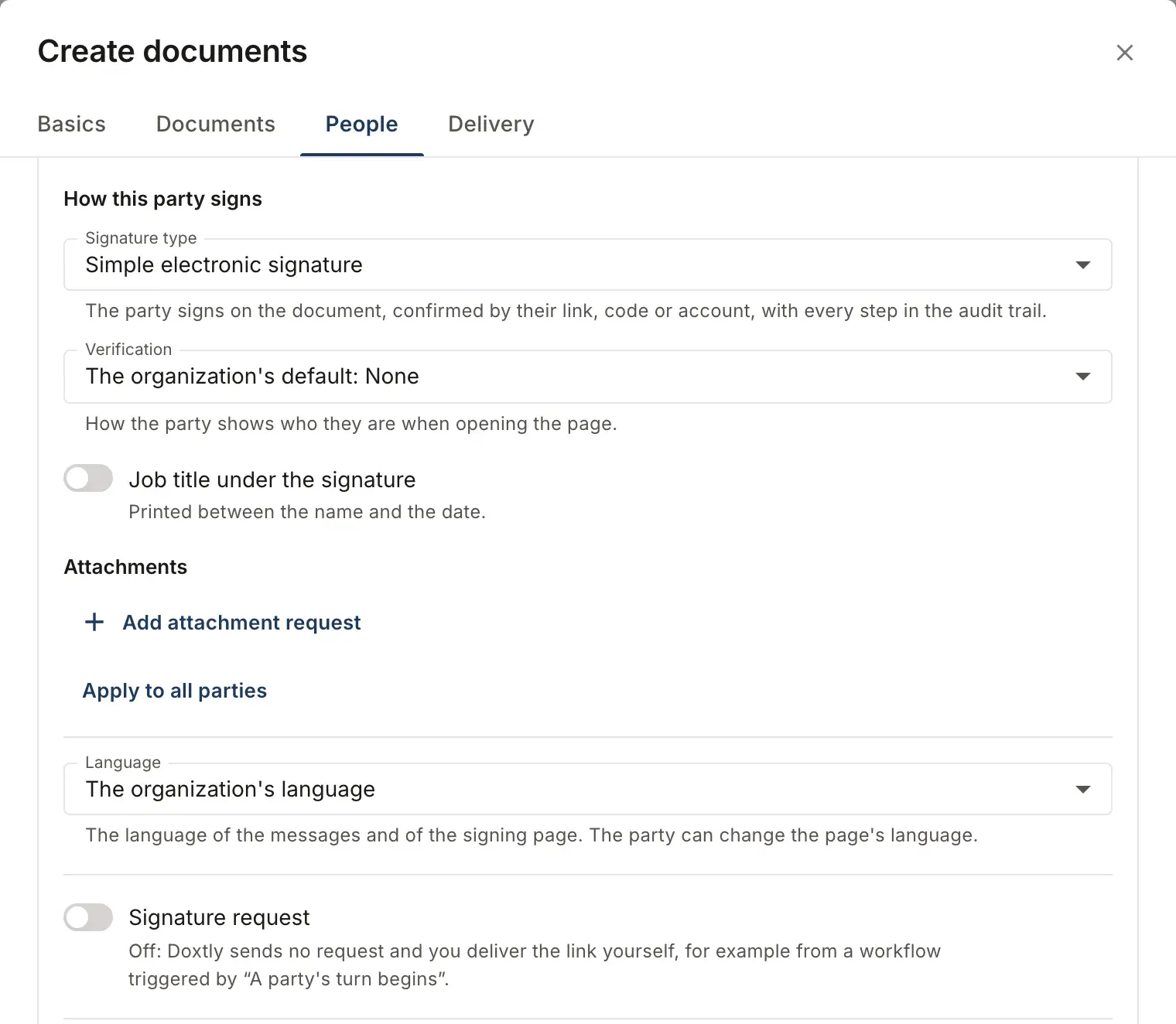
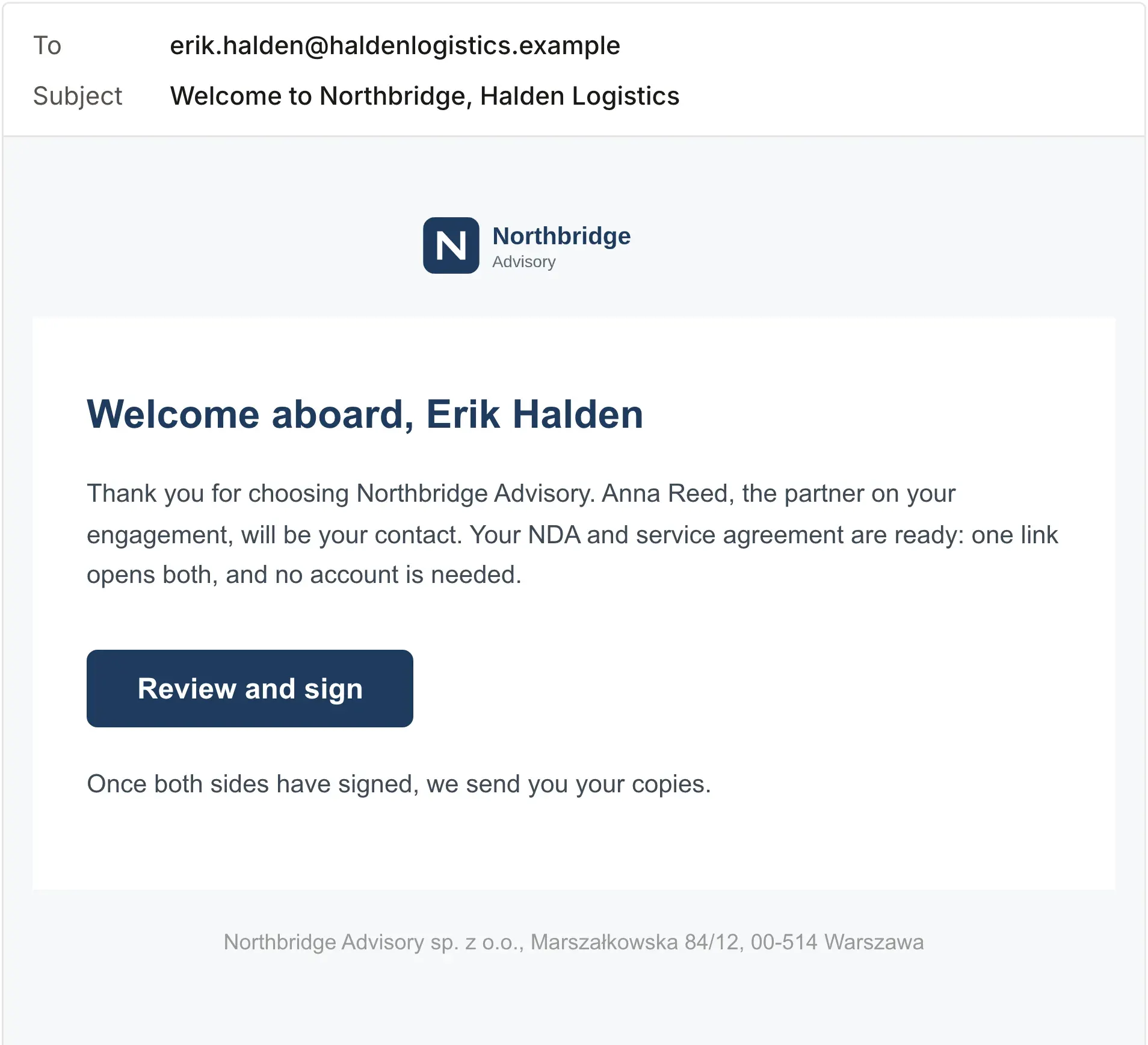
A Send email step delivers “Welcome to Northbridge”: who their contact is, what happens next, and a button to their signing link. That one link opens both documents, and they sign on a computer or a phone with no account. A second email gives Anna her own link. Signature request is off for both parties in Create documents, so these are the only emails they get. An upload step puts the registration certificate in
Clients/Halden Logistics/Intake.
The team can see where it stands
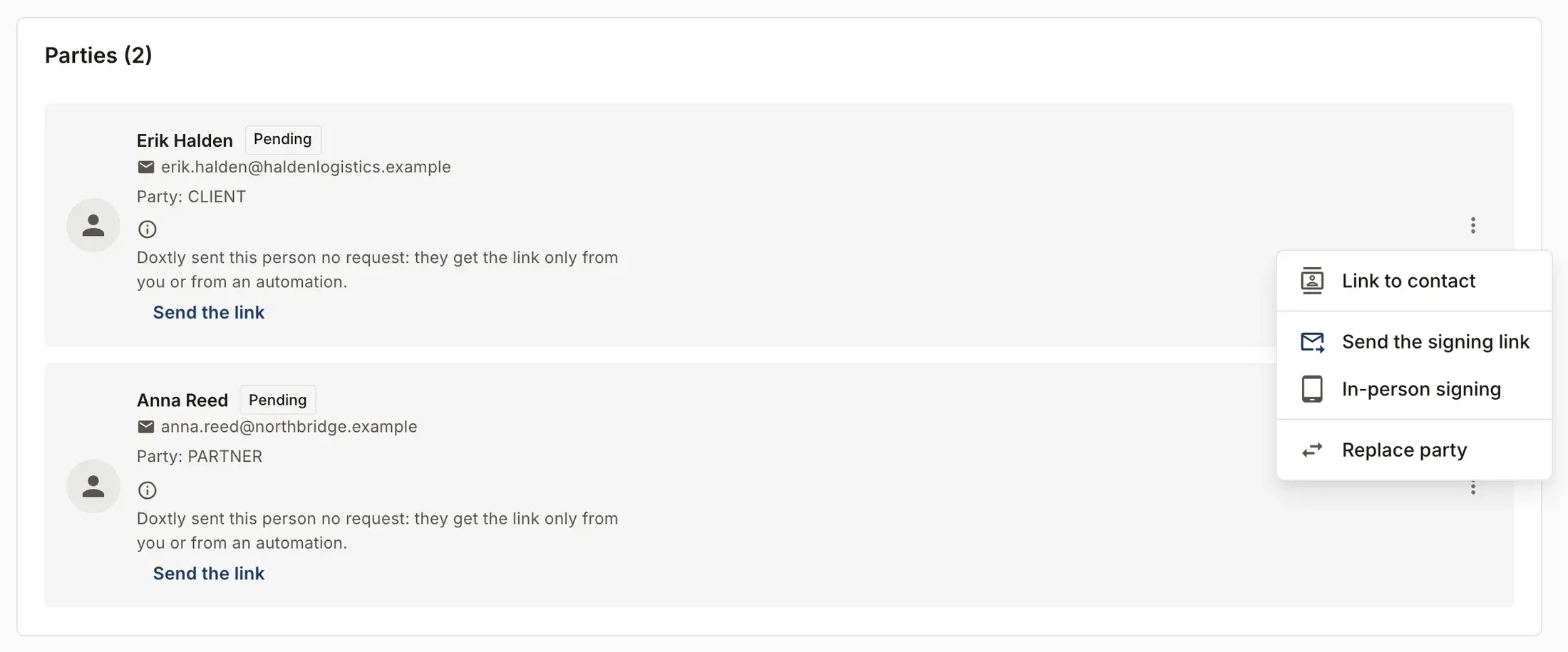
The package page shows who has opened the documents and who has signed. If Halden goes quiet, anyone with access opens the party’s menu there and chooses Send the signing link.
The last signature starts the archive
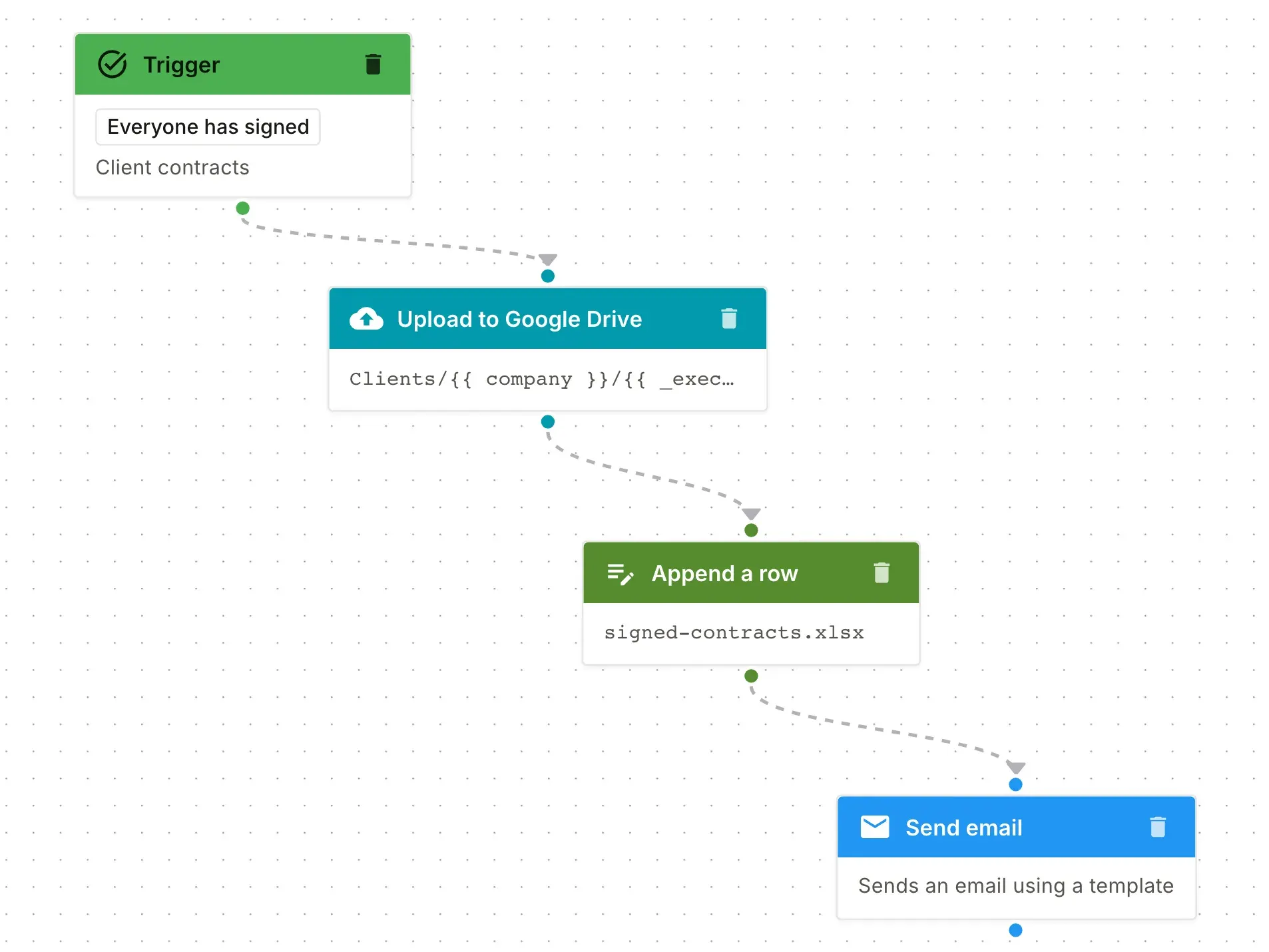
A second workflow listens for The package is fully signed, and it still knows the form’s answers. It uploads the sealed PDFs to
Clients/Halden Logistics/Signedon Google Drive, adds a row to a register spreadsheet, and emails the client their copy with the office in CC.What Northbridge ends up with
For Halden Logistics: answers given once, no name retyped, two sealed PDFs with a Certificate of Completion, one folder holding the certificate and the signed documents, and a new line in the register. The next client goes through the same flow, and nobody has to start it.
What you set up once
- A form with Save form data on and a field for every blank in your documents
- Your Word templates, with markers and signature places
- A document type, here “Client contracts”, which connects the two workflows
- An email integration and three email templates: the welcome, the note to the partner, the signed copy
- A Google Drive, OneDrive, SharePoint, Dropbox or Box integration for the client folders
- The two workflows, with Attach all available files turned off in the first one’s emails, so the unsigned PDFs don’t travel with the link, and Send the parties their signed documents turned off on Create documents, because the second workflow sends the copies
Ways to adapt it
- Sign before leaving the page
- Turn on Allow immediate signing on the Create documents step, and the client goes from the form straight to the signing page. Keep the partner’s email, because only the person on the page is handed over.
- General terms to read, not sign
- Add a document with no signature marker to the package. It goes in to be read and holds nothing up.
- A refusal reaches the right person
- A third workflow on A party declines to sign tells your account manager at once, with the reason the client gave.
- The partner signs in the app
- Link the party to the partner’s Doxtly account, and the package also appears under Waiting for you on their dashboard, where they sign inside the app. Turn their Signature request on, and Doxtly emails them too, so the second Send email step can go.
- OneDrive instead of Google Drive
- The palette has an upload step for each provider, with the same settings.
- Reminders that go out by themselves
- Add reminders on the Create documents step: up to five, after sending or before the deadline, only to those who have not acted yet. You can also send the link again from the package page.
- Save the client as a contact
- Add a Save contact step to the workflow, and the client appears in Contacts with every document they took part in, ready to be suggested the next time you send them something.
Questions people ask
What should a client onboarding form ask for?
Whatever your documents print, and little else. Go through your NDA and agreement, list each blank, and make a field for it: usually the company name, tax ID, address, the contact person’s name and email, and the service they chose. Add an upload for anything you keep on file, such as a registration certificate.
Does my client need a Doxtly account to sign?
No. They open their link in a current browser on a computer or a phone, and there is nothing to install.
Can a client sign the NDA and the contract in one go?
Yes. Both documents sit in one package, so the client has one link and one Sign all documents button. Each document gets its own digital seal when its last party has signed.
What happens if the client doesn’t sign?
The package page shows it, and you can send the link again from there. With a deadline set, the package expires when the time is up and nobody can sign it any more. Until then, Change deadline on the package page gives more time, unless the document type locks the deadline.
How does the client get their signed copy?
From the Send email step of the second workflow, with the signed documents attached. Northbridge turned off Send the parties their signed documents on the Create documents step, so the client doesn’t get them twice: left on, Doxtly’s own Everyone signed message carries each party’s sealed PDFs. Each sealed PDF ends with a Certificate of Completion listing the evidence for every signature.
Are documents signed this way legally valid?
A Doxtly signature is a simple electronic signature with evidence recorded, which suits NDAs, service agreements and onboarding paperwork. Where the law requires a qualified signature, a party can give one with a certificate of their own. Signature types explains the difference. For anything high-stakes, ask your lawyer.
Which plan do I need for this?
Free allows one workflow, so you can try the first one there. The archive workflow needs a paid plan, as does a third for refusals. Each new client uses one form submission, one signature package, two workflow runs, two generated documents and the emails you send, three in this example. Pricing shows the current limits.
In the manual
Start with one document.
Take the contract you retype most often and turn it into a template. The Free plan is enough, and you need no card.