

Signature types and legal effect
This page answers the question a careful customer asks first: what exactly is a Doxtly signature, and is it enough for my document? The short answer is that Doxtly gives you a simple electronic signature with strong evidence behind it, protected by a digital seal. That fits most everyday business documents. It doesn’t replace a qualified signature where the law demands one.
The three types of signature in EU law
Section titled “The three types of signature in EU law”The EU’s eIDAS regulation names three types of electronic signature. People shorten them to SES, AES and QES.
| Type | In plain words | Legal weight | In Doxtly |
|---|---|---|---|
| SES, simple electronic signature | Any electronic data a person uses to sign: a drawn mark, a typed name, a click on “I agree”. | A court can’t reject it only because it is electronic (eIDAS Art. 25). If someone disputes it, the evidence decides. | Yes. This is what every Doxtly signature is. |
| AES, advanced electronic signature | Uniquely tied to the signer, able to identify them, made with means under their sole control, and any later change to the document can be detected (Art. 26). | Stronger in a dispute, because the signature itself carries more of the proof. | When a party sends back a PDF signed with their own advanced certificate: see Qualified signatures. |
| QES, qualified electronic signature | An advanced signature made with a qualified certificate and a qualified device, issued to a person whose identity a trust service provider has verified. | The same effect as a handwritten signature across the EU (Art. 25(2)). | When the party signs with their own qualified certificate: see Qualified signatures. |
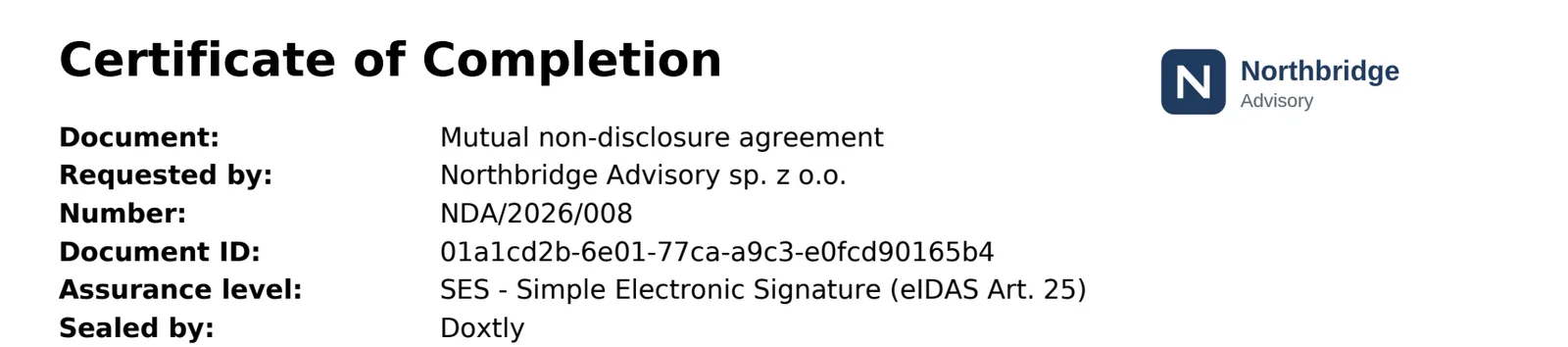
The Certificate of Completion on every sealed document says this openly: its Assurance level row reads “SES - Simple Electronic Signature (eIDAS Art. 25)”. A one-time code by SMS doesn’t change that row. It gives you better evidence for the same kind of signature.
Outside the EU the idea is similar. In the United States, the ESIGN Act and UETA look at intent to sign, consent to do business electronically, and a record that can be kept. The disclosure each signer accepts is written with these laws and eIDAS in mind.
Which one do you need?
Section titled “Which one do you need?”| Your document | What to do |
|---|---|
| NDAs, service agreements, order confirmations, statements of work | Use Doxtly, and add a one-time code if the value justifies it. |
| Course enrollment, attendance and certificate acknowledgements, client onboarding, consent forms | Use Doxtly. The link alone is often enough. |
| Internal documents: policy acknowledgements, handovers, approvals | Use Doxtly. Colleagues can sign inside the app, which ties the act to their account. |
| A contract you expect to fight over, or of high value | Usable, with the strongest evidence you can collect: an SMS or WhatsApp code and a timestamped level. Ask your lawyer whether a QES would be wiser. |
| Anything the law requires in a set form | A qualified signature, where the party signs with their own certificate. If the law requires written form, the electronic equivalent in the EU is generally a QES (in Poland, for example, Art. 78¹ of the Civil Code). Property deeds, wills and notarized acts usually have stricter rules still. Use a qualified trust service provider, or paper. |
What makes a Doxtly signature hold up
Section titled “What makes a Doxtly signature hold up”A simple electronic signature stands on its evidence. So Doxtly records, with each signature:
- who signed, and through which door: their own secure link, signed in to the app, or acting under an authorization
- how they were checked: nothing beyond the link, a code by email, SMS or WhatsApp along with the address or number that received it, an access password, or an identity document with a selfie
- the exact disclosure they accepted, with its version
- when it happened, by the server’s clock and the browser’s
- the IP address and browser
- how the mark was made: drawn, typed, or the saved signature
- a fingerprint of the document as it stood when they signed
- their location, if the package asked for it
Each signature extends a chain of hashes, so an entry can’t be slipped in or edited later without showing. You read all of this on the package’s audit log, and Download audit certificate gives it to you as a file. That works for a document sealed without the Certificate of Completion page too.
Why record how the mark was made? Experts treat two identical handwritten signatures as a warning sign, and a typed or saved signature is identical every time by design. Saying so in the record turns that from a suspicion into a stated fact.
Raising the bar
Section titled “Raising the bar”| You want to prove | Use |
|---|---|
| The person had the invitation | The secure link, always on. It goes to one person and is never shown in the app. |
| They controlled that mailbox or phone at that moment | Code by email, Code by SMS or Code by WhatsApp. A code to a phone is stronger than one to the inbox the link went to, because a forwarded email then isn’t enough. |
| They were one of your own people | A party linked to their account, signing in the app. |
| They are who they say they are | Identity document and selfie. Still a simple signature, with much stronger evidence: see Identity verification. |
| The act carries the legal weight of handwriting | A qualified signature, with the party’s own certificate. |
| When they signed, independently of Doxtly | PAdES-T or higher. |
| Where they were | Ask for the signer’s location. Use it only when you need it, because people tend to refuse a prompt they didn’t expect. |
Signing with people in the United States
Section titled “Signing with people in the United States”Doxtly is built to support electronic signing under the US ESIGN Act and state UETA laws: every signer is shown the disclosure, agrees to it before signing, and the exact wording goes into the audit log with its version. What that means for you depends on the document and on who signs it. This is not legal advice, so have your counsel look at how you use it.
Your part as the sender. The disclosure tells the signer how to reach you and what a paper copy costs. Set both under Organization settings → Signing: the contact defaults to your organization’s email and the fee to free. When a signer writes asking for paper, or withdraws their consent, or gives you a new address, acting on it is yours to do, because that happens outside Doxtly. Leave Parties may download a copy on for consumers, so that they can save the document as the disclosure says, and keep Send the parties their signed documents on so that they get their signed copy.
Documents you should not sign this way. ESIGN and UETA leave out some documents, and a few states add more. Don’t send these for electronic signature in the US without checking with counsel:
- wills, codicils and testamentary trusts
- adoption, divorce and other family law matters
- court orders, notices and official court papers
- notices of default, foreclosure, repossession or eviction
- notices that cut off utility services
- notices cancelling health or life insurance
- product recall notices that affect health or safety
- documents that must accompany hazardous materials
The Doxtly digital seal
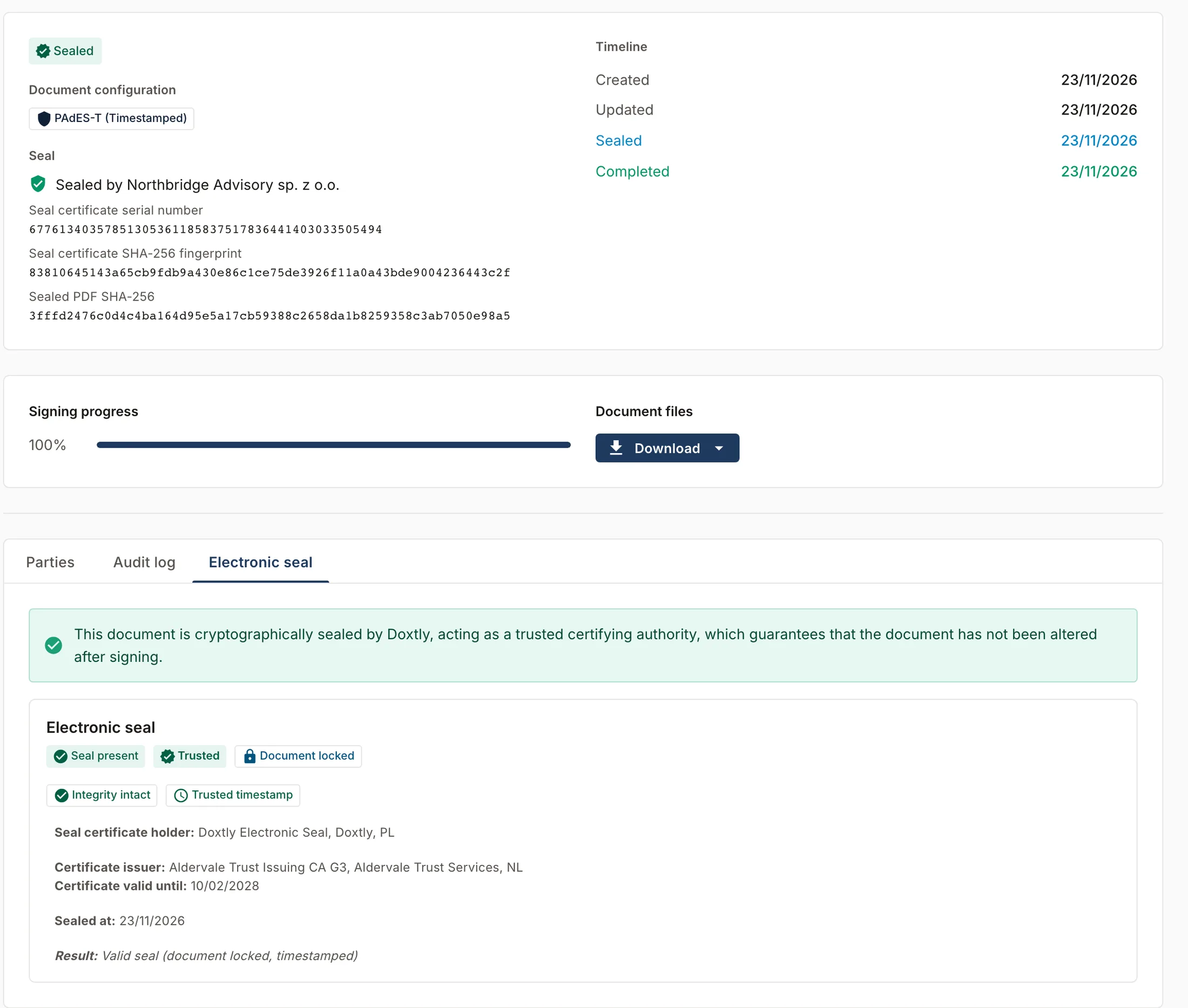
Section titled “The Doxtly digital seal”When the last party signs a document, Doxtly applies one certifying digital signature over the whole PDF, with every party’s mark in it. That is the seal. It uses the PAdES standard, the form of digital signature built into PDF files, so the proof travels inside the file.
The seal is an advanced electronic seal under the EU’s eIDAS regulation. Its certificate comes from a certification authority on Adobe’s Approved Trust List (AATL), and its private key is kept in a hardware security module (HSM), which it never leaves. That is why Adobe Acrobat and Acrobat Reader show the seal as trusted, with a green tick, with nothing to install or set up.
The seal does two jobs:
- It locks the document. Any change to the file afterwards breaks the seal, and a check shows it.
- It says the document went through Doxtly for your organization. On the document’s page, Sealed by shows your organization’s company name. The certificate behind the seal is Doxtly’s, so the Certificate of Completion and the verification report name Doxtly as the holder of that certificate.
What it doesn’t do is sign in the signer’s place. A party’s handwritten-looking mark is a picture on the page, and the proof of who made it is the record above, printed on the certificate. Read the seal as “this file hasn’t changed since everyone signed”, not as “this person’s identity was certified”.
A few things follow from how sealing works:
- Before the last signature, a document has no seal. The people still to sign see a working copy with the earlier marks drawn on it, and the Electronic seal tab says “Seal validation will be available after the last party signs.”
- Each document in a package gets its own seal, when its own last party signs.
- Documents nobody signs, such as attachments and documents that were only filled in, aren’t sealed.
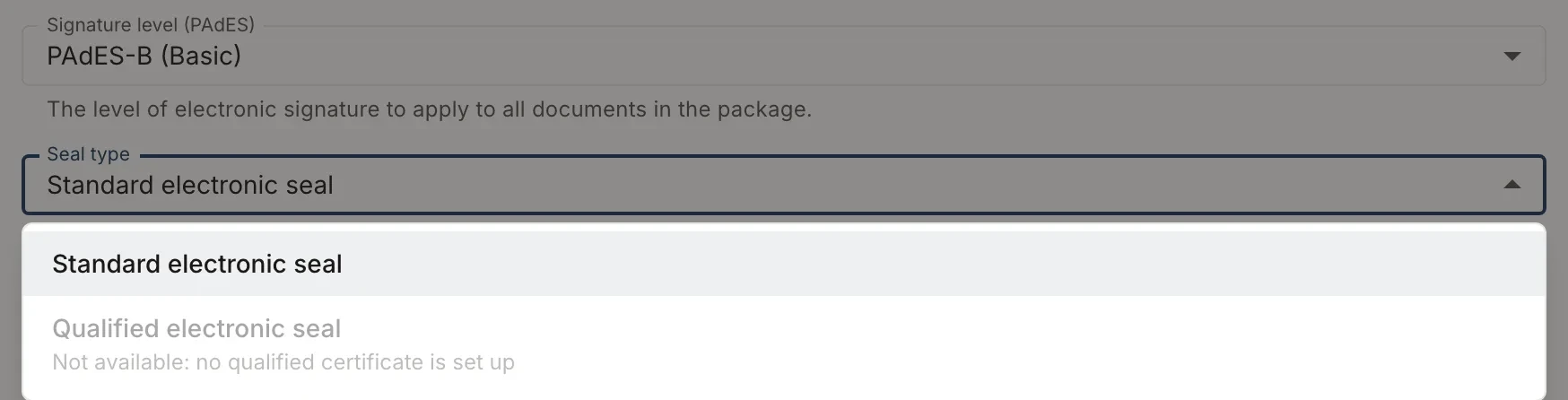
- Organizations don’t bring their own certificate. Every document is sealed by the platform, so there is nothing to buy or renew. Seal type on the package chooses the standard seal or, where one is available, a qualified seal, which Doxtly’s cloud doesn’t offer: see The seal on the finished documents. It sits under Signature level (PAdES) on Basics. A qualified seal is always applied at PAdES-LT at least: a lower level chosen on the package is raised to PAdES-LT. Without a qualified certificate, Qualified electronic seal is greyed out with Not available: no qualified certificate is set up, and when the document type sets the seal the field shows it and can’t be changed (Set by the document type.).
Anybody can check a sealed PDF, including a copy that came back by email, with no account. See Verifying signatures.
Signature levels: how long the seal can be proved
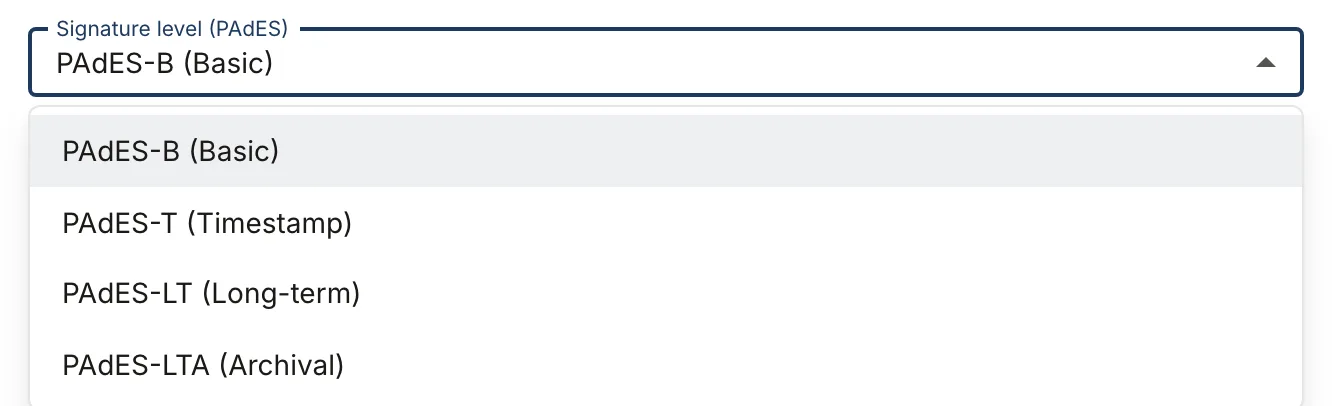
Section titled “Signature levels: how long the seal can be proved”The Signature level (PAdES) setting has nothing to do with SES, AES or QES. It decides what goes into the seal, and so how long the seal can be checked and how well it proves the time. Choosing LTA doesn’t make a signature “more legal”. It makes the proof last longer.
| Level | What it adds | Choose it when |
|---|---|---|
| PAdES-B (Basic) | The seal and its certificate, with no timestamp. The time of sealing is the one the seal itself states, which nobody outside vouches for. | Short-lived paperwork where the exact moment doesn’t matter. |
| PAdES-T (Timestamp) | A timestamp from a time-stamping authority, an outside service that vouches for when the seal was made. | Contracts in general. A sensible starting point whenever dates could matter. |
| PAdES-LT (Long-term) | Everything in T, plus the data needed to validate the certificate, kept inside the file. It can be checked offline and after the certificate has expired. | Documents you keep for years: employment files, long contracts. |
| PAdES-LTA (Archival) | Everything in LT, plus a timestamp over the whole document, so it stays verifiable after the services it relied on are gone. | Archives kept for ten years or more, such as legal or tax records. |
You choose the level on the package, under Basics (New package), or per workflow step, on the Basics tab of Create documents. A new package starts at PAdES-LT, or at PAdES-B on an installation with no timestamp service. A document type can require a minimum. The timestamps are provided by the platform: you set nothing up. On a paid plan they come from a qualified time-stamping authority, and on the free plan from a free one.
Northbridge, for example, leaves course certificates on PAdES-B, uses PAdES-T for client contracts, and PAdES-LT for employment files it must keep for years. Each of those is a workflow step of its own, so each gets its own level.