

Notifications
Doxtly tells you when something needs a person: a limit was reached, a workflow failed, a payment did not go through, a refund failed, someone acted in your name. Notifications reach you in the app, by email, or both, and also on Slack or Microsoft Teams once your organization has connected them. You choose per type, and only people who can act on a notice receive it.
The bell
Section titled “The bell”The bell in the header shows how many unread notifications you have, up to 99+, counting each repeat of the same thing. The count refreshes every minute while the app is open. Click the bell to open the panel. With nothing there, it says No notifications.
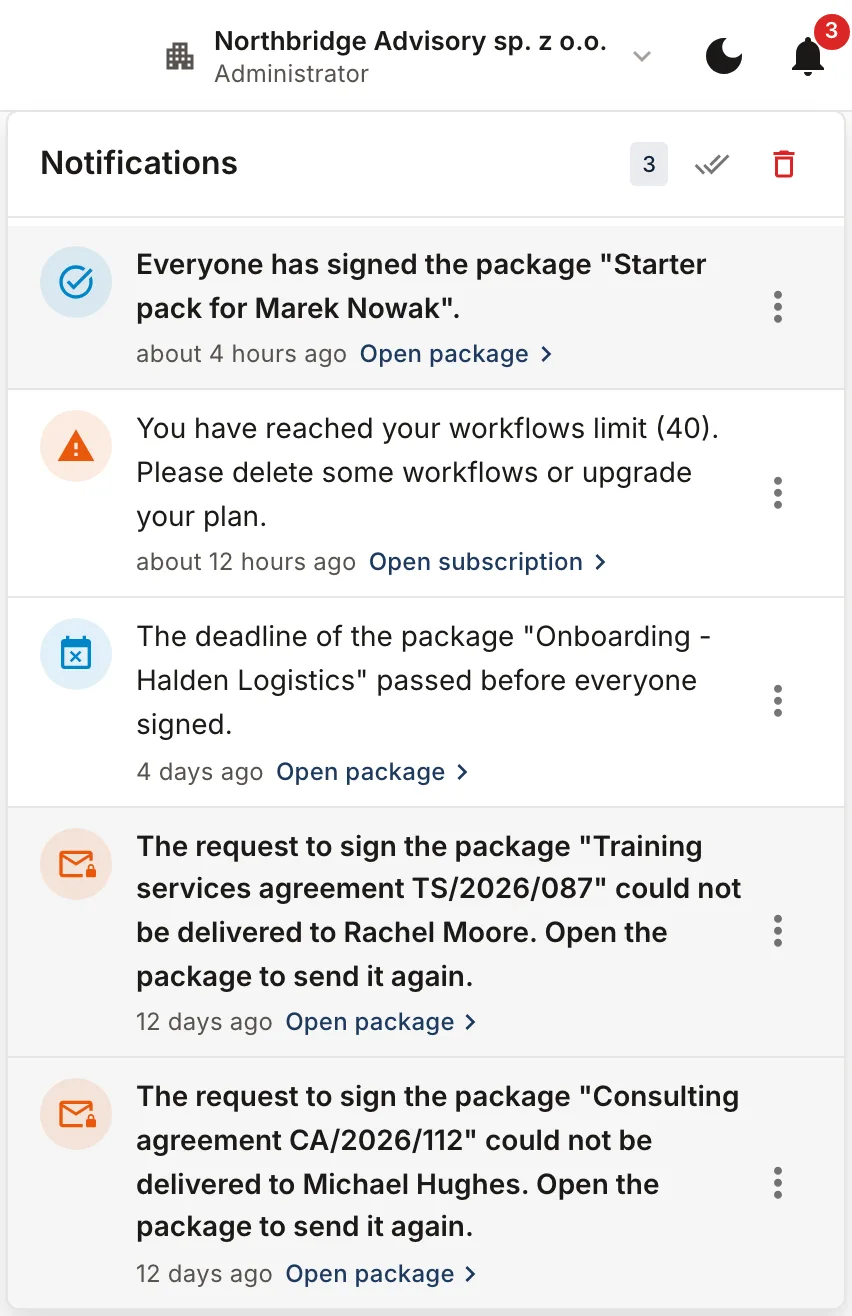
Newest activity comes first, ten at a time: Load more at the bottom brings the next ones. Each row shows:
- An icon for the type, in a colour that says how much it matters. Hover it to read the word: Information, Success, Warning or Critical.
- The message. Unread ones are in bold on a tinted background.
- When it last happened. Hover to see the exact date and time.
- A number on the icon, when the same thing has happened more than once. A recurring workflow failing every few minutes is one row with a count, rather than a wall of copies. Hover the time to see when it first and last happened.
- A link, such as Open subscription, when there is somewhere to go that you are allowed to open.
Click a row with a link to open that page. The notification is marked as read on the way, and the panel closes. A row with no link is there to be read.
Managing them
Section titled “Managing them”The three dots on a row offer Mark as read or Mark as unread, handy for keeping something on your list, and Delete. At the top of the panel, beside the unread count, Mark all as read and Delete all act on your whole list. Both ask you to confirm, as does deleting a single row, and deleting cannot be undone.
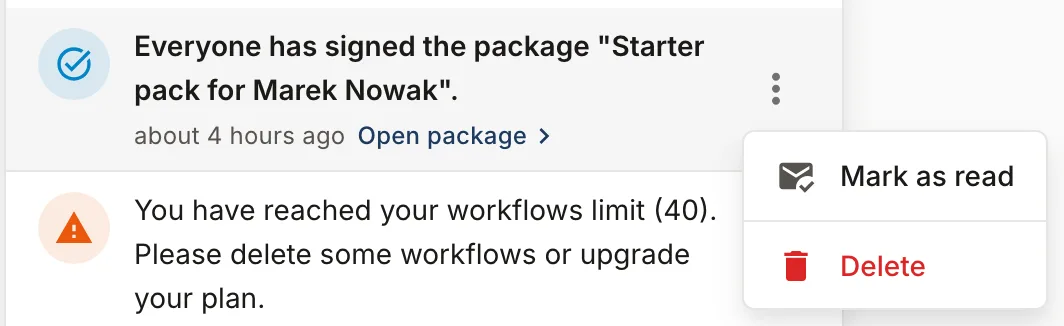
Your notifications are your own. Marking one as read or deleting it changes nothing for colleagues who got the same notice. Notifications are also separate per organization: the bell shows the ones of the organization you are working in.
What you can be told, and who is
Section titled “What you can be told, and who is”Doxtly sends each notice only to active people who can do something about it. A Viewer is not told the plan’s limit was reached, because they could not open the subscription to fix it.
| In your preferences | When | Who receives it | Link |
|---|---|---|---|
| Feature limit exceeded | A plan limit was reached. Critical for monthly limits, which stop work; a warning for limits on how many things you can keep. | People who hold both View subscription and invoices and Manage subscription | Open subscription |
| Storage quota exceeded | Disk or data space ran out, and a document was not saved or a webhook request’s content was not kept. Warning. | The same | Open subscription |
| Subscription no longer active | The subscription ended, was left unpaid, was paused, or never started. Critical. | The same | Open subscription |
| Payment failed | A subscription payment did not go through or awaits your confirmation; it names any features paused until it is paid. Warning. | The same | Open subscription |
| Last payment attempt ahead | Stripe’s next attempt at an invoice is the last. Warning. | The same | Open subscription |
| Trial ending | The Starter trial ends in 3 days, in a day, or has ended and the organization is now on Free. Warning. | The same | Choose a plan |
| Doxtly AI | The plan’s monthly Doxtly AI limit is 80% used or used up, the Doxtly balance runs low, is used up or expires within 30 days or 7 days, or a top-up was credited. Information. | The same | Open the balance |
| Doxtly e-mail | Doxtly e-mail stopped sending for want of messages, the fee for sending from your own domain couldn’t be paid, a waiting message was given up, Doxtly issued a warning or a suspension, or your own domain was verified or its records are gone. Success for a verified domain, Warning for the rest. | People who hold both View integrations and Manage integrations | Open Doxtly e-mail |
| Signing session failed | The signing session of a form or interactive document submission failed after its retries. The message says whether the submitter was still sent their link: Warning if they were, Critical if not. When the documents were made but the package sends no signature request, it says so: the link is then yours to send. | People who hold View workflows and their runs | Open the failed run |
| Workflow failed | A workflow run failed or ran out of time. Critical. | The same | Open the latest failed run |
| Template cloud file needs attention | A template’s file in the cloud changed and awaits approval, cannot be used, is unavailable, or its integration needs reconnecting. Documents keep coming from the approved version meanwhile. Warning. | People who hold both View file templates and generated files and Manage file templates | Open the template |
| Authorization granted | Someone authorized you to act for them, or you authorized someone. Information. | The two people involved | Open authorizations |
| Authorization withdrawn or expired | An authorization you gave or received was withdrawn or ran out. Warning for the person who held it, Information for the person who gave it. | The two people involved | Open authorizations |
| Somebody acted on your behalf | An authorized person accepted or refused a package in your name. Warning. | You | Open package |
| A package was refused | A party refused to sign a package you answer for. Warning. | You, the person responsible | Open package |
| A package was not approved | An approver did not approve a package. Warning. | You, the person responsible | Open package |
| A party did not pay | A party signed a package you answer for but didn’t pay within 24 hours. They can still pay from their signing link. Warning. | You, the person responsible | Open package |
| A package is complete | Everyone signed a package you answer for. Information; turn it off here if you don’t want it. | You, the person responsible | Open package |
| A request to sign was not delivered | A party’s request could not be delivered after every retry, over about seven hours. Warning. | You, the person responsible | Open package |
| Package past its deadline | A package you answer for expired with something unsigned. Information. | You, the person responsible | Open package |
| Export ready | An export of finished packages you asked for is ready. Information. | The person who asked for it | Open exports |
| Import of signed documents | An import of documents signed outside Doxtly you started is done, with how many of the sheet’s documents were imported. Information. | The person who started it | Open the import |
| Identity checks | A party of a package you sent needs your decision on their identity check. Warning. | The person who sent the package | Open package |
| A party asks for another way to confirm their identity | A party asks to confirm their identity another way. Warning. | The person who sent the package and those who manage documents of its type | Open package |
| A party used up their identity check attempts | A party can no longer try to verify their identity. Warning. | The person who sent the package and those who manage documents of its type | Open package |
| Identity verification limit reached | The limit you set for identity verification costs this billing period is reached. Warning. | People who hold both View subscription and invoices and Manage subscription | Open subscription |
| A data source needs attention | A form or template can no longer read its data source. Warning. | People with Manage forms for a form, or Manage file templates for a template | Open |
| A quiz attempt needs grading | Open answers of a quiz attempt that the AI couldn’t grade wait for a person: see Grading. Warning. | People with Grade attempts | Grade it |
| AI analysis of results | An AI analysis of a survey’s or a quiz’s results that you started has ended. Information. | The person who started it | Open |
| Results counted in the background | The results you opened, of a quiz or a survey with too many responses to count at once, are counted. Information. | The person who opened them | Open results |
| Export of responses ready | An export of responses you asked for, too large to make at once, is ready. Information. | The person who asked for it | Download, or Open the folder when it was saved to a drive |
| Quiz summary export ready | An export of a quiz’s Summary you asked for is ready. Information. | The person who asked for it | Download, or Open the folder when it was saved to a drive |
| Answer and response sheets ready | The answer sheets of a quiz or the response sheets of a survey you printed are ready. Information. | The person who printed them | Download |
| A contract is ending soon | A contract you answer for enters its type’s warning days before its last day. Warning. | You, the person responsible for the contract | Open the contract |
| The notice deadline is coming | A renewing contract you answer for enters its warning days before the last day to give notice. Warning. | You, the person responsible for the contract | Open the contract |
| A contract ends | A contract you answer for has passed its last day in force. Information. | You, the person responsible for the contract | Open the contract |
| An outgoing webhook keeps failing | An outgoing webhook has delivered nothing for a day, with at least five failed attempts. Warning. | People with Manage webhooks | Open the webhook |
| An outgoing webhook was switched off | Doxtly switched off an outgoing webhook that failed for five days, or whose address answered that it no longer exists. Critical. | People with Manage webhooks | Open the webhook |
| A CRM merge unlinked a record | Two records merged in your CRM were linked to two different contacts, companies or packages, so one of them lost its link. Warning. | People with Manage integrations | Open the record |
| A refund failed | A payment provider did not give a payer’s money back: a refund failed after it was asked for. Critical. | People with Refund payments | Open the payment |
| A late payment was refunded | A payer paid after the time to pay had run out, and the payment is refunded automatically. Information. | People with Refund payments | Open the payment |
| A payment provider could not be reached | A payment ended unpaid because its provider could not be asked whether it was paid, usually because the integration needs connecting again. Critical. | People with Manage integrations | Open the integration |
| Someone you invited joined | A person you invited accepted the invitation and joined the organization, by creating an account or with one they had. Information. | Whoever sent the invitation last | None |
The person responsible for a package is whoever sent it, or, for a package made by a workflow, the Responsible person set on the step, and without one the organization’s longest-standing administrator. For a document added as signed outside Doxtly, it is the person chosen when it was added, or whoever added it.
Contracts bring three notices of their own, all to the person responsible for the contract and all opening it. One comes when a contract enters the warning period its document type sets before its end, with the email A contract ends soon. For a contract that renews by itself, the same warning comes before the last day to give notice instead, as Notice is due soon: if nobody gives notice by then, the contract renews. Both are warnings. The third, A contract ends, is information and comes once the contract’s last day in force has passed. Each is sent once for the day it is about, so a contract extended later warns again before its new end. The notice and its email write the day in their reader’s language. Alerts before the end explains the warning period.
With the built-in roles, Administrators get everything about the plan, and everyone gets workflow failures, since every built-in role can view runs. A Viewer does not get template notices, which need permission to manage templates.
Choosing how you are told
Section titled “Choosing how you are told”Everything starts switched on, in both the app and email. To change that:
-
Click your name in the header and choose My profile.
-
Open the Notifications tab.
-
For each type, turn In app and Email on or off, and Slack or Microsoft Teams when your organization has connected them (Preferences). Hover the info icon for a reminder of what the type covers.
-
Click Save changes.
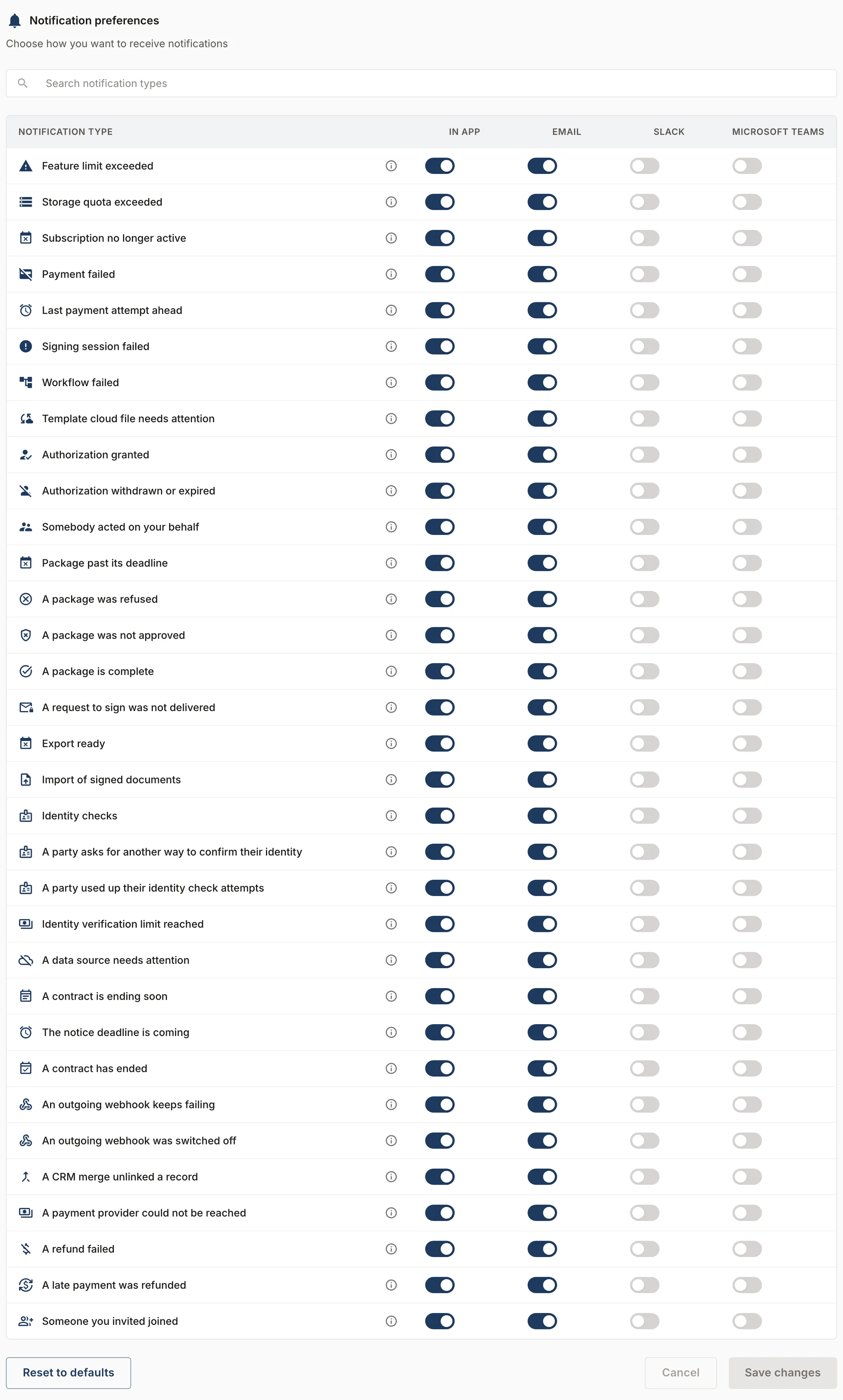
Turn both off and you will not hear about that type at all, so think twice for Workflow failed or Payment failed. Reset to defaults asks you to confirm, then turns everything back on in the form. Nothing changes until you click Save changes, and Cancel goes back to what was saved.
Emails go to your sign-in address, in the language you chose for Doxtly, or the organization’s if you never chose one. Preferences are per organization, so you can follow one client’s workflow failures closely and keep another quiet. The preferences page has more on this.
A setup that works for many offices: whoever looks after the workflows keeps Workflow failed on email, so a broken run reaches them away from the app. Everyone else leaves that one in the app, or off, because with the built-in roles they would all get it.
How long notifications are kept
Section titled “How long notifications are kept”Doxtly clears old notifications by itself, keeping the important ones longer:
| Severity | Kept while unread, from when it last happened | Kept after reading, from when you read it |
|---|---|---|
| Information | 30 days | 7 days |
| Warning | 90 days | 30 days |
| Critical | 180 days | 90 days |
A list also holds at most 500 entries. Past that, read notifications go before unread, less severe before more severe, and older before newer.