

How Doxtly works
Doxtly has a handful of building blocks, and almost everything you will do is one of them feeding the next. Learn these, and the rest of the manual is detail.
The short version
Section titled “The short version”Information comes in, something happens to it, and a finished result goes out:
- A form collects information from a person, or a webhook receives it from another system.
- A workflow notices that and runs its steps.
- One step fills a template with that information and produces a PDF.
- Another step sends it in an email, or puts it in a package for signature.
- When the package is signed, that is a new event, and another workflow can pick it up.
The building blocks
Section titled “The building blocks”| Block | What it is | Where you find it |
|---|---|---|
| Web form | A page of questions. Each answer sent through it is a submission. | Forms → Web forms |
| Interactive document | A set of PDF templates and web forms that people fill in through a link. You get the filled PDFs and the values behind them. When you need proof of who signed, a workflow can pass them on to a package. | Forms → Interactive documents |
| Quiz | Scored questions with a pass mark, graded by Doxtly and, for open answers, by AI or a person. Each go is an attempt. | Forms → Quizzes |
| Survey | Questions without right answers, such as an NPS or a staff survey. Each set of answers is a response. | Forms → Surveys |
| Payment | Money a visitor pays when sending a form, through your own Przelewy24, Stripe, PayU or PayPal account. The submission counts once it is paid. | Resources → Payments |
| File template | Your Word, PDF or SVG file with marked places for values. Each PDF made from one is a generated file. | Resources → File templates |
| Email template | A designed message with places for values. Each message that goes out is listed on the Sent tab. | Resources → Messages |
| Package | One or more documents sent to one or more parties for signature. In a document type with Contracts with a term on, each package is a contract: Doxtly follows its term, warns before it ends and keeps its annexes. A document signed on paper or in another tool can be added as signed outside Doxtly to sit beside the rest. | Documents → Document list |
| Workflow | A trigger and the steps that follow it. Each time it runs, that is a run (the app also calls it an execution). | Automation |
| Contact | A person you work with, kept with their company and details, so that packages, forms and messages can be filled in from them. | Resources → Contacts |
| Portal | A page with its own address that gathers links to your web forms, interactive documents, quizzes, surveys and drive files, for your team or your clients. | Resources → Portals |
| Webhook | An address another system sends data to, in order to start a workflow. | Resources → Webhooks |
| Integration | A connection to something outside Doxtly: your email account, an SMS or WhatsApp provider, a cloud drive, Slack or Microsoft Teams, a CRM such as Pipedrive, a payment provider such as Przelewy24, Stripe, PayU or PayPal, reCAPTCHA or an AI provider. | Organization → Integrations |
All of this belongs to an organization: your company’s private space in Doxtly, with its own people, plan and settings.
How data gets from a form into a document
Section titled “How data gets from a form into a document”This is the one idea worth learning properly.
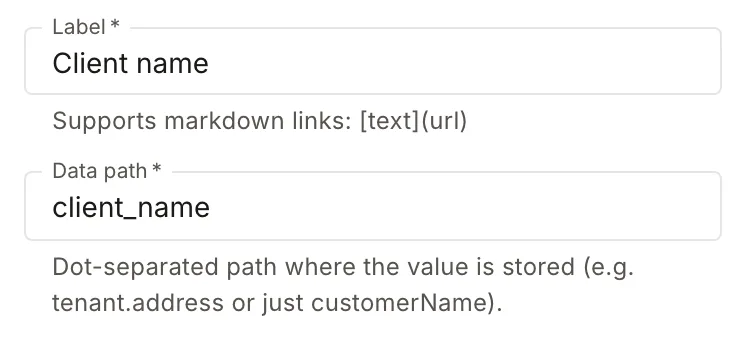
Every field in a form has a data path, a short name for the value, such as client_name or client.email. In your Word template you write the same name inside a marker, ${client_name}, wherever the value belongs. When a workflow generates the document, Doxtly matches names and puts each value in its place.
So a form field with the data path client_name and a template with ${client_name} are connected by nothing more than the shared name. That is why one template can serve several forms, and why the workflow designer can warn you in advance when a template needs a value that the step does not have.
Everywhere else, the same values are written one way, with double curly braces: {{ client_name }}. That goes for workflows, email and text message templates, file names, form and document settings. Inside the braces you can also work on the value: {{ client_name | upper }} writes it in capitals, and {{ nickname ?? client_name }} takes the name when the nickname is missing. A field that only computes, such as a form’s dynamic value or a workflow’s condition, holds the expression alone, without braces: quantity * price.
You will meet both notations. The Word template guide explains the markers, and Expressions and functions the braces, with every function.
What can start a workflow
Section titled “What can start a workflow”A workflow has exactly one trigger. In the designer you choose it by what it starts on, then by when:
| Trigger | Fires when |
|---|---|
| A form is submitted | A form is sent, a submission is edited, or either, as you choose |
| An interactive document is filled in | An interactive document is sent, a submission is edited, or either, as you choose |
| A document is generated | A file is generated from the template you name |
| Document package | Something happens to a package of the type you name: a party’s turn begins, a party opens the documents, signs, pays or doesn’t pay, or declines, an approver approves or rejects, everyone has signed, the deadline passes, or the package is voided. For a contract, also when its dates change, it is ending soon or it has ended |
| CRM | A deal in your Pipedrive or HubSpot, or an opportunity in Copper, changes stage or status, or a person there is created or changed |
| Payment | A payment taken through a form succeeds, runs out unpaid, or is refunded |
| Quiz | An attempt at a quiz starts or finishes, needs grading or is regraded, the results are released, an invited person doesn’t take it, or the quiz closes |
| Survey | A response to a survey starts or is submitted, an invited person doesn’t respond, the survey closes or a quota is full |
| A contact is saved | A contact is added or changed, of any type or the one you name |
| Webhook request | Another system sends data to one of your webhooks |
| Recurring | The clock reaches a time you set, again and again, in your organization’s time zone |
What a workflow can do
Section titled “What a workflow can do”Steps can branch on your data (Condition, Switch), reshape it (Data transformation), and act: Generate document, Create documents for signature, Send email, Send SMS, Send WhatsApp message, Upload to the cloud, Download from the cloud, Read from a sheet, Write to a sheet, post to Slack or Microsoft Teams (Send to a messenger), keep your contacts up to date (Save contact, Update contact, Delete contact), look up one of your contracts (Find a contract), work in your CRM (Sync a contact with the CRM, Update a deal, Add a note in the CRM, Attach files in the CRM), send a quiz or a survey and work with the results (Send a quiz, Quiz summary, Grade quiz attempt, Send a survey), call another system (Webhook), or run an AI agent. The nodes reference describes each one.
Some steps need an integration first. Send email needs an active email integration, for example, because Doxtly sends your messages through your own mailbox. The designer tells you what is missing.
Create documents prepares the package and asks each party to sign when their turn begins, by email from your organization’s default message unless you choose otherwise in the party’s Signature request. Turn that off for a party and you deliver the link yourself, with a Send email, Send SMS or Send WhatsApp message step after it. A person who has just filled in your form can also go straight to signing with immediate signing.
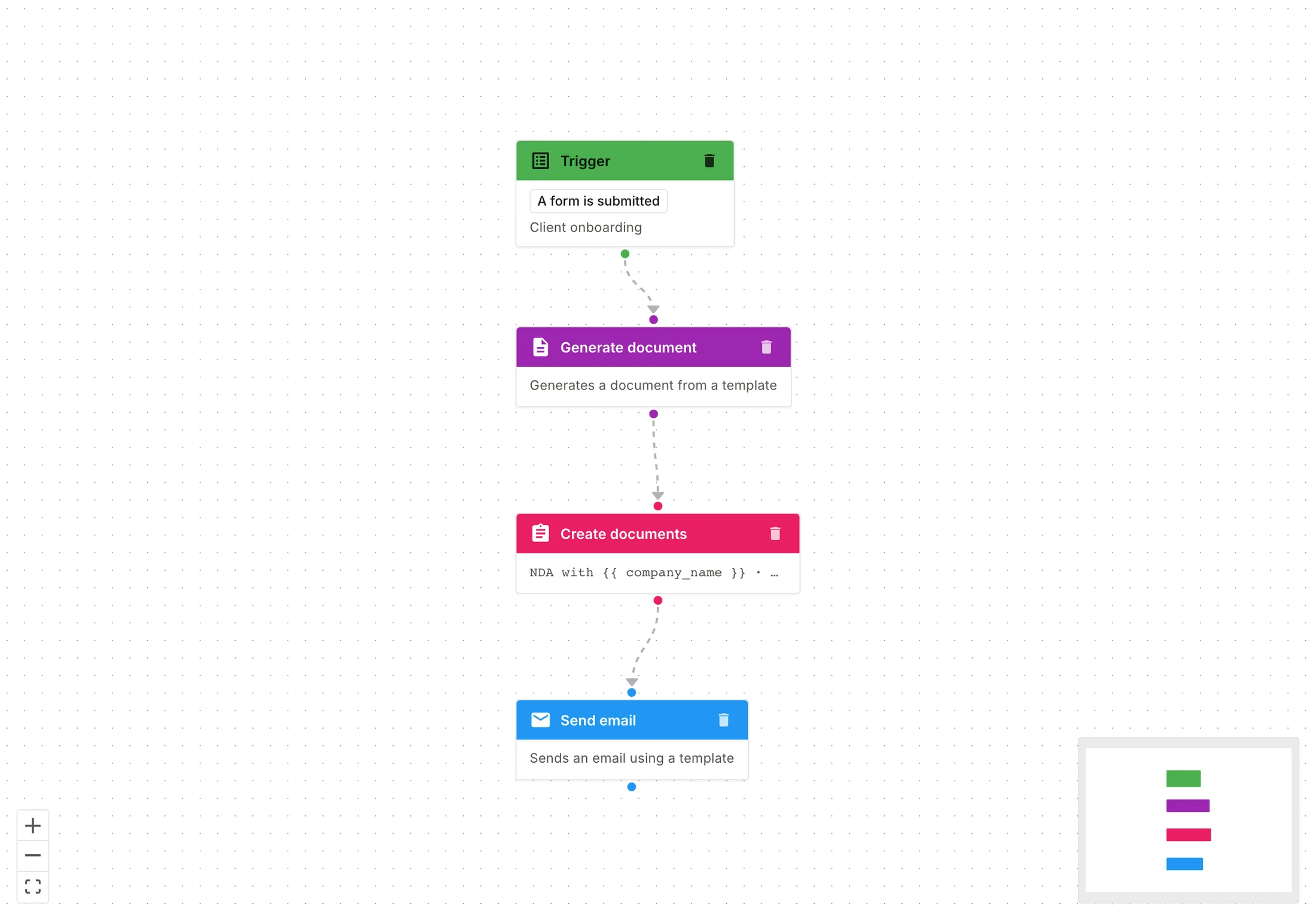
An example from start to finish
Section titled “An example from start to finish”Northbridge Advisory, a consulting firm, onboards a new client like this:
- The client opens the Client onboarding form from a link on Northbridge’s website and fills it in.
- The trigger A form is submitted starts the Client onboarding workflow.
- Generate document writes an NDA and a service agreement from Northbridge’s Word templates.
- Create documents puts both in a package. Immediate signing is on, so the client goes straight from the form to the signing page.
- The client signs. The partner sees the package under Waiting for you on the dashboard and signs too.
- The package is fully signed starts a second workflow, which uploads the signed PDFs to the client’s folder on Google Drive and sends the accounting team an invoice request.
Nobody at Northbridge opened Word, and the partner did one thing: sign.
Words you will meet
Section titled “Words you will meet”| Word | Meaning |
|---|---|
| Submission | One set of answers sent through a form or an interactive document |
| Generated file | One PDF produced from a template |
| Package | A bundle of documents out for signature |
| Party | Someone who takes part in a package, typically by signing it |
| Contract | A package whose document type follows a contract term, with its changes, such as annexes, kept beside it |
| Run, execution | One pass through a workflow, with a record of each step |
| Integration | A connection to an outside service |
| Access key | What your own software uses to call the API |
| Organization | Your company’s space in Doxtly |
| Plan | What your organization subscribes to, which sets its limits |
Ready to try it? The quick start builds a small version of this example.