

Contract from a form
A new client fills in your onboarding form, and moments later they have a service agreement to sign, with their details already in it. Nobody on your team retypes a name. A partner of the firm countersigns from the same package.
Available when: an active email integration for the signing emails
What it looks like
Section titled “What it looks like”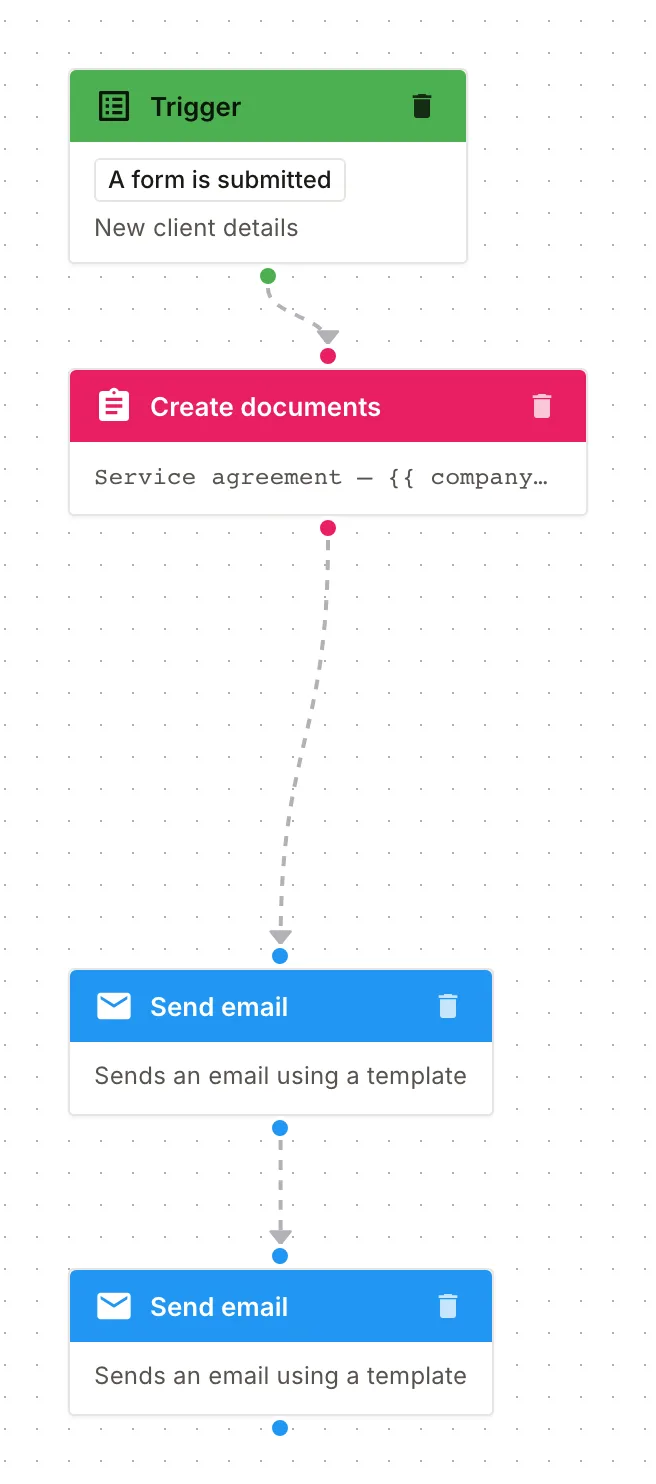
What you need
Section titled “What you need”- A form, here “New client details”, with fields such as
client_name,client_emailandcompany. - A PDF template, here “Service agreement (PDF)”, with its fields and signature areas for the parties
CLIENTandPARTNER. - A document type, here “Client contracts”.
- Two email templates, each with a button leading to the signing link. The address of the client’s button is
{{ _recipients.CLIENT.signingUrl }}.
Your contract is a Word file? Add a Generate document step before Create documents, with [SIGNATURE:CLIENT] markers in the file, and use the generated file as the document.
Build it
Section titled “Build it”-
Create a workflow. In the Trigger, set Starts on to Form and Trigger source to “New client details”.
-
Add Create documents and connect it to the trigger. Select it and click Configure this step.
-
On Basics, set Document type to “Client contracts”. Later workflows listen to this type, so it matters more than it looks.
-
On Documents, click Add document. Under Fragments, choose Template, and under Choose a template pick “Service agreement (PDF)”. Give it a Document title, for example
Service agreement – {{ company }}. Under Signed or filled in by you seeCLIENTandPARTNER, read from the template. -
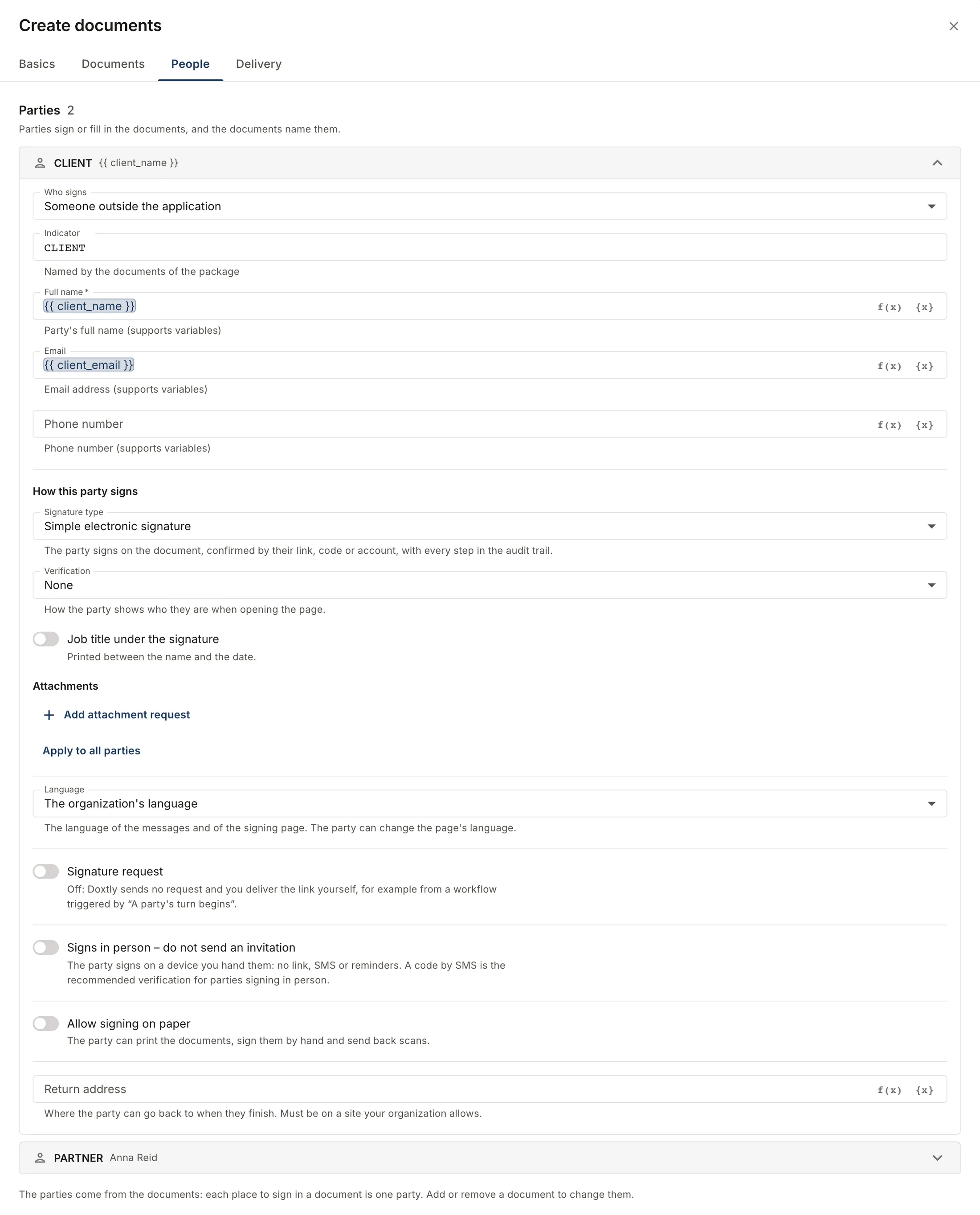
On People, there is a row for each party the template names. For
CLIENT: Full name{{ client_name }}, Email{{ client_email }}. ForPARTNER, type a fixed name and address. Your own emails deliver the links in this recipe, so turn off Signature request in both rows, or each party gets two emails. -
On Delivery, set Days after sending, for example 14, if the offer shouldn’t stay open for ever. Leave the rest as it is for now.
-
Add Send email after it. Set Recipient email address to
{{ _recipients.CLIENT.email }}and pick the client’s email template. -
Add a second Send email for the partner, with
{{ _recipients.PARTNER.email }}and the partner’s template. -
Save the workflow and switch it on.
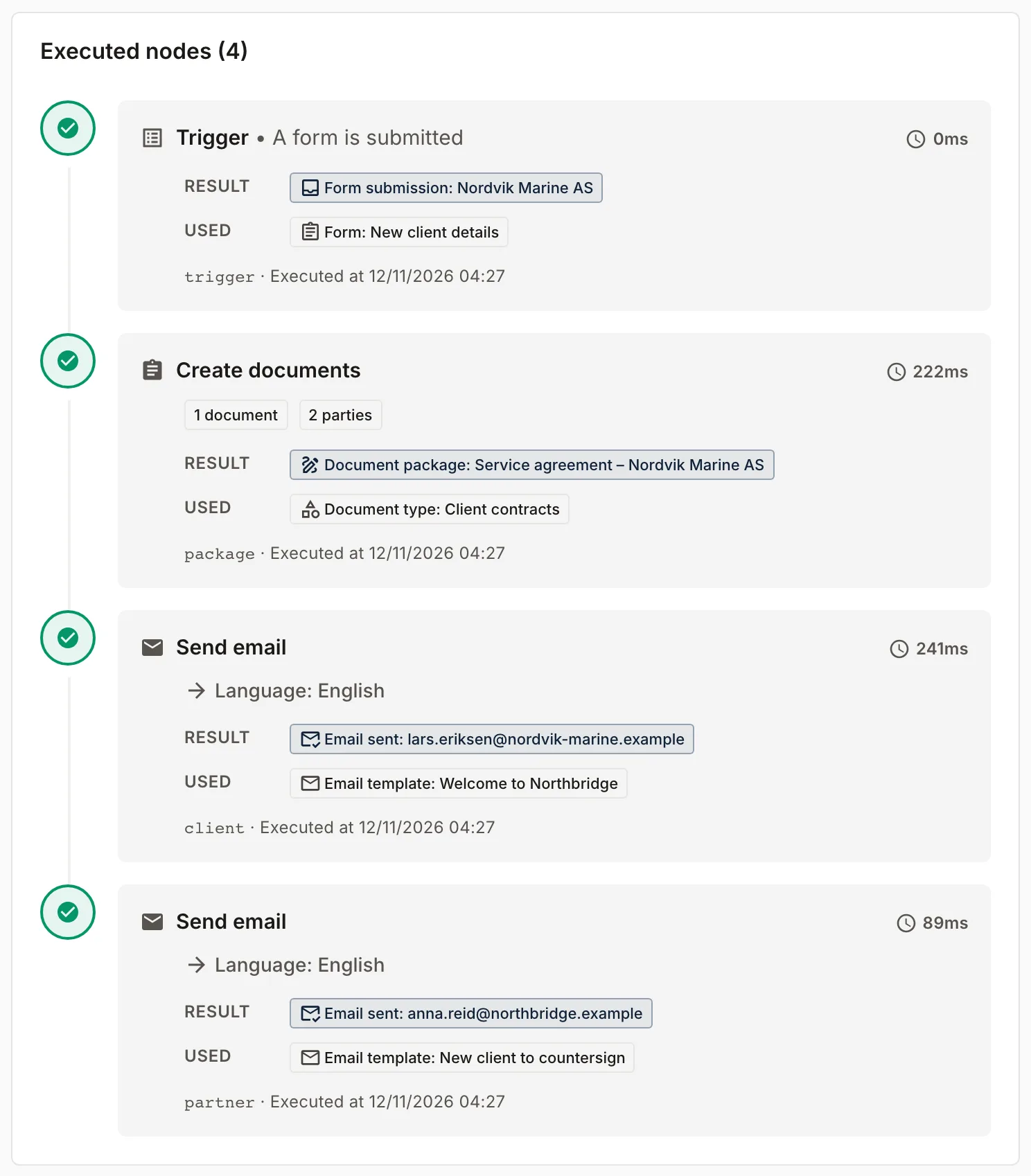
Check the run
Section titled “Check the run”Send the form to yourself and open the run in Executions. You should see four green steps. The Create documents card links to the Document package, and each Send email card links to the email it sent.
Variations
Section titled “Variations”Sign straight after the form. On the Delivery tab of Create documents, turn on Allow immediate signing and set Main signing party to CLIENT, who needs an email address under Parties. The client goes to the signing page as soon as they press send, so you can delete their Send email. Keep the partner’s. The run then has 90 seconds, because somebody is waiting. This works only when the workflow starts from a submission, and only one Create documents step in a workflow can do it.
A Word contract. Signing needs a PDF that names its signers. Add Generate document before Create documents, with a Word template holding [SIGNATURE:CLIENT] and [SIGNATURE:PARTNER] markers. In Create documents, add the fragment File from workflow and pick the generated file under Choose a file. The designer knows the template behind that file, so the rows for CLIENT and PARTNER appear under Parties on People by themselves.
A contract with a term. If “Client contracts” keeps contracts with a term, give the form a start_date field and turn on Contract term on Basics, with Starts on {{ start_date }} and Ends on {{ start_date | addyears(1) | adddays(-1) }}. Doxtly then knows when each contract ends, and Renew a contract before it ends can offer the extension in time.
Different contracts for different clients. Add a Condition or a Switch before Create documents, for instance on the fee, and let each branch create its own package.
Stricter identity checks. On People, open the party’s row and set Verification to Code by email, Code by SMS or Code by WhatsApp. A one-time code needs each party’s email address, or their Phone number for the other two. See Sending for signature.
A copy for someone who doesn’t sign. On People, next to Viewers, click Add and give your lawyer’s name and address. They get a read-only link of their own by email when the package is created.
What next
Section titled “What next”Once everybody has signed, Archive after signature files the result. If somebody refuses, Follow up a declined contract tells the right person.