

Survey trigger
This trigger starts a run when somebody answers one of your surveys: as they start a response, or once they have sent it. It also starts when an invited person lets the deadline pass, when the survey closes, and when one of its quotas fills up. Use it to tell the account team about a client who is unhappy, to copy every response into a spreadsheet, or to file each response sheet in your cloud storage.
Always available
Settings
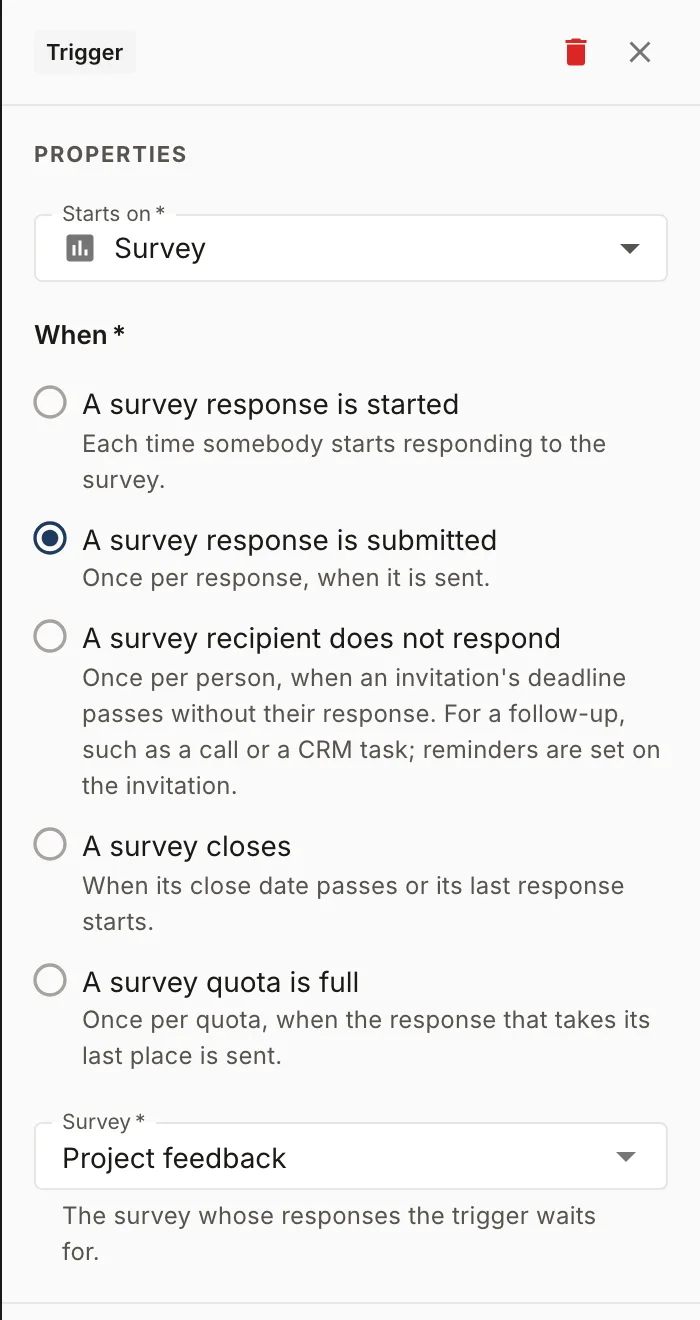
Section titled “Settings”Under Starts on choose Survey, then under When one of its five events.
| Setting | What it does |
|---|---|
| When | A survey response is started, A survey response is submitted, A survey recipient does not respond, A survey closes or A survey quota is full. |
| Survey | “The survey whose responses the trigger waits for.” Required: the list holds your organization’s surveys, by title. |
A survey has no right answers, so nothing is scored and there is nothing to filter by outcome or grade. For quizzes, use the Quiz trigger.
A survey response is started
Section titled “A survey response is started”“Each time somebody starts responding to the survey.” The run starts as the response begins, so it has no answers yet: _response says who is responding and when they started, without submittedAt, durationSeconds or _answers.
A survey response is submitted
Section titled “A survey response is submitted”“Once per response, when it is sent.” The run gets the answers, _response with submittedAt and durationSeconds, and _answers, one entry per question. It also brings the response’s response sheet, a PDF of the answers as given: file pickers offer it under Response sheet, to attach to an e-mail, file in storage or put into a package. An anonymous survey keeps no response sheet, so its runs bring none.
A survey recipient does not respond
Section titled “A survey recipient does not respond”“Once per person, when an invitation’s deadline passes without their response. For a follow-up, such as a call or a CRM task; reminders are set on the invitation.” When you send the survey’s invitations with a Deadline, Doxtly watches it. Once it passes, each person those invitations went to who hasn’t responded starts one run: a person of the survey’s access list, or a contact who was sent a personal link. Their reminders stop then. It works as the Quiz trigger’s event of the same name.
The run has no answers, no _response and no _answers. It gets _survey and _person, which the picker lists under Recipient. For a contact it also gets _contact and _company, as a run from a personal link does, custom fields included; the picker marks them Only when the recipient is a contact.
| Variable | Label in the picker | Contents |
|---|---|---|
_person.kind |
Recipient kind (list or contact) | list or contact. |
_person.name, .email |
Name, Email address | Who it is. |
_person.group |
Group | Their group on the access list; empty for a contact. |
_person.invitedAt, .openedAt, .startedAt |
Invited at, Opened at, Started at | When they were sent the invitation, opened it and started a response; empty until it happened. |
_person.remindersSent |
Reminders sent | How many reminders went out to them. |
_person.deadline |
Deadline | The invitation’s deadline. |
To send the survey again, or another one, from a workflow, use Send a survey.
A survey closes
Section titled “A survey closes”“When its close date passes or its last response starts.” It starts once per close: change the close date or the limit in the survey’s schedule, and the next close starts it again. The run gets _survey and _closure only: no response is its subject. Use it for a closing report, such as an e-mail to the person in charge.
| Variable | Label in the picker | Contents |
|---|---|---|
_closure.reason |
Why it closed | date or limit. |
_closure.closedAt |
Closed at (date and time) | When it closed. |
_closure.responses, .submitted |
Responses started, Responses submitted | How many responses it took, and how many of them were sent. |
A survey quota is full
Section titled “A survey quota is full”“Once per quota, when the response that takes its last place is sent.” A quota closes one group of respondents once it has enough of them, such as 200 from Kraków; from then on, the people it would count are told the survey is closed for them. The run gets _survey and _quota only: no answers, no response and no files. Use it to tell the person running a study that a group is complete, or to stop a campaign that invites more of them.
| Variable | Label in the picker | Contents |
|---|---|---|
_quota.id |
Quota ID | The quota’s identifier. |
_quota.label |
Quota name | The name it was given. |
_quota.limit |
Responses | How many responses it takes. |
_quota.filledAt |
Filled at (date and time) | When its last place was taken. |
What it hands to your steps
Section titled “What it hands to your steps”Once a response is submitted, each question’s answer sits at the top of the run’s data, by its data key, as a form’s fields do: {{ q_recommend }}. In the picker they are under Survey answers. The survey link’s parameters and the survey’s metadata come too. Besides them:
| Variable | Label in the picker | Contents |
|---|---|---|
_survey.id |
Survey ID | The survey’s identifier. |
_survey.title |
Survey title | Its title. |
_response.id |
Response ID | The response’s identifier. |
_response.number |
Response number | Which of the person’s responses it is: 1 for the first. |
_response.startedAt |
Started at (date and time) | When the response began. |
_response.language |
Language | The language it was given in, such as en. |
_response.personName, .personEmail, .personGroup |
Respondent’s name, Respondent’s e-mail, Respondent’s group | Who responded: from the survey’s access list, or on a link anyone can open, from the questions that ask for it; empty when neither says. |
_response.sheetNumber, .sequence |
Response sheet number, Response sheet sequence number | The response’s number in the survey, with the survey’s prefix (FEEDBACK-0042), and the bare number (42). |
For A survey response is submitted, also:
| Variable | Label in the picker | Contents |
|---|---|---|
_response.submittedAt |
Submitted at (date and time) | When it was sent. |
_response.durationSeconds |
Duration (seconds) | How long it took, in whole seconds. |
_response.summaryRow |
Summary row (for a spreadsheet) | The response’s row of the survey’s Summary, by the column headings in the survey’s language, for a Write to a sheet step to write as it is. An anonymous survey’s row names no one and has no number. |
_answers |
Answers per question (list) | One entry per question, in the order the person saw them. |
Each entry of _answers holds questionId, number (the question’s number, from 1), position, key (its data key), label (its text), answer and otherText (what the person wrote with “Other”; empty when they didn’t choose it). Use it in a list mapping, such as one spreadsheet row per question.
Times are in your organization’s time zone. An answer to a password question is always empty.
Anonymous surveys
Section titled “Anonymous surveys”With Anonymous responses on, nobody can tell whose response it is, workflows included. _response.personName, .personEmail and .personGroup are always empty, a response through a contact’s link brings no _contact or _company, and the run gets no link parameters and no response sheet. A survey recipient does not respond still knows whom the invitation went to, because the list records only that a person responded, never which response is theirs.
Example: an unhappy client reaches the account team at once
Section titled “Example: an unhappy client reaches the account team at once”Northbridge Advisory sends each client a short “Project feedback” survey when a project ends. It asks how likely they are to recommend Northbridge, from 0 to 10, under the data key q_recommend, and for a comment under q_comment. A workflow listens for submitted responses:
| Setting | Value |
|---|---|
| Starts on | Survey |
| When | A survey response is submitted |
| Survey | Project feedback |
A Condition checks q_recommend <= 6. On True, Send to a messenger posts to the account team’s Slack channel: {{ _response.personName }} rated us {{ q_recommend }}: {{ q_comment }}. On False, nothing more happens.
The same events reach outgoing webhooks that take them, for a CRM or a feedback tool that should hear about every response by itself.