

Contact saved trigger
This trigger starts a run when one of your contacts is saved. Use it to tell another system about a new client through a Webhook, or to welcome a new supplier by email.
Available when: the View contacts permission to set up
What starts it
Section titled “What starts it”A contact created or changed, from any place: a person in the app, an access key, a workflow’s step such as Save contact or Update contact, or a CRM integration that corrects the Pipedrive ID kept in a custom field after records were merged in Pipedrive. A save that changes nothing starts nothing, and so does adding a note. A save that changes only custom fields starts it too. Deleting a contact starts nothing either.
Settings
Section titled “Settings”Under Starts on choose Contact.
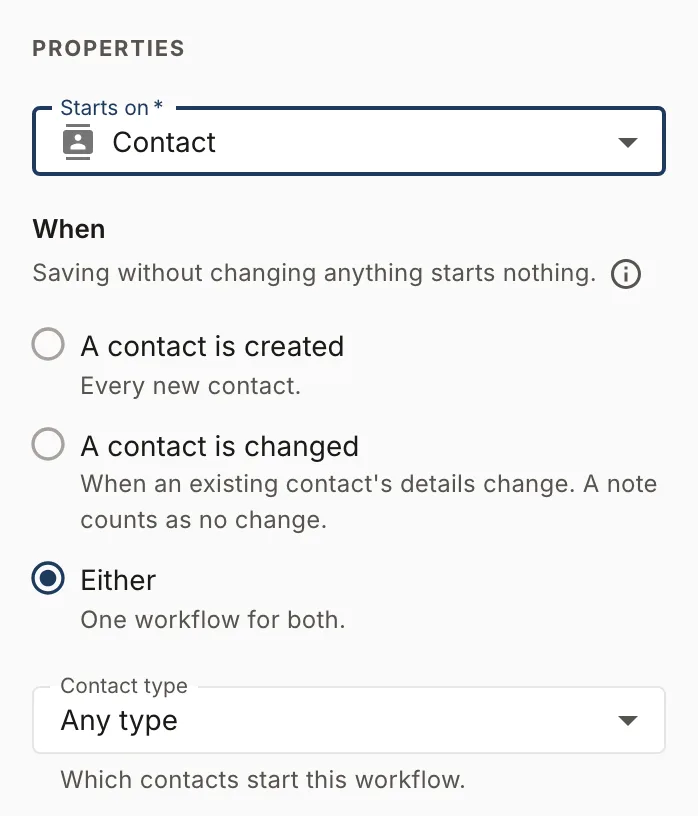
| Setting | What it does |
|---|---|
| When | A contact is created, A contact is changed, or Either (the default). |
| Contact type | Any type (the default), No type, or one of your types. |
A workflow listening to one type ignores contacts of other types, and contacts with none. If the type you chose is deleted, the workflow no longer matches, and you have to choose another type before saving it again.
What it hands to your steps
Section titled “What it hands to your steps”| Variable | Meaning |
|---|---|
_contact.id, .email, .firstName, .lastName, .fullName |
Who it is. |
_contact.phone, .jobTitle, .companyName, .language |
The other details; empty when the contact has none. |
_contact.company.taxId, .street, .postalCode, .city, .country, .email, .phone, .website, .id |
The contact’s company, when it has one. |
_contact.type.id, .type.name |
The type; empty without one. |
_contact.<key>, _contact.company.<key> |
The contact’s and its company’s custom fields, by key, such as _contact.clientNumber; missing when the field has no value. A sensitive field is never here. |
_contact.createdAt, .updatedAt |
Date and time. |
_contactChange.event |
created or updated. |
_contactChange.changedFields |
The names of the fields that changed; a custom field by its key. |
_contactChange.previous.firstName, .lastName, .email, .phone, .jobTitle, .companyName, .language, .type |
A changed field’s value before the save. The type is its name. A changed custom field’s is under its key, except a sensitive one’s. |
_contactChange.source |
user, workflow, api, or crm for a CRM integration’s correction. |
_contactChange.changedBy |
The name of who saved it. |
Avoiding loops
Section titled “Avoiding loops”A workflow that listens for contacts and saves contacts could keep starting itself. Doxtly stops such a chain at its limit and says why on the run’s page. To skip saves made by workflows from the start, add a Condition on _contactChange.source != 'workflow'.