

Form submission trigger
This trigger starts a run each time someone sends one of your forms, and if you wish, each time a submission is corrected afterwards. It’s the usual start for anything that follows an enquiry, a booking or an onboarding form.
Always available
What starts it
Section titled “What starts it”Someone sends the form, on its public page, on your website through an embed, or through one of the plugins. Out of the box, that’s the only thing that starts a run.
Three other cases are worth knowing:
- A submission held back as spam starts nothing while it waits. If you mark it as not spam, the form’s workflows run then, with its values and files. Nobody is on the page any more, so documents a workflow would have handed over on the spot go out by email instead. A submission the form refuses outright never starts anything.
- A form that takes a payment starts its workflows once the payment is made, not when the form is sent, with the values and files the submission kept. A submission never paid starts nothing. Nobody waits on the page by then, so documents for signing go out by email.
- An edit starts a run only if When allows it, and the person correcting the submission clicks Save and run workflows. The dialog lists the workflows that will run. If they choose Save only, nothing starts. See editing submissions.
Settings
Section titled “Settings”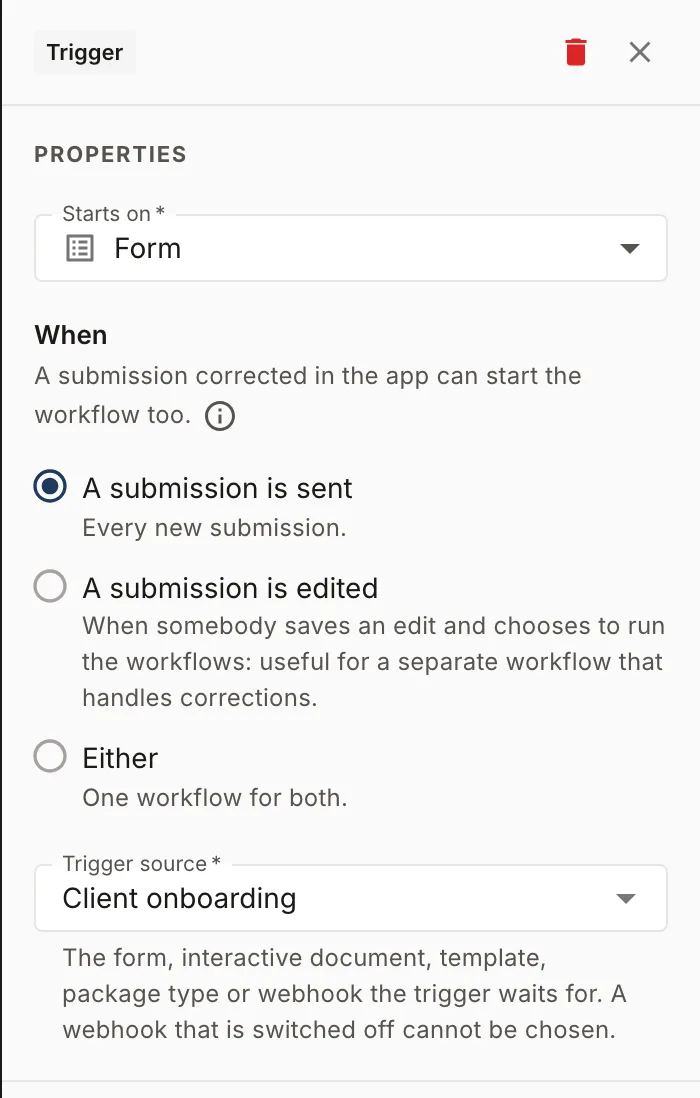
| Setting | Values | What it does |
|---|---|---|
| Trigger source | One of your forms | The form to wait for. Required. |
| When | A submission is sent (default) | Every new submission of the form. |
| A submission is edited | Only when somebody saves an edit and chooses to run the workflows. Use it for a separate flow for corrections, such as telling the account manager what changed. | |
| Either | One workflow for both. Tell them apart with _submission.revision, which is 0 on a new submission. |
What later steps get
Section titled “What later steps get”Values
Section titled “Values”The form’s answers, by the name of each field, nested as the form nests them. A repeating group is a list. An uploaded file appears as a reference, and the file itself is picked in file settings (see below).
An answer can be missing from a run. The picker warns about a field that may not arrive with May have no value – the field has a display condition. Keep that in mind in a Condition.
The _form block
Section titled “The _form block”| Variable | Label in the picker | Contents |
|---|---|---|
_form.id |
Form ID | The identifier of the form that was filled in. |
_form.title |
Form title | Its title, as the form is named now. |
One workflow listening to several forms can tell them apart by _form.title, and an email can name the form.
The _submission block
Section titled “The _submission block”| Variable | Label in the picker | Contents |
|---|---|---|
_submission.id |
Submission ID | The submission’s identifier. |
_submission.title |
Submission title | Its title. |
_submission.submittedAt |
Submitted at (date and time) | When it was sent. |
_submission.submittedDate |
Submitted on (date) | The day it was sent, such as 2026-11-05, in your organization’s time zone. |
_submission.language |
Language of the page | The language of the page it was sent from, such as en. |
_submission.revision |
Edit number (0 on a submission) | 0 when sent, then the edit’s number. |
_submission.editedAt |
Edited at (date and time) | When it was edited. Empty on a submission. |
_submission.editedBy |
Edited by | Who edited it. Empty on a submission. |
_submission.resultsRow |
Results row (for a spreadsheet) | The submission as a row of the form’s results: id, sentAt, then each field included in the results by its data path, written as the export writes it, such as {{ _submission.resultsRow.city }}. Only when it is sent or edited. |
_submission.personalLink |
Sent in through a personal link | true for a submission through a personal link, false otherwise. |
The _payment block
Section titled “The _payment block”For a form with a Payment element, what was paid. On a form without one, these are empty.
| Variable | Label in the picker | Contents |
|---|---|---|
_payment.id |
Payment ID | The payment’s identifier, as on the Payments page. |
_payment.amount |
Amount (decimal) | The amount, such as 490.00. |
_payment.amountMinor |
Amount in minor units (cents, grosze) | The same in the currency’s smallest unit, such as 49000. |
_payment.currency |
Currency | Such as PLN. |
_payment.status |
Payment status | succeeded when the payment has just been made; on a run after an edit, partially_refunded or refunded if money was given back since. |
_payment.provider |
Payment provider | przelewy24 or stripe. |
_payment.paidAt |
Paid at (date and time) | When it was paid. |
For what happens to the payment later, a refund for one, use the Payment trigger.
The _contact and _company blocks
Section titled “The _contact and _company blocks”A submission through a personal link also brings the contact and the company the link was sent to, as they were when it was sent in, their custom fields included: {{ _contact.email }}, {{ _company.name }}. The picker lists them under From a personal link, each marked Only when sent in through a personal link. A submission through the form’s own link has none of them, so check _submission.personalLink in a Condition before a step that needs them. Every variable is listed under Data and variables.
Metadata and link parameters
Section titled “Metadata and link parameters”_metadata holds the form’s metadata as this submission keeps it, so changing the form later doesn’t rewrite what an old submission gives its runs. _params holds the link parameters the form captures, always as text. A run on an edit gets the parameters from the original link. A parameter a link didn’t carry reads as empty, and the picker marks each one Required or Optional, as the form declares it.
Each file field of the form is offered in file pickers, under Form fields, by its label. Every file of the trigger takes them all.
On an edit, the run gets every file the submission holds at that moment, whether it changed or not.
A sample
Section titled “A sample”Northbridge Advisory’s client onboarding form, opened from a newsletter link:
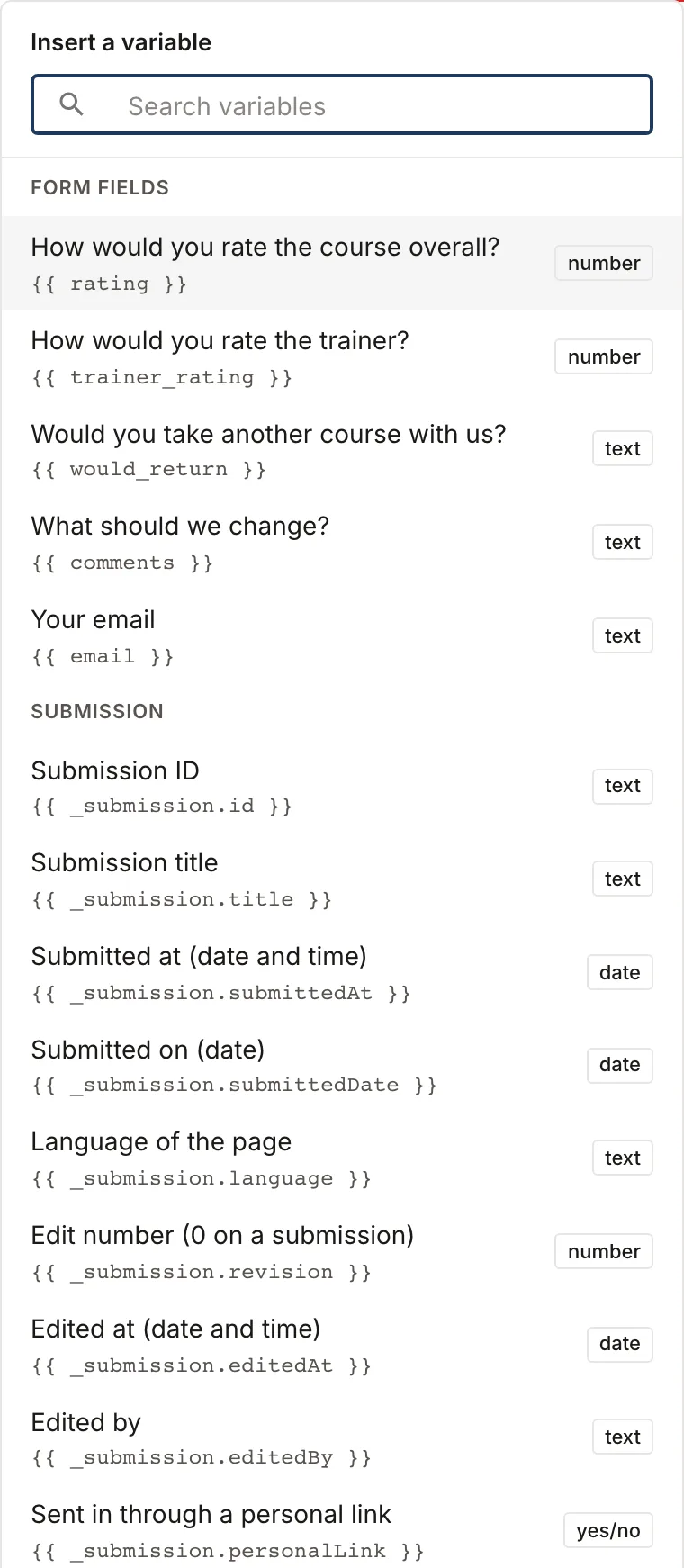
{ "contact": { "fullName": "Marta Lindqvist", "email": "marta@haldenlogistics.example" }, "company": { "name": "Halden Logistics", "country": "SE" }, "services": ["training", "audit"], "registrationCertificate": "file:019a4f1e-90d1-7c44-a2e7-61f0b3c8d412", "_form": { "id": "0198c2a4-6d10-7e3b-9f41-2a7b5c8e1d06", "title": "Client onboarding" }, "_submission": { "id": "019a4f1e-7bf0-7a3c-8c12-5e0a4d7f6b21", "title": "Halden Logistics", "submittedAt": "2026-11-05T10:15:00+01:00", "submittedDate": "2026-11-05", "language": "en", "revision": 0, "editedAt": null, "editedBy": null, "personalLink": false }, "_metadata": { "team": "onboarding" }, "_params": { "utm_source": "newsletter" }, "_execution": { "id": "…", "eventId": "…", "workflowId": "…", "triggeredAt": "…", "date": "2026-11-05" }}The variable picker lists all of this for you, grouped as Form fields, Form, Submission and This run, with Link parameters and Form metadata when the form has them.
What this trigger allows
Section titled “What this trigger allows”This trigger and the interactive document trigger are the only two that allow Allow immediate signing: a Create documents step takes the person who just submitted straight to the signing page. That only means something if someone is waiting in a browser. After an edit, or a release from spam, nobody is, so those runs send the main party the link the way their Signature request says, or by email when it is off.
Example: correct a contract when the data was wrong
Section titled “Example: correct a contract when the data was wrong”Northbridge keeps one workflow for new clients and wants corrections to reissue the service agreement, without sending the welcome email again.
- Set When to Either.
- Connect Generate document straight after the trigger.
- Add a Condition with
_submission.revision == 0. - Connect the welcome email to its True branch and leave False unconnected, so an edit ends the run there.