

The Payments page
The Payments page lists the payments your forms asked for, and those of parties who pay after signing a package: those paid, those still waiting, those that ended unpaid and those given back. It is where you check that a participant really paid before the workshop, and where you start a refund.
Available when: your plan includes payments, and you hold View payments
Open Resources → Payments in the sidebar. The page has two tabs: Payments, the payments themselves, and Refunds, every refund of every payment. Each tab keeps its own filters in the page’s address, so you can bookmark a filtered view of either and switching tabs doesn’t lose them.
The list
Section titled “The list”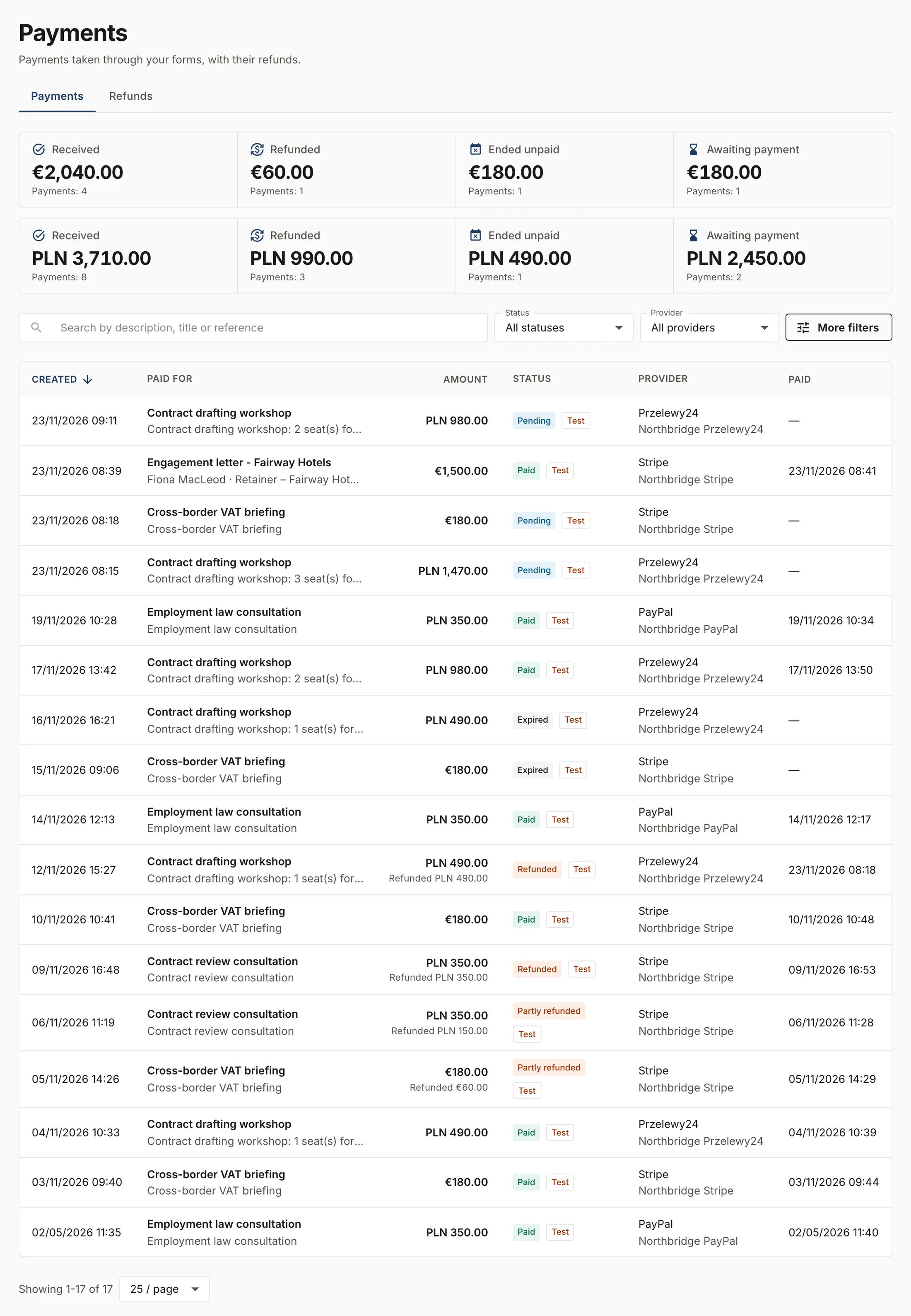
| Column | What it shows |
|---|---|
| Created | When the form was sent and the payment started. |
| Paid for | The name of the form it was paid through, as it was when the payment was made, with the payment’s description under it. For a party who pays after signing, the package’s title, with the party’s name and the description under it. |
| Amount | The amount and currency. Under it, Refunded and how much, once something was given back. |
| Status | Where the payment stands, and Test for a payment taken through an integration in test mode, where no money moved. |
| Provider | Przelewy24, Stripe, PayU or PayPal, with the integration’s name under it, or Integration deleted. |
| Paid | When it was paid. |
The newest come first. Click Created, Amount or Paid to sort by it, and click a row to open the payment. On a phone the payments are cards with the same details.
Until a form with a payment element is sent, the page says “No payments yet”.
Statuses
Section titled “Statuses”| Status | What it means |
|---|---|
| Pending | The form was sent, and the payer has until the end of the 24 hours to pay. |
| Paid | The provider confirmed the payment. The submission was taken and its workflows started. |
| Expired | The 24 hours passed without a payment. Nothing started for the submission. |
| Partly refunded | Paid, and part of the money was given back. |
| Refunded | Paid, and all of it was given back. A late payment, refunded automatically, ends here too. |
Finding a payment
Section titled “Finding a payment”| Filter | What it does |
|---|---|
| Search | Finds a payment by its description, by the name of the form or the package, by the provider’s reference, or by its ID. The payer’s email address isn’t searched. |
| Status | One of the statuses above, or All statuses. |
| Provider | Przelewy24, Stripe, PayU or PayPal. |
| Integration | One of your payment integrations; a test one says (test mode). |
| Form | The form the payment was taken through. |
| Mode | Live and test, Live only or Test only. |
| Created from, Created to | When the payment started. |
Search, Status and Provider are always in view; More filters opens the rest.
The filters you choose show as chips under the bar, and Clear all removes them. When nothing matches, the page says “No payments match”.
Totals above the list
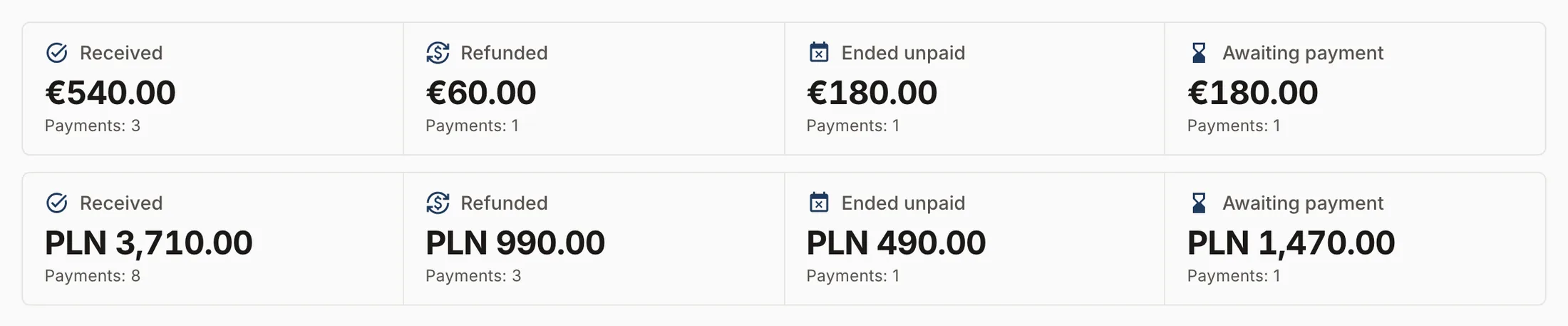
Section titled “Totals above the list”Above the list, four cards add up the payments it shows:
| Card | What it adds up |
|---|---|
| Received | The payments that were paid, late ones included. |
| Refunded | What refunds that went through gave back. |
| Ended unpaid | The payments that ended without being paid. |
| Awaiting payment | The payments still waiting for the payer. |
Each card shows the amount and, under it, the number of payments, such as “Payments: 12”. Amounts in different currencies are never added together: each currency gets its own row of four cards. The cards follow the filters, Created from and Created to included, so they always add up the rows below them. To see last month’s takings, set those two dates. When nothing is found, there are no cards.
A program can read the same totals through the API. The same four cards for the current month can also sit on your dashboard, as the Payments this month widget.
A payment’s page
Section titled “A payment’s page”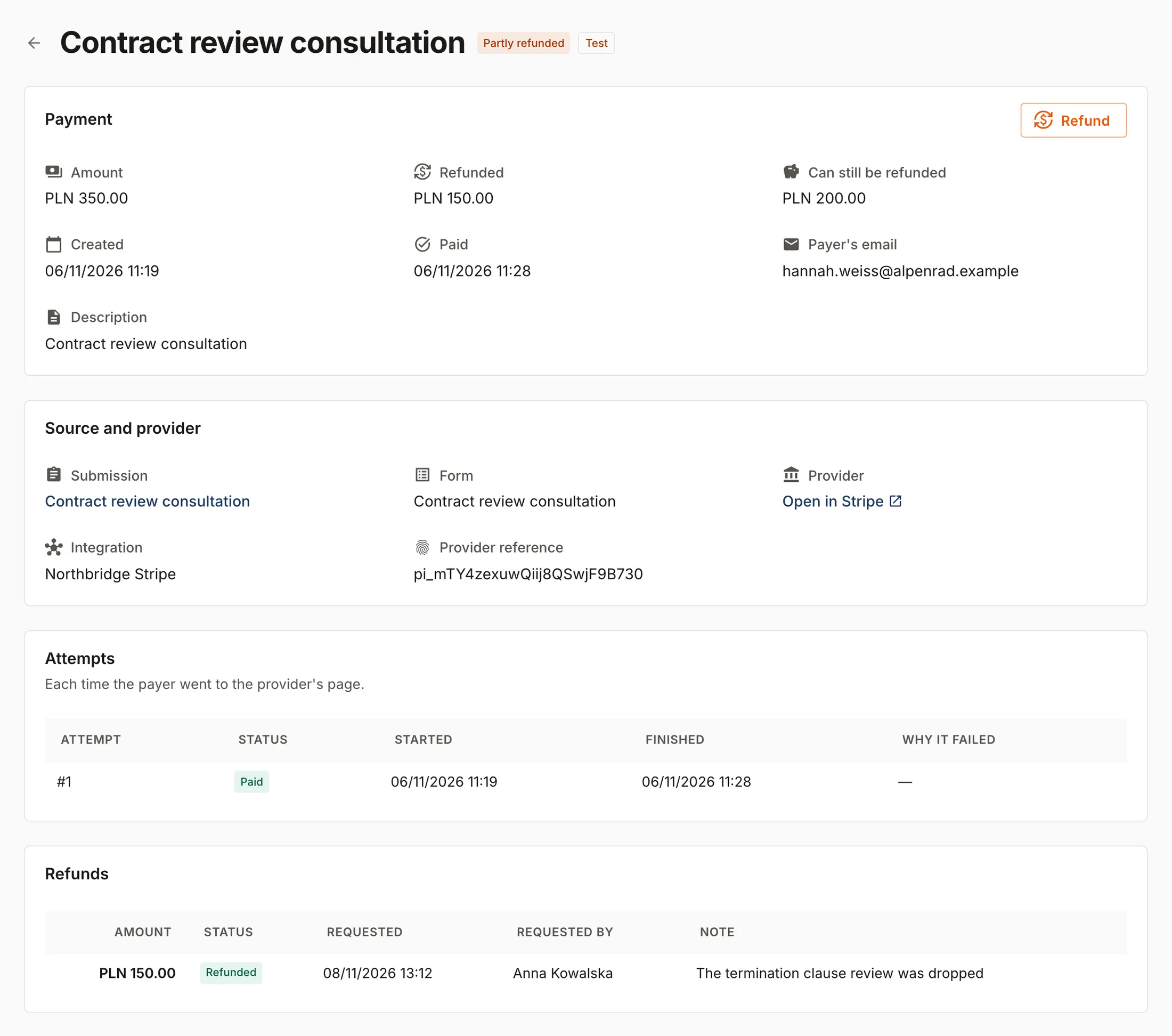
The Payment card:
| Field | What it holds |
|---|---|
| Amount | What was asked for. |
| Refunded | What was given back so far, once something was. |
| Can still be refunded | What is left to give back: the amount less the refunds made and those still in progress. Shown for a paid payment. |
| Created, Paid | When it started, and when it was paid. |
| Can be paid until | For a pending payment, when the 24 hours end. |
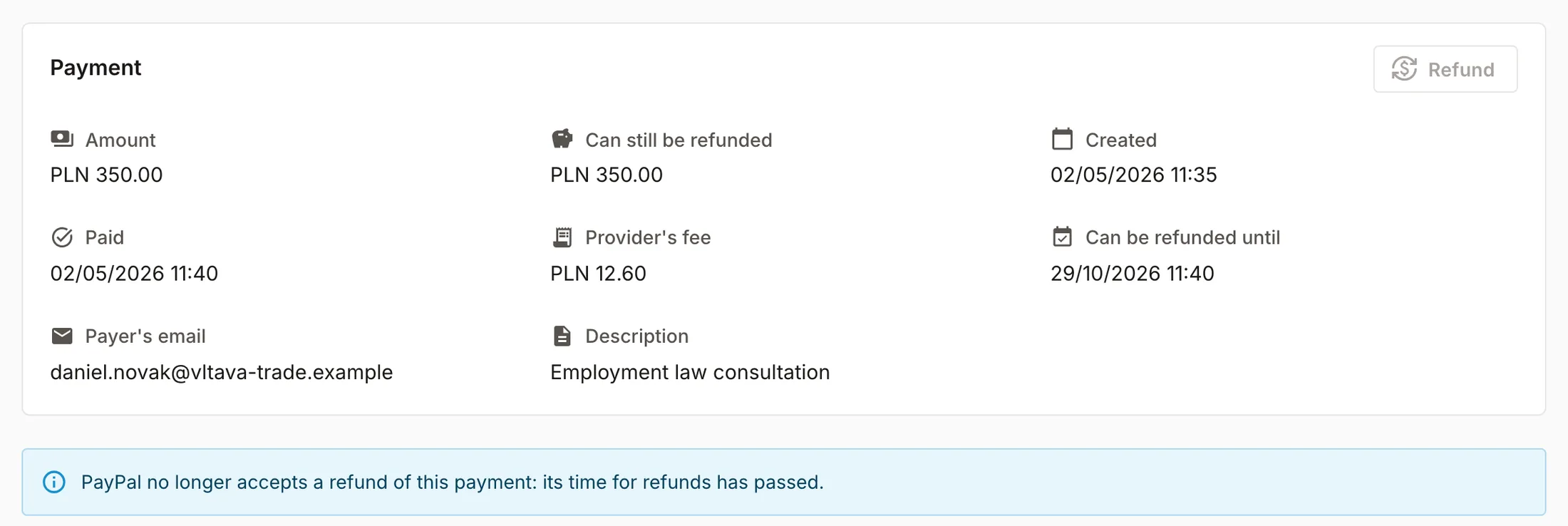
| Provider’s fee | What the provider charged for the payment, when it says so: Przelewy24, PayU and PayPal do, Stripe doesn’t. |
| Can be refunded until | For a PayPal payment, the end of the 180 days in which PayPal accepts refunds. |
| Ended unpaid | For a payment that wasn’t paid, when it ended. |
| Payer’s email | The address the provider sent its receipt to, if the form named one. |
| Description | What the provider showed the payer. |
Refund, at the top of the card, is there for whoever holds Refund payments, once the payment is paid. When it can’t be refunded any more, the button is greyed out, and both its tooltip and a note under the card say why:
| Why | What the note says |
|---|---|
| The integration was deleted | “This payment can’t be refunded through Doxtly: its integration was deleted. Refund it in PayU’s own panel.”, with the payment’s provider named |
| Everything was given back, or is held by refunds in progress | “Nothing is left to refund: everything was given back or is held by refunds still in progress.” |
| PayPal’s 180 days are over | “PayPal no longer accepts a refund of this payment: its time for refunds has passed.” |
See Refunds.
The Source and provider card:
| Field | What it holds |
|---|---|
| Submission | A link to the submission it paid for, if you may view forms. Once the submission is deleted, the form’s name stays, marked (deleted). |
| Form | The form it was sent through; empty once the submission is deleted. |
| Package, Party | Instead of the two above, for a party who pays after signing: a link to the package, if you may view documents, and the party who pays. Once the package is deleted, its title stays, marked (deleted). |
| Provider | Przelewy24, Stripe, PayU or PayPal. For Stripe, Open in Stripe opens the payment in your Stripe dashboard. |
| Integration | The integration it went through, or Integration deleted. |
| Provider reference | The provider’s own reference, to find the payment in its panel. |
Attempts
Section titled “Attempts”Each visit the payer makes to the provider’s page is an attempt, numbered from #1. The table shows its status (Open, Paid, Failed, Expired or Canceled), when it started and finished, and Why it failed, such as “The amount is below the provider’s minimum” or “The provider did not answer”. Several attempts usually mean the payer tried again after a declined card or a change of mind.
Refunds
Section titled “Refunds”The refunds of the payment, newest first, with their amount, status (In progress, Refunded or Failed), when they were requested, by whom and the note. A refund for a payment that came too late says Automatically (late payment), and one requested through the API or by a person since deleted says An access key or a deleted user. Without refunds, the table says “Nothing was refunded.”
The Refunds tab
Section titled “The Refunds tab”The Refunds tab lists every refund on its own row, newest first, so you can see at a glance what went back to payers and whether it arrived. It is open to everyone who may view payments.
| Column | What it shows |
|---|---|
| Requested | When the refund was asked for. |
| Payment | The title of the payment it gives back, with its provider. |
| Amount | The amount given back. |
| Status | In progress, Refunded or Failed, with Test for a test payment. A failed refund shows why under its status. |
| Reason | Requested by hand or Late payment, with the note under it if one was written. |
| Requested by | The person who asked for it, Automatically (late payment), or An access key or a deleted user. |
Click Requested or Amount to sort by it, and click a row to open the payment. On a phone the refunds are cards with the same details.
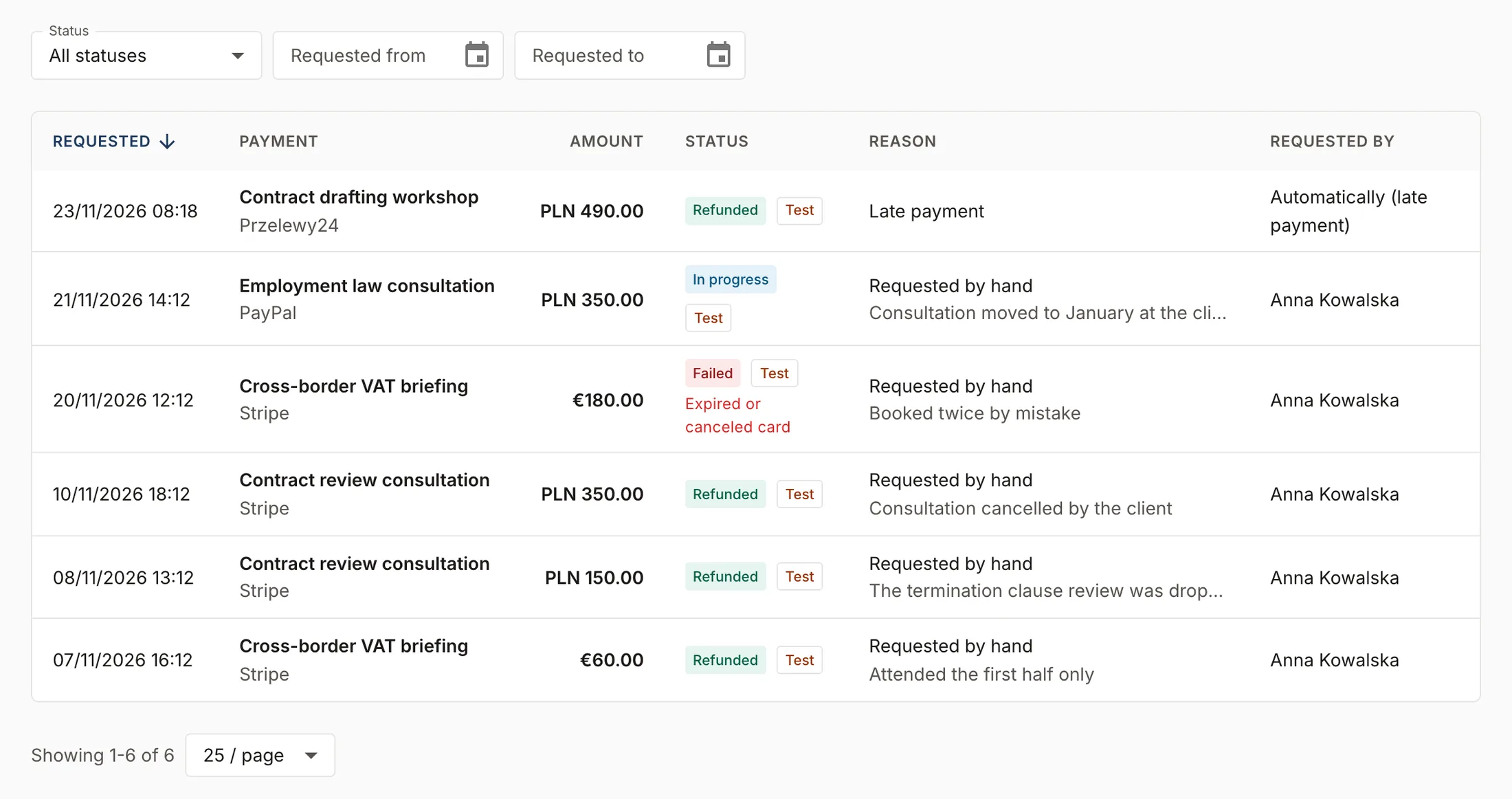
Filter by Status (In progress, Refunded or Failed), Requested from and Requested to. The filters show as chips, and Clear all removes them. Until anything is refunded, the tab says “No refunds yet”; when nothing matches the filters, “No refunds match”.
A program with an access key holding List refunds can read the same list through the API.
From a submission
Section titled “From a submission”A submission of a form with a payment element shows its payment too: the amount, its status, the provider and when it was paid, with Open the payment for whoever may view payments. See Submissions.
What stays when things are deleted
Section titled “What stays when things are deleted”- A submission deleted: the payment stays on this page with the form’s name, marked (deleted).
- An integration deleted: its payments stay, showing Integration deleted, but they can no longer be refunded through Doxtly. Refund them in the provider’s panel. An integration with a payment still waiting for the payer can’t be deleted until that payment has ended.