

Grade quiz attempt
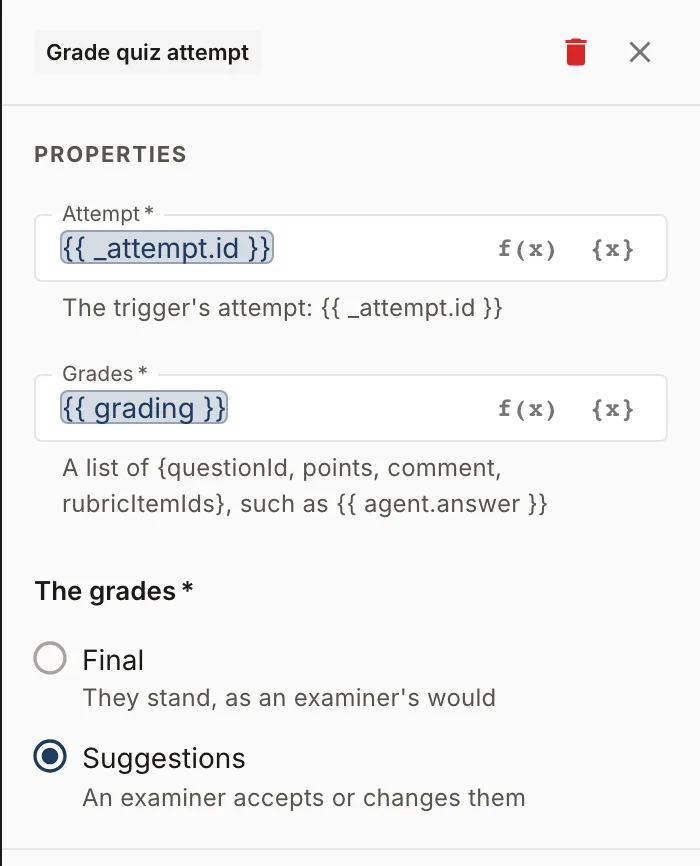
The Grade quiz attempt node writes grades for an attempt’s open answers while the workflow runs: “Grades open answers with an earlier step’s grades, such as an AI agent’s”. The grades come from an earlier step, usually an AI agent of your own that reads the answers against your marking guide. Use it when your own agent, with its prompt and model, should mark the essays of a recruitment test, or when the grades come from another system through a webhook.
Available when: the Manage workflows and Grade attempts permissions to set up
You find it in the Quizzes group of the palette.
Settings
Section titled “Settings”| Setting | What it does |
|---|---|
| Attempt | Required. The attempt to grade, by its ID. {{ _attempt.id }} by default: “The trigger’s attempt”, in a workflow started by the Quiz trigger. |
| Grades | Required. “A list of {questionId, points, comment, rubricItemIds}, such as {{ agent.answer }}”: usually the variable an earlier step stored its answer under. See the grades. |
| The grades | Final (the default): “They stand, as an examiner’s would”. Suggestions: “An examiner accepts or changes them”. |
The grades
Section titled “The grades”The step takes a list with one entry per question it grades, or an object whose grades holds that list, or text with either written as JSON, which is what an AI agent answering in JSON gives.
| Field | What it holds |
|---|---|
questionId |
Required. The question, by the questionId of its entry in _results. |
points |
The points given, from 0 to the question’s most. |
comment |
Optional. A comment on the grade, as an examiner writes one. Longer than 2,000 characters, it is cut there. |
rubricItemIds |
Optional. The rubric items that apply. Without points, the points are what the items make. |
Each entry needs points, rubricItemIds or both. A question appears once, and only a question that earns points can be graded.
The trigger’s _results gives the agent what it needs: each question’s questionId, label, answer, maxPoints, and verdict, which is pending for an answer waiting to be graded. Pass {{ _results }} in the agent’s Data, and give it a JSON schema with a grades list of those fields.
Final grades or suggestions
Section titled “Final grades or suggestions”Final grades the answers as an examiner would. They count at once, and the attempt’s history of grades records them as Graded by a workflow, with the workflow’s name. Once no answer is left to grade, the attempt is scored and finished: A quiz attempt is finished starts its workflows, and the result is shown or e-mailed as the quiz’s settings say. A finished attempt can be graded again: its new score starts A quiz attempt is regraded.
Suggestions leave the answers open in the Needs review queue, each with the points the step proposed, as the quiz’s own AI suggestions do. An examiner accepts or changes each one. Only an attempt that waits for grading takes suggestions, and only for answers still waiting.
A workflow started by A quiz attempt needs grading fits both: the answers are there, and nobody has graded them yet.
When it fails
Section titled “When it fails”All of the step’s grades are saved together, or none: when one is refused, nothing is written and the attempt stays with the examiners. The step then fails with one of these:
- The attempt isn’t one of your organization’s: “The step found no attempt … in your organization.”
- The grades are no list it can read, or an entry lacks a field: “The grades the step was given cannot be read (…). Give a list of
{questionId, points, comment, rubricItemIds}.” - A grade is refused, such as points above the question’s most, a question that isn’t in the attempt, or an attempt not finished yet: “No grade was written: … The attempt stays with the examiners.”
On the run’s page, the step’s card says how many answers it graded and whether as Final grades or as Suggestions for an examiner, and links the attempt it graded.
Example: your own agent marks the essays
Section titled “Example: your own agent marks the essays”Northbridge Advisory’s recruitment test ends with two essay questions, and the firm’s own agent knows its marking guide.
| Step | Settings |
|---|---|
| Quiz trigger | When: A quiz attempt needs grading, Quiz: Analyst recruitment test |
| AI agent | Data: answers = {{ _results }}; Answer format: JSON, with a grades list; Store the answer as: grading |
| Grade quiz attempt | Attempt: {{ _attempt.id }}; Grades: {{ grading }}; The grades: Suggestions |
The examiner opens the queue and finds each essay with its proposed points, and accepts or changes them. Once the firm trusts the agent, Final marks the essays without anyone waiting.