

Refunds
A participant cancels a week before the workshop, or a consultation is cut short: you give the money back from the payment’s page in Doxtly, and the provider returns it to the payer. You don’t have to sign in to your provider’s panel for it.
Available when: your plan includes payments, and you hold Refund payments (Administrators and Managers among the built-in roles)
Refund a payment
Section titled “Refund a payment”- Open Resources → Payments and click the payment.
- Click Refund at the top of the Payment card. When the payment can’t be refunded, the button is greyed out and a note says why; see below.
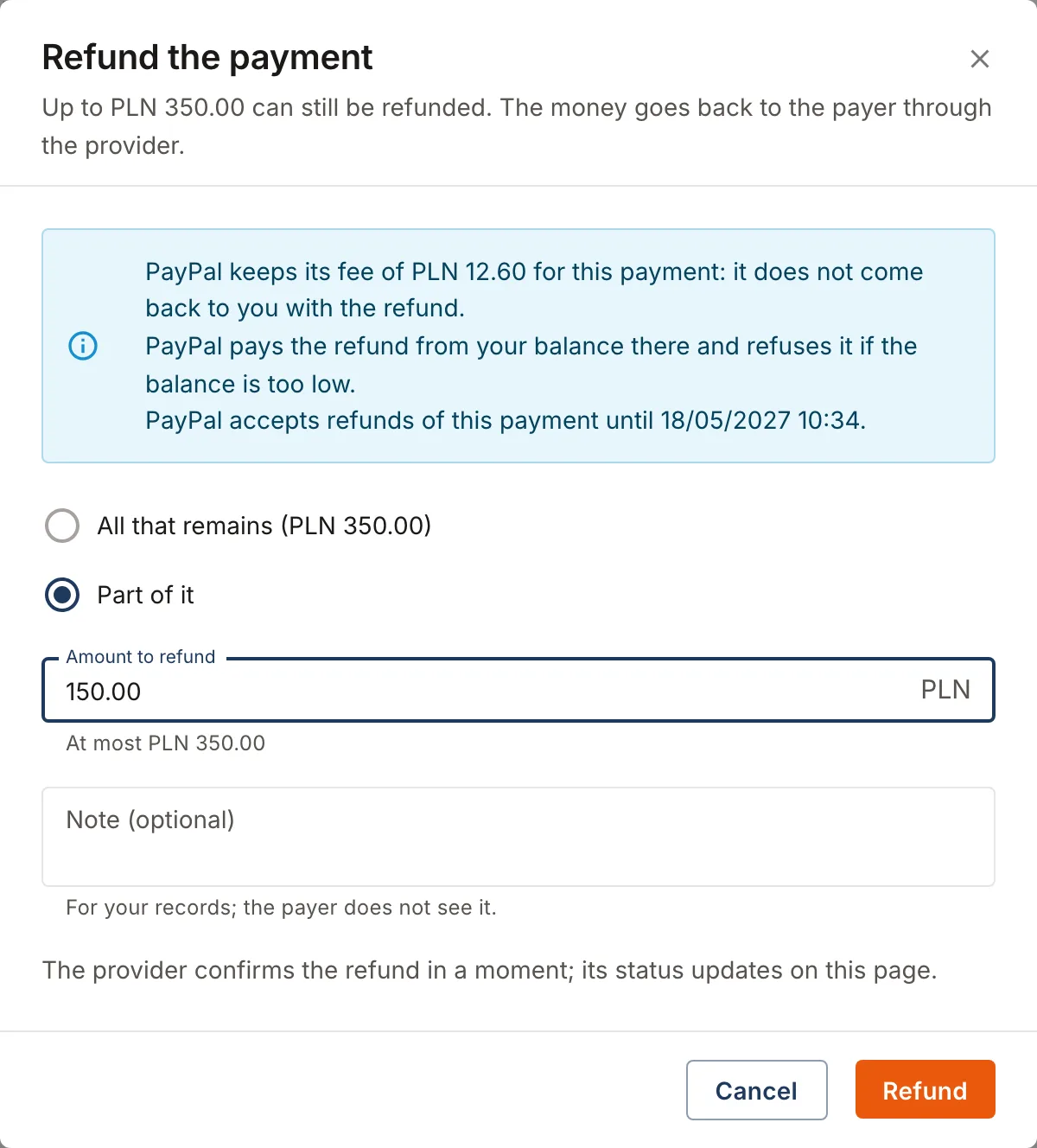
- Choose All that remains, or Part of it and type the Amount to refund, with a dot or a comma for decimals.
- Add a Note (optional) if you like, such as “Cancelled on 12 November, by phone”. It stays in Doxtly for your records; the payer doesn’t see it, and the provider isn’t sent it.
- Click Refund.
The window closes with “The refund was requested.”, and the refund appears in the Refunds table as In progress. Providers make refunds in their own time, often within seconds, sometimes later. The refund turns Refunded once the provider confirms it, and the payment becomes Partly refunded or Refunded. If the provider hasn’t reported back within an hour, Doxtly asks it.
You can refund several times, as long as the sum doesn’t exceed what was paid. A refund still in progress already holds its amount, so two people refunding the same payment at the same moment can’t give back more than was paid: the second one is told “The refund is larger than what remains of the payment.”
What the provider keeps, and when it says no
Section titled “What the provider keeps, and when it says no”Before you ask for anything, the window lists the rules of the payment’s provider, so a refund doesn’t surprise you later:
- “PayPal keeps its fee of PLN 12.60 for this payment: it does not come back to you with the refund.” All four providers keep the fee they charged for the original payment. The amount is named when the provider told Doxtly what it was; for Stripe it never is.
- “PayU pays the refund from your balance there and refuses it if the balance is too low.” This is said for Przelewy24, PayU and PayPal: the money comes out of what your account holds with them, so top it up first if payouts have emptied it.
- “PayPal accepts refunds of this payment until …” PayPal accepts refunds for 180 days after the payment. After that, Doxtly refuses the refund itself, without asking PayPal.
| Provider | Keeps its fee | Paid from your balance there | Time limit |
|---|---|---|---|
| Przelewy24 | Yes | Yes | None documented |
| Stripe | Yes | No | None for cards |
| PayU | Yes | Yes | Exists, length not published by PayU |
| PayPal | Yes | Yes | 180 days |
Each provider page says more: Przelewy24, Stripe, PayU, PayPal.
What can stop a refund
Section titled “What can stop a refund”| What you see | Why |
|---|---|
| No Refund button | The payment wasn’t paid, or you don’t hold Refund payments. |
| Refund greyed out: “Nothing is left to refund: everything was given back or is held by refunds still in progress.” | Everything was given back, or what remains is held by refunds still in progress. |
| Refund greyed out: “This payment can’t be refunded through Doxtly: its integration was deleted. Refund it in …’s own panel.” | The integration was deleted. Refund it in the provider’s panel. |
| Refund greyed out: “PayPal no longer accepts a refund of this payment: its time for refunds has passed.” | The 180 days PayPal allows are over. Give the money back another way. |
| “Your … balance can’t cover this refund. Top it up in … and try again.” | The provider found your balance with it too low. |
| “The time for refunds through … has passed for this payment.” | The provider refused it as too old. PayU has such a limit but doesn’t publish it. |
| “At most … can be refunded.” | The amount is more than what remains. |
| “Enter an amount greater than zero, with no more decimal places than the currency has.” | The amount can’t be read, or has more decimals than the currency: PLN has two, HUF none. |
| The refund turns Failed | The provider refused it, for example because the payment is disputed, or was already refunded in the provider’s own panel. The amount is released, so you can try again. |
A refund that fails at the provider after it was accepted sends the notification A refund failed to everyone who may refund payments: “A refund of … for “…” failed at …: the payer did not get the money back. Open the payment to try again or refund them another way.” Open the payment opens it.
A payment whose integration was deleted can no longer be refunded through Doxtly. Refund it in your provider’s own panel or account.
Late payments are refunded by themselves
Section titled “Late payments are refunded by themselves”A payment that arrives after the 24 hours to pay have run out is refunded in full straight away, without anyone asking. The refund shows Automatically (late payment) in the Requested by column, and the people who may refund payments get A late payment was refunded: “A payment of … for “…” arrived after the time to pay had run out, so its submission was not accepted. … is refunding the full amount automatically.”
Refunds and workflows
Section titled “Refunds and workflows”A refund that reaches the payer, yours or an automatic one, starts the workflows listening to A payment is refunded on the Payment trigger, and is sent to the outgoing webhooks that take it. Use it to let your accounting team know, or to cancel the participant’s place.
A program with an access key holding Refund a payment can do the same through the API.