

Linking to forms and interactive documents
Sometimes a link does the job better than an embedded form: an “Enrol now” line in a course description, a sentence in an article. Interactive documents can only be linked to, because they have no embed code. With the module, you click the Doxtly button, type the name, and the address of its public page goes in. Nobody opens Doxtly to copy anything.
Available when: an access key is saved in the module's settings, with List forms to find forms, List interactive documents to find interactive documents, and List quizzes and List surveys to find quizzes and surveys, and the user has Use Doxtly Forms
The button has to be on the format’s toolbar, next to Drupal’s own Link button: the format needs that one for links to exist at all. Without it, the Doxtly dialog has no Link tab. See The access key for the key’s permissions.
Where it works
Section titled “Where it works”| Place | Search by name | What to do otherwise |
|---|---|---|
| CKEditor, with the Doxtly button | Yes | |
| Drupal’s own Link button in CKEditor | No | Use the Doxtly button, or paste the address |
| Link fields and menu links | No | Paste the address |
Where the search doesn’t reach, a link still works: copy the Public link from the form’s or document’s Share dialog and paste it.
In the editor
Section titled “In the editor”-
Select some text. With nothing selected, the name of what you pick goes in as the link’s text.
-
Click the Doxtly button and open the Link tab.
-
Type at least two letters of the name.
-
Choose the result. A form says Doxtly form and an interactive document Interactive document.
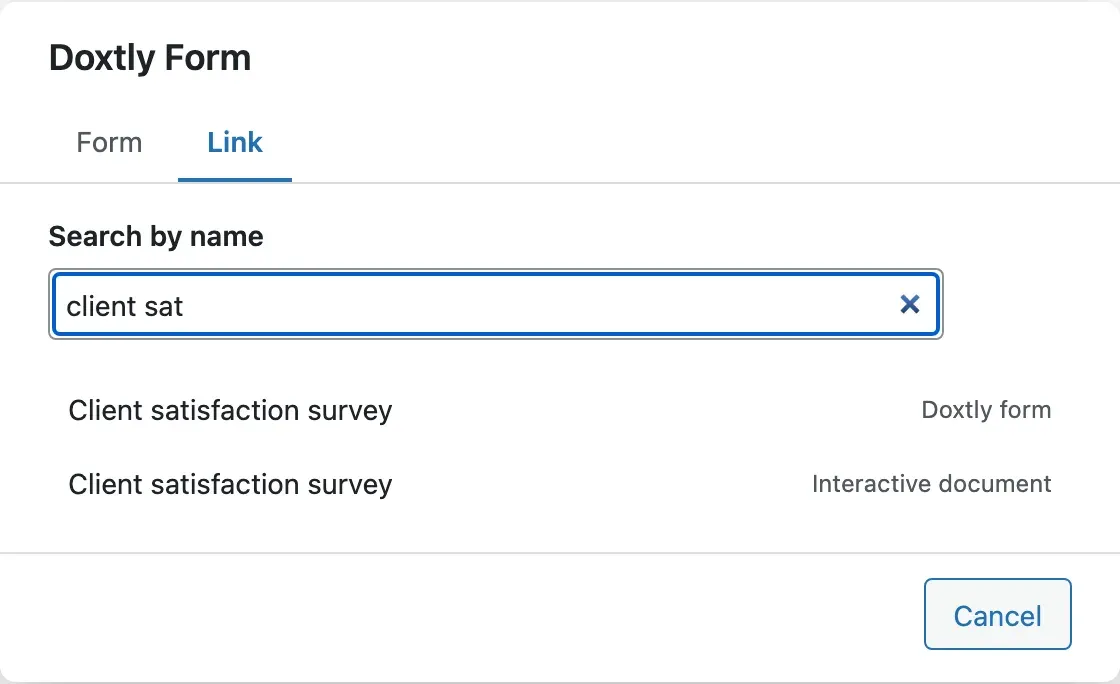
The link goes in, and you carry on typing.
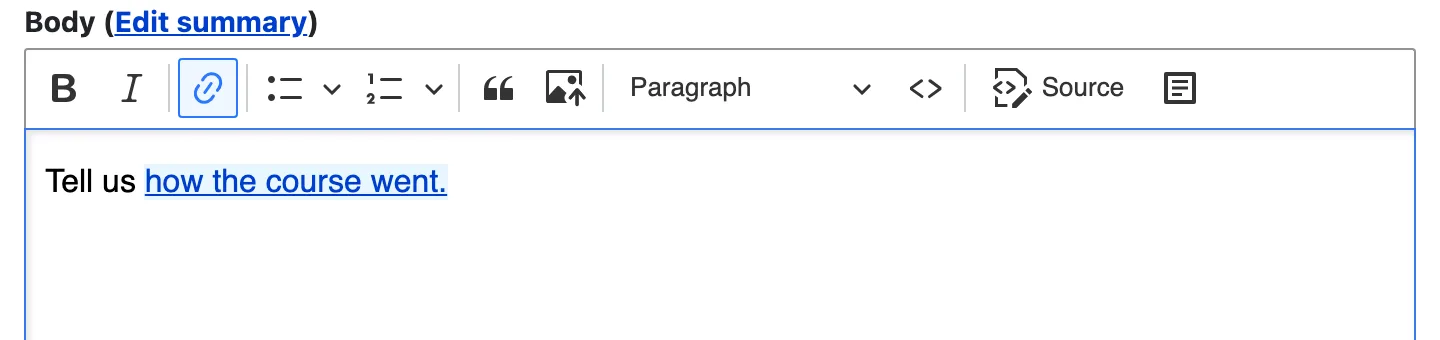
An address with /f/ in it is a form, and one with /i/ an interactive document. To check one, click the link in the editor: Drupal’s own link box shows the address.
What the search finds
Section titled “What the search finds”- Only what is Active in Doxtly. A form or a document that is switched off is not offered, because its page would show nothing.
- Forms, interactive documents, quizzes and surveys. A quiz is labelled Doxtly quiz and a survey Doxtly survey, and the link leads to its public page (
/q/). To show one on the page instead of linking to it, place it. - The name in any case, with or without accents:
lodzandŁÓDŹboth find “Łódź”. Every word you type has to be in the name, in any order. - At most ten results, those starting with what you typed first. If you don’t see yours, type more of the name.
- Changes within two minutes, or straight away if you save the settings: what you just activated turns up, and what you just switched off drops out.
Two forms can have the same name. The label then adds the last eight characters of the ID, such as Doxtly form · 1cb8ad39. Those are the last characters of the form’s address in Doxtly.
What goes on your page
Section titled “What goes on your page”An ordinary link to the public page: https://app.doxtly.com/f/… for a form, https://app.doxtly.com/i/… for an interactive document. The address starts with your Application URL, so an organization with a subdomain gets https://northbridge.app.doxtly.com/f/… once that’s saved in the settings.
Because it’s a plain link, it stays where you put it. It works without the module and without the access key, and it adds no script to your pages. A link you added before changing the Application URL keeps the old address.
To carry something along, add link parameters to the address by hand with Drupal’s Link button, for example ?language=pl.
What a link needs
Section titled “What a link needs”The link leads to the same page as the Public link in Doxtly, so the same rules apply.
| In Doxtly | What the visitor gets | What to do |
|---|---|---|
| The form or document is Active | The page | Nothing |
| It was deactivated or deleted after you linked to it | A message that it can’t be found. Drupal doesn’t warn you about it, as the block does for an embedded form. | Activate it, or change the link. |
| It has a password | A password prompt | Tell people the password. It doesn’t travel with the link. |
| It uses Validate request origin | The page only if your Doxtly address is among the allowed origins | Add that address, or use the block or field for a form. For a document, see its security settings. |
| It has a required parameter | Missing required parameters | Add the parameter to the link’s address. |
When Doxtly can’t be reached
Section titled “When Doxtly can’t be reached”Without a key, with a key that lacks a permission, or while Drupal can’t reach Doxtly, the search says “Nothing found in Doxtly.”, with no error. A key with only List forms finds forms, and one with only List interactive documents finds documents. If Doxtly doesn’t answer, the search waits three seconds at most and then leaves it alone for a minute, so typing stays quick. Troubleshooting lists what to check.