

What Doxie remembers
In the app, Doxie remembers a few things that help her help you: your role, what your business does, what you are working on, how you like your answers. Tell her once that you run onboarding for a consulting firm and prefer short answers with steps, and the next conversation starts from there. You see every note she keeps, and you can change it, delete it, or switch her memory off. On the website she remembers nothing between conversations.
What she notes
Section titled “What she notes”Only what matters for your work with Doxtly, in short notes of one kind each:
| Kind | For example |
|---|---|
| Role | Runs client onboarding at a consulting firm |
| Business | Northbridge Advisory sends service agreements and NDAs to new clients |
| Goal | Wants every signed contract saved to the shared drive |
| Setup | Has a Client onboarding form that starts the Onboarding workflow |
| Preference | Prefers short answers with numbered steps |
She never keeps anything sensitive: health, beliefs, political views, sex life, ethnic origin, trade union membership, criminal matters, anyone’s finances, passwords or other secrets, identity or card numbers, contact details. Nor trivia that doesn’t help with the work.
She notes things after a conversation ends, or once nobody has written in it for half an hour, and she doesn’t announce it in the chat. She keeps up to 40 notes, each up to 200 characters, and when there are more, the oldest go first. A note that is no longer true is rewritten or removed as she learns more.
Each organization has its own
Section titled “Each organization has its own”What Doxie learns in one organization stays there, your preferences included. If you belong to several, she never takes anything she learned in one to another: in each she gets to know you on her own, and your colleagues never see your notes.
See and change the notes
Section titled “See and change the notes”-
Open your profile and its Doxie tab.
-
Under What Doxie remembers, read the notes, each with its kind.
-
To correct one, press the pencil (Edit), change the text and press Save. To forget it, press the bin (Delete).
-
To forget everything listed, press Delete all and confirm.
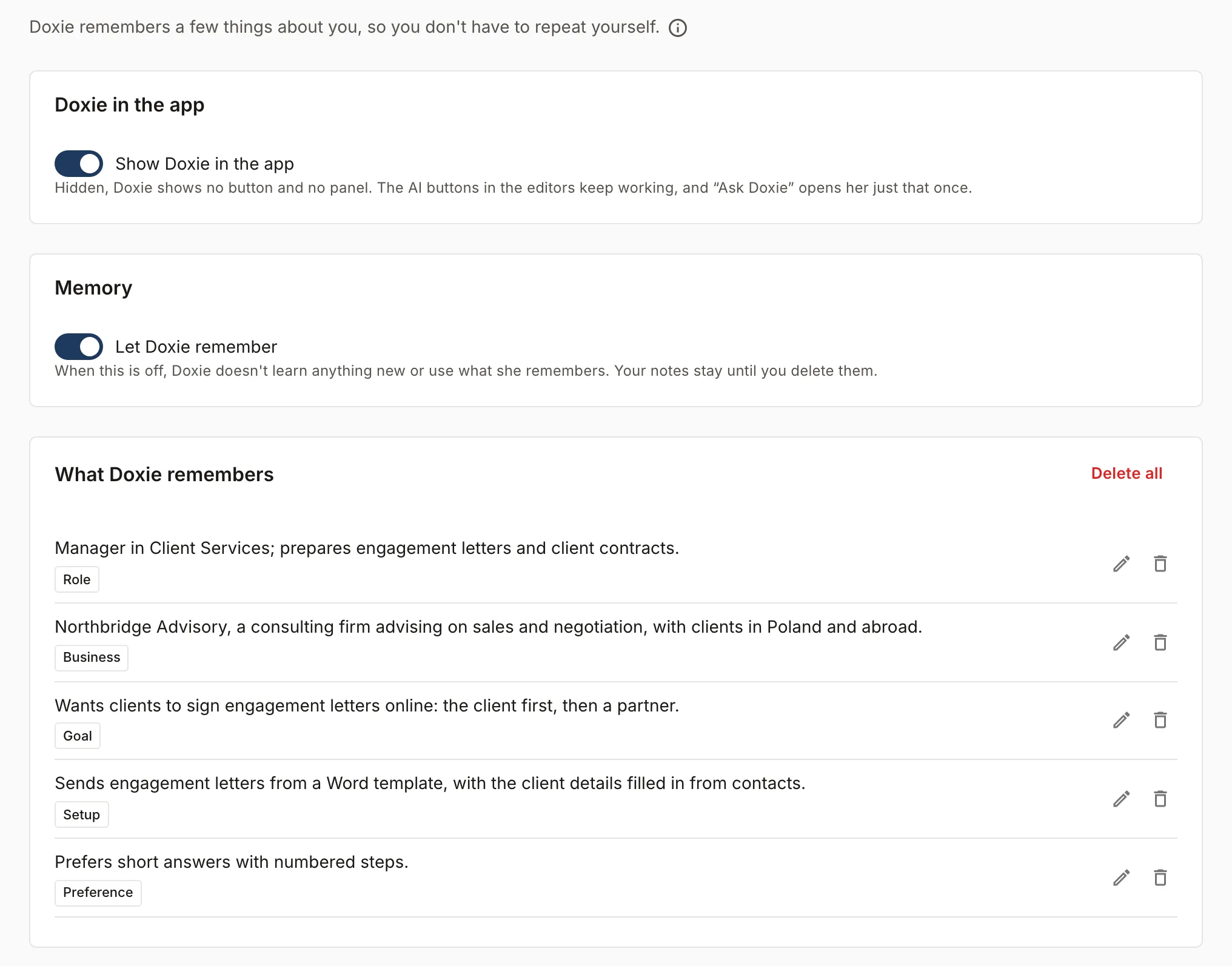
An edited note follows the same rules as hers: up to 200 characters, and nothing sensitive. The tab is yours alone: nobody else, an administrator included, can see or change it.
Switch her memory off
Section titled “Switch her memory off”Turn off Let Doxie remember on the same tab. From then on Doxie neither learns anything new nor uses what she remembers. The notes stay until you delete them, so switching the memory back on picks up where it was.
How she addresses you
Section titled “How she addresses you”In languages that mark a person’s gender in the way they are addressed, such as Polish, Doxie uses neutral forms until she knows which to use. She never guesses it from a name that could belong to anyone. She switches when your own words show it, such as the Polish zrobiłam or zrobiłem, “I did it” in the feminine or the masculine, or when your first name leaves no doubt, and remembers it as a preference of that organization, which you can see, change or delete like any other note. On the website, only what you write in that conversation counts.
How long notes are kept
Section titled “How long notes are kept”Notes aren’t deleted with your conversations. They stay until you delete them, or until your membership of the organization ends.