

Save contact
The Save contact node puts a person into your contacts, or updates the one already there, by their email address. A form’s sender becomes a contact the moment they send, and the contact’s history names the workflow and the run that did it. A training company can add each person who books a course, so the next invitation only needs their address.
Available when: the View contacts and Manage contacts permissions to set up
You find it in the Contacts group of the palette. On the canvas it shows the address it saves.
Settings
Section titled “Settings”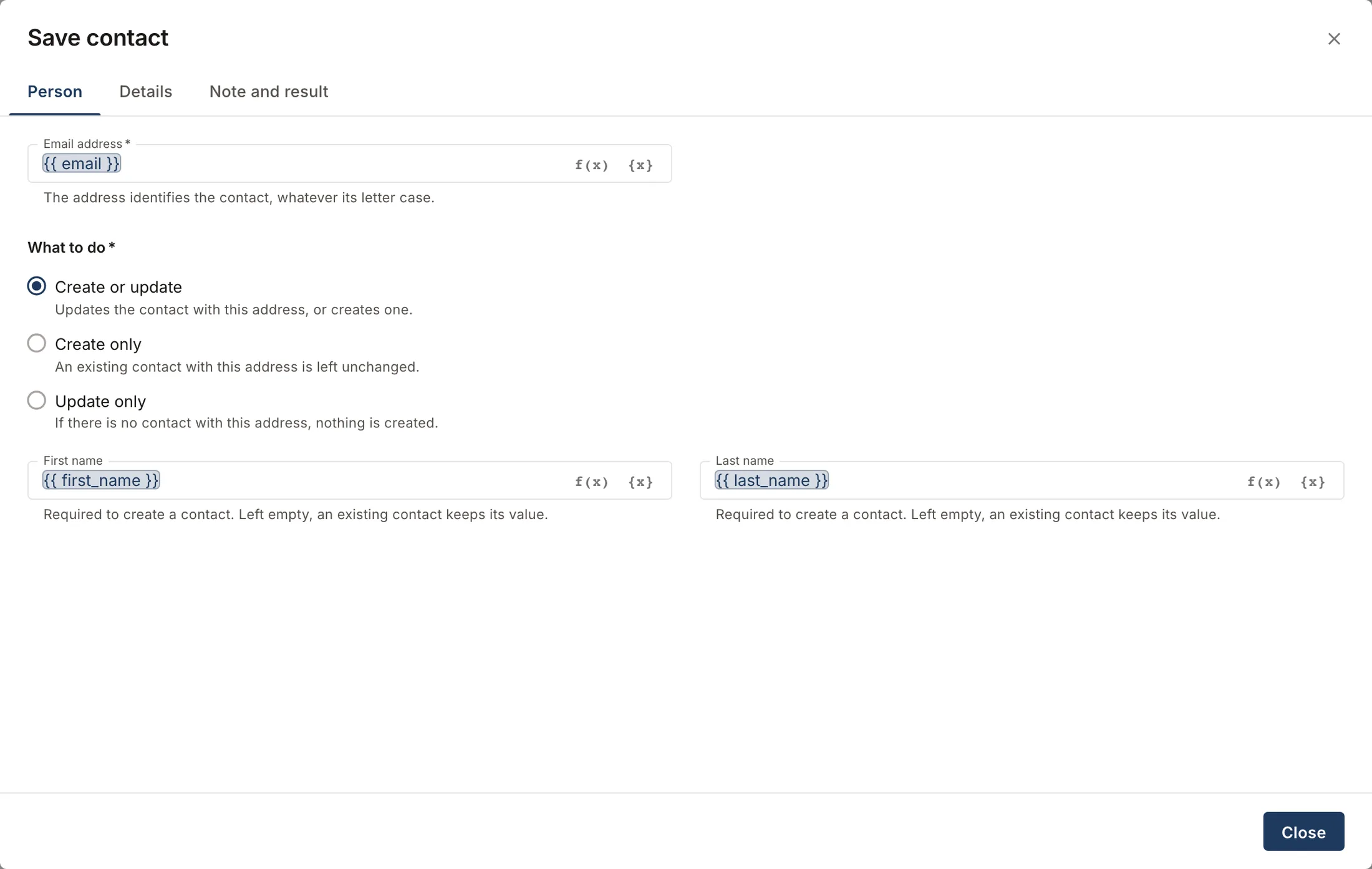
The step has three tabs. Every text field takes variables.
Person
Section titled “Person”| Setting | What it does |
|---|---|
| Email address | The address that identifies the contact, whatever its letter case. Required. |
| What to do | Create or update (the default), Create only or Update only. |
| First name, Last name | Required to create a contact. Left empty, an existing contact keeps its value. |
Create only leaves an existing contact as it is. Update only makes nothing when no contact has the address.
Details
Section titled “Details”| Setting | What it does |
|---|---|
| Phone, Job title, Company | Written when they come out non-empty. Left empty, a form without a phone doesn’t wipe a phone someone typed in by hand. Company names the company: the one of that name, whatever its letter case, or a new one with just that name. |
| Language | A language code the contact writes in: ar, de, en, es, fr, hi, it, ja, pl, pt, th, tr, uk or zh, or a variable that gives one. |
| Contact type | No change (the default), No type, or one of your types. It is chosen from a list and can’t come from a variable. |
| Photo | A picture from an earlier step: PNG, JPEG or WebP of up to 2 MB. |
Note and result
Section titled “Note and result”| Setting | What it does |
|---|---|
| Note | Added to the contact’s notes, signed by the workflow, every time the step saves the contact and the note comes out non-empty. A contact the step leaves as it is (Create only, when the address already has one) gets no note. |
| Output key | What later steps call the result. contact by default. |
What it leaves for later steps
Section titled “What it leaves for later steps”| Variable | Meaning |
|---|---|
{{ contact.id }} |
The contact’s identifier. |
{{ contact.created }}, {{ contact.updated }} |
Whether the step created it, or changed it. |
{{ contact.email }}, {{ contact.fullName }} |
The address and the name. |
{{ contact.type.name }} |
The type, empty without one. |
On the run’s page
Section titled “On the run’s page”
The step’s card says Created, Updated, No change or Not found (only with Update only), lists the fields it changed, says Note added when it added a note, and links to the contact.
When it fails
Section titled “When it fails”The step stops the run when the address comes out empty, when a new contact has no first or last name, when the address is invalid, when the photo isn’t a picture of an accepted kind, when the named type no longer exists, or when your plan’s contact limit is reached. Updating an existing contact isn’t affected by the limit. A photo counts towards your plan’s disk space, and a photo that doesn’t fit is refused like any other save.