

Przelewy24 integration
A Przelewy24 integration connects your organization’s merchant account at Przelewy24, the Polish payment provider, to Doxtly. Your forms can then take payments: the visitor pays with BLIK, a fast bank transfer, a card or a wallet on Przelewy24’s page, and the money goes to your account, under your agreement with Przelewy24. Doxtly takes no fee and never sees the payer’s card or bank details.
Available when: your plan includes payments (Starter, Pro and Business), and you hold Manage integrations
On a plan without payments, Przelewy24 isn’t offered among the types, and opening an integration made earlier shows “Payments are not in your plan” with See the plans.
What needs it
Section titled “What needs it”- the Payment element of a form, which names the integration the money goes through
- refunds of the payments made through it
You can connect several Przelewy24 accounts, each as its own integration, and choose one per form.
Before you start
Section titled “Before you start”You need a Przelewy24 merchant account that has been verified and can take payments. You’ll copy four values from its panel: in Przelewy24’s panel they are under My data → API data and configuration (in Polish, Moje dane → Dane API i konfiguracja).
To try things out first, sign up for Przelewy24’s sandbox too. It has its own panel and its own keys, and takes test payments only.
Connect Przelewy24
Section titled “Connect Przelewy24”- Go to Organization, Integrations, click New integration and pick Przelewy24 in the Payments group.
- Fill in Integration name, such as “Northbridge Przelewy24”.
- Leave Test mode (sandbox) off for real payments, or switch it on for your sandbox account. You can’t change it later.
- Type the Merchant ID, and the POS ID if your account has one different from it.
- Paste the CRC key and the API key.
- Tick the other Currencies your account takes, if any.
- Click Save. The integration is a Draft.
- Click Test connection. Once Przelewy24 accepts the keys, the integration turns Active and forms can use it.
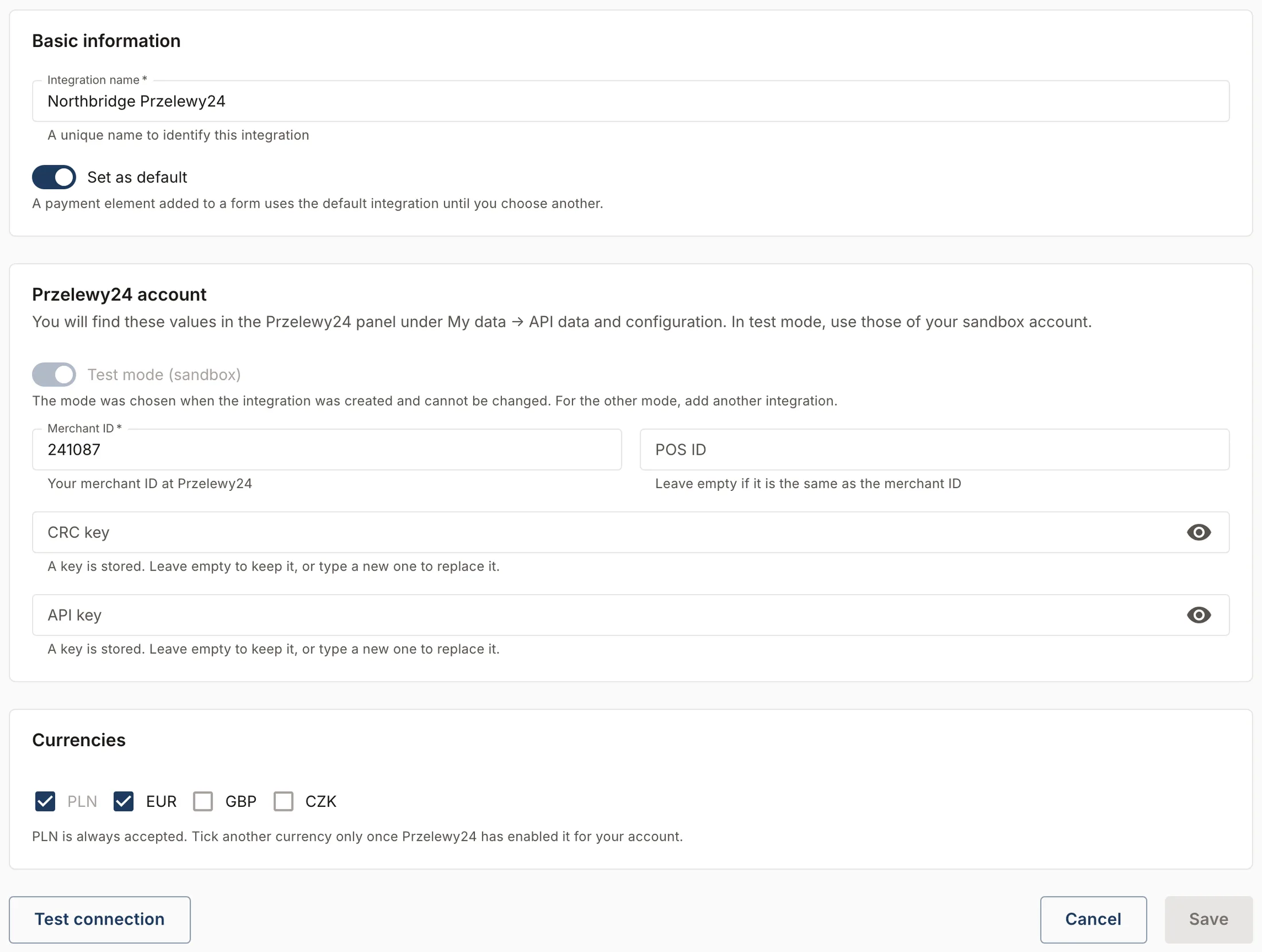
Until it passes its test, the page says “Test the connection to start taking payments: forms can use this integration only after a successful test.” Saving new keys makes it a Draft again, so test once more after you change them.
Every field
Section titled “Every field”| Field | What it does |
|---|---|
| Integration name | Your label, shown wherever a payment integration is chosen, such as the form’s payment element. Up to 255 characters, unique among your Przelewy24 integrations. |
| Set as default | Makes this the integration a new payment element takes. “A payment element added to a form uses the default integration until you choose another.” |
| Test mode (sandbox) | Payments go through Przelewy24’s sandbox, and no real money changes hands. Chosen when you create the integration, and fixed from then on: “The mode was chosen when the integration was created and cannot be changed. For the other mode, add another integration.” |
| Merchant ID | Your merchant ID at Przelewy24, the number only. Required. |
| POS ID | The ID of the shop (point of sale) payments go to. Leave it empty if it is the same as the merchant ID, which it is for most accounts. |
| CRC key | The key that signs the payments and Przelewy24’s notifications. Required. |
| API key | The key Doxtly uses when it asks Przelewy24 about payments and refunds. In Przelewy24’s panel it is called the key for reports (Klucz do raportów). Required. |
| Currencies | PLN is always taken. Tick EUR, GBP or CZK only once Przelewy24 has enabled that currency for your account. |
| Test connection | Asks Przelewy24 whether it accepts the saved keys. Nothing is paid. It works once your changes are saved. |
Both keys are stored encrypted and never shown again. Once saved, their fields say “A key is stored. Leave empty to keep it, or type a new one to replace it.”
Payments through Przelewy24
Section titled “Payments through Przelewy24”- The minimum payment is 1.00 in each currency. Doxtly sets no upper limit; your Przelewy24 agreement may have one.
- The payer chooses among BLIK, fast bank transfers, cards with Apple Pay and Google Pay, and wallets, as far as your account offers them. Traditional bank transfers and deferred payments, which take days to arrive, are never offered.
- Przelewy24 needs the payer’s email address to send its receipt, so a form paying through it must name its Payer’s email field. The address can be at most 50 characters.
- Each attempt at Przelewy24’s page lasts until the 24 hours to pay run out, but no longer than 99 minutes. After that the payer starts a new attempt from Doxtly’s payment page.
- You don’t set a notification address in Przelewy24’s panel: Doxtly gives Przelewy24 its address with each payment.
Every payment made through Doxtly is confirmed with Przelewy24 (its “verify” step) before it counts. Without that, Przelewy24 doesn’t pay the money out.
When it stops working
Section titled “When it stops working”| What you see | What to do |
|---|---|
| The integration turns Invalid: “The last connection test with Przelewy24 failed: the keys were not accepted. Check them, save and test the connection again.” | Copy the keys from the panel again, save and test. |
| “Przelewy24 does not accept calls from Doxtly’s address. Add Doxtly’s addresses to the list of allowed addresses in your Przelewy24 account.” | Your account allows its API only from listed addresses. Add Doxtly’s in Przelewy24’s panel. |
| “Przelewy24 does not accept payments in this currency for this integration.” | The currency isn’t enabled for your account. Untick it here, or ask Przelewy24 to enable it. |
While Przelewy24 can’t be reached, payments waiting for confirmation stay Pending, past their 24 hours if need be, and Doxtly keeps asking until Przelewy24 answers. If Przelewy24 still can’t be asked by then, because the keys have stopped working, the payment ends unpaid, and the people who manage integrations get the notification A payment provider could not be reached. Its Open the integration opens this page.
What you see once it’s set up
Section titled “What you see once it’s set up”Click the row in the list for the summary: Merchant ID, the POS ID when it differs, Currencies, and Test mode or Live mode.

What Doxtly reads and writes in Przelewy24
Section titled “What Doxtly reads and writes in Przelewy24”| Reads | Writes | |
|---|---|---|
| Transactions | The status of the transactions it registered | A transaction for each attempt to pay: the amount, currency, the payment’s description, the payer’s email address and language, and the addresses Przelewy24 returns the payer to and sends its notifications to |
| Confirmation | Przelewy24’s notification that a payment was made | Its confirmation (“verify”) of each payment made in time |
| Refunds | Their status | The refunds you ask for, and the automatic ones for late payments |
Doxtly doesn’t read your account’s other transactions, its balance or payouts.
Delete a Przelewy24 integration
Section titled “Delete a Przelewy24 integration”An integration with a payment still waiting for the payer can’t be deleted: “This integration has payments waiting for the payer. It can be deleted once they have ended.” Make the forms that pay through it inactive, then wait until the last payment has ended, at most 24 hours.
Once deleted, its payments stay on the Payments page, marked Integration deleted, and can only be refunded in Przelewy24’s panel. A form whose payment element named it can’t be sent, and its visitors read “This form cannot take payments at the moment. Try again later or contact the organization.” until you choose another integration in the element. See Delete an integration.