

Switch node
A Switch reads one value and sends the run down the path that matches it. Use it when a single answer picks among several routes: the client’s country decides which contract to send, the chosen service decides who gets the email.
Always available
Add a switch
Section titled “Add a switch”- Add Switch from the Conditions group of the palette. It starts with two empty cases.
- Connect the step before it to the node.
- In Properties, write the Expression, such as
company.country. - Fill in each case’s value, and add a Path name (optional) if the value alone says little.
- Use Add case for more.
- Connect each case’s output to its next step. Connect Default if unexpected values should go somewhere.
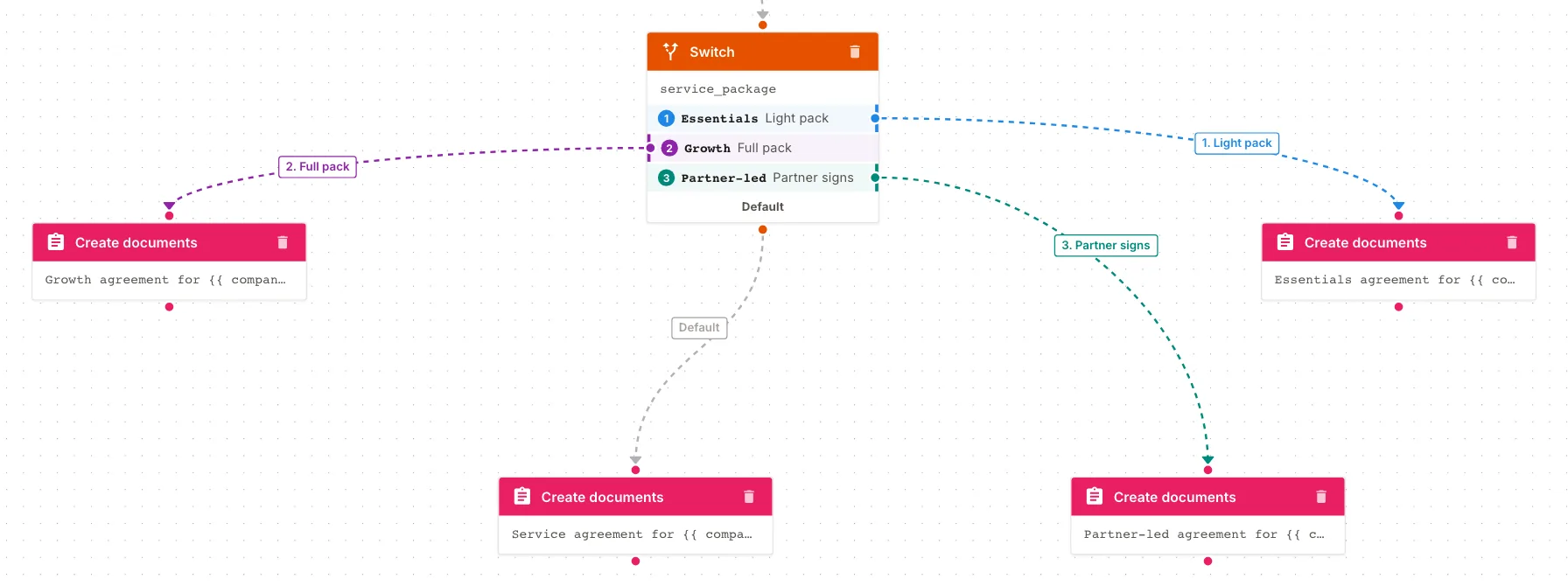
On the canvas, the node shows its expression, each case with its number, value and path name, and Default at the bottom. Until you fill them in it says Set an expression, and no value on an empty case. Outputs spread out to both sides: the first to the right, the second to the left, and so on. Once a case is connected, it leaves from the side its next step is on. A hollow handle means nothing is connected to it yet.
Several cases may lead to the same step. If Sweden and Norway share a contract, connect both cases to one Generate document.
Settings
Section titled “Settings”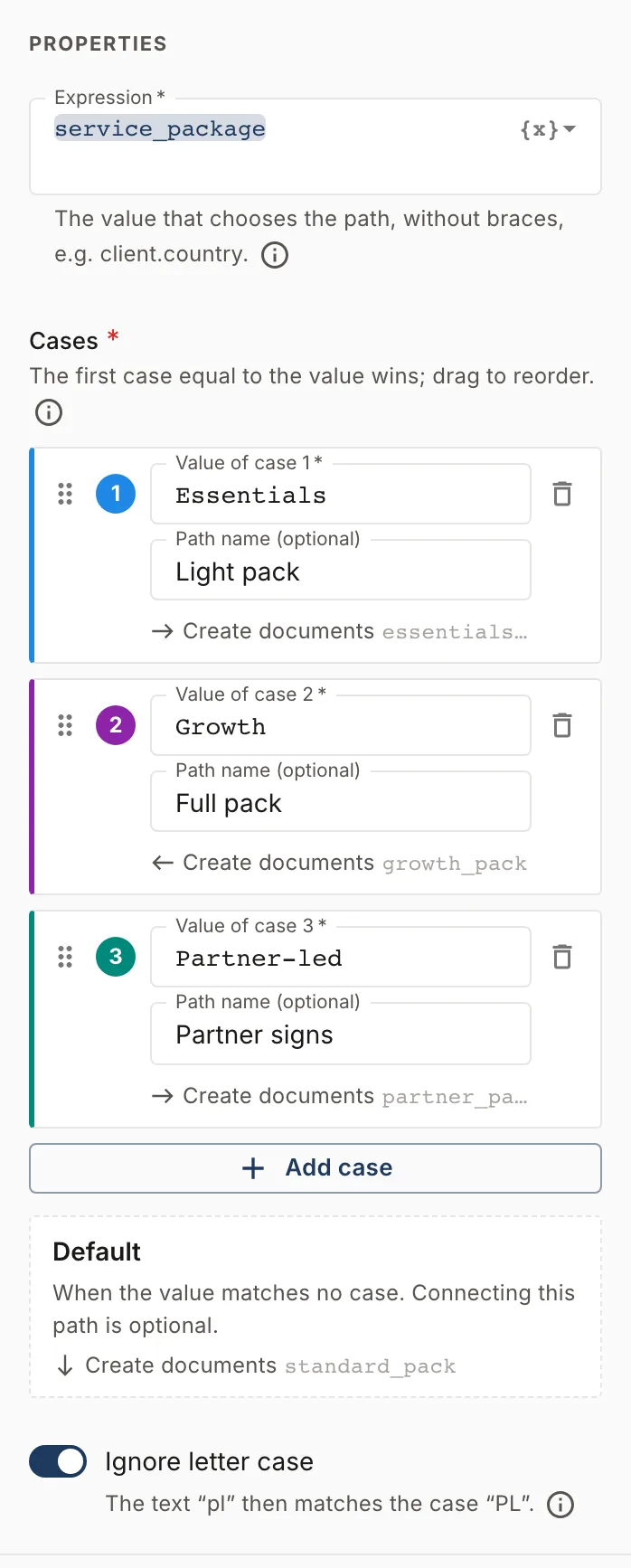
| Setting | What it does |
|---|---|
| Expression | What gives the value to compare. Required. It’s written as in a Condition, without braces, and is usually a bare path, but it can compute: client.country | upper, client.country ?? "PL" or fee >= 10000 ? "large" : "small". The field has the editor’s buttons and checks. |
| Cases | The list to compare with. At least one. |
| Ignore letter case | Off by default. On, the text pl matches the case PL. |
| Node ID | The node’s identifier, under Node information. |
Each case
Section titled “Each case”| Part | What it does |
|---|---|
| Value of case 1 | What the expression’s value is compared with. Required. It’s plain text: variables can’t be used here. |
| Path name (optional) | A readable name for the path, such as Sweden for SE. Shown on the canvas and in the run. |
| The line under them | Where the path leads, or Not connected — connect the node’s output on the right to the next step (or on the left, whichever side that case leaves from). |
| The handle at the left | Drag to reorder. |
| The bin | Remove the case and its connection. The last case can’t be removed: A switch needs at least one case. |
Cases are tried in order from the top, and the first match wins. A case keeps its connection when you move it or change its value. Removing a case removes its connection too.
The Default path
Section titled “The Default path”Default is taken when no case matches, and also when the value is empty or missing. Connecting it is optional.
| Default is | When no case matches |
|---|---|
| Connected | The run goes on along it. |
| Not connected | The run ends here with the outcome No matching case. This isn’t an error, and you can filter the run list by it. |
How values are compared
Section titled “How values are compared”A case’s value is text you typed, so it’s compared the way you’d read it:
| The expression gives | Matches a case when | Example |
|---|---|---|
| Text | Both are the same once spaces at either end are dropped. Letter case counts unless Ignore letter case is on. | SE matches SE, and SE |
| A number | The case is the same number. A decimal comma works too. | 5 matches 5, 5.0 and 5,0 |
true or false |
The case is true or false, in any letter case |
true matches TRUE |
| Nothing, only spaces, or a value the run doesn’t have | Never. The run takes Default. | |
| A list or an object | Never: the step fails | company rather than company.country |
That last one fails on purpose, because taking Default would hide a mistake. The message is The switch expression gave a list or an object, but cases can only be compared with text, a number or true/false. Point it at a single field, such as client.country rather than client.
The number rule applies only when the value really is a number. If it arrives as text, it’s compared as text, and 5 doesn’t match the case 5.0. The run card’s Value type tells you which one you got.
When the value is missing
Section titled “When the value is missing”If the run doesn’t hold the variable at all, or holds nothing above it (address.city on a run with no address), the value is null and the run takes Default. You don’t need ?? here, unless a missing value should count as one of the cases: client.country ?? "PL".
An expression that computes something works the same way: the missing variable is null and the calculation goes on, so fee >= 10000 ? "large" : "small" gives small on a run with no fee. A function that can’t use what it’s given gives null too, and dividing by zero gives 0, so a switch fails only on a list or an object, above.
What stops the workflow from saving
Section titled “What stops the workflow from saving”| Message | What to do |
|---|---|
| Add at least one case | The list is empty. |
| Case 2 has no value | Fill it in. A blank case could never match. |
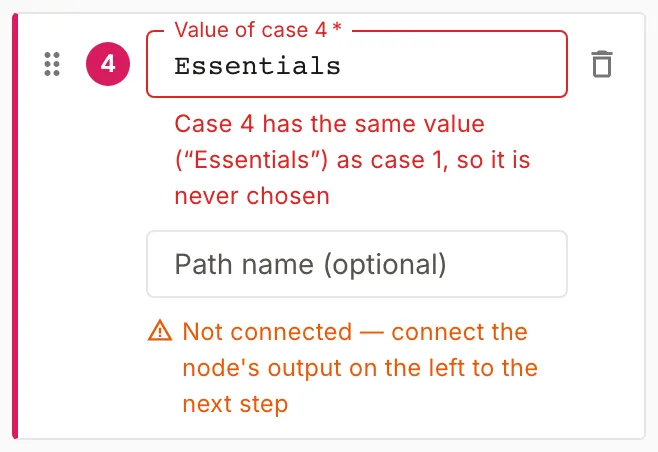
| Case 3 has the same value (“SE”) as case 1, so it is never chosen | Change or remove it. With Ignore letter case on, se and SE count as the same. |
| Case 2 (“NO”) leads nowhere. Connect its output or remove the case | Every case must lead somewhere. Only Default may stay open. |
In a run
Section titled “In a run”The run’s card says which way it went, and it shows the case as you named it, or its value if you gave it no path name. It doesn’t show what the run actually held, because that’s your client’s data. What it records is the kind of value, which usually explains a surprise.
| Card says | Meaning |
|---|---|
| Took case 2: Norway | That case matched. |
| No case matched — default path | The run took Default. |
| No case matched — the run ended here | Default wasn’t connected. |
| The expression gave no value | The value was empty or missing. This is the usual reason for the two lines above. |
| Value type: text | When no case matched, the kind of value it had: text, number or true/false. |
| Cases: 3 | How many cases the node had. |

When no case matched and Default wasn’t connected, the run’s row in the list of runs carries No matching case:

Example: a contract per country
Section titled “Example: a contract per country”Northbridge sends a different service agreement to each Nordic market. The form’s company.country field feeds a switch with Ignore letter case on and three cases: SE Sweden, NO Norway, DK Denmark. Each leads to a Generate document step with that country’s template. Default leads to an email asking a consultant to prepare the agreement by hand.