

CRM trigger
This trigger starts a run when something changes in your Pipedrive company. Use it to let your sales pipeline drive the paperwork: a deal moved to Contract sent writes and sends the agreement, a deal marked lost voids what was waiting for a signature, a new person in Pipedrive becomes a contact.
Available when: your plan includes CRM integrations and the organization has a CRM integration; setting it up takes View contacts
Settings
Section titled “Settings”Under Starts on choose CRM, then under When one of its two events, and the CRM integration to listen to.
| Setting | What it does |
|---|---|
| When | A CRM deal changes stage or status or A CRM person is saved. |
| CRM integration | Required. The Pipedrive integration whose changes start the workflow. |
On a plan without CRM integrations, CRM under Starts on is greyed out with “CRM integrations are not in your plan”. Without View contacts it is greyed out with “Needs the View contacts permission”.
A CRM deal changes stage or status
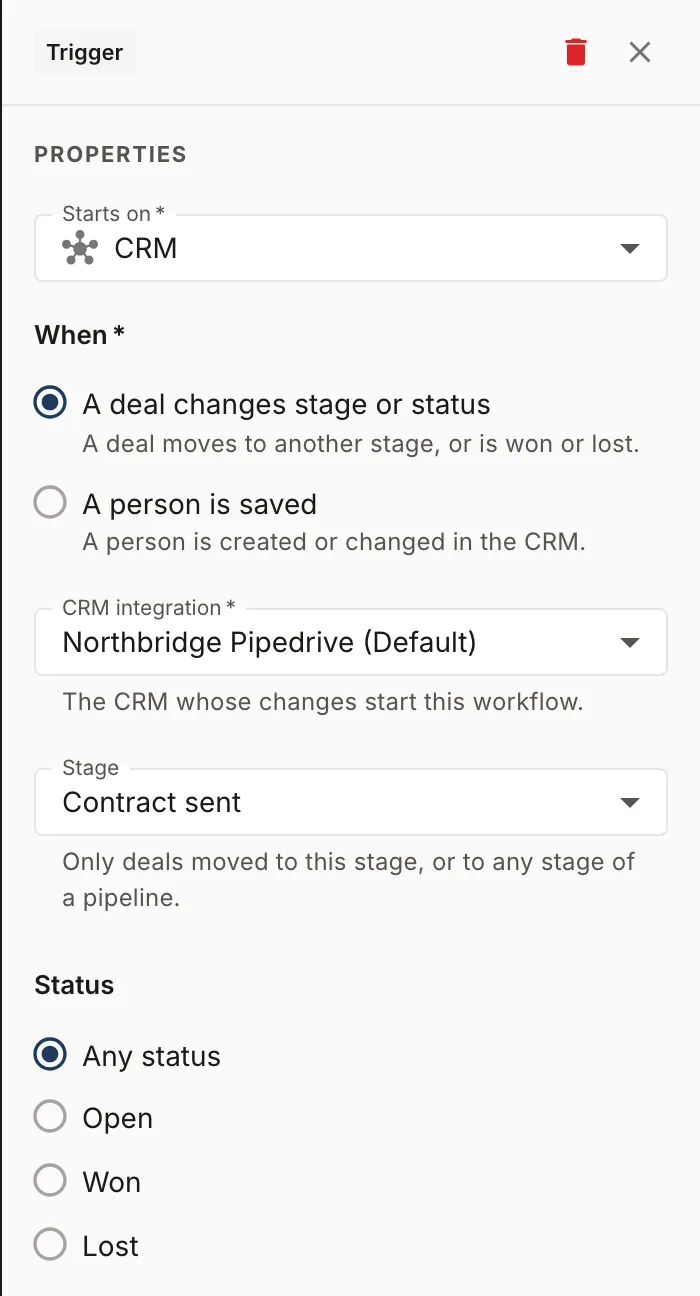
Section titled “A CRM deal changes stage or status”Starts a run when a deal moves to another stage, or is won, lost or reopened. A change of any other part of the deal, such as its value or owner, starts nothing.
| Setting | What it does |
|---|---|
| Stage | Any pipeline and stage (the default), Any stage of a pipeline, or one stage. Only deals that stand there after the change start the workflow: moved into it, or won or lost while in it. The stages are listed under their pipelines, as in Pipedrive. |
| Status | Any status (the default), Open, Won or Lost. Only deals that have this status after the change start it. |
Both together narrow further: Stage Contract sent with Status Open starts on deals moved into Contract sent and on one reopened there, but not on one marked lost while it stood there. To tell a move from a change of status, compare _opportunity.stageId with _opportunity.previousStageId in a Condition. To act when a deal is won, whatever its stage, set Status to Won and leave Stage at Any pipeline and stage.
If a stage is deleted in Pipedrive, the trigger says “The CRM no longer has this stage. Choose another one.”
A CRM person is saved
Section titled “A CRM person is saved”Starts a run when a person is created or changed in Pipedrive. Deleting a person starts nothing.
| Setting | What it does |
|---|---|
| When | A person is created, A person is changed, or Either (the default). |
What starts it, and what doesn’t
Section titled “What starts it, and what doesn’t”- Pipedrive tells Doxtly only about deals and people the connected user can see. That’s why an admin account is the one to connect.
- A change Doxtly made itself, through a CRM step of any workflow, starts nothing: “Changes made by this organization’s workflows do not start it again.” Someone changing the same deal in Pipedrive a moment later is heard as usual.
- A change Pipedrive tells of twice starts one run.
- Nothing starts while the integration is Invalid or deleted, or when your plan no longer includes CRM integrations. Changes made meanwhile aren’t replayed later.
- If Pipedrive can’t be read when the change comes in, because it is busy or down, Doxtly tries again a little later. A deal or person deleted in the meantime starts nothing.
- A change that comes in after Pipedrive stopped accepting the connection, or after your Pipedrive company used up its requests for the day, can’t be read and starts nothing, then or later.
With HubSpot and Copper
Section titled “With HubSpot and Copper”The trigger works the same way on a HubSpot or Copper integration, with these differences:
- HubSpot’s won and lost are stages, so Status matches the deal’s stage, and HubSpot doesn’t say which stage a deal left:
_opportunity.previousStageIdis empty. - Copper’s opportunities are the deals here, and an abandoned one counts as lost.
- Copper calls once and never again, so Doxtly also looks every hour at the opportunities changed since it last looked: a deal moved while Doxtly couldn’t be reached still starts the workflow, once, up to an hour late. A person changed in that time starts nothing. See Changes in Copper reach Doxtly. Copper doesn’t say who made a change, so a change to a record a workflow wrote in the five minutes before is taken for the workflow’s own.
What it hands to your steps
Section titled “What it hands to your steps”The run reads the deal or the person from Pipedrive as the change comes in, so it gets its values as they are then, not only what changed.
| Variable | Meaning |
|---|---|
_crm.integrationId, .integrationName |
The integration the change came through. |
_crm.provider |
pipedrive, hubspot or copper. |
For A CRM deal changes stage or status:
| Variable | Meaning |
|---|---|
_opportunity.id, .title |
The deal’s ID in Pipedrive and its title. |
_opportunity.pipelineId, .pipelineName, .stageId, .stageName |
Where it is now. |
_opportunity.previousStageId, .previousStageName |
Where it was before; the same as now when only its status changed. |
_opportunity.status, .previousStatus |
open, won or lost, now and before. |
_opportunity.value, .currency |
Its value, such as 1500.5, and currency, such as EUR. |
_opportunity.personId, .organizationId |
The IDs of its person and organization in Pipedrive. |
_opportunity.customFields |
The deal’s other fields, by Pipedrive’s code for each, such as _opportunity.customFields.c3d4e5f6…. |
_opportunity.packageId |
The package whose Deal ID field holds this deal’s ID, if one does. |
_opportunity.contactId, .companyId |
The contact and company linked to the deal’s person and organization through the integration’s Pipedrive IDs; empty when none is. |
For A CRM person is saved:
| Variable | Meaning |
|---|---|
_person.id, .name, .firstName, .lastName |
The person’s ID in Pipedrive and their name. |
_person.email, .phone |
The main address and number. |
_person.emails, .phones |
All of them, as lists. |
_person.jobTitle, .organizationId |
Job title and the organization’s ID. |
_person.customFields |
The person’s other fields, by Pipedrive’s code. |
_person.contactId, .companyId |
The contact keeping this person’s ID, and the company keeping its organization’s; empty when none does. |
_personChange.event |
created or updated. |
_personChange.changedFields |
The codes of the fields that changed, for a change. |
Use contactId to tell a known client from a new one: a Condition on _opportunity.contactId sends a deal without a contact to a Sync a contact with the CRM step first. The same values come to an outgoing webhook that takes the CRM’s events.
On the run’s page, the trigger links to the integration. See runs.
Example: the contract follows the deal
Section titled “Example: the contract follows the deal”Northbridge Advisory’s salespeople move a deal to Contract sent in the Sales pipeline once the client agrees. A workflow listens for exactly that:
| Setting | Value |
|---|---|
| Starts on | CRM |
| When | A CRM deal changes stage or status |
| CRM integration | Northbridge Pipedrive |
| Stage | Contract sent, in Sales |
| Status | Open, so that a deal won or lost while it stands there doesn’t get a second contract |
Its steps generate the service agreement from {{ _opportunity.title }} and {{ _opportunity.value }}, and Create documents sends it, keeping {{ _opportunity.id }} in the package’s Pipedrive deal ID. When everyone has signed, a second workflow marks the deal won.