

Webhook request trigger
This trigger starts a run when another system sends a request to one of your webhooks. A webhook is an address of yours that a shop, CRM or payment provider calls when something happens there. Use it to bring events from outside Doxtly into a workflow.
Available when: your organization has a webhook that is switched on
What starts it
Section titled “What starts it”A request that your webhook accepts. A request refused for any reason, such as a bad token or data that doesn’t match the schema, starts nothing. The request’s page lists the runs it started, or says why there are none.
A request sent again with the same idempotency key starts nothing new. If a first attempt failed halfway, the repeat starts only the workflows the first one didn’t.
The sender gets the webhook’s own answer and doesn’t wait for your workflow to finish, so a run can’t change what the caller receives.
Settings
Section titled “Settings”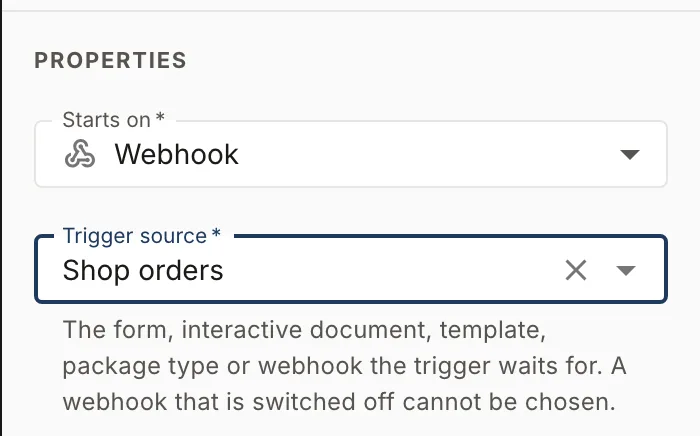
| Setting | What it does |
|---|---|
| Trigger source | The webhook to wait for. Required. |
Only a webhook that is switched on can be chosen. Create it first, in webhook setup. Choosing a webhook takes only the permission to build workflows.
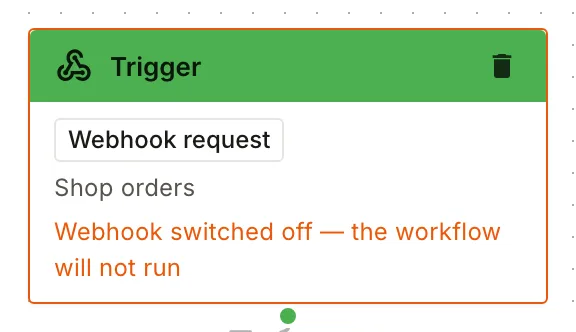
If you switch a webhook off later, the workflow keeps it. The source then reads, for example, Shop orders (switched off), and the node warns Webhook switched off — the workflow will not run. You can still save the workflow unchanged. If the webhook is deleted, the node shows Configuration incomplete until you choose another.
What later steps get
Section titled “What later steps get”Values
Section titled “Values”If the request brought an object, such as a JSON object or a form’s fields, its fields sit at the top of the run’s data: {{ orderId }}, {{ customer.email }}. Whether that comes from the body or from the address depends on the webhook’s data source.
Anything else, such as a JSON list, a number or plain text, isn’t spread out. It’s kept in _webhook.body instead.
The picker lists fields under Webhook request data when the webhook has a JSON Schema, and marks a field the schema doesn’t require with May have no value – the field is not required. Without a schema, nothing says what requests will bring, so type paths by hand. Adding a schema is worth it for this alone.
The _webhook block
Section titled “The _webhook block”| Variable | Label in the picker | Contents |
|---|---|---|
_webhook.requestId |
Request ID | The request’s identifier. For a repeat, the first request’s. |
_webhook.correlationId |
Correlation ID (X-Request-ID) | The ID shown in the requests list. |
_webhook.webhookId |
Webhook ID | The webhook’s identifier. |
_webhook.webhookName |
Webhook name | Its name. |
_webhook.method |
HTTP method | POST, GET and so on. |
_webhook.contentType |
Content type | The type the sender stated. |
_webhook.receivedAt |
Received (date and time) | When it arrived. |
_webhook.headers.<name> |
Not listed, type it | One header, by its lower-case name. A repeated header’s values are joined with commas. Headers holding credentials are left out. |
_webhook.body |
Not listed, type it | Data that isn’t an object. Empty when the data is an object. |
Link parameters
Section titled “Link parameters”_params holds the parameters of the address, as text: any name, one value each, without the webhook’s own token. The picker offers A link parameter (type its name). A webhook has no metadata of its own, so _metadata stays empty.
None. Webhooks don’t accept file uploads.
A sample
Section titled “A sample”For POST …/v1/webhooks/<id>?source=shop with the JSON body {"orderId": "A-17", "total": 120.5}:
{ "orderId": "A-17", "total": 120.5, "_webhook": { "requestId": "019a51c8-20ab-7e14-8d37-6f1b90c4e2a7", "correlationId": "c1f0a3e2-7d44-4b19-9a6e-2e8d5b7c3f01", "webhookId": "0198f0aa-3c1d-7b52-a4e0-71d29e5b8c63", "webhookName": "Shop orders", "method": "POST", "contentType": "application/json", "receivedAt": "2026-11-04T10:00:00+01:00", "headers": { "user-agent": "shop/1.0" }, "body": null }, "_params": { "source": "shop" }, "_execution": { "id": "…", "eventId": "…", "workflowId": "…", "triggeredAt": "…", "date": "2026-11-04" }}Plan limits
Section titled “Plan limits”A run counts towards your plan once a step after the trigger has finished, even if a later step fails. When your plan has no runs left, a new request is refused with 503 before anything starts, so the sender can try again later, and the requests list shows it as Plan limit reached. A repeat of a request that was already answered needs no run, so it still gets its answer. See plans and limits.
Example: a contract for every large order
Section titled “Example: a contract for every large order”Northbridge’s shop posts each paid order to a webhook. A Condition checks total >= 10000. On True, Generate document fills the service agreement from {{ customer.name }} and {{ orderId }}, Create documents turns it into a package for signing, and Send email gives the customer the signing link.