

Renew a contract before it ends
A contract that quietly runs out is a client you have to win back. Doxtly knows when each of your contracts ends, so this workflow doesn’t wait for anyone to remember: when a client contract enters its warning period, it prepares an annex that extends the contract by a year and sends it to the client and to a partner of the firm. Once both have signed, the contract runs a year longer, and its contract file says so.
Available when: an active email integration for the signature requests
What it looks like
Section titled “What it looks like”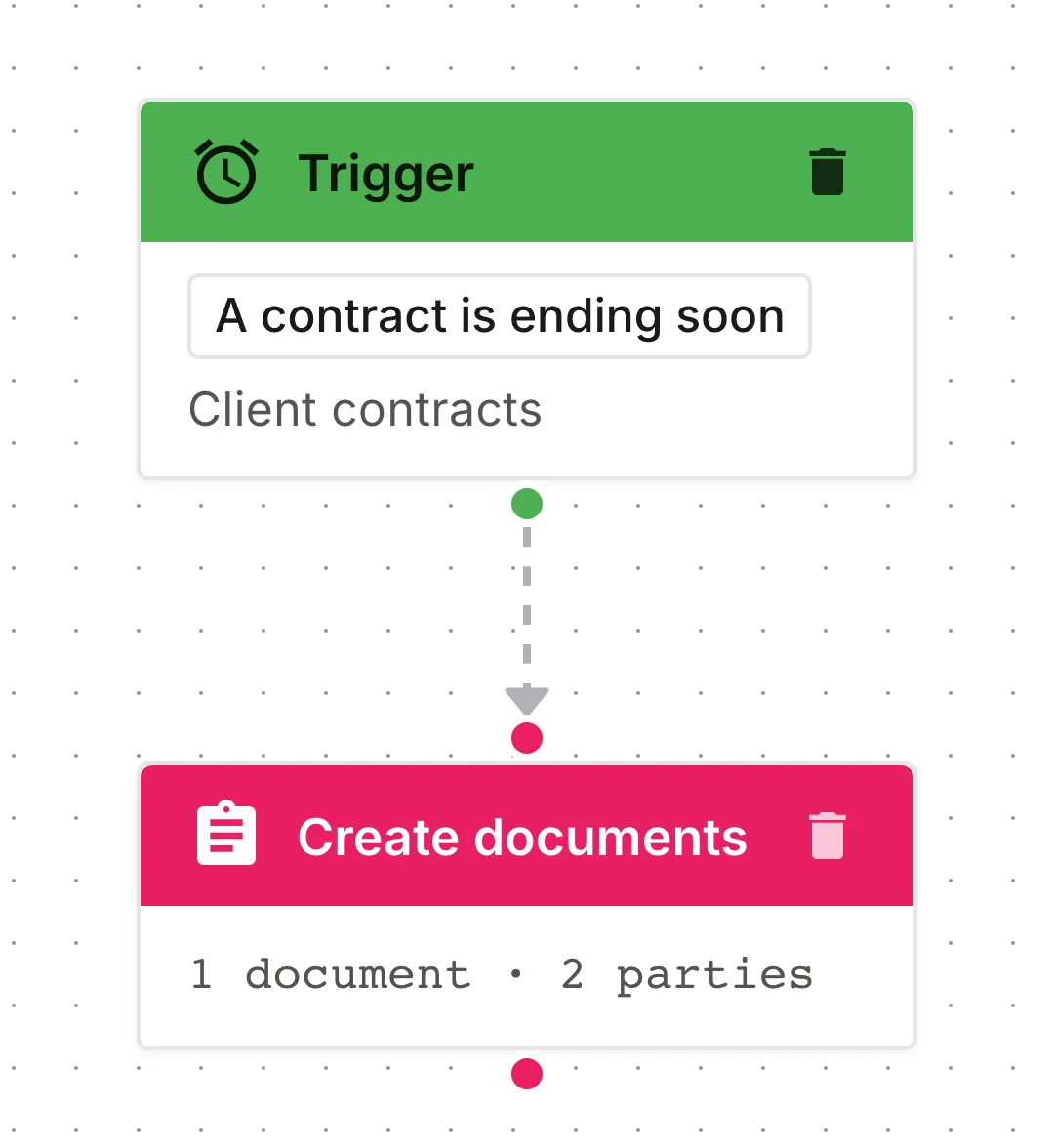
What you need
Section titled “What you need”- A document type, here “Client contracts”, that keeps contracts with a term. Its Warn this many days before decides how early the workflow starts: 30 days for a new type.
- Contracts of that type with an end and without automatic renewal, made by a workflow from a form, such as Contract from a form with a contract term. Each run then knows the client’s details from that form: here
client_nameandclient_email. - A template for the annex, here “Extension annex”, with signature places for
CLIENTandPARTNER. It can print the contract it extends and the new end: in a Word template${_package.annex.contract.title},${_package.annex.number}and${_package.annex.newEndsOn}.
Build it
Section titled “Build it”-
Create a workflow. Set Starts on to Document package, When to A contract is ending soon and Trigger source to “Client contracts”.
-
From Documents in the palette, drop Create documents and connect it. Select it and click Configure this step.
-
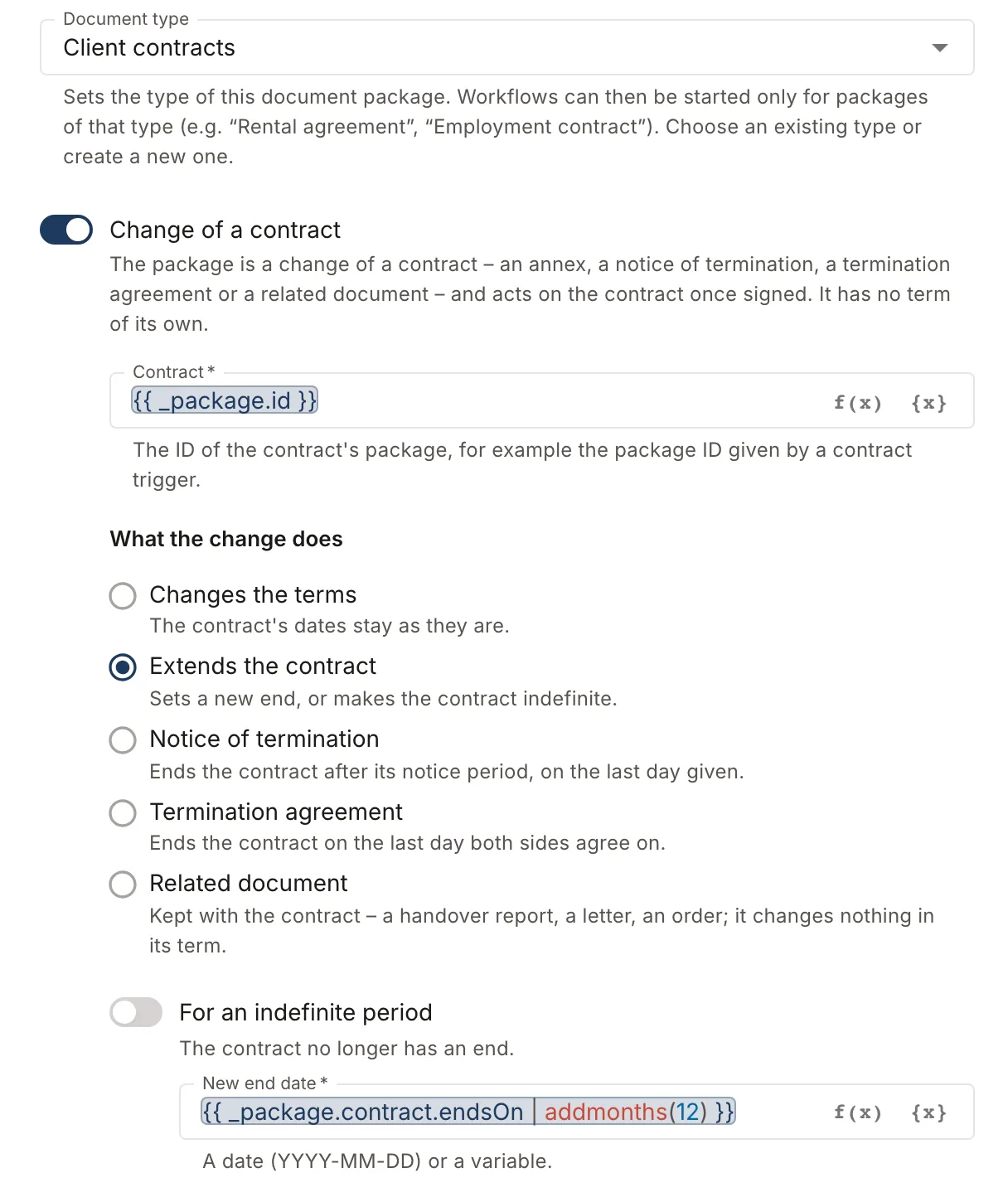
On Basics, set Document type to “Client contracts” and turn on Change of a contract. Set Contract to
{{ _package.id }}, the contract the event is about, and What the change does to Extends the contract. Leave For an indefinite period off and set New end date to{{ _package.contract.endsOn | addmonths(12) }}. -
On Documents, click Add document. Under Fragments, choose Template and pick “Extension annex”. Set the Document title to
Extension of {{ _package.title }}. -
On People, there is a row for
CLIENTand one forPARTNER. ForCLIENT: Full name{{ client_name }}, Email{{ client_email }}. ForPARTNER, set Who signs to A user of the application and pick the partner who looks after your clients. Keep Signature request on in both rows, so Doxtly asks each of them to sign. -
On Delivery, set Days after sending to
14, so the offer doesn’t stay open longer than the contract itself. -
Save the workflow and switch it on.
What happens next
Section titled “What happens next”The client and the partner get Doxtly’s signature request. The annex takes the next number of its contract, and its document prints it. Once both have signed, the annex takes effect: the contract’s end moves a year on, the annex shows in its contract file, and the contract is no longer ending soon. A year later the new end brings a new warning, and the workflow offers the next annex.
If the client doesn’t sign, nothing changes: the contract still ends on its old day, and A contract ends comes the day after.
What the run knows
Section titled “What the run knows”| Variable | What it holds |
|---|---|
_package.id |
The contract’s ID, which Contract takes. |
_package.title, _package.number |
The contract’s title and number. |
_package.contract.endsOn |
Its last day in force, such as 2026-11-24. |
_package.contract.parties |
Its parties, each with indicator, fullName, email and contactId: {{ _package.contract.parties[0].email }} is the first one’s address. |
_package.contractAlert.kind |
ending_soon, or notice_deadline_soon for a contract that renews. |
_package.contractAlert.forDate |
The day the warning is about. |
The form answers that created the contract are there too, under Package data in the variable picker. See A contract is ending soon.
Check the run
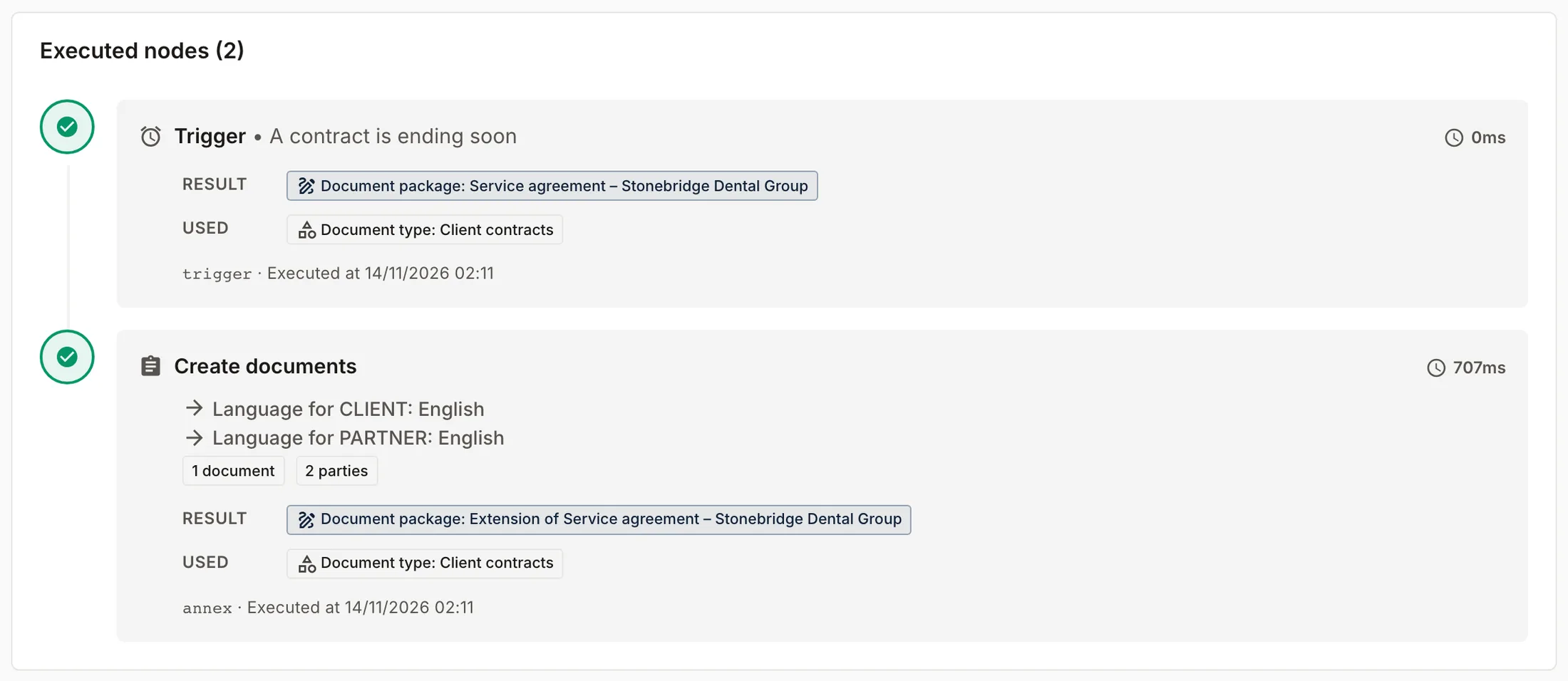
Section titled “Check the run”You don’t have to wait a month. Send your form to yourself, sign the test contract, and in its contract file change the term so that it ends in a few days. Within the hour, the run appears in Executions: the trigger card reads A contract is ending soon, and the Create documents card links to the Document package of the annex.
Variations
Section titled “Variations”- Contracts that renew by themselves. For those the warning comes before the last day to give notice, and
_package.contractAlert.kindisnotice_deadline_soon. To make annexes only for contracts that don’t renew, put a Condition_package.contractAlert.kind == "ending_soon"before Create documents. - Ask the account manager first. Instead of Create documents, add Send email to the account manager, with
{{ _package.title }}and{{ _package.contract.endsOn | formatdate("d MMMM yyyy") }}in the template, and let them start the annex with Create annex in the contract file. - A longer extension, or none at all. Use
addyears(2)in New end date, or turn on For an indefinite period.