

Contracts
A signed contract usually goes on living after the last signature: it runs until a date, renews by itself, gets an annex, is given notice. Doxtly keeps all of that with the contract. You see which contracts are in force and which are about to end, you make an annex or a notice from the contract itself, and the person who answers for it is warned in time.
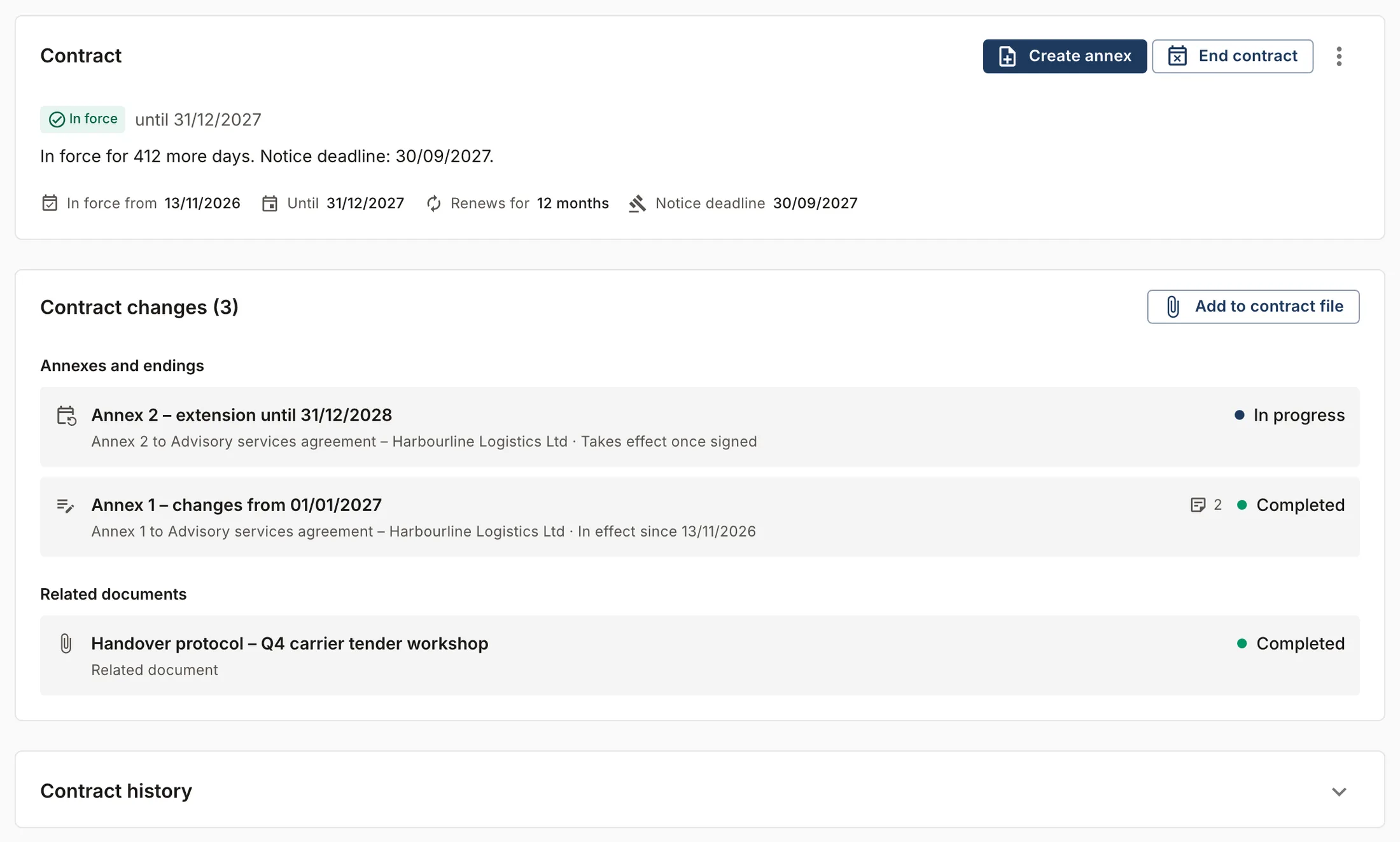
Take an example consulting firm, Northbridge Advisory, and its advisory services agreement with Harbourline Logistics. Both sides signed it in Doxtly on 13 November 2026. It runs until 31 December 2027, renews for another 12 months unless one side gives three months’ notice, and a notice takes effect at the end of a month. Northbridge sets this term once, and Doxtly works out that the last day to give notice is 30 September 2027, shows the contract as Ending soon from 31 August, tells the person responsible for it, and renews it on 1 January 2028 if nobody gave notice. When the client asks for more hours, the annex is made from the contract’s page, with the contract’s parties and data already in it.
Contracts with a term
Section titled “Contracts with a term”Contracts are switched on per document type: turn on Contracts with a term for a type such as “Client contracts”, and every package made under it from then on is a contract. Packages of other types look and work as before. The same place sets Warn this many days before, from 1 to 365 days and 30 for a new type, which decides when a contract of the type counts as ending soon, and Documents for changes, the templates its changes start from.
A package is a contract when it is made under such a type and is not itself a change of a contract. Turning the switch off later stops the type making contracts; those it made keep their term, their history and their changes. A draft that is a contract stays one, with its term, for as long as it keeps its type, even after the switch is turned off. Choosing a type without contracts for such a draft asks first: Drop the contract term? says that under that type the package is no contract any more and its term is removed when you save. Change the type goes ahead, Keep the type leaves the draft as it was.
Contract term
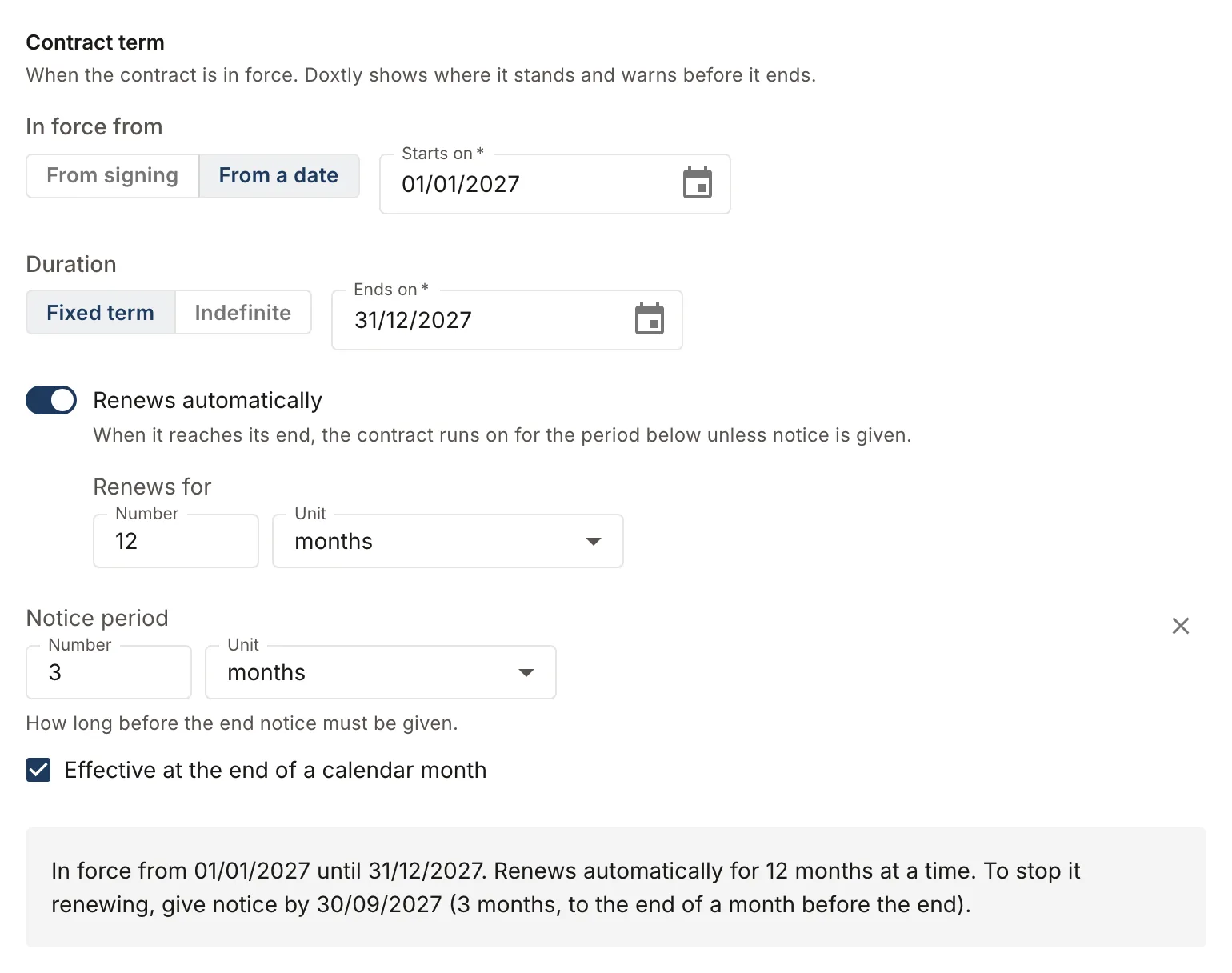
Section titled “Contract term”The term says from when the contract is in force, until when, and what happens at its end. You set it in the Contract term section of the editor’s Basics tab, when you add a document signed outside Doxtly, in a Create documents step, and later with Change term. A new contract starts From signing and Indefinite.
| Setting | Values | What it does |
|---|---|---|
| In force from | From signing, or From a date with Starts on. | From signing, the contract is in force from the day everybody signed it in Doxtly, or the day you give when you add it as signed outside Doxtly. A date can lie before or after the signing. |
| Duration | Fixed term with Ends on, or Indefinite. | A fixed term starts as one year: Ends on is the day before the anniversary of the start, or of today for a contract in force from signing. The end can’t come before the start, and the field says The end cannot come before the start. |
| Renews automatically | Off, or on with Renews for: 1 to 999 days, weeks, months or years, 12 months to begin with. | Only for a fixed term. When it reaches its end, the contract runs on for the period below unless notice is given. Each renewal adds the period to the end, again and again, until a change ends the contract. |
| Notice period | None, or Add a notice period: 1 to 999 days, weeks, months or years, 1 month to begin with. Effective at the end of a calendar month on or off. | How long before the end notice must be given. With a fixed term, Doxtly works out the notice deadline from it. With the box ticked, notice takes effect only at the end of a month, so the deadline is counted back from the last month end on or before the contract’s end. Remove the notice period takes it away. |
A month or a year added to a day that the target month doesn’t have lands on its last day: 31 January and one month is the last day of February. Each renewal is counted from the end the term started with, so an end on the 31st stays on the last day of the month.
Under the fields, one sentence says the term back with the days it works out to. For a contract from 1 January 2027 until 31 December 2027 with the same renewal and notice it reads In force from 1 January 2027 until 31 December 2027. Renews automatically for 12 months at a time. To stop it renewing, give notice by 30 September 2027 (3 months, to the end of a month before the end)., with the dates written as your language writes them. That is the sentence to check against the paper. The same sentence appears on the Contract card until the contract is signed.
A copy of a contract takes its term while its document type still has contracts with a term, and the editor reminds you: This package is a copy. Check the deadline and the contract’s dates before sending it.
Contract states
Section titled “Contract states”Where a contract stands is a second line of information beside the signing status. The signing status says how far the signatures have got; the state says whether the contract is in force. A contract still being signed has no state: the list says starts once signed and the card The term starts once everybody has signed. A contract whose package was voided, declined, not approved or ran out of time before everybody signed never came into force: the list shows a dash, and the card says only so, such as This contract never came into force: the package was voided before everybody signed., with no changes and nothing to do.
| State | When |
|---|---|
| Not yet in force | Signed, and the term starts on a later day. |
| In force | Signed, started, and not ending soon. |
| Ending soon | In force, and within its type’s warning days before the day the warning is about. For a contract that doesn’t renew, that is its last day in force. For one that renews, it is the notice deadline. |
| Ended | Its last day in force has passed, at the end its term and its extensions gave it. |
| Terminated | Its last day in force has passed, and a notice or a termination agreement ended it before its own end. |
Ending soon therefore means “act now”. A renewing contract is ending soon in the days before its notice deadline, because after that day notice is too late, and it goes back to In force once the deadline has passed: the card then says The notice deadline passed on… and it renews at its end. A renewing contract with no notice period never shows Ending soon. Once a notice or an agreement has ended a renewing contract, it renews no more, and the warning is about its last day.
The state is worked out each day in your organization’s time zone, the same on the contract’s page, in the document list, on the dashboard and in workflows. “Expired” is never a contract’s word: it belongs to the signing deadline, which a contract has too while it is being signed.
The contract file
Section titled “The contract file”A contract’s page is its file. Under the summary are three cards: Contract, Contract changes and Contract history. The header shows the state’s chip beside the title.
The Contract card leads with the state’s chip and the day that goes with it (until its last day, indefinite, or from the day a contract not yet in force starts), and a sentence about today: In force for 47 more days., Today is its last day in force., Comes into force in 12 days, on…, Ended; its last day in force was…, with Notice deadline: after it where there is one. Below is a row of facts:
| Fact | Shows |
|---|---|
| In force from | The day it came or comes into force; From signing while it is being signed and the term has no start date. |
| Until | Its last day in force, or Indefinite. |
| Renews for | The renewal period, while the contract renews. |
| Notice deadline | The last day to give notice, when the term has a notice period, a fixed end and no change ended it. |
| Signed outside Doxtly on | The signing date, for a contract added as signed outside Doxtly. |
With Manage documents, the card has Create annex and End contract, and its three-dot menu has Change term; the page’s header menu offers the same three. While the contract is being signed, Create annex and End contract are greyed out, with Available once the contract is signed. Once it has ended or been terminated they are gone, and Change term stays.
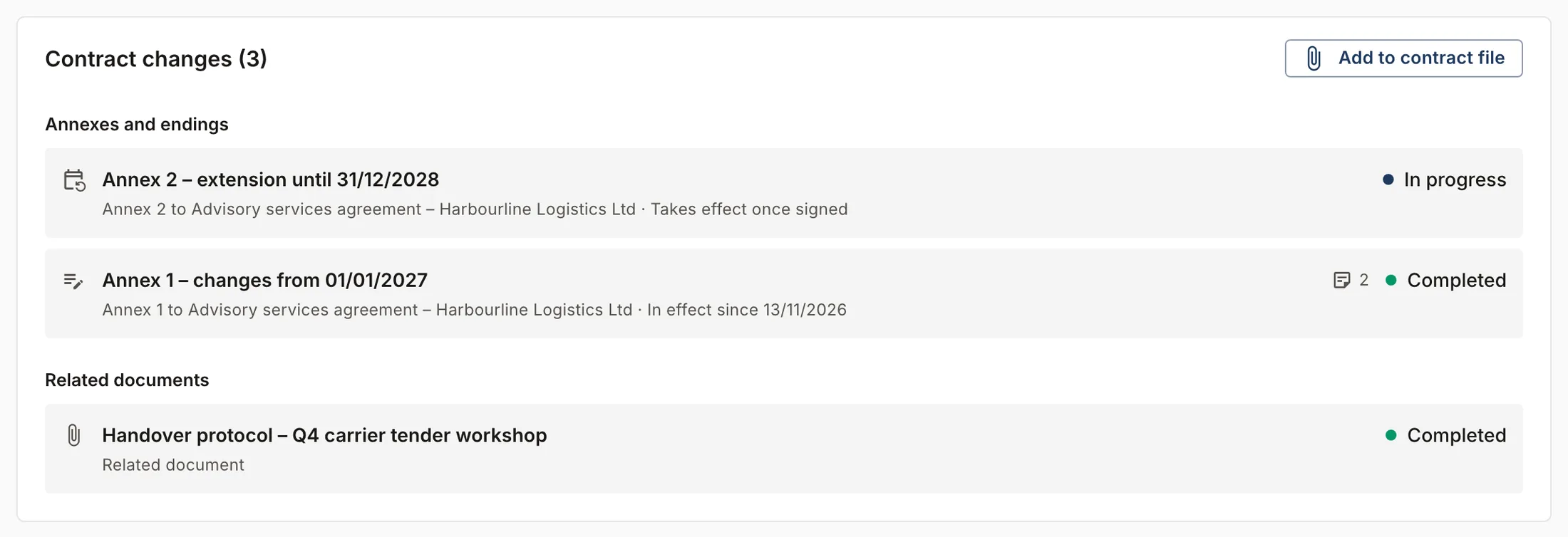
Contract changes lists every change of the contract, newest first. Annexes, notices and termination agreements come under Annexes and endings, the documents only filed with it under Related documents; the group names appear when there are both. Each row opens its own package and shows what it does, such as Annex 2 – extension until 31 December 2028 or Notice of termination – last day 31 December 2027, its title, its signing status and whether it applies: In effect since…, Takes effect once signed or Did not take effect. A row with internal notes shows their count. With none, the card says This contract has no annexes or notice yet. Add to contract file files a related document.
Contract history
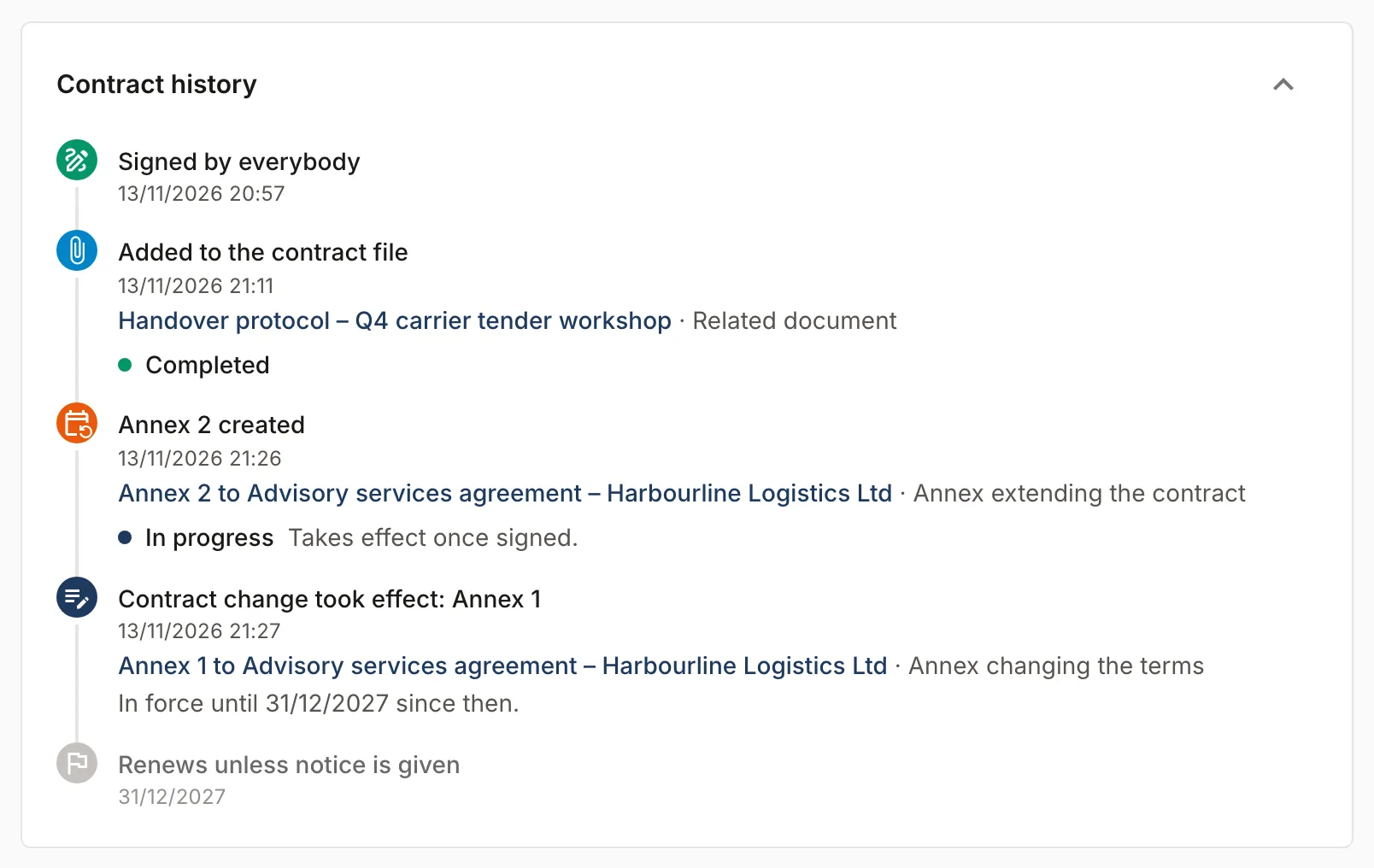
Section titled “Contract history”Contract history is folded when the page opens. Unfold it to read what happened to the contract, oldest first, with when and, where a person did it, who:
| Entry | What it records |
|---|---|
| Signed by everybody | Everybody signed the contract in Doxtly. |
| Recorded as signed outside Doxtly | It was added as signed outside Doxtly. |
| Term changed | Somebody changed the term: Before: and Now:, each as the summary sentence. |
| Fields changed | Somebody changed the contract’s custom fields, each value before and after; a sensitive one only as changed. |
| Contract change took effect | A change took effect, named by what it is (Contract change took effect: Annex 2), with a link to it and In force until… since then. |
| Contract change deleted | Somebody deleted a change that was in effect, with the end the contract has again. |
| Renewed automatically: its end moved from… to… | The term renewed itself. Several renewals worked out at once, as for a contract added years after it was signed, make one entry. |
| Ended, Terminated | Its last day in force passed. |
A change not yet in effect stands where it was made, as Annex 2 created with its signing status and whether it will apply; a related document as Added to the contract file. The end still to come closes the line, greyed: Ends, or Renews unless notice is given for a contract that renews.
Change the term
Section titled “Change the term”Change term corrects what Doxtly keeps about the contract, for example a notice period entered wrong. It changes nothing in the signed documents, so it is allowed at any time, signed or not. Change the contract’s term shows the same fields as the editor, with the summary, and says The change is kept in the contract’s history, with the term as it was and who changed it. Save recalculates the state and the dates at once; saving the term as it already is changes nothing. Once the contract has been sent, every change goes into the history as Term changed. Once it is signed, every change also starts the workflows waiting for A contract changes, even one that leaves its days where they were.
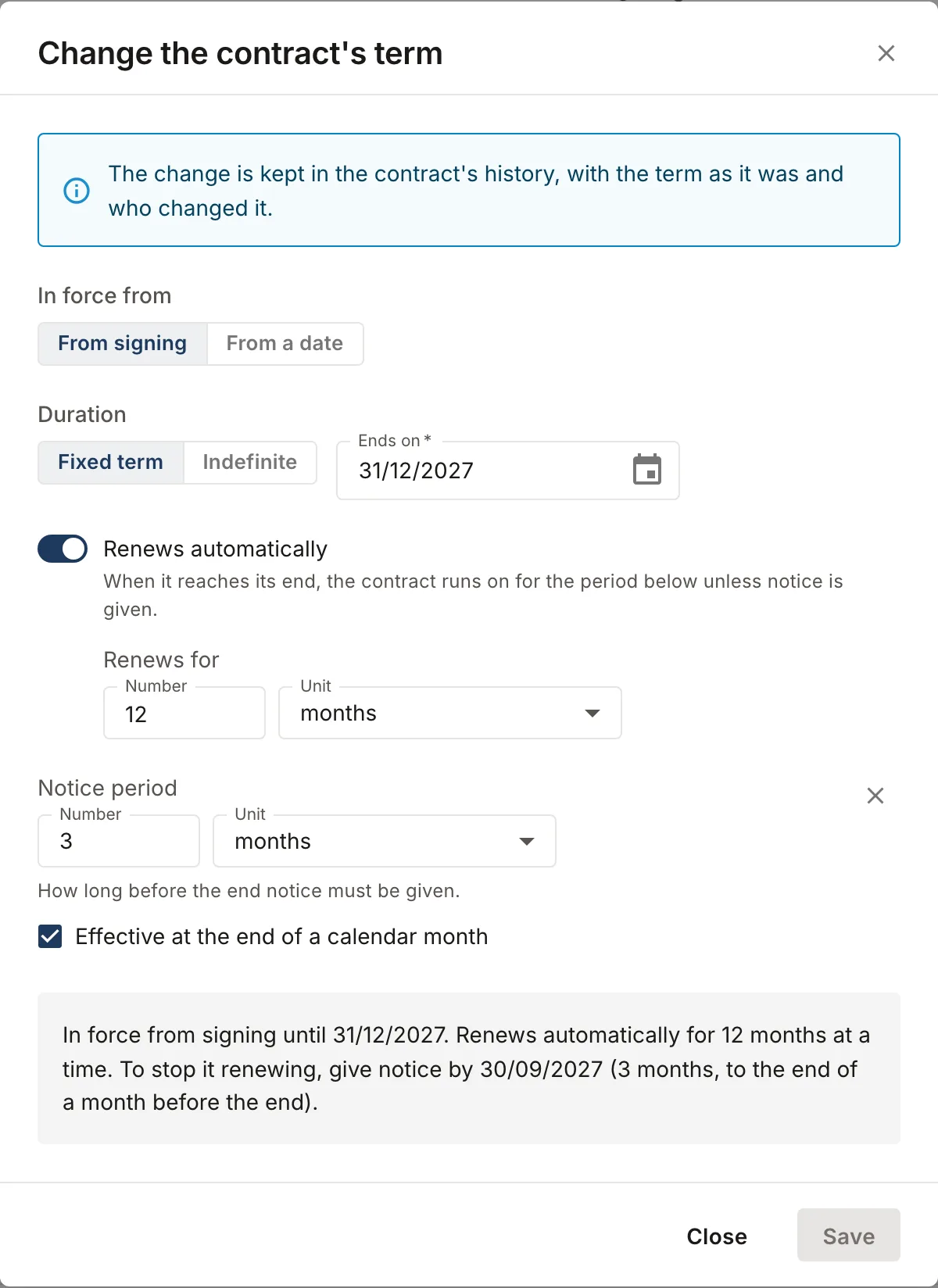
To change what the parties agreed, make an annex instead: that is a document the parties sign.
Contract changes
Section titled “Contract changes”Available when: you have the Manage documents permission for the contract
A change of a contract is a package of its own, kept with the contract and signed like any other. There are five kinds:
| Kind | What it does | Who signs |
|---|---|---|
| Annex changing the terms | Changes what was agreed; the contract’s dates stay as they are. Changes apply from is optional, for the text’s sake. | The contract’s parties. |
| Annex extending the contract | Moves the end to a later day (Until a date, New end) or makes the contract Indefinite. | The contract’s parties. |
| Notice of termination | Ends the contract on its Last day in force, the day you choose. | Only your side; the other side receives it. |
| Termination agreement | Ends the contract on a Last day in force both sides agree on. | Both sides. |
| Related document | Nothing to the term. A handover report, a letter, an order kept with the contract. | Whoever you choose, or nobody. |
The last column says what each kind is meant for. Who really signs is decided by its document, as on any package, usually the type’s document for the change.
Only the two annexes are numbered, within their contract: Annex 1, Annex 2. A notice, an agreement and a related document have no number and go by their kind. Two annexes made at the same moment get two numbers in turn. When the latest annex is deleted while still a draft, its number is given to the next one; an annex that was sent keeps its number even if it is voided or deleted, so the numbers never repeat what the parties have seen. A change never takes a number of its document type’s numbering: it is known as Annex 2 to or Notice of termination of its contract, and its contract’s number.
A change is made of a signed contract, never of another change. A change made by Send again or Duplicate on a change is the next change of the same contract, doing the same, with the next number.
Annexes
Section titled “Annexes”-
On the contract’s page, choose Create annex. It is also in the row menu of the document list, and Extend on the dashboard opens the same dialog on an extension.
-
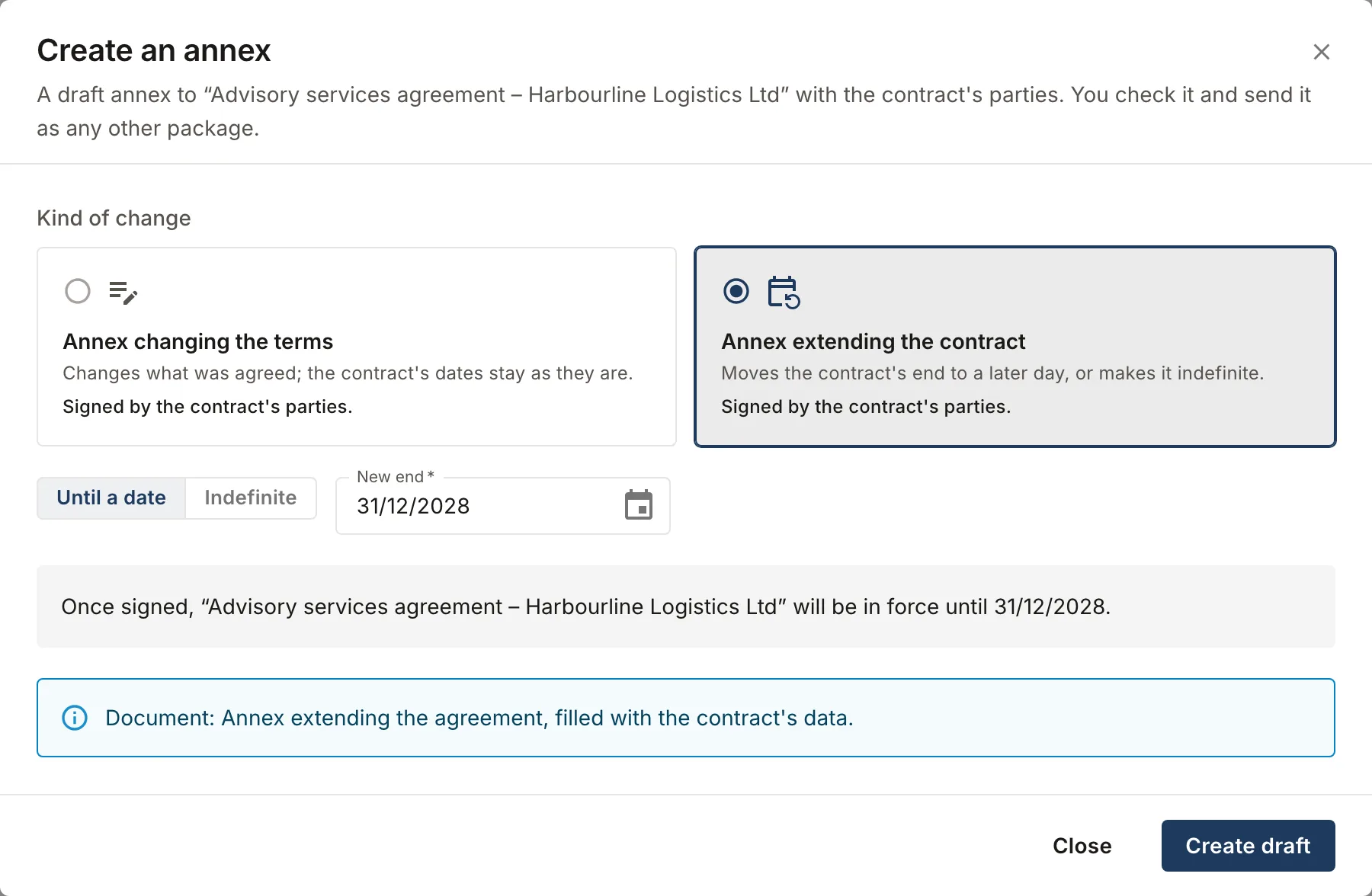
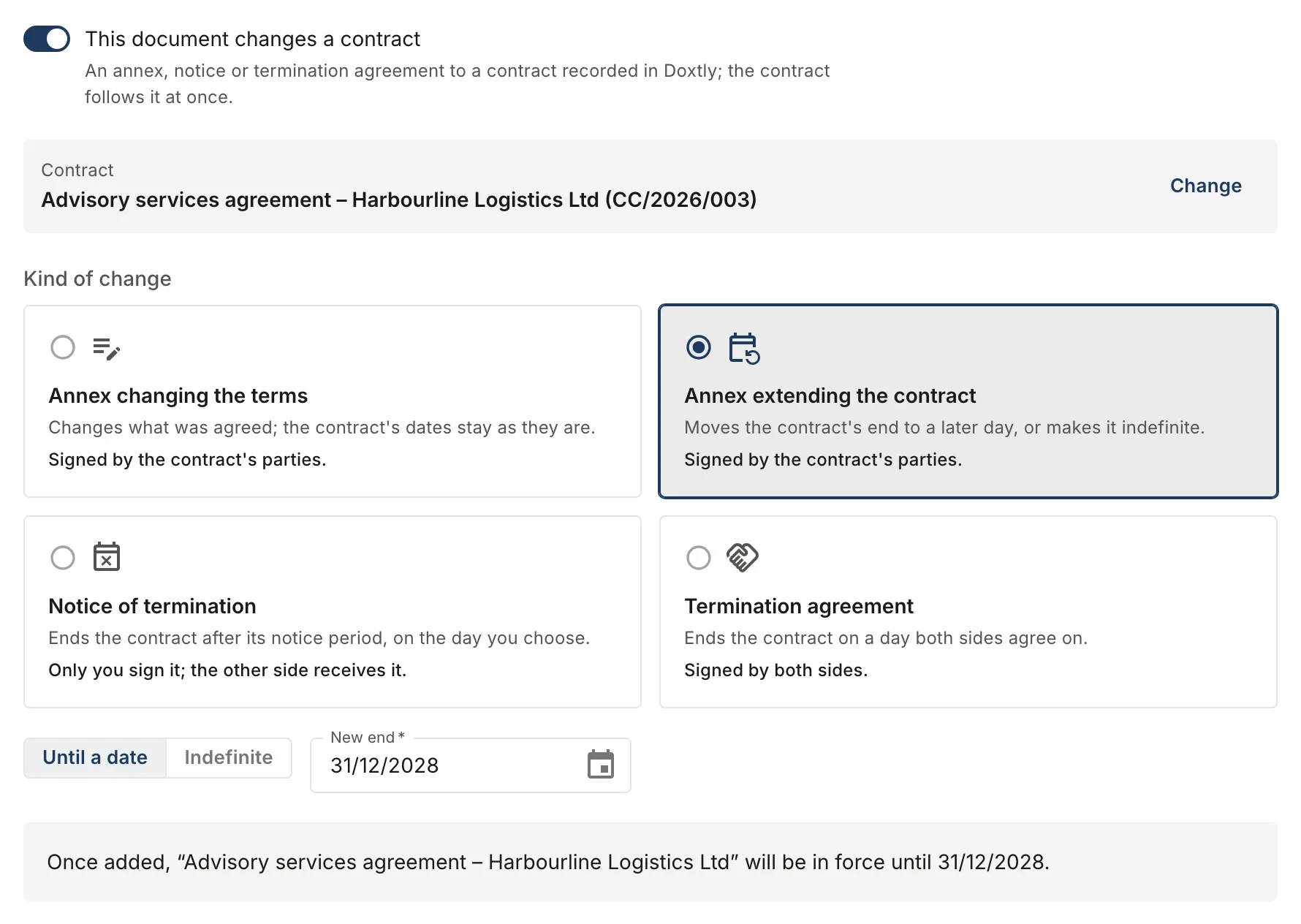
In Create an annex, under Kind of change, choose Annex changing the terms or Annex extending the contract. Each card says what it does and who signs it.
-
Give the day the kind needs. An extension starts at the contract’s end plus its renewal period, or a year after the end for a contract that doesn’t renew, and must fall after the present end.
-
Read the sentence under the fields, such as Once signed, “Advisory services agreement – Harbourline Logistics Ltd” will be in force until 31 December 2028., and the line about the document: Document: Annex extending the agreement, filled with the contract’s data., or This type has no document for this change; you add one in the editor.
-
Choose Create draft. The draft opens in the editor on its documents, to be checked and sent like any other package. Nothing is sent before.
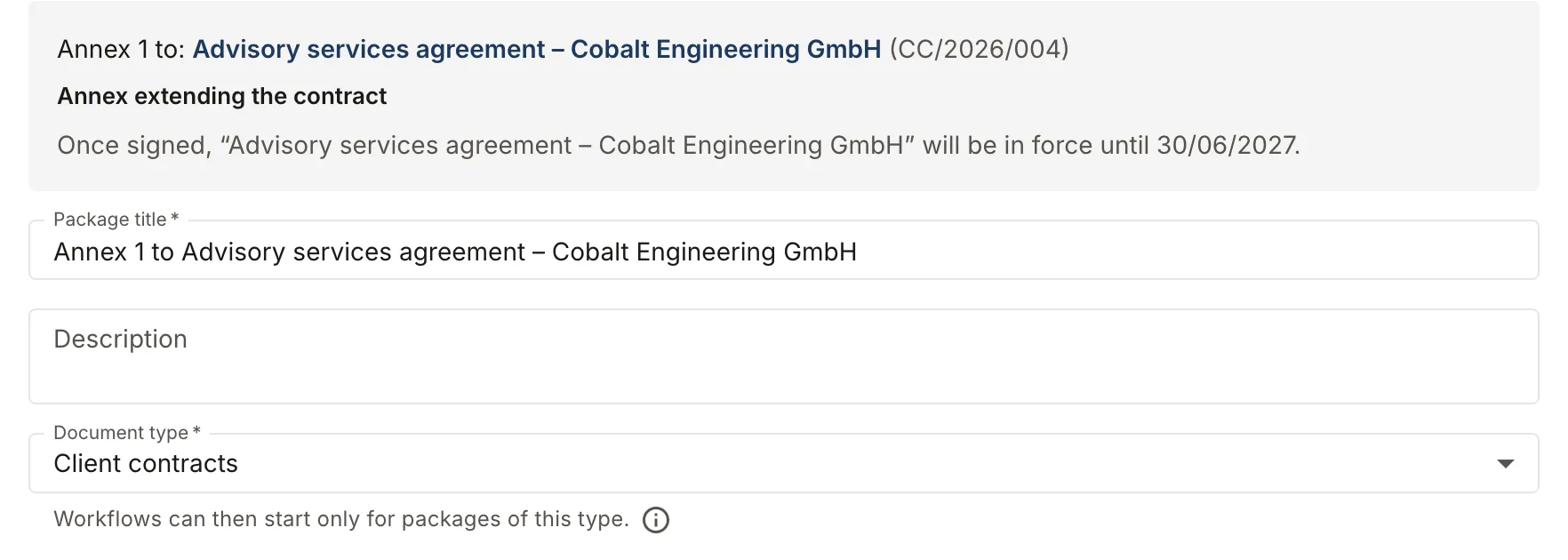
The draft is titled Annex 2 to Advisory services agreement – Harbourline Logistics Ltd, in your organization’s language, and you may rename it. It takes the contract’s type, its settings, its parties with how each signs, its viewers and its responsible person. Each party keeps how they get the request, how they confirm who they are, their language and the user they are linked to. An access password isn’t copied: a party who opened the contract with one shows an empty Access password field on the People tab, so type a password again before sending. At the top of its Basics tab a panel names the contract it changes, with a link, the kind and what it will do. What the change does is fixed when it is made: for a different change, make a new one. A change goes to the contract’s parties only, so Send separately to several people is not offered: A change of a contract goes to the contract’s parties only, so it is not sent separately to several people.
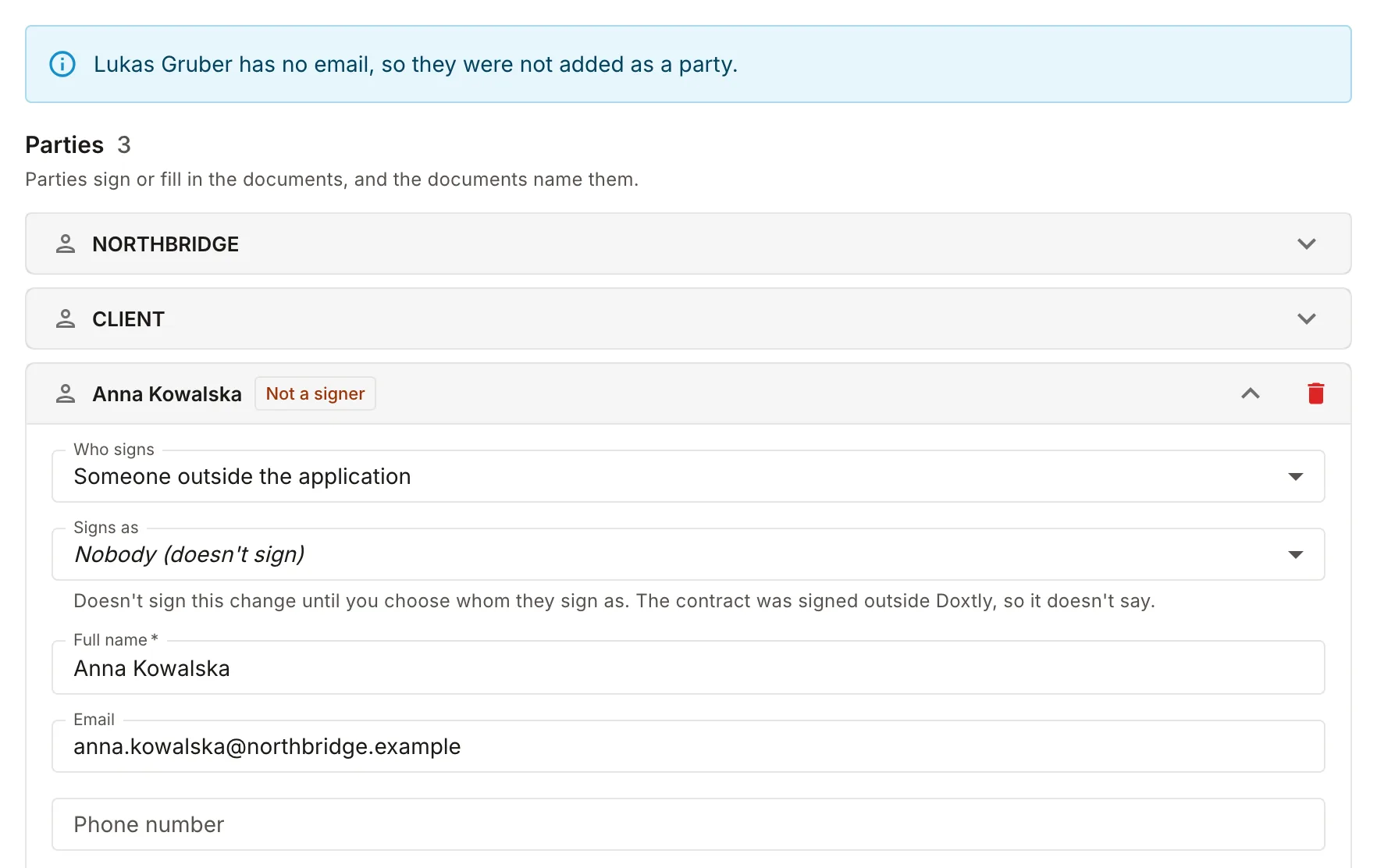
A contract added as signed outside Doxtly has only the parties recorded with it, and its changes start from those. Each one with an email becomes a party of the draft, linked to their contact. One without an email can’t be asked to sign, so it is left out, and the editor says so under Parties on the People tab until you add them yourself: Lukas Gruber has no email, so they were not added as a party. They are asked by email. The contract doesn’t say whom each recorded party signs as, and Doxtly doesn’t guess it: on the People tab each one has Signs as, which offers the parties the documents name that nobody stands for yet, and Nobody (doesn’t sign). A party left on nobody is marked Not a signer: they sign nothing and get nothing. Until every party the documents name has somebody, the draft can’t be sent and says, for example, Choose which party signs as CLIENT. The contract was signed outside Doxtly, so its parties have no roles, and Doxtly does not guess them.
Ending a contract
Section titled “Ending a contract”End contract opens End the contract, with Notice of termination and Termination agreement. It works like an annex, with one day to give: Last day in force, the last day the contract is still in force.
-
A notice starts at the last day a notice given today would leave the contract with:
- without a notice period, today;
- for a contract that renews, the end of its present period when today is on or before its notice deadline, and the end of the next period once the deadline has passed;
- for a fixed-term contract that doesn’t renew, today plus the notice period, or the contract’s own end if that comes first;
- for an indefinite contract, today plus the notice period.
Where notice takes effect at the end of a month, today plus the notice period moves on to the end of that month.
-
An agreement starts at today.
-
The day can’t be before today, and, for a contract that doesn’t renew, not after its end, which comes anyway.
Its draft is titled Notice of termination of… or Termination agreement of….
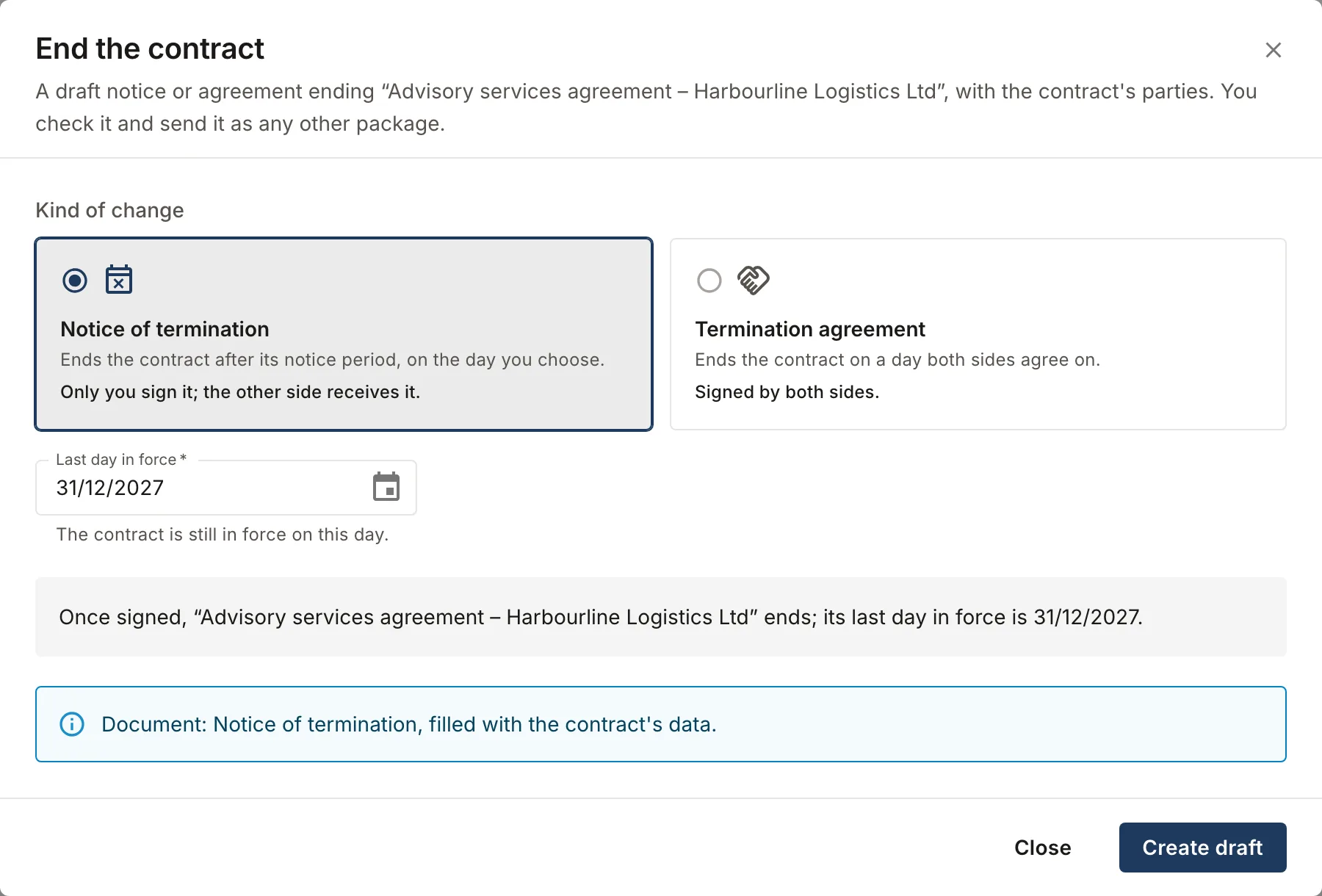
When the type’s document for the notice names only your side, the contract’s other parties don’t sign it, so they become viewers of the draft: they get a link to read the notice when it is sent, and the package records when each one opened it, which is your proof it was delivered. Once you have signed it, their link goes on opening the signed notice, and the Everyone signed message brings them its signed copy. A party with no email address to send the link to stays a party, for you to deal with in the editor. The same happens with any change whose document leaves some of the contract’s parties out.
Related documents
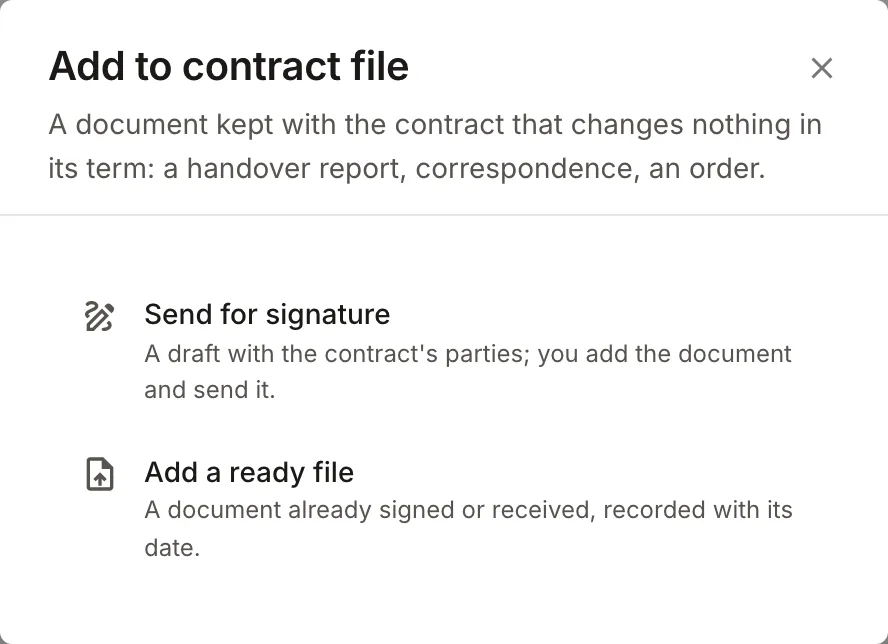
Section titled “Related documents”A related document is kept in the contract file and changes nothing in the term: a handover report, correspondence, an order. Add to contract file on the Contract changes card offers two ways, once the contract is signed, even when it has ended:
- Send for signature: a draft with the contract’s parties, titled Related document - Advisory services agreement – Harbourline Logistics Ltd, to which you add the document and send it.
- Add a ready file: a document already signed or received, recorded with its Document date on the page described under Add one document. Its parties are optional, and its Contract file section names the contract it is filed with.
Documents for changes
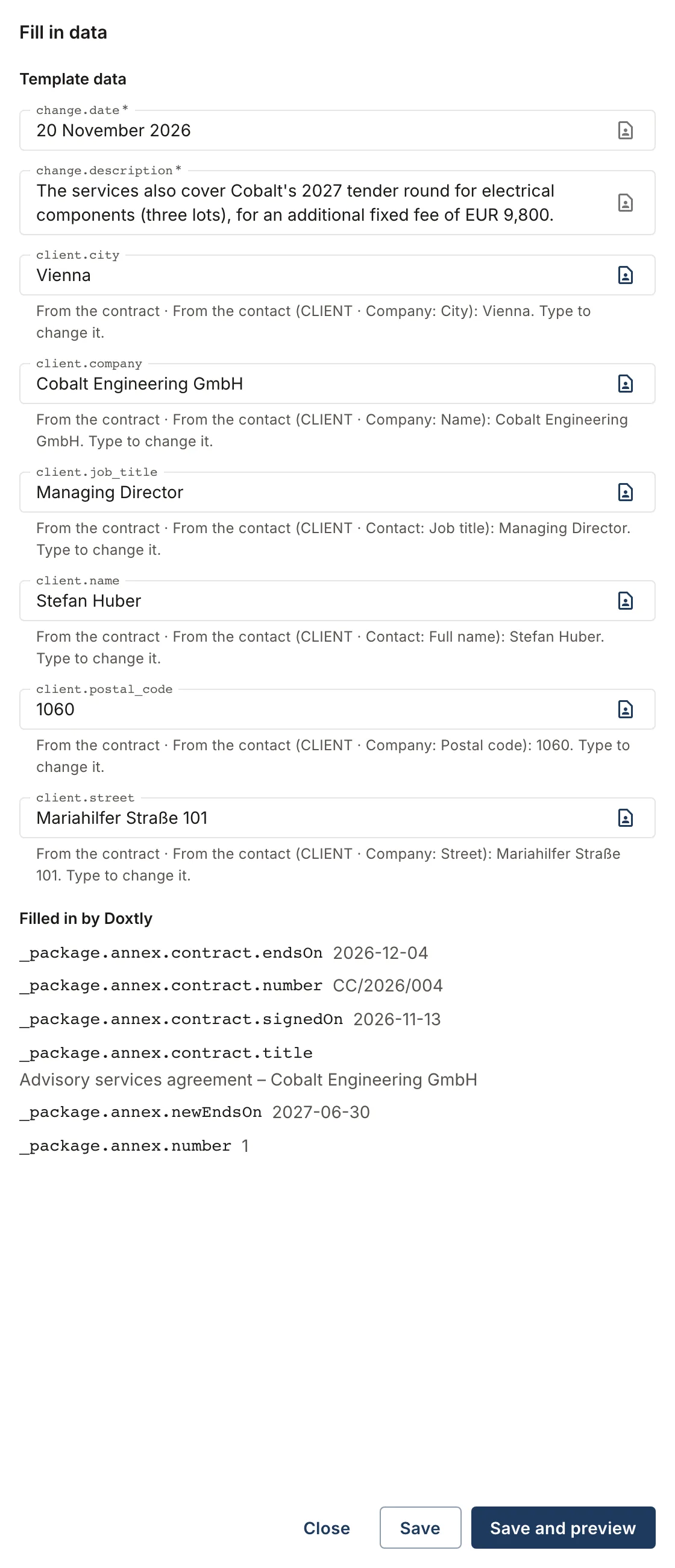
Section titled “Documents for changes”A type with contracts can give each kind of change its own template under Documents for changes. The draft of a change then starts with that document, filled with the contract’s data:
- Values the template shares with the contract. A variable of the template named like one the contract’s documents were filled with, such as the client’s name or address, takes the value the contract was made with, whether typed in Fill in data, taken from a contact or given by a workflow. Pictures and sensitive values are never carried over. In Fill in data such a field says From the contract for as long as it keeps that value, a field a contact would fill too. Every value stays yours to change. What Doxtly fills in itself, the
_packagevalues below, is no field there: Filled in by Doxtly lists each one the draft will have, with what it is now: a change takes no package number, and an annex value with nothing in it, such as the new end of an annex that changes only the terms, is left out. - Values of the change and its contract, which every document of a change can print:
| Value | Holds |
|---|---|
_package.annex.kind |
The kind: amends_terms, extends, ends_by_agreement, ends_by_notice or related. |
_package.annex.number |
The annex’s number; empty for the other kinds. |
_package.annex.effectiveOn, .newEndsOn, .indefinite, .lastDay |
What the change says: from when the changed terms apply, the new end or whether it makes the contract indefinite, the last day in force. |
_package.annex.contract.title, .number, .signedOn |
The contract’s title, number and signing date. |
_package.annex.contract.startsOn, .endsOn, .noticeDeadline, .renews |
The contract’s dates as they stand, renewals and earlier changes counted. |
_package.annex.contract.notice |
Its notice period in words, in your organization’s language, such as 3 months. |
_package.annex.contract.fields.<key> |
Its custom fields, never a sensitive one. |
Days are written as 2027-06-30. A Word template prints them with a marker such as ${_package.annex.contract.endsOn}, as with any value. A contract’s own documents can print _package.contract.state, .startsOn, .endsOn, .noticeDeadline, .renews and .terminatedOn in the same way.
A contract added as signed outside Doxtly was filled with nothing in Doxtly, so only the second group fills its changes’ documents. Without a template for the kind, the draft starts with no document, and you add one in the editor as in any package.
When a change takes effect
Section titled “When a change takes effect”A change takes effect on its contract once everybody has signed it in Doxtly, or at once when it is added as signed outside Doxtly. A draft never does, nor does a change that was declined, not approved, voided or ran out of time; its card then says Did not take effect: signing was not completed. and what it would have done.
| Kind | Effect on the contract |
|---|---|
| Annex changing the terms | None on the dates; it enters the history. |
| Annex extending the contract | The contract’s end becomes the new end, or the contract becomes indefinite. |
| Notice of termination, Termination agreement | The contract ends on the last day the change gives. A renewing contract renews no more. If the day falls before its end, it ends as Terminated. |
| Related document | None. |
When several changes have taken effect, the latest to take effect decides the end. The contract’s state, dates and history follow at once. Every change that takes effect starts the workflows waiting for A contract changes, an annex changing only the terms as well; a related document starts none. The same trigger starts when somebody changes the term of a signed contract and each time the contract renews.
A change can’t move the contract to a day before it came into force: A change cannot end or extend the contract to a day before it is in force.
Deleting a change that was in effect undoes what it did: the contract’s dates are worked out again without it, and the history gets Contract change deleted with who deleted it. It starts A contract changes only when the contract’s days move with it, so deleting an annex that changed only the terms starts none. Deleting a change that never took effect changes nothing in the contract. A contract with changes can’t be deleted: This contract has annexes. Delete the annexes first. Delete its changes first, related documents included.
The page of a change has a link back to its contract above its title, a chip with its number or kind, and a Contract change card: the contract it changes, what it does and whether it applies. See Package page.
Contracts in the document list
Section titled “Contracts in the document list”Once your organization has a type with contracts, the document list has a Contract column with the state’s chip and its day, sortable by the day each contract ends, and a Contract filter for the states, with All contracts as its default. A change of a contract names it under its title, as Annex 2 to: Advisory services agreement – Harbourline Logistics Ltd.
With Group changes under contracts, on by default, a contract’s changes are listed under it rather than on rows of their own, and its row has a button such as 3 changes to open them. The filters and the search still look at every package: when only a change matches, its contract comes onto the list with that change marked. On a phone, a contract’s card has the same chip and day. See Changes under their contract.
Alerts before the end
Section titled “Alerts before the end”The responsible person of a contract, or whoever made it when nobody was chosen, is told three things, in the app and by email:
| When | In the app | |
|---|---|---|
| A contract that doesn’t renew, or that a change ended, enters its warning days before its last day. | The contract “…” ends on…. | A contract ends soon |
| A renewing contract enters its warning days before its notice deadline. | The last day to give notice on the contract “…” is…; after that it renews. | Notice is due soon |
| Its last day in force has passed. | The contract “…” ended on…. | A contract ends |
Each is sent once for the day it is about. A renewing contract is warned again before each new notice deadline. A change of the term, by an annex or by hand, tells nobody, since somebody made it. Each person decides how these reach them, in the app, by email, both or not at all, with A contract is ending soon, The notice deadline is coming and A contract ends in their notification preferences; all three start on in both. A contract that ended more than a week before Doxtly could have said so, such as one added as signed outside Doxtly long after its end, gets its end in its history, and nobody is told. Workflows can do more on the same moments with the triggers A contract is ending soon and A contract ends, and find contracts with the Find a contract step: see Document package triggers.
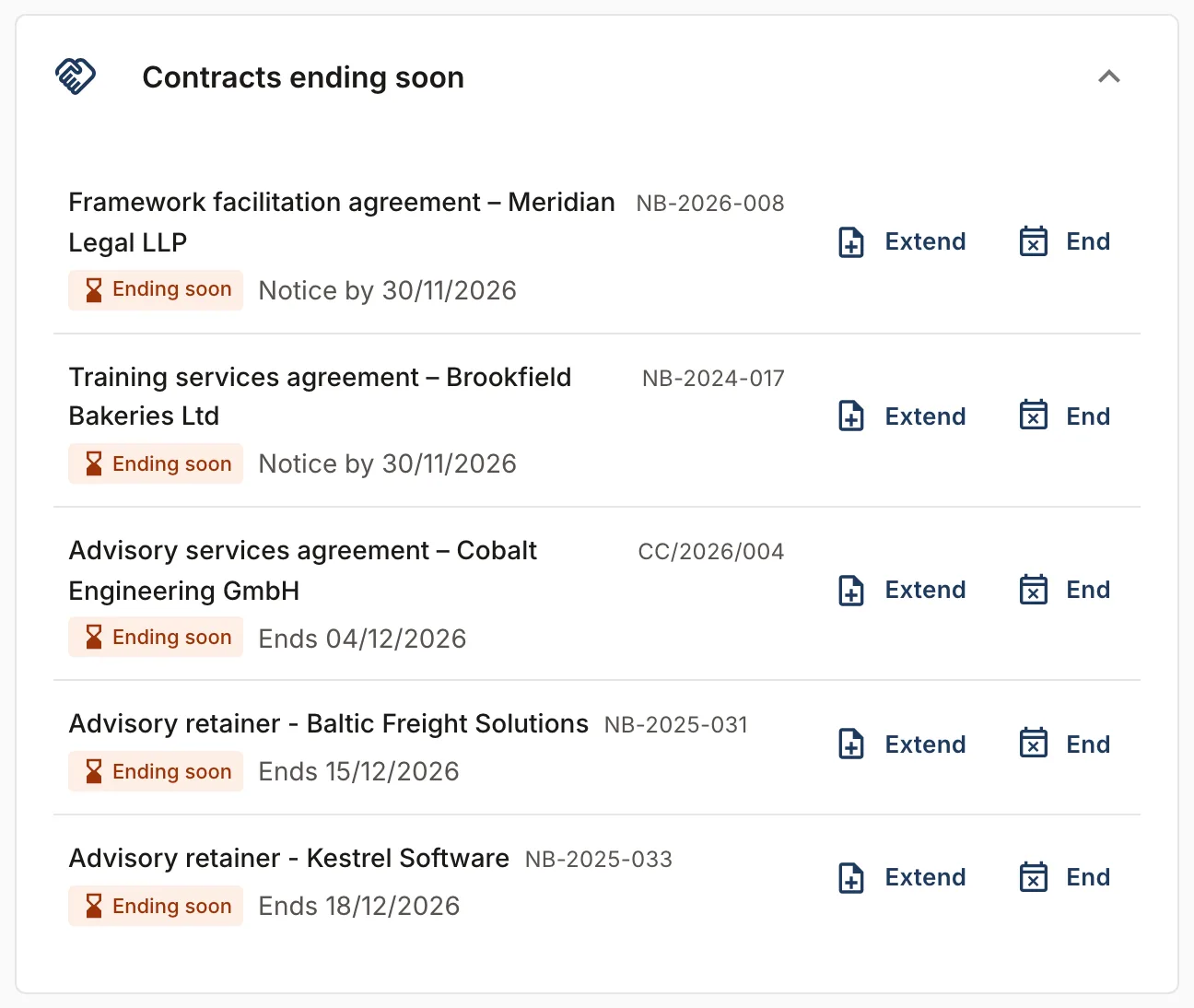
The dashboard’s Contracts ending soon panel lists up to five contracts in the Ending soon state that you may see, the nearest warning first, each with its title (two lines of it, all of it on hover), its number, its chip and why it is there: Notice by and the notice deadline for a contract that renews, Ends and its last day for any other. With Manage documents, Extend opens Create an annex on an extension and End opens End the contract. With more than five, a line under them, such as And 3 more documents., ends with Show all, which opens the document list filtered to Ending soon. With none, it says No contract is ending soon. The panel is there for people who may view documents, once the organization has a type with contracts.
Documents signed outside Doxtly
Section titled “Documents signed outside Doxtly”Available when: you have the Manage documents permission for the document's type
Contracts signed on paper or in another service before you used Doxtly still have terms that run and annexes that come. Add signed document, beside New package in Documents, records them so that they sit with the rest: in the list, on the contacts’ pages, in the dashboard and in the alerts. Nothing is sent to anybody. The package is finished from the start and carries the chip Signed outside Doxtly, and its parties are listed with the note As recorded: nobody was asked to sign in Doxtly. It doesn’t count toward your plan’s packages sent for signature; its files take room in your storage.
The button opens a menu of two: Add one document and Import from a sheet.
Add one document
Section titled “Add one document”The Add signed document page has four sections, and the bar at the bottom names the first thing still missing, or says Ready to add.
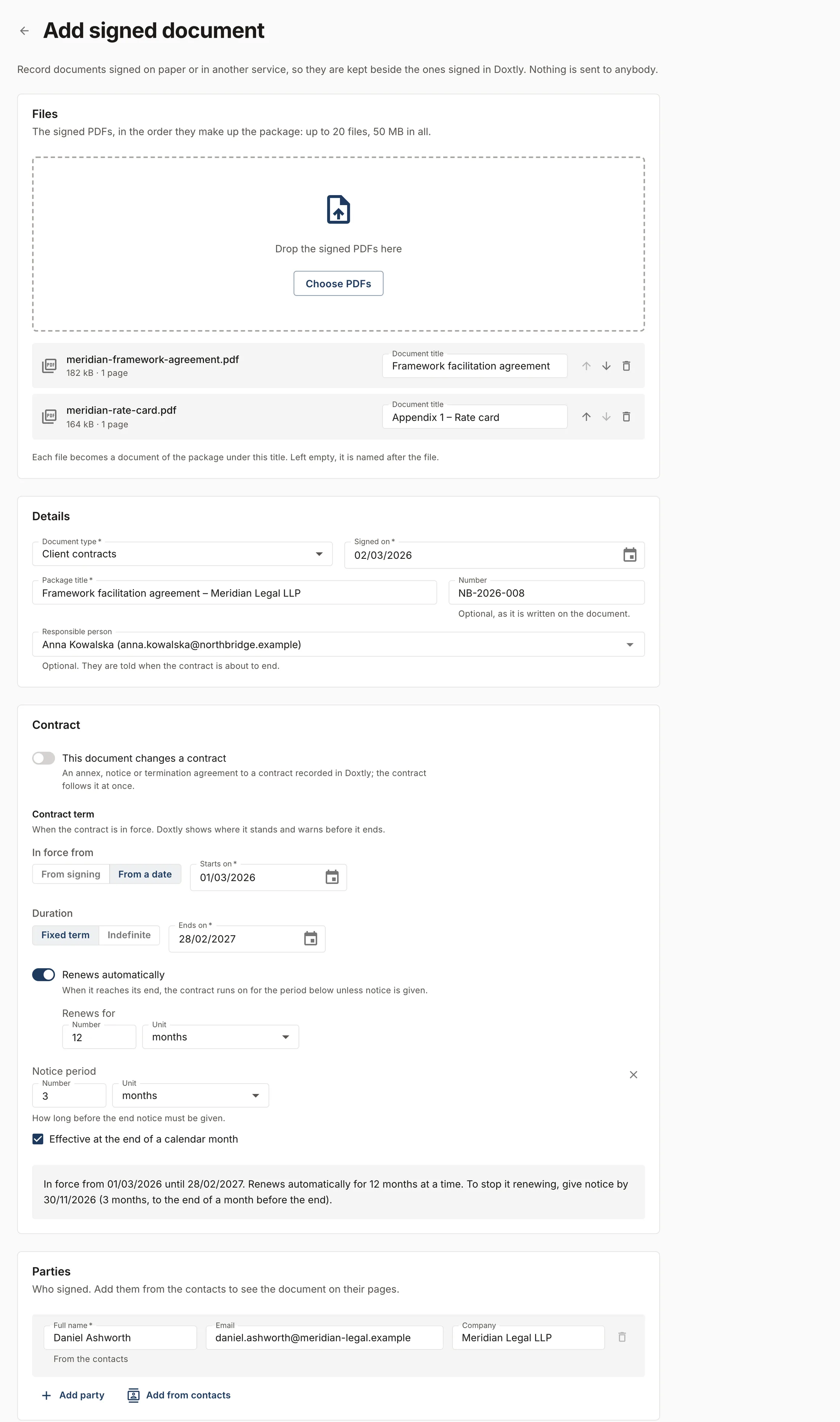
- Files: the signed PDFs, in the order they make up the package, up to 20 files and 50 MB in all. Only PDF files are taken. Each file shows its size and number of pages, can be moved up and down or removed, and becomes a document of the package under its Document title, which starts from the file name. With one file, the package title is suggested from it too.
- Details: the Document type (the list marks the types with contracts), Signed on, which can’t be in the future, the Package title, the Number, optional and free text, as written on the document, unique within the type, and the Responsible person, who will be told when the contract is about to end. It starts as you, when you are one of the people it offers; choose somebody else or clear it, and with nobody chosen the alerts go to you as the person who added it.
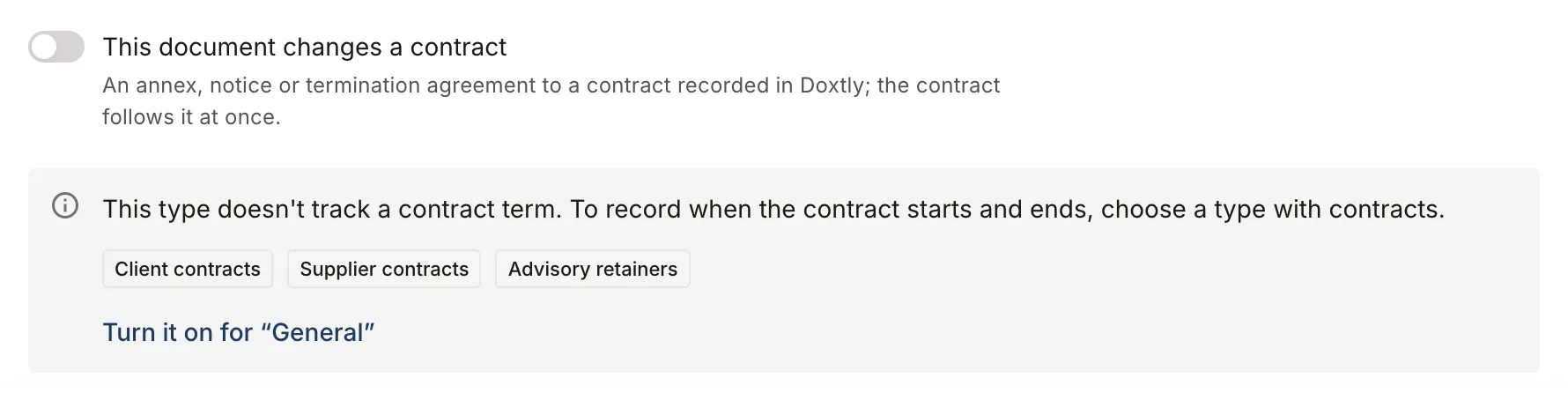
- Contract, for a type with contracts: the term, as in the editor. For a type without, a panel says This type doesn’t track a contract term. and offers the organization’s types with contracts to pick, and, for whoever may manage document types, Turn it on for “…”, which opens the type’s settings.
- Parties: who signed, with Full name, and optionally Email and Company. Add from contacts links a party to a contact, so the document appears on the contact’s page. At least one party is needed.
This document changes a contract, in the contract section, records an annex, a notice or a termination agreement of a contract already in Doxtly. Search for the contract by its title or number, choose the kind of change and its day, and read what it will do: Once added, “…” will be in force until…. The change takes effect at once, from its signing date, and its day may lie in the past.
Add document adds it and opens its page.
Import from a sheet
Section titled “Import from a sheet”To bring in many documents at once, such as every client contract from a shared drive, use Import from a sheet: a sheet with one row per document, and their PDF files. Each row is checked and added exactly as Add one document adds one. The import goes in four steps; Back returns to an earlier one.
-
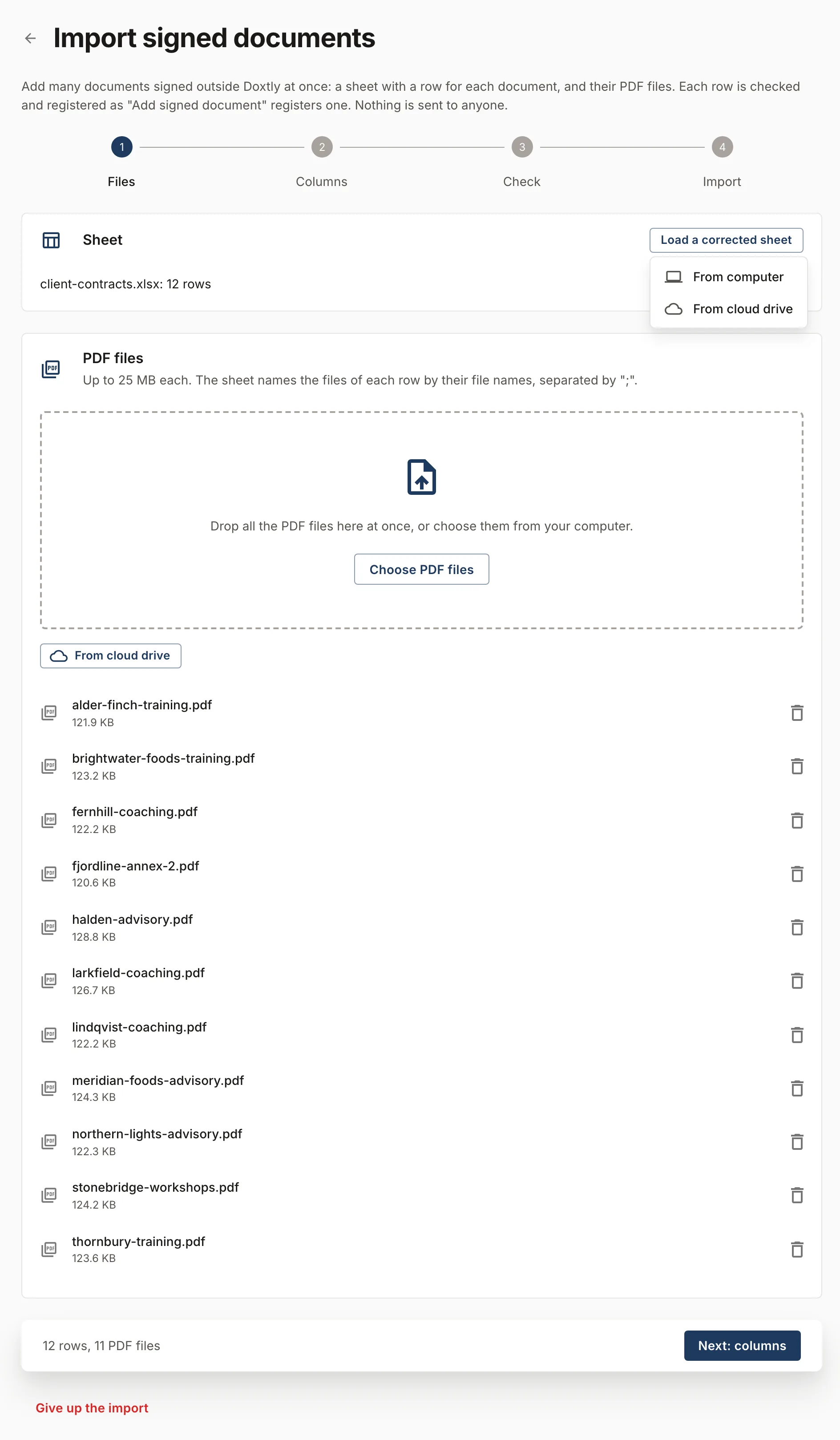
Files. Choose the Sheet: a CSV, XLSX, ODS or XLS file of up to 500 rows, with its headers on the first row. Download the template sheet gives one with every column already named, in your language, for two parties. Then add the PDF files, all at once, up to 25 MB each and 2,000 in an import. A file with the name of one already added takes its place. The sheet names each row’s files by their file names, separated by
;. Load a corrected sheet replaces the sheet and keeps the PDFs. With a connected drive, From cloud drive takes the sheet, a corrected sheet or the PDF files from the drive instead, the PDFs several at once.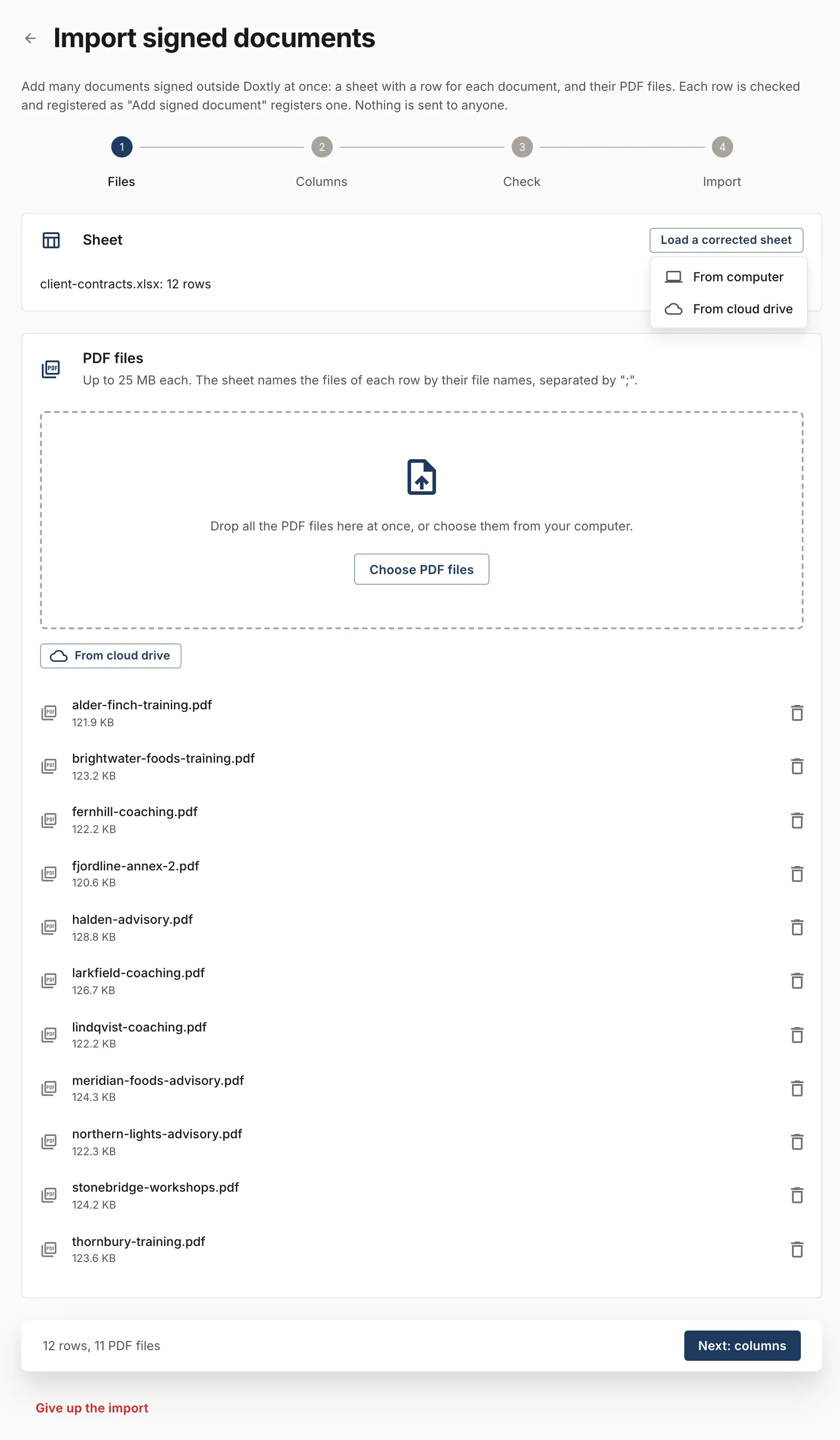
-
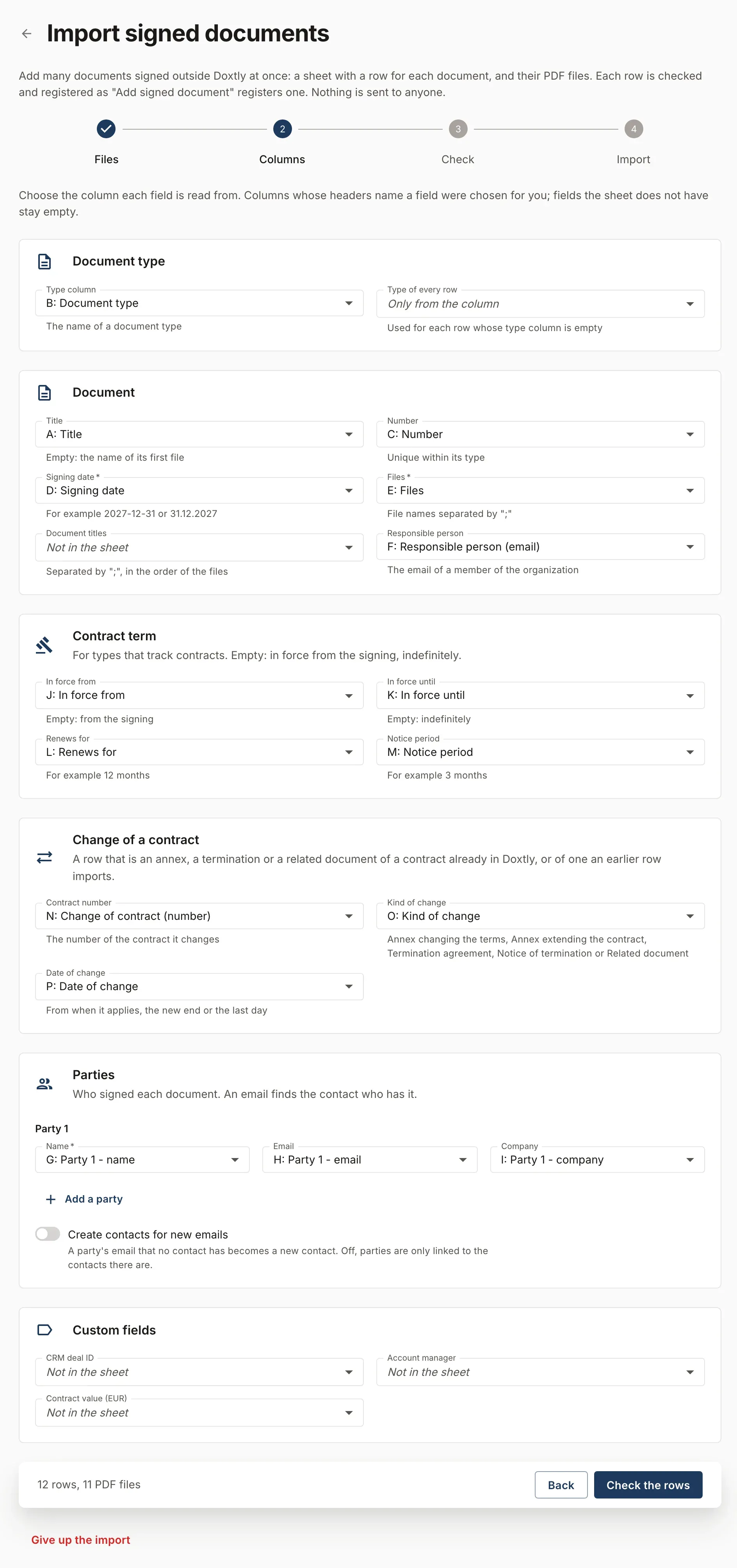
Columns. Choose the column each field is read from. Columns whose headers name a field, in English, Polish, Spanish or your language, are chosen for you. Each row needs a type, its signing date, its files and the name of at least one party.
-
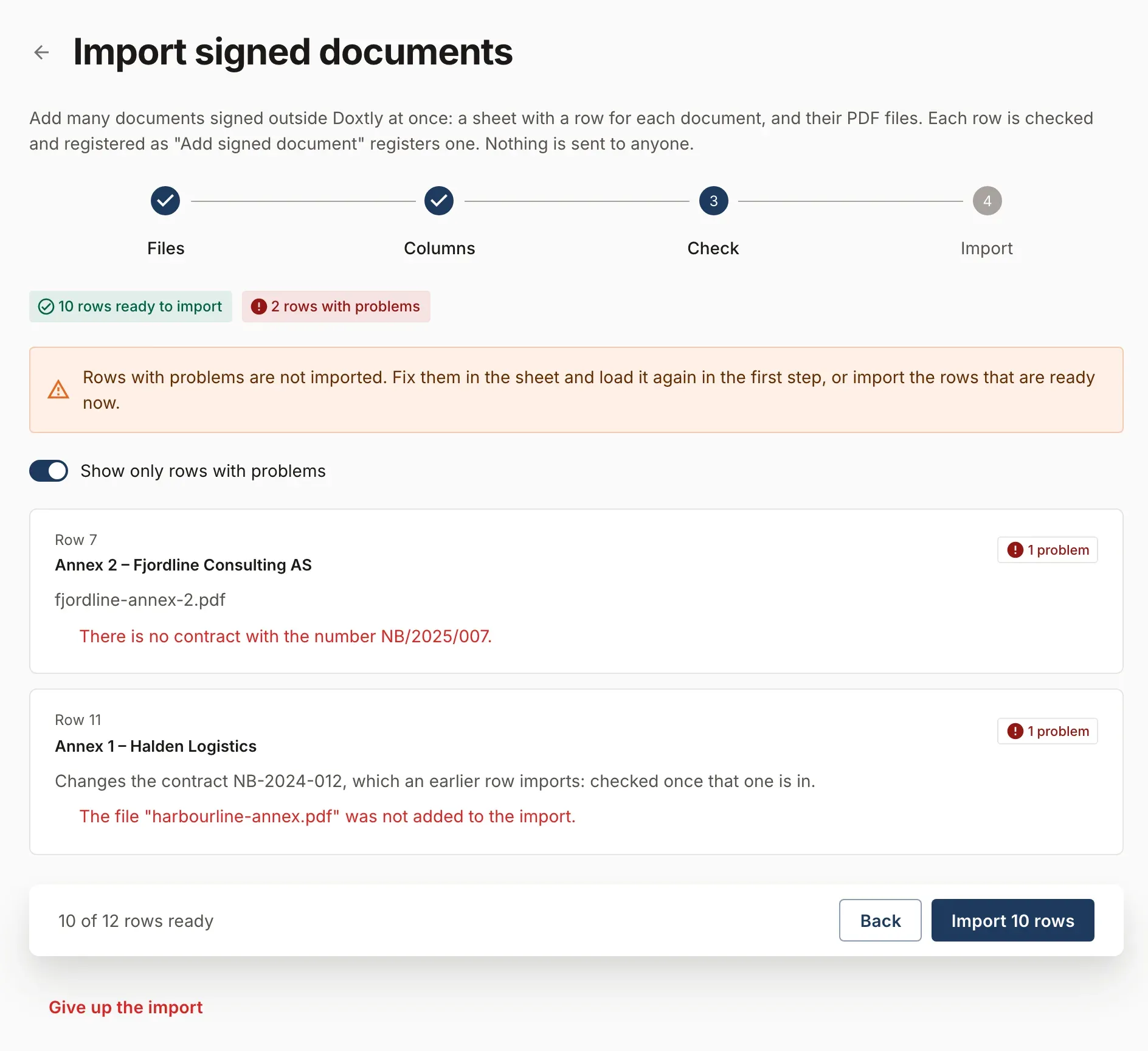
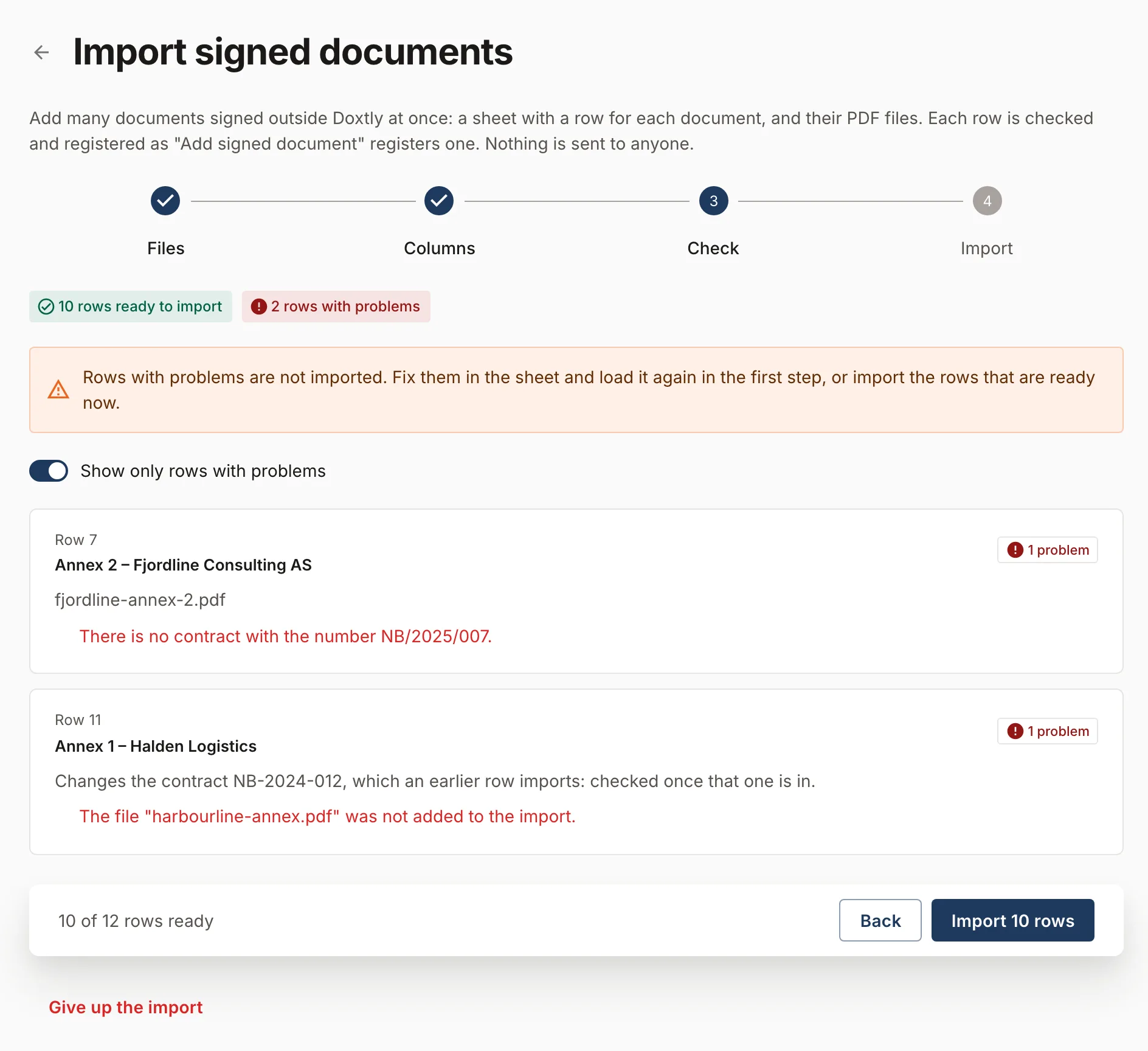
Check. Every row as it would be imported, nothing written yet: Ready, or its problems in words, such as There is no contract with the number NB/2025/007. Show only rows with problems narrows the list, and the files no row names are listed. Rows with problems are not imported: fix them in the sheet and load it again in the first step, or import the ready rows now with Import 10 rows.
-
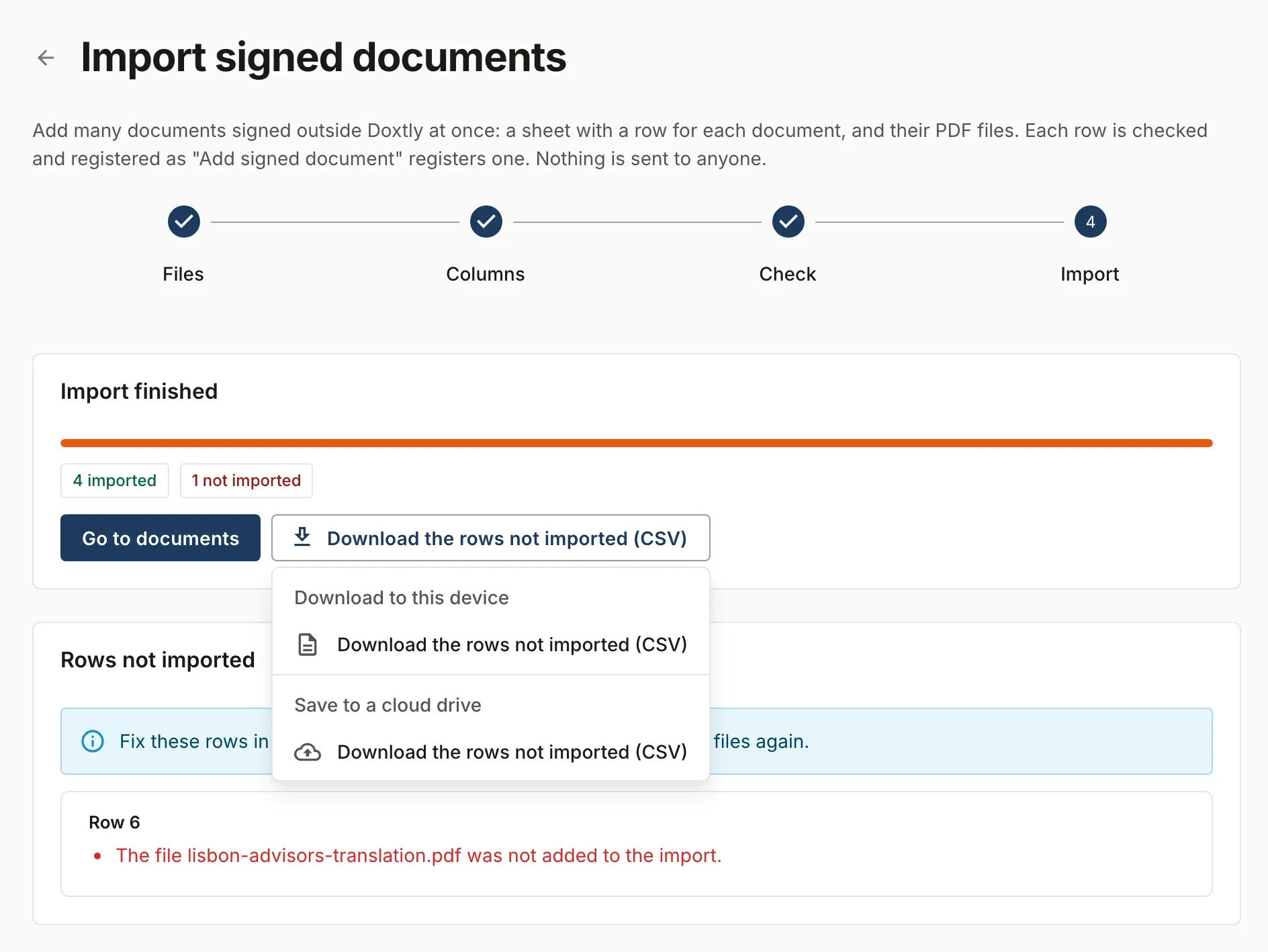
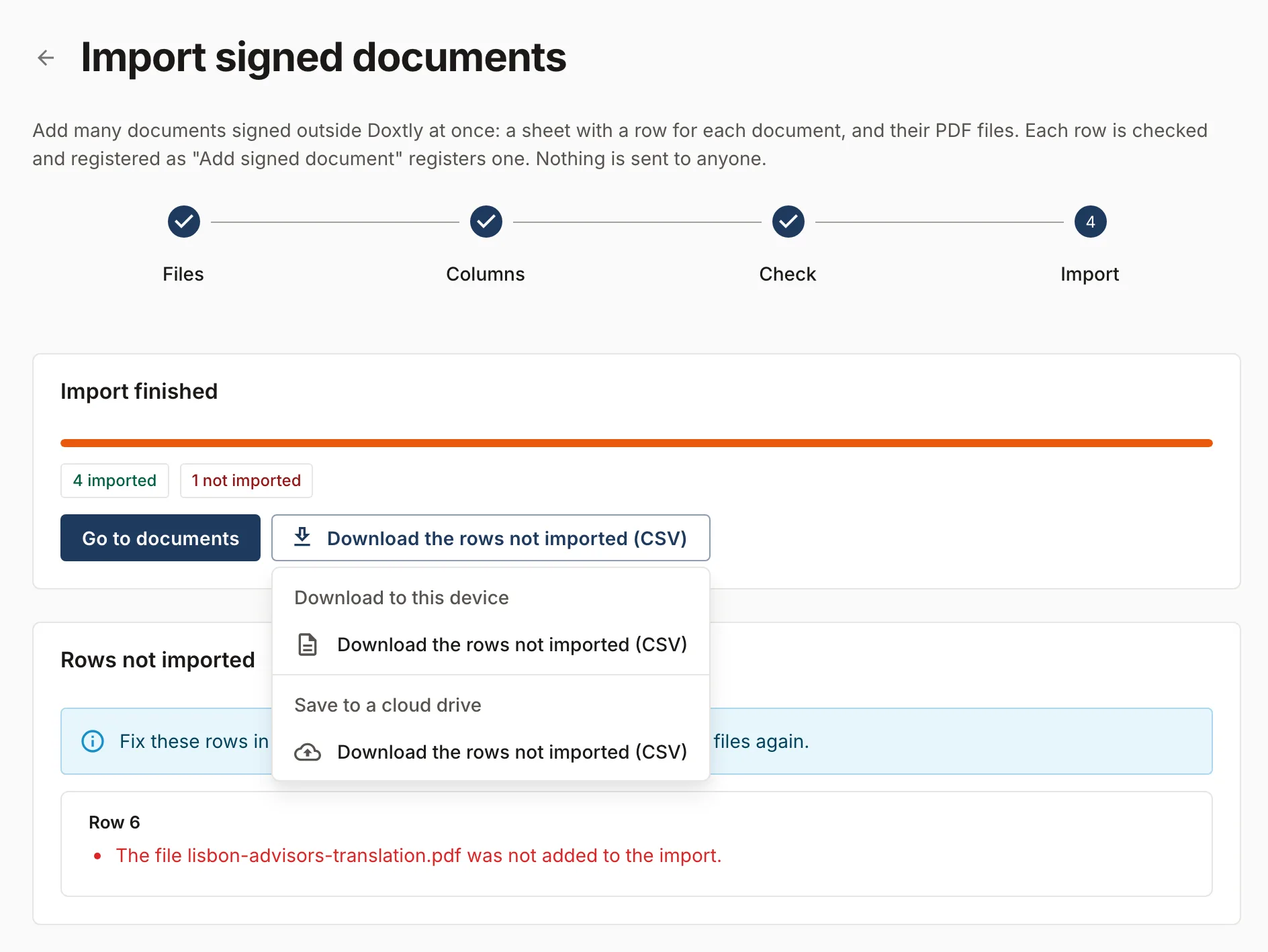
Import. The rows go in, in the background, with how many are imported, not imported and to go. You can leave the page: you are notified when it is done, and the notification opens the import again. Once finished, Download the rows not imported (CSV) gives those rows with the sheet’s own columns, the row’s number first and Why it was not imported last, to fix and import again with their PDF files. With a connected drive, its menu offers Download to this device and Save to a cloud drive, so the file can go straight into the team’s folder.
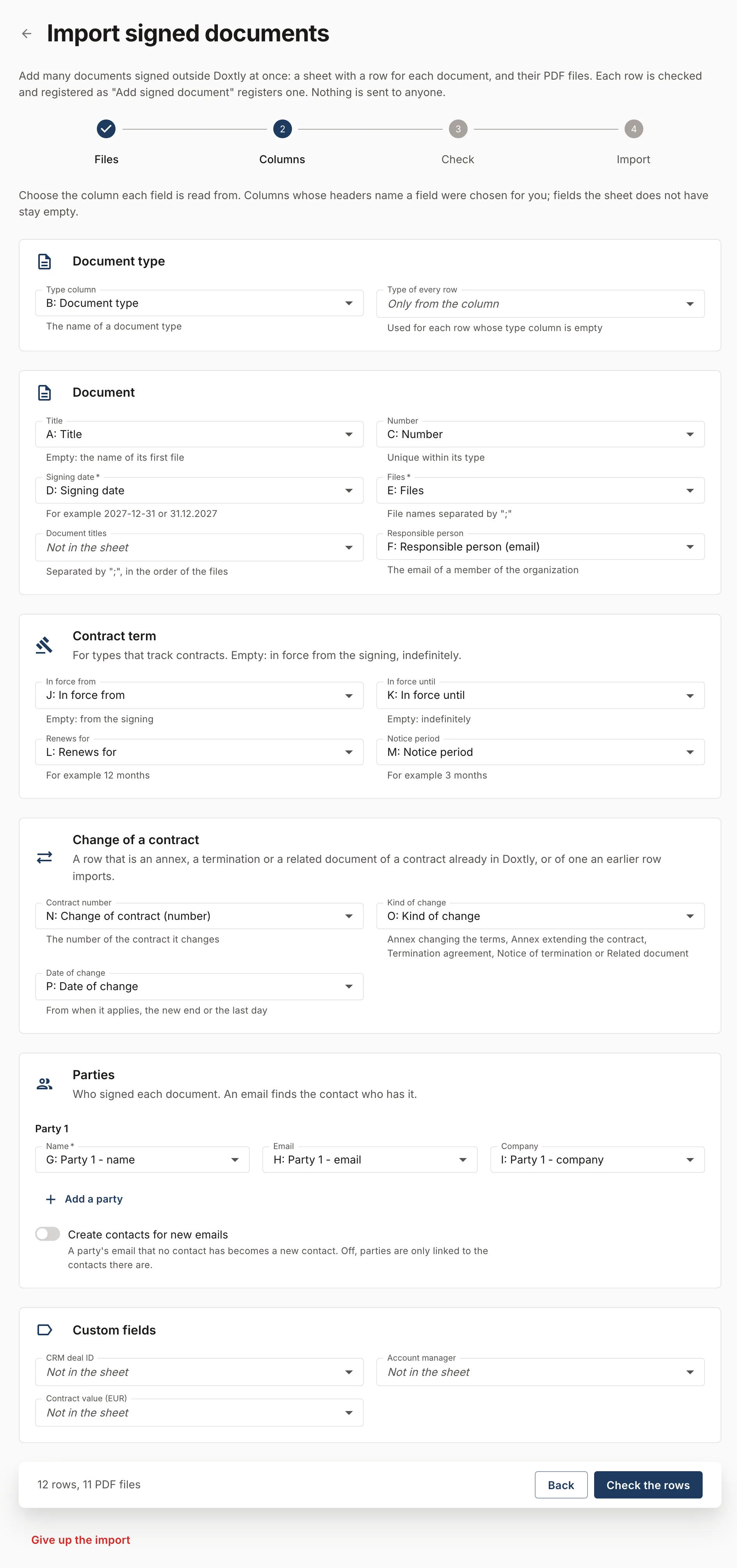
| Field | What the cell holds |
|---|---|
| Type column | The name of a document type. Type of every row gives the type of each row whose cell is empty, or none (Only from the column). |
| Title | Empty: the name of its first file. |
| Number | Unique within its type, also among the rows of the sheet. |
| Signing date | A date such as 2027-12-31 or 31.12.2027; 31/12/2027 works too. |
| Files | File names separated by ;. |
| Document titles | Separated by ;, in the order of the files. |
| Responsible person | The email of a member of the organization. |
| In force from, In force until | Empty: from the signing, and indefinitely. Only for types that track contracts. |
| Renews for, Notice period | A period such as 12 months, 3 miesiące or 2 años. |
| Contract number | For a row that is a change: the number of the contract it changes, already in Doxtly or imported by an earlier row. |
| Kind of change | Annex changing the terms, Annex extending the contract, Termination agreement, Notice of termination or Related document; empty, an annex changing the terms. |
| Date of change | From when it applies, the new end, or the last day. An extension without one makes the contract indefinite. |
| Party 1, Party 2… | Name, Email and Company of each party, up to ten; Add a party adds one. |
| Custom fields | Your packages’ custom fields, except sensitive ones. |
A party’s email finds the contact who has it, and the document then appears on that contact’s page. Create contacts for new emails makes a contact of each email no contact has yet; it needs Manage contacts. A row whose type you may not manage documents of is refused.
Give up the import deletes the sheet and the PDFs added to it; documents already imported stay. An import and its report are kept for 7 days after it was last prepared or after it finished.
How long contracts are kept
Section titled “How long contracts are kept”A type’s retention counts the days from when a package ended. A signed contract ends at the end of its last day in force, so the days count from then, not from the signing. A contract in force indefinitely, or one that renews until a change ends it, never ends, and is never removed.
A change shares its contract’s fate: it is kept as long as the contract, by the contract’s type, and is removed with it. While one of a contract’s changes is a draft or still being signed, nothing of the contract is removed.
Permissions
Section titled “Permissions”| What | Needs |
|---|---|
| See contracts, their state, changes and history, and the dashboard panel | View documents for the type. The alerts go to the responsible person. |
| Set and change a term, create annexes and endings, add to the contract file, delete changes | Manage documents for the type. |
| Add documents signed outside Doxtly, one or from a sheet | Manage documents for the document’s type, and for the contract a change belongs to. |
| Create contacts during an import | Manage contacts as well. |
| Read the notes of a contract or a change, or write them | View documents to read, Manage documents to write. See Notes. |
| Switch contracts on for a type, set its warning days | Manage document types. A template under Documents for changes also needs View file templates and generated files. |
Through the API, an access key does the same with the matching operations, such as Change a contract term, Create an annex, Add a signed document and Import signed documents. Roles are set up under Roles.