

The Twig template language
Twig is a small template language: you write the document, and mark in it where values go and which parts repeat or depend on something. Doxtly uses it in SVG templates. With a few lines of it, one training invoice design prints any number of course lines, adds “With distinction” to a certificate only when the score earns it, and writes dates the way your clients expect.
This page is the language reference. How to prepare the SVG file itself is on the SVG page.
Available when: your plan includes SVG templates (Starter or higher)
Three kinds of tag
Section titled “Three kinds of tag”{{ client.name }} prints a value{% if client.vip %}…{% endif %} does something: repeats, tests, sets{# a note to yourself #} a comment, never printedEverything outside these tags is left as you wrote it. Twig in Doxtly follows the Twig documentation, except that only the tags, filters and functions on this page are available.
Printing values
Section titled “Printing values”Dots go down into nested data. With this data:
{ "client": { "name": "Lakeside Clinic", "address": { "city": "Gdańsk" } } }{{ client.address.city }} prints Gdańsk.
Whatever you print is escaped, so a value like Marsh & Sons cannot break the file. The raw filter and {% autoescape false %} turn that off. Use them for markup your template builds itself, never for data that came from a person.
A filter changes a value on its way to the page, and filters chain:
{{ client.name|upper }}{{ notes|default('None')|slice(0, 80) }}{{ items|map(i => i.name)|join(', ') }}{{ client_no|pad(6) }}The filters and functions are the ones of Expressions and functions, the same as in forms, PDF templates and workflows: every function can be called by its name, in capitals or not ({{ SUM(items|map(i => i.price)) }}, {{ formatdate(issue_date, 'dd.MM.yyyy') }}), and every one that can follow a value is a filter ({{ issue_date|formatdate('d MMMM yyyy') }}). Twig adds the few on What a template may use.
You can also calculate: {{ net * 1.23 }}, {{ 260 + loop.index0 * 20 }}. In Twig + only adds numbers; the ~ sign joins text: {{ client.first ~ ' ' ~ client.last }}. Conditions use and, or, not and ==, not &&, ||, ! or ===.
Missing values
Section titled “Missing values”Templates are strict, because a contract with a silent gap is worse than no contract. Before anything is drawn, Doxtly compares the data with what the template reads, and a request that lacks something is refused with the list: Request data is missing required variables: client.vat_id. A value it can only find out about while drawing, such as a field missing from one item of a list, stops the document with an error naming the line.
A value that is there but empty is not missing: it prints nothing, and an empty list repeats nothing. There are two ways to mark a value as optional:
{{ client.vat_id|default('not registered') }}
{% if client.vat_id is defined %}  VAT ID: {{ client.vat_id }}{% endif %}
Doxtly notices both. A value used only this way is not on the list of what the template requires, and the Data structure dialog marks it as optional.
Conditions
Section titled “Conditions”{% if score >= 90 %} With distinction{% elseif score >= 60 %} Passed{% else %} Not passed{% endif %}Comparisons use ==, !=, <, >, <=, >=, and combine with and, or and not. Twig’s tests work as well, for example {% if notes is empty %} or {% if loop.index is even %}.
{% for item in items %} {{ loop.index }}. {{ item.name }}: {{ item.price|formatnumber(2, '.', ',') }}{% endfor %}The list must be in the data; item is only a name for the current entry, and is not something the data has to supply. Inside a loop you can use:
| Variable | Meaning |
|---|---|
loop.index |
The current round, counted from 1. |
loop.index0 |
The current round, counted from 0. Handy for positions. |
loop.first, loop.last |
Whether this is the first or last round. |
loop.length |
How many items there are. |
Setting your own values
Section titled “Setting your own values”{% set %} keeps a value for later. A value set before a loop keeps what the loop did to it, so this is how you carry a running total or position:
{% set total = 0 %}{% for item in items %} {% set total = total + item.price %}{% endfor %}Total: {{ total }}Values you set yourself are not data, and nobody is asked to supply them.
Macros
Section titled “Macros”A macro is a piece you draw several times, written once, such as the small label and value pairs on an invoice. Call it through _self. It sees only what you pass to it, not the rest of the data:
{% macro label(x, y, title, value) %}  <text x="{{ x }}" y="{{ y }}" font-size="7">{{ title }}</text>  <text x="{{ x }}" y="{{ y + 13 }}">{{ value }}</text>{% endmacro %}
{{ _self.label(40, 108, 'ISSUE DATE', formatdate(issue_date, 'dd.MM.yyyy')) }}
A template is a single file. include, extends, import, embed, use, source and dump are not available.
Built-in values
Section titled “Built-in values”Besides the data sent in, a template can read:
| Value | Contents |
|---|---|
_request.file_name |
The name of the file being generated. |
_request.template_type |
svg. |
_request.generated_at |
When generation started, in your organization’s time zone, such as 2026-03-15T14:30:00+01:00. Print it through a filter: {{ _request.generated_at|formatdate('dd.MM.yyyy HH:mm') }}. |
_metadata |
The template’s metadata merged with what the run brings. Absent when there is none. |
_params |
The link parameters a form or interactive document was opened with, when a workflow generates the document, or whatever an API call sends under that name. Absent otherwise. |
Because _metadata and _params may be absent, guard anything optional. {{ _metadata.document_type|default('Document') }} is safe; {{ _metadata.document_type }} stops the document if there is no such value. The full list of what a run provides is in Data and variables.
formatdate writes a date in the pattern you give it, as a function or a filter:
{{ formatdate(issue_date, 'dd.MM.yyyy') }}{{ issue_date|formatdate('d MMMM yyyy') }}The pattern’s letters are those of Dates: dd.MM.yyyy gives 15.03.2026, yyyy-MM-dd gives 2026-03-15, dd.MM.yyyy HH:mm gives 15.03.2026 14:30, d MMMM yyyy gives 15 March 2026 and d MMM yyyy gives 15 Mar 2026. Month and day names come in your organization’s language, so the last two read 15 marca 2026 and 15 mar 2026 in a Polish organization. Text in apostrophes stays as written: d MMMM yyyy 'r.'.
It reads a date written as 2026-03-15, with a time after a T or a space (2026-03-15 14:30, 2026-03-15T14:30:00), with an offset (2026-03-15T14:30:00+01:00, taken on the clock it is written in), or day first with dots (15.03.2026, 15.03.2026 14:30). An empty value, a date that does not exist (2026-02-31), anything else that is not a date, and a pattern with letters outside that list (such as the old d.m.Y) print nothing, so try a new template with sample data before it goes live.
TODAY() and NOW() are today and now in your organization’s time zone, and ADDDAYS, ADDMONTHS, DAYS and the other date functions work as everywhere: {{ issue_date|adddays(14)|formatdate('dd.MM.yyyy') }} prints the due date of a 14-day invoice.
Numbers
Section titled “Numbers”formatnumber(decimals, decimal_separator, thousands_separator) is what you want for money: {{ amount|formatnumber(2, ',', ' ') }} prints 45 000,00. Without the separators, formatnumber(2) writes exactly two decimals with a dot and no thousands separator, 45000.00. It is the same function as in forms, workflows and emails, so an amount looks the same in all of them. round, floor, ceil, abs, min(), max() and sum() work as everywhere.
Automatic numbering
Section titled “Automatic numbering”Legal documents refer to their own clauses, and clauses come and go. Numbering functions count as the template renders, so a section left out by a condition leaves no gap, and a reference to a clause always prints its true number.
| Function | Level | Default output |
|---|---|---|
article() |
Article | I. |
paragraph() or p() |
Paragraph | § 1. |
point() or pt() |
Point | 1. |
subpoint() or sub() |
Subpoint | a) |
item() |
Item | 1. |
Each call gives the next number of its level and restarts the levels below it. The first argument may be a format for this one number, or a label to refer to it by. With both, the format comes first:
{{ paragraph('definitions') }} Definitions{{ paragraph('roman', 'scope') }} Scope of the engagement| Format | Also written | Output |
|---|---|---|
numeric |
num, n, 1 |
1, 2, 3 |
roman |
roman_lower, i |
i, ii, iii |
roman_upper |
I |
I, II, III |
alpha |
alpha_lower, a |
a, b, c |
alpha_upper |
A |
A, B, C |
ordinal |
ord |
1st, 2nd, 3rd |
polish |
pl |
pierwszy, drugi, trzeci |
Roman numerals go up to 3999 and Polish words up to twenty; past that the number prints in digits.
A label that happens to be a format’s name is read as the format, so use descriptive labels such as payment_terms.
Referring to a clause
Section titled “Referring to a clause”{{ paragraph('fees') }} Fees{{ point() }} The client pays as set out in {{ ref('fees') }}| Function | What it prints |
|---|---|
ref('fees') |
The number as printed, such as § 3. |
ref('fees', false) |
The number alone, such as 3 |
ref('fees', true, 'roman') |
The number in another format, such as § iii. |
ref_full('fees') |
The whole path without the closing dot, such as § 3 ust. 2 for a point |
has_ref('fees') |
Not printed: true if the label was numbered. Use it in {% if %}. |
The words in a ref_full path are Polish legal terms: § for a paragraph, ust. for a point, pkt for a subpoint, lit. for an item. They stay the same in every language, so for a document in English use ref().
A reference can only print a number that is already known. A label numbered further down, or left out by a condition, prints as [fees]. Number the labelled clause first, and wrap references to optional clauses:
{% if has_ref('confidentiality') %}See {{ ref('confidentiality') }}.{% endif %}Other numbering functions
Section titled “Other numbering functions”| Function | What it does |
|---|---|
current_paragraph(), current_point(), current_subpoint() |
The current number alone, without moving on, or nothing if none was given yet. Takes a format. |
full_number() |
Every level numbered so far, such as 2.1. Takes a separator: full_number(' / '). |
reset_points(), reset_subpoints(), reset_numbering() |
Restart the points, the subpoints, or everything. They print nothing, so write {% do reset_points() %}. Labels already given stay usable. |
configure_numbering('paragraph', 'roman', 'Section ', ':') |
Sets a level’s format, prefix and suffix for the rest of the document. The level is article, paragraph, point, subpoint or item. A prefix or suffix you leave out becomes empty, so configure_numbering('paragraph', 'roman') also drops the § and the dot. |
n(), numbering_context(), new_numbering_context() |
Give you a named, separate counter, for two independent numberings in one document: {% set annex = new_numbering_context('annex') %}, then {{ annex.paragraph() }}. |
What a template may use
Section titled “What a template may use”A template can lay out the data it was given and nothing else. Anything not listed here stops the document with The template uses a tag, filter or function that is not allowed in document templates.
if, for, set, macro, with, apply, autoescape, block, do, verbatim
Filters
Section titled “Filters”Every function of Expressions and functions that can follow a value is a filter, under its name in small letters: upper, lower, capitalize, trim, digits, pad, replace, first, last, slice, split, join, len, contains, formatdate, adddays, round, formatnumber, abs and the rest. Twig adds:
| Filter | What it does |
|---|---|
default |
A value to use when the first is missing or empty: default('Unknown'). |
title |
Every word with a capital letter. |
striptags |
Removes markup. |
keys, column, merge, reverse, sort, batch |
Work with lists and objects. |
map, filter, reduce, find |
Take an arrow function written in the template: items|filter(i => i.price > 0). sort takes one too. |
escape or e, raw |
Control escaping. |
url_encode, json_encode, convert_encoding |
Convert a value for another use. |
A count is len, as in {% if items|len > 1 %}. Twig’s own length, date, date_modify, format and number_format are not available, nor are format_date and parse_date: write len, formatdate and formatnumber. replace takes the text to find and its replacement, replace('-', '/').
Functions
Section titled “Functions”| Function | What it does |
|---|---|
| Every function of Expressions and functions | By its name, in capitals or not: SUM(), IF(), TODAY(), formatdate(), lookup(). date(2026, 3, 15) is the catalogue’s DATE. |
range, cycle |
Lists. |
image, qrcode, barcode |
Pictures and codes. See SVG templates. |
| The numbering functions above | Numbering and references. |
Limits of a render
Section titled “Limits of a render”So that one template cannot hold up document generation, a render is bounded: at most one million steps and 30 seconds. A turn of a loop, a call of a macro or an arrow function, and every filter, function, test and operator are a step each. A list or text that one of them builds counts one more step per element or kilobyte. An ordinary document stays nowhere near this; you only meet the limit with something like range(1, 1000000)|sort. A render that goes over stops with the error The template could not be filled in, naming the line it reached.
When something goes wrong
Section titled “When something goes wrong”Doxtly does not test Twig when you upload a file, so mistakes surface when a document is generated. Try a new template with sample data before it goes live, through a test run of the workflow or a call to the API.
Generated files marks the document as failed. The reason itself appears on the failed step of the workflow run and in the API’s answer.
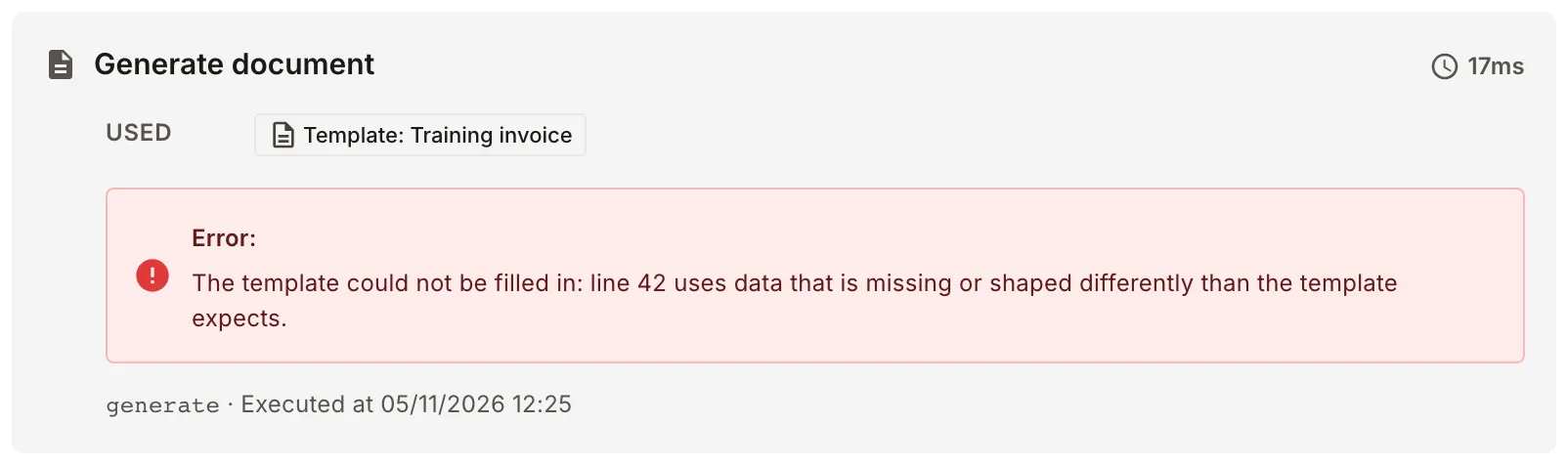
| Message | What to check |
|---|---|
| The template has a syntax error on line N. | An unclosed tag or a misspelt keyword. |
| The template could not be filled in: line N uses data that is missing or shaped differently than the template expects. | A value the data lacks (guard it as shown above), or a value of another kind than the line needs, such as text where the line loops over a list. Also a date that cannot be read. |
| The template uses a tag, filter or function that is not allowed in document templates. | Something not on this page. |
| Request data is missing required variables: … | The data left out values the template needs. Add them, or make them optional. |
| Image has invalid data URI format, Image is missing MIME type, Image contains invalid base64 data, Image has unsupported MIME type | image() was given something that is not a usable picture. See Images. |
| An image put into a document must be at most 10 MB | Use a smaller picture. |