

Word template reference
This is the look-up page for Word templates. If you have never made a template, start there: it explains what a marker is and shows each idea with pictures. Here you find every marker the template accepts, each spelling, and what it prints.
All markers at a glance
Section titled “All markers at a glance”| Marker | What it does |
|---|---|
${client.name} |
Prints a value |
${client.vat|none} |
Prints a value, or a default |
${tags} with a list of plain values |
Prints them joined with commas |
${date:start:d MMMM yyyy} |
Prints a date in a format |
${if:paid} … ${else} … ${/if} |
Keeps or drops content |
${items.name} in a table row |
Repeats the row for each item |
${items} … ${/items} |
Repeats a section for each item |
${sections} … ${paragraphs} … ${/paragraphs} … ${/sections} |
Repeats a list of each item inside its section |
${loop.index} in a repeated row or section |
Prints the item’s position: 1, 2, 3 |
${photo:120:80} in a repeated section |
Places the item’s picture |
${if:paid} in a repeated section |
Tests the item’s field |
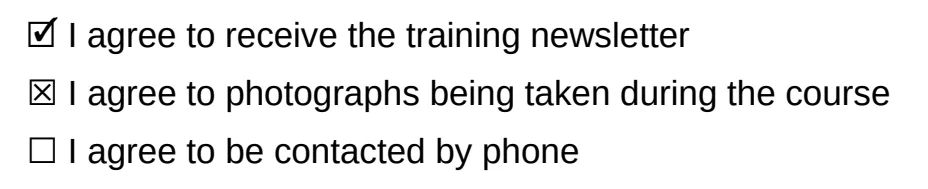
${checkbox:agreed} |
Prints a ticked or empty box |
${logo:4cm:2cm} |
Places a picture |
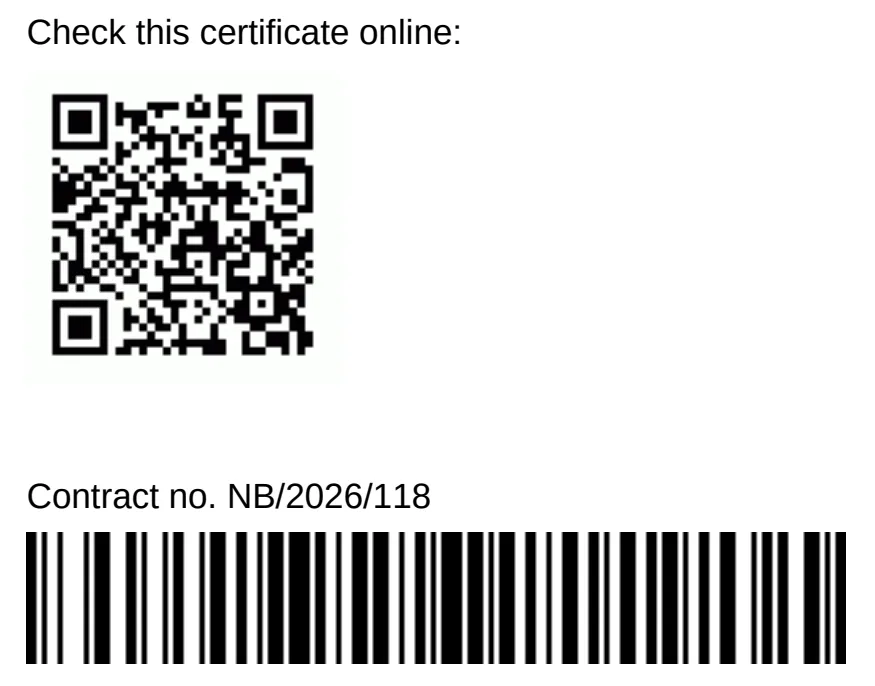
${qrcode:url:150} |
Draws a QR code |
${barcode:sku:ean13} |
Draws a barcode |
${#paragraph}, ${#point}, ${#subpoint} |
Print the next number |
${#paragraph:fees} |
Numbers and labels a clause |
${%fees} |
Prints the number of a label |
${@paragraph} |
Prints the current number without counting |
${#full} |
Prints the current number with all its levels |
${#reset:points} |
Starts a level from 1 again |
[SIGNATURE:CLIENT] |
Marks where a party signs |
[IN:CLIENT] |
Marks where a party puts its initials |
There are no filters, comparisons or calculations in a Word template, and no marker that picks out one item of a list: a list is repeated whole, and each copy can print its position. The one format a template sets itself is a date’s.
General rules
Section titled “General rules”- Give each marker one look, from the
$to the}. Never format part of it differently. Word then cuts the marker with a join you cannot see. Doxtly rejoins the pieces and still fills the marker in, but the value prints in the look of the$alone. The text around the marker keeps its own look. The rule, with a picture. - A marker stays inside one paragraph, with no spaces in it (but for the text of a default) and no invisible characters from pasted text.
- Names are case-sensitive. Use letters without accents, digits,
_and.. - Where this page writes
path, put a name from your data, such aspaidorclient.vip.
When part of a marker looks different
Section titled “When part of a marker looks different”| Marker | What happens |
|---|---|
| A value, a default, a field in a list | The whole value, or the default, prints in the look of the $. |
| A checkbox | The box prints in the look of the $: its size and colour too. |
| A number or a reference | The number prints in the look of the $. |
A condition, a repeated section’s markers, ${#reset:…} |
Nothing to see, because these print nothing. They work as usual. |
| A picture, a QR code, a barcode | Nothing to see: a picture has no font. |
[SIGNATURE:…] |
Read from the printed page, so bold or a colour on part of it does no harm. Hidden text does: that part is missing from the page, and the party with it. |
Where each marker works
Section titled “Where each marker works”| Marker | Body | Table row of a list | Repeated section | Header, footer | Footnote, endnote |
|---|---|---|---|---|---|
| Values, defaults | Yes | Yes | Yes | Yes | No |
| Pictures | Yes | The item’s, or the document’s | The item’s, or the document’s | Yes | No |
| Conditions | Yes | Decided for each row | Decided for each copy | Yes | No |
| Repeating a list | Yes | Not applicable | A list of the item | No | No |
Position (loop.*) |
No, an ordinary value | Yes | Yes | No, an ordinary value | No |
| Checkboxes, QR codes, barcodes | Yes | Whole-document values only | The item’s, or the document’s | Yes | No |
Counting numbers (#, @) |
Yes | Yes | Yes | No, printed as typed | No |
References (%) |
Yes | Yes | Yes | Yes | No |
| Signature markers | Yes | Yes | Yes | Yes | Yes |
In what order a document is filled
Section titled “In what order a document is filled”- Conditions are decided, and what they drop is gone. A condition inside a table row of a list or a repeated section that names a field of the items waits for step 3.
- The data is checked: anything the remaining document prints must be there.
- Table rows and repeated sections are repeated. Each copy goes through the same steps for its item: its conditions are decided, its own lists repeated, its position, values and pictures put in, and what it still needs is checked.
- Numbers are planned on the document as it now stands, then checkboxes are ticked and codes prepared.
- Pictures, codes and values go in.
This order explains most behaviour: a hidden clause needs no data and takes no number, a repeated point gets a number per copy, and a value hidden by an item’s condition is not needed for that item.
Values
Section titled “Values”| Marker | Prints |
|---|---|
${name} |
The value at the top level of the data |
${client.address.city} |
A nested value, as deep as the data goes |
${_metadata.key} |
Metadata of the template, merged with the run’s. Details |
${_params.campaign} |
A parameter of the link that started the run. It is required like any value, so give it a default if the link may not carry it. |
${_request.file_name} |
The file name being generated, such as Mutual NDA.pdf |
${_request.template_type} |
word |
${_request.generated_at} |
The moment of generation in your organization’s time zone, as 05.11.2026 14:05 |
${_package.number} |
The number of the signing package, such as UM/2026/0142. Only in a package and the steps after one: elsewhere use ${_package.number|}. Details |
The _request values cannot be set by the data, never need to be sent and are not listed on the Variables tab. Inside a repeated row or section, loop.* gives the item’s position in the same way. Outside one, ${loop.index} is an ordinary value the data would have to supply.
What each kind of value prints
Section titled “What each kind of value prints”| In the data | Printed |
|---|---|
| Text | As it is. &, < and $ are just characters, and a text that looks like a marker stays text. |
| Number | As sent, with no thousands separator or rounding: 1500.5 |
true |
1. For yes or no, use a condition or a checkbox. |
false |
Nothing |
null |
The default, or nothing if the marker has none |
| A list of plain values, such as a multi-select’s answer | Joined with a comma and a space: Word, Excel |
| An object (a group of named values), or a list of objects | Not printed by its own name: name a field of it, or repeat the list |
| A picture as a data URI | The picture |
A value that reads like a signature marker, such as a client typing [SIGNATURE:CEO] in a form, looks the same on paper but names nobody. Only the template decides who signs.
Default values
Section titled “Default values”${client.vat_number|none} the value, or the word none${order.po_number|} the value, or nothing${remarks| - } the value, or " - " with its spaces${_metadata.office|Warszawa} metadata takes a default too${_params.campaign|direct} and so does a link parameter${logo:4cm:2cm|} the picture, or nothing${stamp:50:50|No stamp} the picture, or the text No stamp${milestones.note|-} in a table row, per item${note|-} in a repeated section, per item- The default is everything between the first
|and}, and cannot contain}. - It applies when the data does not have the value, or has
null. An empty text is a value. - A value with a default is never required.
- Conditions and checkboxes need no default: a missing value counts as false. QR codes and barcodes take none.
${date:path:format}${date:path:format|default}${date:path}| Part | Rules |
|---|---|
path |
A date as forms and workflows send it: 2026-04-01, 2026-04-01T14:05, a moment with its offset such as 2026-04-01T23:30:00+02:00 (the day and time written there, whatever the time zone), or 01.04.2026. |
format |
Everything after the second colon, up to | or }, so HH:mm belongs to it. Leave it out for the usual format of the organization’s language: MM/dd/yyyy in American English; dd/MM/yyyy in British English, Spanish, French, Italian, Portuguese, Thai, Hindi and Arabic; yyyy-MM-dd in Chinese; yyyy/MM/dd in Japanese; dd.MM.yyyy in Polish and every other language. A value with a time adds HH:mm ( hh:mm a in American English). |
default |
Printed when the data has no value, and when the value is no date. |
| Letters | 2026-04-01T14:05 in Polish |
In English |
|---|---|---|
d, dd |
1, 01 |
1, 01 |
M, MM |
4, 04 |
4, 04 |
MMM |
kwi |
Apr |
MMMM (with a day) |
kwietnia |
April |
LLLL (the month alone) |
kwiecień |
April |
yy, yyyy |
26, 2026 |
26, 2026 |
E, EEE, EEEE |
śr., śr., środa |
Wed, Wed, Wednesday |
H, HH |
14 |
14 |
h, hh, a |
2, 02, PM |
2, 02, PM in American English, pm in British |
m, mm, s, ss |
minutes, seconds | minutes, seconds |
'text' |
the text, as typed | the text, as typed |
- The names are in the organization’s language. In Polish, use
MMMMwith a day (1 kwietnia 2026) andLLLLfor the month alone (kwiecień 2026). - Other letters are refused when the template is uploaded, with the reason:
Y(the year of the week; useyyyy),wandW(the week),Qandq(the quarter) and ordinals. The same letters work in a form’s and a PDF template’s date format. - A format is refused on upload, too, when it is empty, longer than 100 characters, or opens a text with
'and never closes it. - In a table row,
${date:milestones.due:dd.MM.yyyy}prints each item’s date. In a repeated section,${date:due:dd.MM.yyyy}prints the item’s own, or the document’s when the item has none. - A missing date stops the generation unless the marker has a default. A value that is no date stops it too, naming the marker.
Conditions
Section titled “Conditions”${if:path} … ${/if:path}${if:path} … ${else:path} … ${/if:path}| Spelling | Meaning |
|---|---|
${if:paid}, ${if:client.vip}, ${if:_metadata.show_note} |
A path into the data |
${if:!paid}, ${if:not_paid} |
The opposite. A name beginning not_ is always read this way. |
${else}, ${else:}, ${else:paid} |
The other branch; one per block |
${/if}, ${/if:}, ${/if:paid} |
Closes the innermost open block; the name is only for reading |
There is no “else if”: nest a second block instead. There are no comparisons.
What counts as false
Section titled “What counts as false”A condition does not hold for:
false,0,null, a missing value, an empty list;- the texts
"",null,0,false,no,n,off,uncheckedandnie, in any letter case, with spaces around them ignored.
Everything else holds, so "yes", "Tak", "maybe" and a list with items do. Note the difference from checkboxes, which tick only for a short list of yes-words.
When a condition’s name has no value, Doxtly also tries show_<name>, has_<name>, and the nested value under the same name with underscores for dots: ${if:warranty} finds has_warranty, and ${if:client_vip} finds client.vip.
Placement
Section titled “Placement”| Where | How it behaves |
|---|---|
| On a line of its own | The line goes with the marker, leaving no gap. Blank lines you typed around a block stay. |
| Inside one paragraph | Only the text between the markers goes: Price ${if:discount}reduced${else}standard${/if}, net. The text after a hidden block joins the text before it and takes its look. |
| Filling a table cell | The cell stays, empty, when the block does not print |
| Around a whole table | Markers on lines before and after the table |
A block cannot start in one table cell and end in another: such markers count as not paired, and are left as typed. So a block cannot hide single table rows; to make a row optional, use a list with one item or none. Pair markers of the same kind: both on their own lines, or both within one paragraph.
If the markers of a part of the document do not pair up, for instance an ${if} that is never closed or one that closes in another table cell, every condition in that part is left as typed. They print in the document, which is your sign to count them.
| Form | Syntax | Rules |
|---|---|---|
| Table row | ${list.field} in the cells of one row |
The row is repeated. Any field of the list found in the row triggers it. |
| Repeated section | ${list}, the content, then ${/list} |
Each marker alone on its paragraph. Inside, ${field} is the item’s, or the document’s when the item has no such field. A dotted name is the document’s, but for the list’s own name in front: ${list.field} is ${field}. |
| List in an item | ${list} … ${inner} … ${/inner} … ${/list}, or ${inner.field} in a table row inside the section |
The inner list of each item. Up to four levels. |
| List in an object | ${order.items.name}, or ${order.items} … ${/order.items} |
Named by its whole path |
- Items are objects with named fields: text, numbers, pictures, lists of plain values (printed joined with commas) and lists of objects (repeated by a section or a table row inside the item’s section). A list of plain values has nothing to repeat:
${tags}prints it joined with commas. A block${tags}…${/tags}is removed with the text in it, and a marker inside it stops the generation. - Inside a section, a plain name the item lacks is read from the outer item, then from the document. A name nobody has stops the generation, named with its list:
sections.paragraphs.note. - A condition inside a section or a table row of a list with a plain name tests the item’s field, with the same spellings and the same
show_andhas_lookups as elsewhere, and the document’s value when the item has no such field. A dotted name is the document’s: in a row write${if:paid}, not${if:items.paid}. - An empty list removes the row or section. A list that is missing from the data stops the generation, unless only a hidden block uses it.
- A list can fill one table row and one repeated section in the same document.
- Two tables may use lists with the same field names, as each marker names its own list.
- Repeating works in the body only. A section break inside a repeated section repeats with each item.
| Limit | Value |
|---|---|
| Lists inside lists | 4 levels |
| Items repeated in one document, every list and level counted | 5,000 |
| Pictures from the data in one document | 200 |
Past a limit, the document is not made, and the error names the list or the picture.
Rows from a spreadsheet step arrive as a list inside an object: ${students.displayRows.name} in a table row, or ${students.displayRows} … ${/students.displayRows}.
Position in a repeat
Section titled “Position in a repeat”Inside a table row of a list or a repeated section, each copy knows where it stands. The names are those of Twig templates, and the data never sends them:
| Marker | Prints, for the second of three items |
|---|---|
${loop.index} |
The position, counted from 1: 2 |
${loop.index0} |
The position, counted from 0: 1 |
${loop.length} |
How many items the list has: 3 |
${loop.first}, ${loop.last} |
1 in the first or the last copy, nothing in the others. Meant for conditions: ${if:loop.first} … ${/if}, ${if:!loop.last}, ${/if} |
${loop.parent.index}, and index0, length, first, last after loop.parent. |
The same for the list around this one, in a list inside an item |
${sections}${loop.index}. ${title}${paragraphs}${loop.parent.index}.${loop.index} ${text}${/paragraphs}${/sections}This prints 1. Scope, 1.1 …, 1.2 …, 2. Price, 2.1 ….
loopis always the innermost repeat around the marker. Eachparent.steps one list out:${loop.parent.parent.index}on the third level. In Twig the outer position is writtenloop.parent.loop.index.- The position prints as a plain number, with no full stop or format of its own. For
a),ii.or a number that runs on from one list to the next, use a number marker. - Inside a repeat,
loopis always the position, even when the data has a field calledloop. Outside any repeat, or with moreparent.than there are lists around the marker,${loop.index}is an ordinary value, and no document is made until the data sends it. - The Variables tab and the data structure do not list the
loopvalues used inside a repeat.
Checkboxes
Section titled “Checkboxes”| Marker | When ticked | Otherwise |
|---|---|---|
${checkbox:path} |
☑ | ☐ |
${checkbox:path:check} |
☑ | ☐ |
${checkbox:path:cross} |
☒ | ☐ |
A box is ticked by true, any number but 0, and the texts 1, true, yes, y, on, checked and tak, in any letter case. Anything else leaves it empty, as does a missing value. A PDF template’s checkbox ticks for the same values, so one set of data works for both.
The box is a character in the font, size and colour of the marker. A font that has no such symbol borrows it from another, which gives the box that font’s own shape. In a table row, a checkbox reads a value of the whole document. In a repeated section, ${checkbox:paid} reads the item’s field, or the document’s when the item has none.
Pictures
Section titled “Pictures”A picture is any value that holds a data URI beginning data:image/…;base64,. A plain ${logo} works, and adding a size is optional. A value that is no data URI, a web link for instance, is not fetched: ${logo} prints it as text, and a marker with a size stays in the document as typed. A list’s items can hold pictures too: in a repeated section, ${photo:120:80} places each item’s own picture, and in a table row, ${products.photo:40:40}.
| Spelling | Result for a 200 × 100 picture |
|---|---|
${logo} |
Fitted into 115 × 70 pixels: 115 × 57.5 |
${logo:100:100} |
Fitted into 100 × 100: 100 × 50 |
${logo:5cm:3cm} |
Fitted into 5 × 3 cm: 5 × 2.5 cm |
${logo:2in:1in} |
2 × 1 inches |
${logo:100x100} |
The same as ${logo:100:100} |
${logo:size=100x100} |
The same |
${logo:width=100:height=100} |
The same |
${logo::2cm} |
2 cm high, the width follows the proportions |
${logo:100:100:false} |
Stretched to 100 × 100. f and - mean the same. |
- Units:
cm,mm,in,pt,pc,px,%,em,ex. A number alone is pixels. - Formats: PNG, JPEG, GIF and BMP. The file’s real content counts, not its label. SVG and WebP are refused with a message naming the marker.
- Size limit: 10 MB per picture.
- The same picture can appear in several places, each with its own size.
- A list’s item can hold its own picture:
${photo:120:80}in a repeated section,${products.photo:40:40}in a table row.
QR codes
Section titled “QR codes”${qrcode:path} 200 × 200 pixels${qrcode:path:150} 150 × 150 pixels${qrcode:client.url:150} a nested value, 150 × 150 pixelsA QR code holds any text you send it. Common contents:
https://northbridge.example/verify/NB-2026-118WIFI:T:WPA;S:Northbridge-Guest;P:course2026;;BEGIN:VCARDVERSION:3.0FN:Maja LundTEL:+48221234567END:VCARDDon’t count on a white margin around the code: leave some space around it in the template. The largest size is 2000 pixels a side. As a guide, 200 pixels print at about 5.3 cm.
Barcodes
Section titled “Barcodes”${barcode:path} Code 128, width factor 2, 60 pixels high${barcode:path:ean13} a chosen type${barcode:path:code128:3:80} type, width factor, heightThe width factor is the width of the thinnest bar in pixels. The barcode is as wide as its bars need, so a longer value makes a wider code. Height is in pixels. A barcode is limited to 4,000,000 pixels in all (width times height). A type name that is not listed draws Code 128.
| Type | Holds |
|---|---|
code128 |
Letters, digits and ASCII characters. The universal choice, and the default. |
code128a |
Capitals, digits and control characters |
code128b |
ASCII letters, digits and characters |
code128c |
Digits, in pairs |
code39 |
Capitals, digits, space and - . $ / + % |
code39+ |
Code 39 with a check character |
code39e |
Code 39 extended to full ASCII |
code39e+ |
Extended Code 39 with a check character |
code93 |
As Code 39, more compact |
ean13 |
12 digits, or 13 with a correct check digit |
ean8 |
7 digits, or 8 with a correct check digit |
ean5, ean2 |
The 5-digit and 2-digit add-ons |
upca |
11 digits, or 12 with a correct check digit |
upce |
The short form of UPC |
itf14, i25, interleaved25 |
Digits, as on shipping cartons |
standard25, s25 |
Digits |
code11 |
Digits and a dash |
codabar |
Digits and - $ : / . +, framed by the letters A to D |
msi |
Digits |
msi+ |
Digits, with a check digit |
pharmacode, pharma2t |
Pharmaceutical codes, numeric |
postnet, planet, imb |
US postal codes |
rms4cc, kix |
UK and Dutch postal codes |
Values for codes
Section titled “Values for codes”- The value must be in the data, or the generation stops. Only a block that does not print is an exception.
- An empty value prints nothing.
- A code reads a value of the whole document, also in a table row. In a repeated section, a plain name reads the item’s field first, like a value does.
| Printed in the document | Meaning |
|---|---|
[QR Error] |
The code could not be made, for instance a size above the limit |
[Barcode Error] |
The type cannot hold this value (letters in an EAN-13, say), or the barcode is too large |
[Code Error] |
Something else went wrong while drawing |
Numbering
Section titled “Numbering”Levels
Section titled “Levels”| Level | Markers | Prints by default |
|---|---|---|
| Article | ${#article}, ${#art} |
I., II., III. |
| Paragraph | ${#paragraph}, ${#p} |
§ 1., § 2. |
| Point | ${#point}, ${#pt} |
1., 2. |
| Subpoint | ${#subpoint}, ${#sub} |
a), b) |
| Item | ${#item} |
1., 2. |
Each level starts again from the beginning under a new number of any level above it: a new article restarts paragraphs, a new paragraph restarts points, and so on. A name that is no level prints in brackets: ${#section} gives [section], and ${@section} gives [@section].
Formats
Section titled “Formats”Add a format after a colon. It changes the number that marker prints, and references to it use the same format.
| Format | Spellings | Example |
|---|---|---|
| Figures | numeric, num, n, 1 |
${#article:1} prints 1. |
| Small letters | alpha, alpha_lower, a |
${#point:alpha} prints a. |
| Capitals | alpha_upper, A |
${#point:A} prints A. |
| Small roman | roman, roman_lower, i |
${#point:i} prints ii. for the second point |
| Capital roman | roman_upper, I |
${#paragraph:I} prints § II. for the second |
| Ordinals | ordinal, ord |
${#paragraph:ordinal} prints § 3rd. for the third |
| Polish words | polish, pl |
${#paragraph:polish} prints § drugi. for the second |
A and I must be capitals to mean capitals; every other name can be written in any case. Roman numerals go up to 3999 and Polish words up to twenty, and larger numbers print in figures.
How a number joins the text
Section titled “How a number joins the text”| You write | The document prints |
|---|---|
${#paragraph}. Definitions |
§ 1. Definitions |
${#paragraph} Definitions |
§ 1. Definitions |
${#paragraph}Definitions |
§ 1. Definitions |
${#subpoint} access to staff |
a) access to staff |
The number’s own full stop and one typed after it count as one, and a space is added before text that touches the number. Do not type a full stop after a subpoint: a) has no stop of its own, so it would stay.
Labels
Section titled “Labels”${#paragraph:fees} labels the clause fees${#paragraph:roman:intro} format first, then label${#point:late_fee} any level can have a labelA label is made of letters, digits and _. It cannot be a format’s name (a, i, n, 1, pl, roman, alpha and the others), which would be read as a format. In a repeated section all copies share the label, and a reference gives the last one.
References
Section titled “References”| Marker | Prints | Example |
|---|---|---|
${%label} |
The number as printed | § 2., or 3. for a point |
${%label:bare} |
The number alone, in its format. :raw and :number mean the same. |
2 |
${%label:full} |
Every level. :hierarchical means the same. |
§ 2 ust. 3 pkt a |
The words in :full are fixed: ust. for a point, pkt for a subpoint, lit. for an item. A reference can come before its label, and works in headers and footers. A label that does not exist, or sits in a hidden block, prints [label], and the numbers around it carry on as if the block were not there.
Current number and full number
Section titled “Current number and full number”| Marker | Prints |
|---|---|
${@paragraph}, ${@point} and the other levels |
The number counted so far at this place, alone and with no counting: 2 |
${@point:roman} |
The same in a format of your choice: ii |
${#full} |
The current number with its levels: 2.1 for point 1 of paragraph 2 |
${#full:x} |
The same, joined with another separator of letters, digits or _ |
${#full} skips levels you never used above the first one you did, and stops at the first unused level below it. Before anything is counted, ${@…} prints nothing.
Starting again
Section titled “Starting again”| Marker | Starts from 1 |
|---|---|
${#reset:points} (also point, pt) |
Points, and the levels below |
${#reset:subpoints} (also subpoint, sub) |
Subpoints and items |
${#reset:all} |
All levels. Labels stay valid. |
A reset prints nothing, but a paragraph holding only a reset stays as an empty line. So attach it to a line you have anyway: ${#reset:points}${#point}. First, or the end of the heading above a table, to number that table’s rows from 1. Inside a repeated row it would restart on every row.
Signature markers
Section titled “Signature markers”[SIGNATURE:CLIENT][SIGNATURE: CLIENT]- The name starts with a capital letter, followed by capitals, digits or underscores. One space after the colon is allowed.
- Lowercase is plain text, unless All caps or Small caps prints it in capitals, in which case it counts as what it prints.
- It may sit in the body, a table, a header, a footer, a footnote or an endnote.
- What counts is what the page prints. Bold or a colour on part of the marker does no harm. Hidden text, deleted tracked changes and field codes are not read as you see them in Word, so keep the marker as plain, visible text.
- Keep the whole marker on one line. Give it room in narrow table cells, because a wrapped marker is not found.
- Leave letter spacing alone. Spacing expanded by a couple of points makes the letters count as separate, and the marker is lost.
- A party whose marker appears several times signs in each place.
[IN:CLIENT]marks where the party puts its initials: the same rules for the name, the party counts as signing even if it has only initials to put, and there is nothing printed beside them. In a footer it repeats on every page, so a party initials every page.
Where the signature lands
Section titled “Where the signature lands”The signature box starts at the marker’s left edge and runs right until the next text, 20 pt before the page’s edge, or 240 pt, whichever comes first. It rises until the text or the form field above it, up to 80 pt. If a line of underscores, dots or dashes lies directly under the marker, the box reaches down to it, so the signature stands on the line. Boxes stay 20 pt from the page’s edges. If the space is smaller than 100 × 30 pt, the box still takes that size and is drawn over the nearby text, which shows through. The signature boxes on one page all take the height of the lowest of them, so every party’s signature is printed at the same size.
The signature is applied on a transparent background: only the marker’s own text is painted out. The signer’s name and the time go under the signature.
For a comfortable result:
- Put the marker on its own line, left-aligned, directly above the signature line, with any caption below that line.
- Leave free space above: two or three empty lines (30 to 40 pt) for a legible signature, five or six (about 80 pt) for a full-size one.
- In two columns, give each at least 100 pt and put nothing else on the marker’s line in that column.
Initials are a small stamp, 90 × 40 pt, centred on the marker and covering it, and made smaller (down to 36 × 18 pt) only when something else has taken that place. Leave the line around the marker clear.
When you upload a Word or SVG template, Doxtly prints it with its markers still unfilled and reads where they stand, the same way the signing page does. If a marker has less free space than a signature or initials need, the form names it and its page, with this advice, so you can fix the file before you save. The check is a warning only, and the values a real document fills in can change the layout a little.
Who signs
Section titled “Who signs”- The Parties tab lists every party named by the template’s markers, including those in conditional blocks. No signing parties means the template names nobody, and a warning there means the file could not be read for parties.
- A party whose every marker sits inside a conditional block counts as conditional, and cannot be the party handed the signing page right after a form.
- A generated document is signed by the parties whose markers it actually printed.
- A document that names nobody goes into a package to be read, and holds nothing up.
Page breaks
Section titled “Page breaks”To start something on a new page, whatever came before it, use Word’s Page break before on its first line: Paragraph > Line and Page Breaks > Pagination. The guide has the steps. It never opens an empty page: a line already at the top of a page stays there.
| Where the setting is | Result |
|---|---|
| The line after a list or a block | That line opens a page, always |
| A line inside a repeated section | Every item starts a page |
A line holding only ${list} |
The list starts on a page, its later items follow on |
A line holding only ${if:…} or ${else} |
The block starts on a page and takes the break with it when it is not printed |
| A line holding only a closing marker | What follows the block opens a page |
| A cell of a repeated table row | No effect |
| A line whose text is wholly inside a condition that comes out empty | Does not start a page |
Tick Keep with next on the line before a signature line to keep the two together. A page break typed with Ctrl+Enter on a line of its own, and empty lines before a page start, can open an empty page in Word. Doxtly’s PDFs leave that page out, but the setting keeps the template looking in Word the way it prints, so use it instead.
When something goes wrong
Section titled “When something goes wrong”| What you see | Likely cause | Fix |
|---|---|---|
| The file is refused on upload: “The template has a marker that is not closed: …” | A ${ with no } after it in the same paragraph, such as ${fullAddress) |
Close the marker with } in Word and upload the file again |
| Generation stops with “Request data is missing required variables: …” | The data lacks a value the document prints, or a marker is misspelt | Compare the names with the Variables tab. Send the value, or give the marker a default. |
| The file is refused on upload: “The template names a value with a space in it: …” | A space inside the marker’s name, such as ${client name} |
Retype the marker without spaces and upload the file again |
| The error names a value that looks correct | An invisible character inside the marker, usually from pasted text | Delete the marker and type it again |
The error asks for loop.index |
The marker is outside every table row of a list and repeated section, or has more parent. than there are lists around it |
Move it into the repeat, or drop a parent.. See position in a repeat. |
The error asks for index or items.index |
index is not built in |
Write ${loop.index} |
${if:…} or ${/if} printed in the PDF |
Markers do not pair up, they span two table cells, or one is broken by Enter | Count the openings and closings, and retype the broken one |
| A value prints in the wrong font, weight or colour | Part of the marker was formatted differently, and the value took the look of the $ |
Retype the marker and format it as one piece |
| Text after a hidden block changed its look | The text before and after an inline block look different | Give both the same look, or put the block on lines of its own |
${items.name} printed in the PDF |
The marker is outside a table row, or it is a second row of the same list | Put it in the list’s one table row |
${items.note} printed in some rows |
Those items have no such field | Give the field a default: ${items.note|-} |
${client} or ${items} printed in the PDF |
The value is an object or a list of objects | Name a field, or repeat the list |
${logo:4cm:2cm} printed in the PDF |
The value is no picture, for instance a web link | Send a data URI |
| “The value for … is not a date” | A date marker’s value is text such as next week |
Send a date such as 2026-04-01, or give the marker a default |
| “The date marker … uses …” when you upload | The format has a letter that is not supported | Use the letters of the table |
| “The list … is nested deeper than 4 levels” | Lists inside lists go deeper than four levels | Flatten the data by one level |
| “Repeating the list … takes the document past 5000 repeated items” | Too many items across all lists | Send fewer items, or split the document |
| “The picture … takes the document past 200 pictures” | Too many pictures | Send fewer pictures, or split the document |
| Generation fails, or the PDF is wrong, only when a condition is false | A block’s markers are of different kinds | Pair them: see placement |
[confidentiality] in square brackets |
The label is misspelt, or its clause is hidden | Correct it, or put the sentence in the same block |
[section] in square brackets |
A number marker with an unknown level | Use a level name |
${#paragraph} printed in a header |
Counting does not work in headers and footers | Use a reference: ${%label} |
a). in the PDF |
A full stop typed after a subpoint | Delete the full stop |
| “The image for … cannot be put into a Word document” | The picture is SVG, WebP or not a picture | Send PNG, JPEG, GIF or BMP |
| “An image put into a document must be at most 10 MB” | The picture is too large | Make it smaller |
| “The uploaded file type does not match the selected template type (Word).” | The file only has a .docx ending and is no Word document. Nothing was saved. |
Open it in Word and save it as .docx |
| “The file cannot be read as a Word document: it is damaged, or of another kind.” | The upload, or the file chosen from a drive, is damaged or of another kind. Nothing was saved. | Open it in Word and save it as .docx again |
| A party is missing on the Parties tab | The marker is in lowercase, or part of it is hidden text | Retype it in capitals, as plain text |
| The signing page finds no place for a party | The marker wraps across lines, or its letters are spaced out | Give it room on one line and normal spacing |
| Text moved compared with Word | A font was replaced in the PDF | Use a common font and check the generated PDF |