

Import a form from a link
Moving to Doxtly from another form builder, or asked to match a form a client already uses? Paste the form’s public address and Doxtly builds a draft from it: its pages, fields, options and required marks, and for JotForm its conditions too. You get a form to review in the designer, not a finished one, and nothing is saved until you save it.
Available when: your plan includes AI agents and has room for another form, and your role has both the Manage forms and Use the AI assistants permissions
If your role or plan doesn’t allow it, the action doesn’t appear. When the plan’s limit of forms is reached, the button in Web forms stays visible but greyed out. The import runs on the same AI as Doxie, the AI assistant in Doxtly. When none is available to your organization, it answers: “AI isn’t available at the moment: this month’s AI budget is used up, or no AI is set up for your organization. An administrator can assign an AI integration to Doxie in the organization settings.”
Import a form
Section titled “Import a form”Northbridge’s new supplier form lives in JotForm. To bring it over:
-
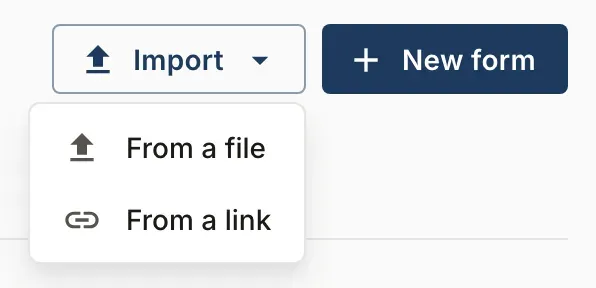
In Web forms, open Import, beside New form, and choose From a link. In the designer of a new form, the same action is under More actions.
-
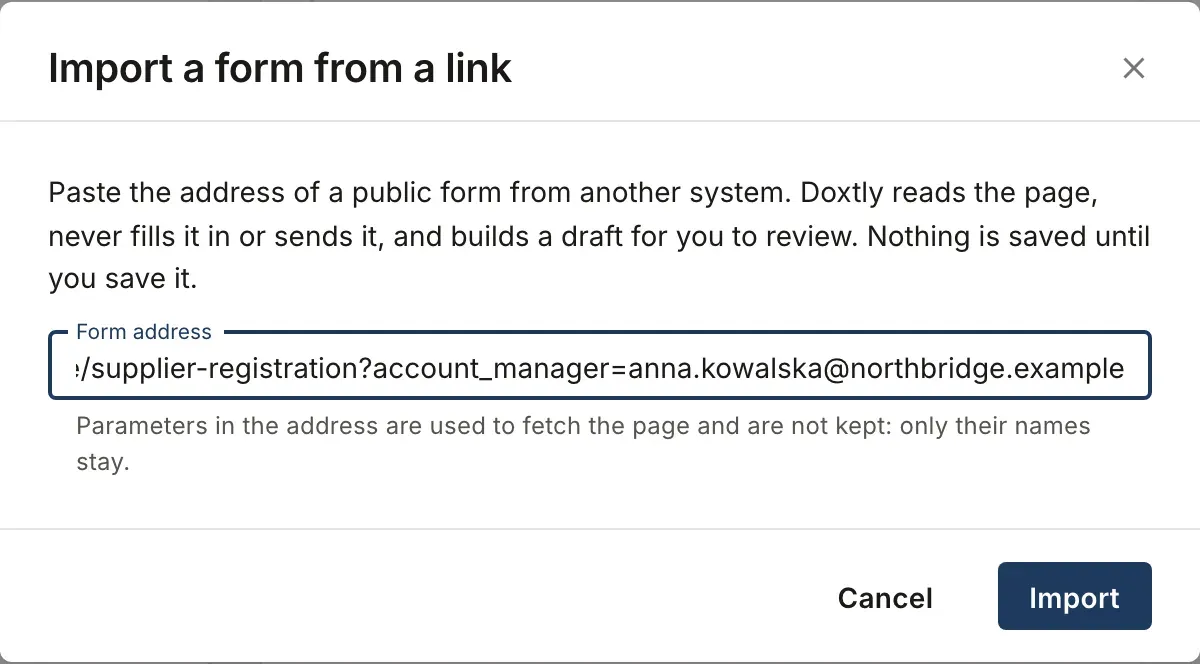
Paste the form’s address under Form address and press Import.
-
Read the Import summary, then press Review the draft.
-
Check the draft in the designer and try it in Preview.
-
Press Create. The form is saved as Inactive, so nobody reaches it until you switch it on. See Active and inactive.
Doxtly opens the address once, the way a browser opens a page, and reads it without running its scripts. It never fills in the form, never sends it and keeps nothing of the page. The import starts a new form, so it isn’t offered in the designer of an existing one. A draft replaces the title and elements already in the designer, and Undo takes it back in one step.
What comes over
Section titled “What comes over”Doxtly reads the structure of the form and nothing else. Every label and option in the draft is one the page had.
| On the page | In the draft |
|---|---|
| The page’s heading or title | The form’s title. Without one, the site’s address. |
| Pages of a multi-step form | The form’s pages. |
| Section headings in a JotForm form, and the first heading of each step elsewhere | Sections with that title. A one-page form from anywhere else arrives as one section without a title. |
| Text, email, number, date, time and text area questions | The matching field. The AI assistant may turn a text question into a better type when its label makes that plain, such as a date. |
| Choices from a list or radio buttons | A Select or Single choice with the same options. |
| A question with several answers to tick | One Checkbox (yes/no) per answer, labelled with the question and the answer, because a Doxtly field holds one answer. None of them is required. |
| A question made of parts, such as a name or an address in JotForm | One field per part. |
| File uploads and signatures | A File upload or Signature field. |
| Required marks | Required, except on a question split into checkboxes. |
| The submit button’s text | The form’s submit button. |
| Conditions in a JotForm form | Conditions on the same fields and sections. |
JotForm keeps its rules in the page, so Doxtly can read them. Any other page keeps them in its own scripts, so its fields come over without conditions and you add those yourself. A rule that says more than showing or hiding a field, such as a calculation, is listed in the summary.
The AI assistant only arranges the form: it decides which fields stand side by side and suggests a better field type. It doesn’t write labels or options, and it can’t add a question.
What a draft never holds
Section titled “What a draft never holds”Everything else on the page stays behind, including its introduction, pictures, styling and thank-you page. A draft also has these limits, whatever the page says:
- No passwords or payment cards. A field that asks for a password, a PIN, a one-time code, a card number, a card’s expiry date or its security code is left out and named in the summary, and so is a payment question in a JotForm form. A form on your organization’s address that asks for these looks trustworthy, which is exactly what a copied sign-in or payment page would exploit. To take a payment, add a Payment element yourself: the payer enters their card on the payment provider’s page, never on the form. To sign people in, use a service built for it.
- No sign-in pages. A page where such fields are at least as many as all the others is refused whole: “This page asks mostly for passwords or payment card details, so it cannot be imported: Doxtly does not build forms that collect them.”
- No imitations. A page whose title or button says it is a sign-in or an account check is refused even without a password box: “This page looks like a sign-in or account verification page, so it cannot be imported: Doxtly does not build forms that imitate them.” The AI assistant also refuses a form that plainly copies another organization’s sign-in, payment or identity page: “This form cannot be imported: it looks like a copy of a sign-in, payment or identity page, which the Terms and Conditions do not allow.”
- No links in labels. Links, web addresses and markup are removed from labels and options, so they arrive as plain text.
- No hidden fields. A field the page keeps out of sight or has switched off is left out and named in the summary. The page’s own hidden values, which no visitor ever sees, go without a mention. A hidden field named like a parameter of the address isn’t listed either, because the parameter is captured instead, as described below.
- No theme, redirect, success message, picture or video. Set these yourself in the designer and in the form’s settings.
Parameters in the address
Section titled “Parameters in the address”A link can carry values after the ?, and these say something useful: ?employee_email=anna@northbridge.example means the form takes an email address from its link. Doxtly shows each parameter’s name and the kind of value it had (email, number, date or text) in the summary, and adds the name to the draft’s link parameters. Your form then captures that parameter from its own link and keeps it with the submission, where a workflow reads it as {{ _params.employee_email }}.
Doxtly opens the page with its whole address, because a parameter can decide which form the page shows. The values are used for that one request and aren’t kept: they don’t reach the AI provider, the summary or the draft, and they aren’t stored or logged. A parameter named like a password or a card is left out and shown in the summary.
A captured parameter doesn’t fill in a field on the form. It travels with the submission.
The import summary
Section titled “The import summary”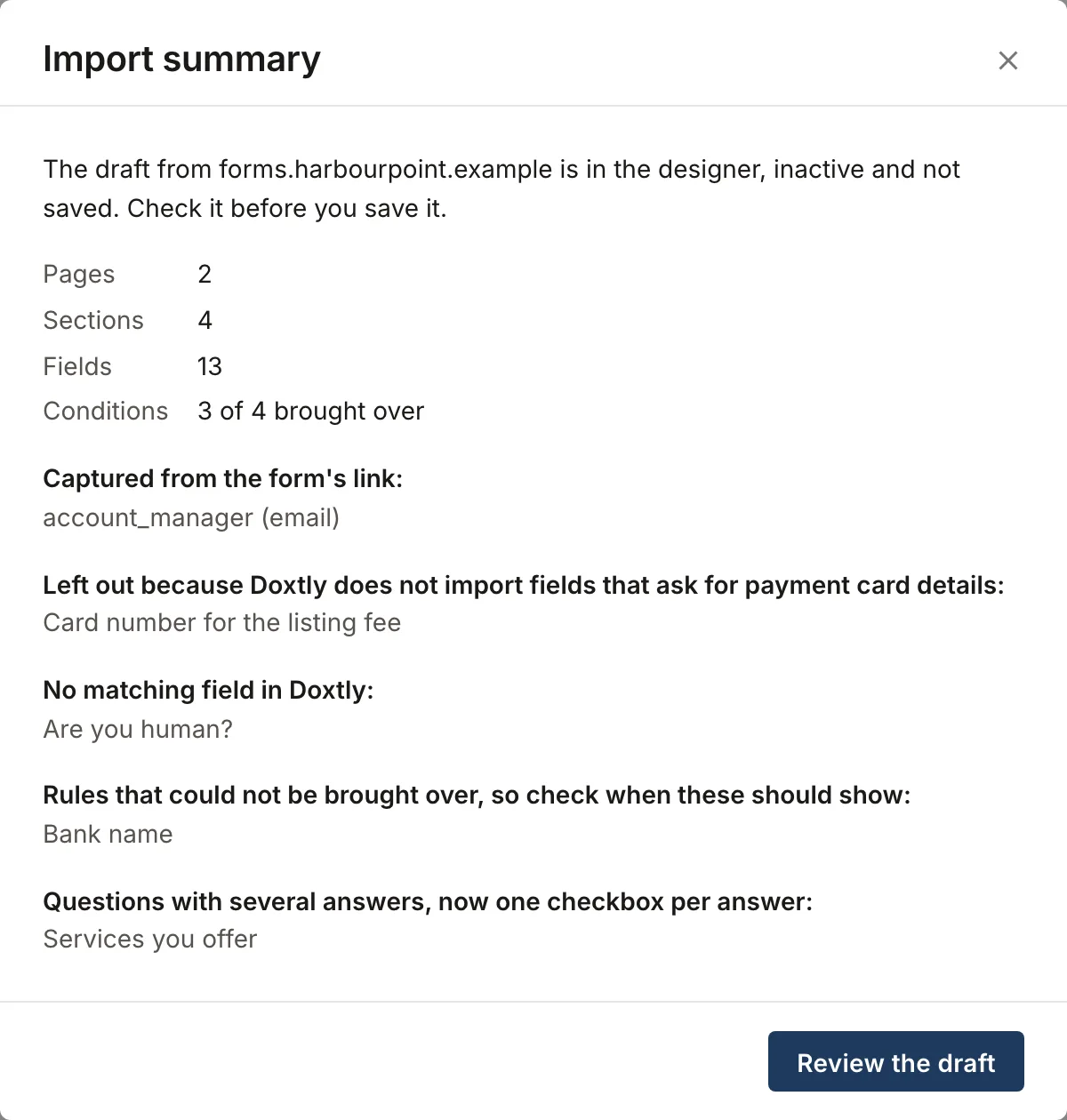
Doxtly counts these from the page itself, not from what the AI answered.
| Line | What it tells you |
|---|---|
| Pages, Sections, Fields | What the draft holds. A question with several answers counts as one field per answer. |
| Conditions | How many of the rules found on the page came over, as in “3 of 4 brought over”. |
| Captured from the form’s link: | The address’s parameters, each with the kind of value it carried. |
| Left out because Doxtly does not import fields that ask for a password: | Fields refused for that reason. |
| Left out because Doxtly does not import fields that ask for payment card details: | Fields refused for that reason. |
| No matching field in Doxtly: | Questions in a JotForm form that Doxtly has no field for, such as a CAPTCHA or a table of questions. Add a replacement if you need one. |
| Rules that could not be brought over, so check when these should show: | Rules that say more than showing or hiding, or that depend on a question that didn’t come over. The field stays, shown to everyone, until you add a condition. |
| Questions with several answers, now one checkbox per answer: | Questions that were split. Each answer is now its own data path. |
| Hidden on the page, so left out: | Fields nobody can fill in on the page, because they are kept out of sight or switched off. |
| Lists shortened to the length a form allows: | Choice lists of more than 200 options. |
A rule is listed under the field it acts on. Each list names up to 50 things and counts the rest, as in “and 20 more”, and something with no name to show is counted too, as in “1 without a name”. So a field Doxtly refused is always either named or counted.
When the page may be incomplete
Section titled “When the page may be incomplete”Doxtly reads what the page itself holds. A warning at the top of the summary says when that may not be everything, or when no draft came of it.
| Message | What it means | What to do |
|---|---|---|
| No form was found on this page. | There’s nothing to fill in. No draft is made. | Check the address. |
| The form is inside a frame from another address. Import that address instead. | The page only shows a form from elsewhere. No draft is made. | Open the page, find the form’s own address and import that. |
| This page may be incomplete: its scripts build the form or load its next steps, and Doxtly reads only what the page itself holds. | The form or its later steps appear only once a browser runs the page. | If a draft was made, compare it with the page and add what’s missing. |
| The page has more questions than a form can take, so the last ones were left out. | Doxtly stopped at 300 fields or at 30 pages, or sooner on a page that took too long to read. | Add the rest by hand. |
| The page was read, but no draft could be built from it. Try again. | The AI’s layout couldn’t be used, even at the second attempt. No draft is made. | Close the summary and import again. |
A site can also answer differently depending on who asks, so compare the draft with the page you see in your browser before you publish it.
Limits
Section titled “Limits”| Limit | Value |
|---|---|
| Address | http or https, on the standard web ports (80 and 443), with no user name or password in it, up to 1,024 characters. It must be on the public internet. |
| Page | An HTML page of up to 2 MB, read within 20 seconds, after at most 2 redirects to another address. |
| Parameters | 20 per address. A name holds only letters, digits and underscores, up to 100 characters, and doesn’t start with a digit. Any other is left out. |
| Fields | 300 per import. |
| Options | 200 per field. |
| Form pages | 30 on a page not made with JotForm. |
| Rules | 300 read per page. More are counted and shown in the summary. A field with more rules than one condition can hold comes over without a condition, and is listed there too. |
| Labels and options | 255 characters each, and 100 for the submit button’s text. Longer text is cut. |
| Imports | 5 a minute per organization, failed ones included. |
An address that can’t be read, a page outside these limits or one built to be unreasonably heavy to read is refused with the reason, such as “The page could not be read: the server answered 404.” A form with more fields or options than the limits allow still comes over, cut to them. Past the limit of imports you’ll see “Too many AI requests. Try again in 40 seconds.”
Good to know
Section titled “Good to know”The import’s AI request counts towards the same monthly allowance as Doxie’s work, or, when your organization assigned her its own AI integration, towards that integration’s usage and budget. A page with nothing to bring over costs no AI request, and an answer that needed a second attempt counts as two. If the import fails, the message comes with Ask Doxie, which opens Doxie told which address you tried and what went wrong.
What goes to the provider is the structure Doxtly read: section titles, labels, options, field types and data paths. The page’s other text and the address’s parameters don’t.
A form built by somebody else may be theirs to protect. You’re responsible for what you import and for having the right to reuse it, and these checks don’t replace that. See the Terms and Conditions.