

Departments
A department is a part of your company that people belong to: Legal, Training, Finance. It carries nothing but a name. Its value is what you can tie to it, so that one team’s work stays with that team.
Departments are optional. A ten-person firm where everyone sees everything doesn’t need any. Add them when you want to say “HR contracts are for HR”, or “team leads manage their own team and nobody else”. They also give you a tidy way to see who works where, since the users list shows each person’s department.
Available when: your role has View departments. Adding, renaming and deleting need Manage departments
What a department changes
Section titled “What a department changes”A person belongs to one department or none. By itself that changes little. Departments come into play in five places:
| Where | What it does |
|---|---|
| Role permissions | A permission granted at the Own department reach works only inside the holder’s department. |
| Document types | A type can be restricted to departments. People whose access to documents is limited to their department then see that type and its packages only if theirs is listed. |
| Forms | When editing submissions is on, a form can name the departments responsible for it. People who may edit submissions only in their own department can edit its submissions if theirs is listed, or if the form lists none. |
| Invitations and the users list | Someone with a department-limited permission invites into, sees and manages only their own department. |
| Single sign-on | People whose account is created at their first sign-in join the department chosen on the Access card. |
Here is an example. Northbridge Advisory has Sales and Training departments, among others. The “Employment” document type is restricted to HR. A custom role gives Training’s coordinator View documents at Own department: she sees packages of Training’s types and of types open to everyone, but the Employment packages stay hidden, and their type name with them.
The built-in roles barely use departments. All four grant the work permissions organization-wide, so a built-in Member can see every document whatever their department. Only their view of people and departments is limited. To keep work inside a team, build a custom role.
The departments list
Section titled “The departments list”Open Structure in the Organization group of the sidebar. Departments is the first tab.
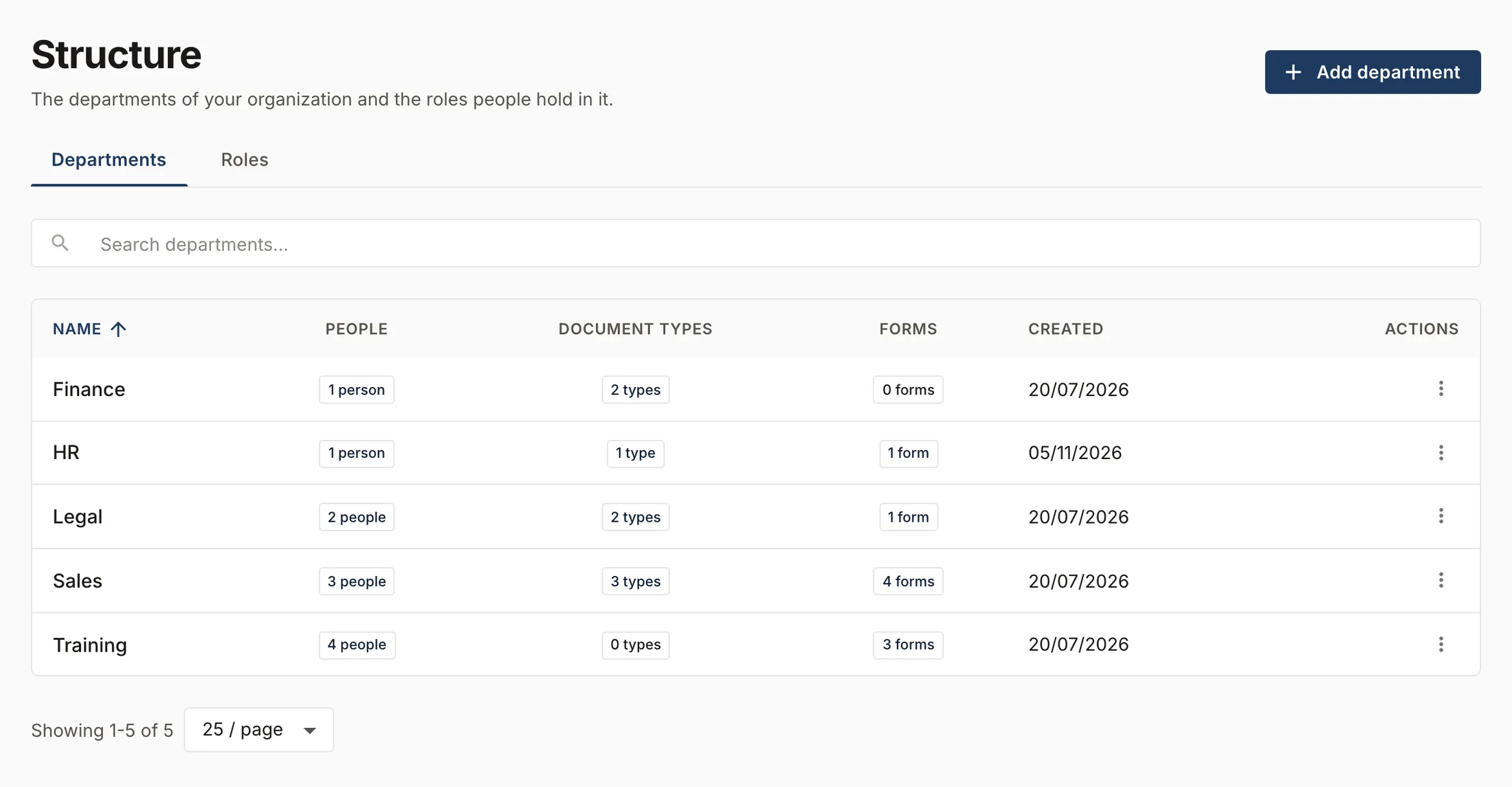
| Column | What it shows |
|---|---|
| Name | The department’s name. |
| People | How many people belong to it. |
| Document types | How many document types are open to it. |
| Forms | How many forms name it as responsible. |
| Created | When it was added. |
| Actions | The menu with Delete. |
The search box looks through names, and Name and Created sort on a click. The list is sorted by name by default, 25 to a page. If your search finds nothing, the list says No departments match your search and offers Clear all. On a phone, each department is a card.
With View departments at Own department, you see only your own department, and nothing if you are in none. That’s the case for a built-in Member. A built-in Viewer has no access to this tab at all.
If you have no departments yet, the list says No departments yet, and if you may add one it offers an Add department button there. The Actions menu and the Add department button appear only for people with Manage departments at Whole organization.

Add a department
Section titled “Add a department”Available when: your role has Manage departments at the Whole organization reach
-
Press Add department at the top of the page.
-
Enter a Name, up to 120 characters, such as Training.
-
Press Add.
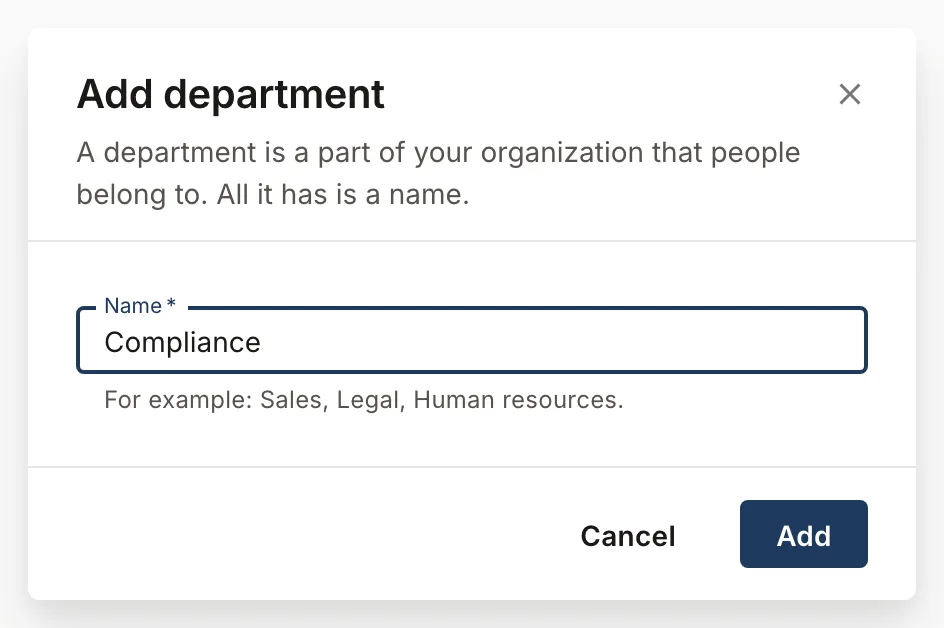
Spaces around the name are dropped. Each name can be used once in your organization. If it’s taken, the dialog says so and stays open.
To put people in, use Change role and department on the users list, or choose the department when you invite them.
Rename a department
Section titled “Rename a department”Available when: your role has Manage departments reaching this department
Click the department’s row, change the Name in the Rename department dialog and press Save. People, types and forms keep their link to it, so a reorganization that turns “Training” into “Academy” costs you one edit.
Someone holding Manage departments at Own department can rename their own department, and that’s all. Adding and deleting shape the whole company, so those need the Whole organization reach.
Delete a department
Section titled “Delete a department”Available when: your role has Manage departments at the Whole organization reach
Open the row’s menu, choose Delete and confirm in the Delete department? dialog. This can’t be undone.
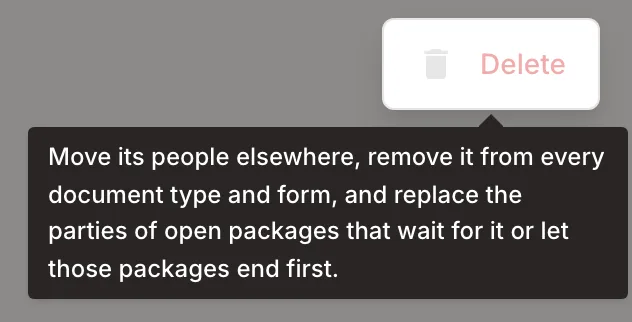
A department must be empty first, because deleting it would otherwise change people’s access without anyone deciding to. Its people would fall out of department-limited permissions, a type or form tied only to it would open up to everyone, and a package party waiting for “anybody in the department” would be left with nobody to take it on. While the department has people, document types or forms, or parties of open packages wait for it, Delete is greyed out and its tooltip says Move its people elsewhere, remove it from every document type and form, and replace the parties of open packages that wait for it or let those packages end first.
A department that workflows name, for example a party of a Create documents step picked from it, can’t be deleted either: the Delete department? dialog lists those workflows and its Delete stays greyed out until you change them (Deleting what a workflow uses).
To empty one:
-
Move its people on the users list.
-
Remove it from each document type that’s open to it.
-
Remove it from each form that names it.
-
For each open package with a party waiting for the department, use Replace party on the package page, or let the package end: signed, declined, voided or expired.
Pending invitations don’t block a delete: those people join with no department. Neither does the department chosen for single sign-on: accounts created at first sign-in then join with no department.
Signing as a department
Section titled “Signing as a department”Where you have departments, a package party can stand for anybody of a department instead of one person. See New package.