

Cloud files
These endpoints let your own software work with the drives your organization connected to Doxtly, for example filing a signed NDA in the client’s folder on Google Drive.
A storage is a drive connected under Integrations: a Google Drive, a OneDrive, a SharePoint library, a Dropbox or a Box, each with a root folder chosen when it was connected. The API sees that root folder and everything beneath it, and nothing above it. On a Google Drive connected with the narrower consent it sees even less: only what Doxtly created or was given, which the storage’s appCreatedFilesOnly capability tells you. The Cloud files page explains the module these endpoints sit behind.
Here is a typical job. Northbridge Advisory signs an NDA in its CRM and wants the PDF in the client’s folder:
- List the storages once and keep the
idof the drive. - Create the folder
Clients/Acme/Contracts. If it’s there already, you get it back and nothing changes. - Upload the file into that folder with
conflict=keep_both, so a second NDA for the same client never replaces the first. - Store the
webUrlof the answer in the CRM, so a colleague can open the file in one click.
Before you start
Section titled “Before you start”The overview explains sending requests and lists, and the errors page the errors every endpoint can answer. Each list below names the fields it accepts. Authentication explains how keys work.
Key permissions
Section titled “Key permissions”A key with manage_cloud_files still can’t upload, and a key with get_cloud_files still can’t download, because each endpoint needs its own permission. Every permission lists them with the labels you tick when you create the key.
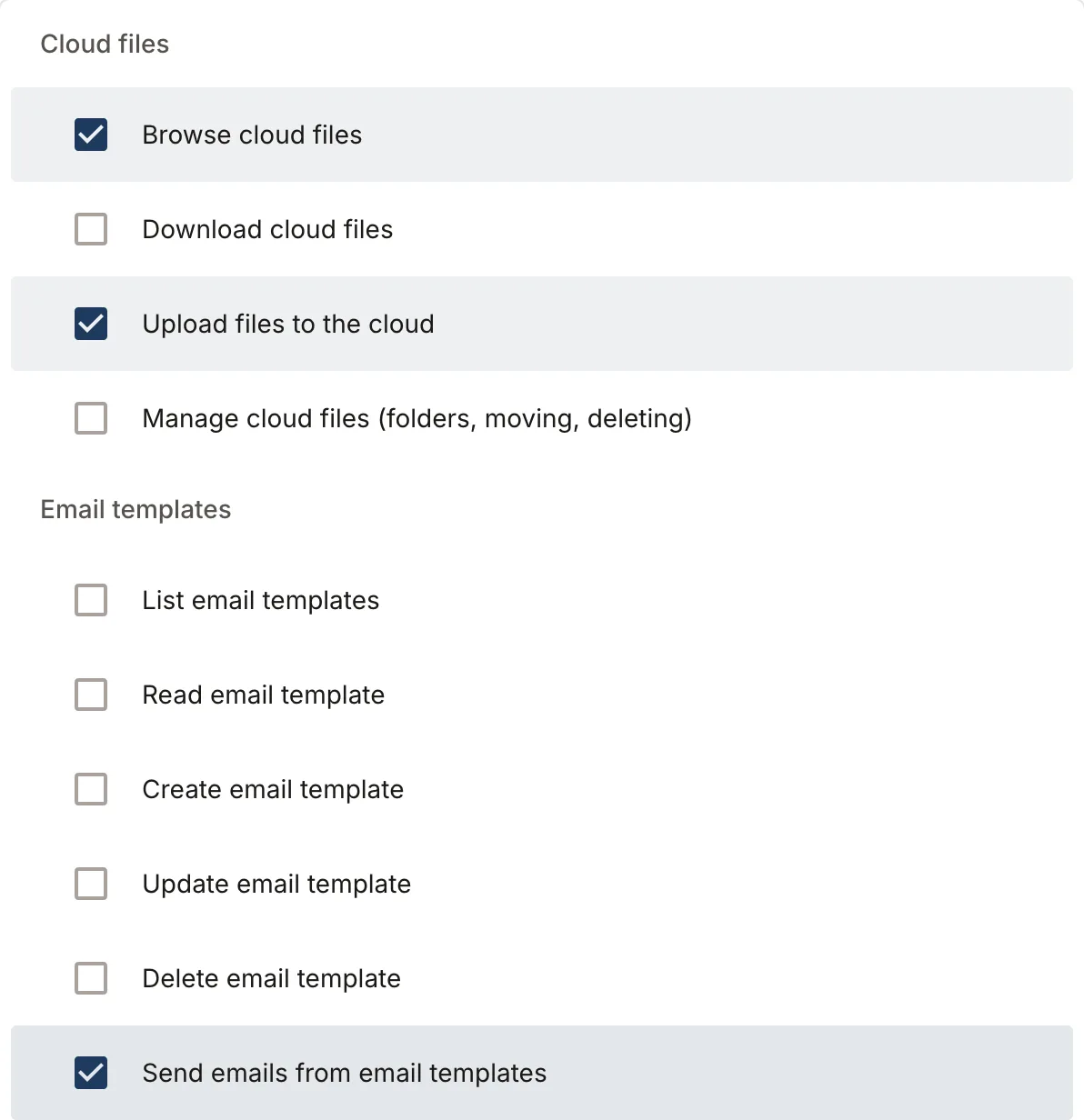
Every item is addressed by its path inside the storage, such as Clients/Acme/NDA.pdf. It’s the same path a workflow node takes, so one you read here can be pasted into a node.
- The storage’s root is the empty path. Where
pathis optional, leaving it out means the root. - Names are separated by
/. A backslash counts as a slash, and a leading, trailing or doubled slash is ignored. - Case doesn’t matter in names:
clients/ACMEandClients/Acmeare the same place on every provider. - These characters are refused:
"*:<>?|and control characters. So is a name made only of dots, which means a path can’t climb out with... - Spaces around a name and dots at its end are trimmed.
- A name has at most 255 characters. A path has at most 1024 characters and 32 levels.
A path over 1024 characters gets 422. Any other broken rule gets 400 with the code invalid_path. Remember to URL-encode paths in query strings: Clients/Acme Ltd/NDA.pdf becomes Clients%2FAcme%20Ltd%2FNDA.pdf, and curl’s --data-urlencode does it for you.
The item object
Section titled “The item object”Most endpoints answer with this object, or a list of them.
| Field | Type | Meaning |
|---|---|---|
id |
string | The provider’s own id for the item. |
name |
string | The item’s name. Empty for the root folder. |
path |
string | Its path inside the storage. |
kind |
string | file or folder. |
mimeType |
string or null | The file type the provider reports. |
size |
integer or null | Size in bytes, when the provider gives one. Google Docs, Sheets and Slides have none. |
modifiedAt |
string or null | Last change, as an ISO 8601 date and time. |
webUrl |
string or null | Where to open it in the provider’s own web app. |
nativeType |
string or null | spreadsheet, document or presentation for a Google Sheet, Doc or Slides deck. Null for everything else. |
isSpreadsheet |
boolean | True when workflow nodes can read it as a spreadsheet: a Google Sheet, or an .xlsx, .xls, .ods, .csv or .tsv file. |
revision |
string or null | The provider’s revision of the item. It changes when the item changes, so comparing two values tells you whether a file was edited in between. |
Errors from the drive
Section titled “Errors from the drive”Any endpoint below that takes a storage id can answer these. They are the only cloud file errors not repeated in each table.
| Status | code |
When |
|---|---|---|
404 |
integration_not_found |
No storage has this id in your organization. A malformed id, another organization’s id and the id of an integration that isn’t a drive all look the same. |
409 |
integration_inactive |
The storage exists but isn’t active. Check needs_reconnect. |
409 |
reconnect_required |
The provider no longer accepts the connection. Someone has to connect it again under Integrations. |
409 |
conflict |
The item changed at the provider while the request was working on it. Try again. |
403 |
access_denied |
The provider refused access to this file or folder. |
429 |
rate_limited |
The provider is limiting requests. Wait and try again. |
503 |
unavailable |
The provider failed or didn’t answer in time. Try again later. |
400 |
unsupported |
The provider can’t do what was asked, or it turned the request down. |
List storages
Section titled “List storages”GET/v1/cloud_files/storages
Returns the organization’s active drives. Call this first: it gives you the id every other cloud file endpoint needs. Default drives come first, then the rest by provider and name. A storage whose connection broke is not listed here, so also read needs_reconnect if you want to warn someone.
Key permission: get_cloud_files. No parameters.
Headers: X-Api-Key, X-Api-Secret
The response is a JSON array, empty when no drive is connected.
| Field | Type | Meaning |
|---|---|---|
id |
string | The storage’s id. |
name |
string | Its name in Doxtly. |
provider |
string | google_drive, one_drive, sharepoint, dropbox or box. |
isDefault |
boolean | Whether it’s the default storage of its provider. |
rootLabel |
string | The root folder as the person who chose it saw it. |
connectedAccount |
string or null | The account the drive is connected as. |
capabilities |
object | What the provider can do, below. |
| Capability | Meaning | Google Drive | OneDrive, SharePoint | Dropbox, Box |
|---|---|---|---|---|
nativeSpreadsheets |
It has spreadsheets of its own, which portable lookups can find. |
true |
false |
false |
conditionalWrites |
A write can depend on the revision that was read. | false |
true |
true |
appCreatedFilesOnly |
The connection sees only what Doxtly created or was given, not the whole drive. | Depends on the consent given when connecting | false |
false |
trash |
Deleted items go to a trash they can be restored from. | true |
true |
true |
nativeConversionOnUpload |
An uploaded office file can become a native document. | true |
false |
false |
The errors every endpoint can answer apply here too.
Example
Section titled “Example”curl 'https://api.doxtly.com/v1/cloud_files/storages' \ -H "X-Api-Key: $DOXTLY_API_KEY" \ -H "X-Api-Secret: $DOXTLY_API_SECRET"Response 200:
[ { "id": "01a1ab0c-4436-705d-84fa-23b997395c43", "name": "Company Google Drive", "provider": "google_drive", "isDefault": true, "rootLabel": "/", "connectedAccount": "documents@northbridge.example", "capabilities": { "nativeSpreadsheets": true, "conditionalWrites": false, "appCreatedFilesOnly": false, "trash": true, "nativeConversionOnUpload": true } }, { "id": "01a1ab0c-473e-7485-9abd-83a696874762", "name": "Legal OneDrive", "provider": "one_drive", "isDefault": true, "rootLabel": "/", "connectedAccount": "documents@northbridge.example", "capabilities": { "nativeSpreadsheets": false, "conditionalWrites": true, "appCreatedFilesOnly": false, "trash": true, "nativeConversionOnUpload": false } }]Shortened: the list holds 4 entries here, and 2 are shown.
List storages that need reconnecting
Section titled “List storages that need reconnecting”GET/v1/cloud_files/storages/needs_reconnect
Returns the drives whose connection the provider no longer accepts, after someone revoked consent or a token expired. They can’t be browsed until someone connects them again. A nightly check of this list is a cheap way to catch a broken connection before a workflow fails on it.
Key permission: get_cloud_files. No parameters.
Headers: X-Api-Key, X-Api-Secret
The response is a JSON array of objects with id, name and provider, in the same order as the storage list.
The errors every endpoint can answer apply here too.
Example
Section titled “Example”curl 'https://api.doxtly.com/v1/cloud_files/storages/needs_reconnect' \ -H "X-Api-Key: $DOXTLY_API_KEY" \ -H "X-Api-Secret: $DOXTLY_API_SECRET"Response 200:
[ { "id": "01a1ab62-263c-78f1-b97c-e4988cc2715f", "name": "Training files", "provider": "google_drive" }]List a folder
Section titled “List a folder”GET/v1/cloud_files/storages/{id}/items
Returns one page of a folder’s contents, folders first and then files, each by name. Use it to show a file picker or to check what’s in a client’s folder.
Key permission: get_cloud_files
Headers: X-Api-Key, X-Api-Secret
Path parameters: id, the storage’s identifier from List storages.
| Query parameter | Type | Default | Rules |
|---|---|---|---|
path |
string | root | The folder to list. At most 1024 characters. |
pageSize |
integer | 100 |
From 1 to 200. |
pageToken |
string | none | The nextPageToken of the previous page. At most 4096 characters. |
search |
string | none | Only items whose name matches this text, ignoring case. At most 255 characters. It looks in this folder only, not in its subfolders. |
Keep search and pageSize the same while you follow a pageToken. On OneDrive, SharePoint, Dropbox and Box, search finds the text anywhere in a name. On Google Drive, Google’s own search does the matching and goes by how words begin, so Acme finds Acme NDA.pdf but cme doesn’t.
| Response field | Type | Meaning |
|---|---|---|
path |
string | The folder listed. |
items |
array | Item objects. |
nextPageToken |
string or null | Pass it to get the next page. Null on the last page. |
An item whose name no path can hold, such as Notes: 2026? on Google Drive, is left out. A page can therefore hold fewer items than pageSize and still have a next one.
| Status | code |
When |
|---|---|---|
400 |
invalid_path |
The path breaks a path rule. |
400 |
not_a_folder |
The path points at a file. |
400 |
unsupported |
On OneDrive, SharePoint, Dropbox or Box, the folder holds more than 10,000 items. |
404 |
not_found |
Nothing is at this path. |
422 |
A query parameter is out of range. |
The errors every endpoint can answer apply here too.
Example
Section titled “Example”curl -G 'https://api.doxtly.com/v1/cloud_files/storages/01a1ab0c-4436-705d-84fa-23b997395c43/items' \ -H "X-Api-Key: $DOXTLY_API_KEY" \ -H "X-Api-Secret: $DOXTLY_API_SECRET" \ --data-urlencode 'path=Clients/Baltic Freight Solutions' \ --data-urlencode 'pageSize=50'Response 200:
{ "path": "Clients/Baltic Freight Solutions", "items": [ { "id": "gdSD", "name": "Service agreement SA-2026-045.pdf", "path": "Clients/Baltic Freight Solutions/Service agreement SA-2026-045.pdf", "kind": "file", "mimeType": "application/pdf", "size": 50239, "modifiedAt": "2026-08-24T12:53:50+00:00", "webUrl": "https://drive.google.com/file/d/gdSD/view", "nativeType": null, "isSpreadsheet": false, "revision": "1" }, { "id": "gdSK", "name": "Kick-off notes.docx", "path": "Clients/Baltic Freight Solutions/Kick-off notes.docx", "kind": "file", "mimeType": "application/vnd.openxmlformats-officedocument.wordprocessingml.document", "size": 2674, "modifiedAt": "2026-11-01T12:53:50+00:00", "webUrl": "https://drive.google.com/file/d/gdSK/view", "nativeType": null, "isSpreadsheet": false, "revision": "1" } ], "nextPageToken": null}Look up an item
Section titled “Look up an item”GET/v1/cloud_files/storages/{id}/item
Tells you whether something is at a path, and what. A missing item is a normal answer here, 200 with exists: false, so this is the call to make before writing somewhere.
Key permission: get_cloud_files
Headers: X-Api-Key, X-Api-Secret
Path parameters: id, the storage’s identifier from List storages.
| Query parameter | Type | Default | Rules |
|---|---|---|---|
path |
string | root | The item to look up. At most 1024 characters. |
lookup |
string | exact |
exact or portable. |
exact finds the item at exactly this path. portable finds what a workflow node would find. On Google Drive, results.xlsx (or .xls, .ods) also finds a Google Sheet named results. On every provider, results with no extension also finds the file results.xlsx.
| Response field | Type | Meaning |
|---|---|---|
exists |
boolean | Whether something is there. |
item |
object or null | The item, or null. |
| Status | code |
When |
|---|---|---|
400 |
invalid_path |
The path breaks a path rule. |
409 |
ambiguous_path |
With portable, more than one item answers to the path, such as both a file results.xlsx and a Google Sheet results. Rename or remove one. |
422 |
lookup isn’t one of the two values, or path is too long. |
The errors every endpoint can answer apply here too.
Example
Section titled “Example”curl -G 'https://api.doxtly.com/v1/cloud_files/storages/01a1ab0c-4436-705d-84fa-23b997395c43/item' \ -H "X-Api-Key: $DOXTLY_API_KEY" \ -H "X-Api-Secret: $DOXTLY_API_SECRET" \ --data-urlencode 'path=Finance/Invoices 2026.xlsx' \ --data-urlencode 'lookup=portable'Response 200:
{ "exists": true, "item": { "id": "gdVV", "name": "Invoices 2026.xlsx", "path": "Finance/Invoices 2026.xlsx", "kind": "file", "mimeType": "application/vnd.openxmlformats-officedocument.spreadsheetml.sheet", "size": 5076, "modifiedAt": "2026-10-05T12:53:50+00:00", "webUrl": "https://drive.google.com/file/d/gdVV/view", "nativeType": null, "isSpreadsheet": true, "revision": "1" }}See which workflows use a path
Section titled “See which workflows use a path”GET/v1/cloud_files/storages/{id}/usages
Returns the workflows with nodes that work with this path or with anything beneath it, active or not. A node whose path holds variables counts when that path could lead here. Ask before you move or delete something: workflows find files by path, so one that reads Clients/Acme/Course results.xlsx stops finding it the moment the file goes elsewhere.
Key permission: get_cloud_files. To see which workflows they are, the key also needs a permission that reads workflows, such as get_workflows. Without one it learns only how many.
Headers: X-Api-Key, X-Api-Secret
Path parameters: id, the storage’s identifier from List storages.
| Query parameter | Type | Default | Rules |
|---|---|---|---|
path |
string | root | The file or folder to ask about. Left out, it asks about the whole storage. At most 1024 characters. |
| Response field | Type | Meaning |
|---|---|---|
count |
integer | How many workflows use the path. |
workflows |
array or null | Null when the key can’t read workflows. Otherwise the workflows by name. |
workflows[].id |
string | The workflow’s id. |
workflows[].name |
string | Its name. |
workflows[].nodes[].nodeId |
string | The node’s id in the workflow. |
workflows[].nodes[].actionType |
string | storage_upload, storage_download, spreadsheet_read or spreadsheet_write. |
workflows[].nodes[].pathTemplate |
string | The path as the node’s author wrote it, variables included. |
| Status | code |
When |
|---|---|---|
400 |
invalid_path |
The path breaks a path rule. |
422 |
path is too long. |
The errors every endpoint can answer apply here too.
Example
Section titled “Example”curl -G 'https://api.doxtly.com/v1/cloud_files/storages/01a1ab0c-4436-705d-84fa-23b997395c43/usages' \ -H "X-Api-Key: $DOXTLY_API_KEY" \ -H "X-Api-Secret: $DOXTLY_API_SECRET" \ --data-urlencode 'path=Contracts'Response 200:
{ "count": 3, "workflows": [ { "id": "01a1ab0c-c9ae-7b5b-bd53-bb7df23299a3", "name": "Archive signed agreements", "nodes": [ { "nodeId": "upload", "actionType": "storage_upload", "pathTemplate": "/Contracts/Signed 2026" } ] }, { "id": "01a1abc6-11f3-784f-a8bb-a6b1b2557d75", "name": "Contract renewal reminders", "nodes": [ { "nodeId": "find", "actionType": "spreadsheet_read", "pathTemplate": "Contracts/contract-register.xlsx" }, { "nodeId": "mark", "actionType": "spreadsheet_write", "pathTemplate": "Contracts/contract-register.xlsx" } ] }, { "id": "01a1abca-96ce-7a20-87a8-eee6b40cb457", "name": "Monday contract list", "nodes": [ { "nodeId": "load", "actionType": "spreadsheet_read", "pathTemplate": "Contracts/contract-register.xlsx" } ] } ]}Read a storage’s quota
Section titled “Read a storage’s quota”GET/v1/cloud_files/storages/{id}/quota
Returns how much space the drive has, in bytes, as the provider counts it. The figures describe the whole account or drive, not only the root folder Doxtly sees, so on Google they include Gmail, Photos and the trash. Doxtly asks the provider on each call, so don’t poll it.
Key permission: get_cloud_files. No query parameters.
Headers: X-Api-Key, X-Api-Secret
Path parameters: id, the storage’s identifier from List storages.
| Response field | Type | Meaning |
|---|---|---|
used |
integer or null | Bytes used. |
total |
integer or null | The allowance. Null when the drive has no limit. |
free |
integer or null | Bytes left. Null when the drive has no limit. |
All three are null when the provider counts no space for this drive, as with a Google shared drive. That’s still a 200.
The errors every endpoint can answer apply here too.
Example
Section titled “Example”curl 'https://api.doxtly.com/v1/cloud_files/storages/01a1ab0c-4436-705d-84fa-23b997395c43/quota' \ -H "X-Api-Key: $DOXTLY_API_KEY" \ -H "X-Api-Secret: $DOXTLY_API_SECRET"Response 200:
{ "used": 40157944218, "total": 107374182400, "free": 67216238182}Read a spreadsheet’s structure
Section titled “Read a spreadsheet’s structure”POST/v1/cloud_files/storages/{id}/spreadsheet_inspect
Returns the sheets and columns of a spreadsheet, with the type each column mostly holds. It never returns a cell’s value. Use it to check that a results sheet still has the columns your integration expects. The file is opened the way a workflow node opens it, so results.xlsx also finds a Google Sheet named results.
Key permission: get_cloud_files
Headers: X-Api-Key, X-Api-Secret, Content-Type: application/json
Path parameters: id, the storage’s identifier from List storages.
| Body field | Type | Required | Rules |
|---|---|---|---|
path |
string | Yes | The spreadsheet. At most 1024 characters. |
sheet |
string or null | No | The sheet to read columns from, at most 255 characters. Blank means the first visible sheet. |
headerRow |
integer or null | No | The row holding the headers, counted from 1. 0 means the sheet has no header row, so columns go by their letters. Null means row 1. From 0 to 1,048,576. |
| Response field | Type | Meaning |
|---|---|---|
exists |
boolean | Whether a spreadsheet is at the path. When false, file is null, the lists are empty and sheet and headerRow echo what you sent. |
file |
object or null | name, path, format (xlsx, xls, csv, ods or native), size, modifiedAt and webUrl. |
sheets |
array | Every sheet, each with name and hidden. |
sheet |
string | The sheet that was read. |
headerRow |
integer | The header row used. |
suggestedHeaderRow |
integer or null | The row that looks like the header, when it isn’t the one you asked for. |
columns |
array | Each with index (from 0), letter (A, B, and so on), header (the header’s text, empty when the cell is), key and type. |
key is the column’s variable-safe name, unique in the sheet, which workflows use. type is string, number, boolean, date, datetime, error or empty.
| Status | code |
When |
|---|---|---|
400 |
invalid_path |
The path breaks a path rule. |
400 |
not_a_file |
The path points at a folder. |
404 |
sheet_not_found |
The file has no sheet with this name. The detail lists those it has. |
409 |
ambiguous_path |
Both a file and a Google Sheet answer to the path. |
413 |
file_too_large |
The file is larger than 25 MB. |
413 |
too_many_columns |
The sheet has more than 200 columns. |
415 |
format_unsupported |
The file isn’t a spreadsheet Doxtly can read, such as a Google Doc, a .pdf, an Excel 5.0/95 workbook or a workbook protected with a password. |
422 |
header_empty |
The row given as the header is empty. |
422 |
corrupted |
The file is damaged. |
422 |
archive_suspicious |
The file looks damaged or unsafe and wasn’t opened. |
The errors every endpoint can answer apply here too.
Example
Section titled “Example”curl -X POST 'https://api.doxtly.com/v1/cloud_files/storages/01a1ab0c-4436-705d-84fa-23b997395c43/spreadsheet_inspect' \ -H "X-Api-Key: $DOXTLY_API_KEY" \ -H "X-Api-Secret: $DOXTLY_API_SECRET" \ -H 'Content-Type: application/json' \ -d '{ "path": "Finance/Invoices 2026.xlsx", "headerRow": 1 }'Response 200:
{ "exists": true, "file": { "name": "Invoices 2026.xlsx", "path": "Finance/Invoices 2026.xlsx", "format": "xlsx", "size": 5076, "modifiedAt": "2026-10-05T12:53:50+00:00", "webUrl": "https://drive.google.com/file/d/gdVV/view" }, "sheets": [{"name": "Attendance", "hidden": false}], "sheet": "Attendance", "headerRow": 1, "suggestedHeaderRow": null, "columns": [ { "index": 0, "letter": "A", "header": "Course", "key": "course", "type": "string" }, { "index": 1, "letter": "B", "header": "Date", "key": "date", "type": "string" }, { "index": 2, "letter": "C", "header": "Participants", "key": "participants", "type": "number" }, { "index": 3, "letter": "D", "header": "Trainer", "key": "trainer", "type": "string" } ]}Download a file
Section titled “Download a file”GET/v1/cloud_files/storages/{id}/content
Returns the file’s bytes as an attachment. A Google Doc comes as .docx, a Sheet as .xlsx, and a Slides deck or any other Google document as .pdf, under its name with that extension added.
Key permission: download_cloud_file
Headers: X-Api-Key, X-Api-Secret
Path parameters: id, the storage’s identifier from List storages.
| Query parameter | Type | Default | Rules |
|---|---|---|---|
path |
string | root | The file. At most 1024 characters. |
The response is the file itself with status 200, never JSON. Content-Disposition carries the file name and Content-Length its size. Content-Type is the file’s own for common office, PDF, text and picture formats, and application/octet-stream for anything else.
| Status | code |
When |
|---|---|---|
400 |
invalid_path |
The path breaks a path rule. |
400 |
not_a_file |
The path points at a folder, which includes leaving path out. |
404 |
not_found |
Nothing is at this path. |
413 |
too_large |
The file is over 100 MB, or a Google document exports to more than the 10 MB Google allows. Open those in the provider instead. |
422 |
path is too long. |
The errors every endpoint can answer apply here too.
Example
Section titled “Example”curl -G 'https://api.doxtly.com/v1/cloud_files/storages/01a1ab0c-4436-705d-84fa-23b997395c43/content' \ -H "X-Api-Key: $DOXTLY_API_KEY" \ -H "X-Api-Secret: $DOXTLY_API_SECRET" \ --data-urlencode 'path=Clients/Lumen Health Clinics/NDA signed.pdf' \ -o NDA.pdfThe response is the file itself. Its headers:
HTTP/2 200content-type: application/pdfcontent-disposition: attachment; filename="NDA signed.pdf"content-length: 50239Upload a file
Section titled “Upload a file”POST/v1/cloud_files/storages/{id}/files
Puts one file into a folder and creates the folder when it’s missing. The file keeps the name you send, with anything a provider can’t accept replaced by _ and anything past 255 characters cut off.
Key permission: upload_cloud_file
Headers: X-Api-Key, X-Api-Secret, Content-Type: multipart/form-data
Path parameters: id, the storage’s identifier from List storages.
Send multipart/form-data:
| Form field | Type | Required | Rules |
|---|---|---|---|
file |
file | Yes | The file. At most 50 MB. |
directory |
string | No | The folder it goes into. Empty means the root. At most 1024 characters. |
conflict |
string | No | What happens when the name is taken. See below. Default fail. |
convertToNative |
boolean | No | true turns it into a Google Doc, Sheet or Slides deck. Default false. |
conflict |
What happens |
|---|---|
fail |
Nothing is written. The request answers 409 with the code item_exists, so you can decide. |
overwrite |
The existing file gets the new content and, where the provider can, keeps its id and version history. A folder in the way still answers 409. |
keep_both |
The new file gets a free name, such as NDA (2).pdf. |
skip |
Nothing is written, and the existing item is returned. |
convertToNative applies only on a storage whose nativeConversionOnUpload is true, and is ignored elsewhere. It works for .xlsx, .xls, .ods, .csv, .docx, .doc, .odt, .pptx and .odp files. The converted document’s name loses its extension.
The response is 201 with the item, and with skip that’s the item that was already there. Compare size or revision if you need to tell the two apart.
| Status | code |
When |
|---|---|---|
400 |
No file field arrived, or the upload broke off. |
|
400 |
invalid_path |
directory breaks a path rule, or the file name has nothing usable left in it. |
400 |
not_a_folder |
A file stands where a folder of directory should be. |
409 |
item_exists |
The name is taken under fail, or a folder has it under overwrite. |
413 |
too_large |
The file is over 50 MB. |
422 |
conflict isn’t one of the four values, or directory is too long. |
|
503 |
A workflow kept writing this name for the 20 seconds the request waited. Try again. |
The errors every endpoint can answer apply here too.
Example
Section titled “Example”curl -X POST 'https://api.doxtly.com/v1/cloud_files/storages/01a1ab0c-4436-705d-84fa-23b997395c43/files' \ -H "X-Api-Key: $DOXTLY_API_KEY" \ -H "X-Api-Secret: $DOXTLY_API_SECRET" \ -F 'file=@NDA.pdf' \ -F 'directory=Clients/Lakeside Clinic/Contracts' \ -F 'conflict=keep_both'Response 201:
{ "id": "gd1CE", "name": "NDA.pdf", "path": "Clients/Lakeside Clinic/Contracts/NDA.pdf", "kind": "file", "mimeType": "application/octet-stream", "size": 50239, "modifiedAt": "2026-11-05T13:28:49+00:00", "webUrl": "https://drive.google.com/file/d/gd1CE/view", "nativeType": null, "isSpreadsheet": false, "revision": "1"}Save an export to a drive
Section titled “Save an export to a drive”POST/v1/quizzes/{id}/results/export/drive?format=xlsx
Every export the server makes on request has a POST .../drive twin that saves the same file to a folder of one of your organization’s storages instead. Its query parameters are the export’s own; the body says where the file goes. The file is the one the download gives, byte for byte. A file the application has already downloaded - an invoice, a generated document, a document’s audit certificate or signed PDF, a paper copy’s scan, a portable file - is saved with Upload a file instead.
| Endpoint | Saves | Key permission of the export |
|---|---|---|
POST /v1/quizzes/{id}/results/export/drive (and /v1/surveys/...) |
The responses, as Export the responses makes them (format, filter) |
export_quiz_results / export_survey_results |
POST /v1/quizzes/{id}/results/report/drive (and /v1/surveys/...) |
The results report (PDF) (filter) |
export_quiz_results / export_survey_results |
POST /v1/quizzes/{id}/results/exports/drive (and /v1/surveys/...) |
The responses made in the background, saved once made | export_quiz_results / export_survey_results |
POST /v1/quizzes/{id}/summary/export/drive |
A quiz summary (its filters, format, include) |
get_quiz_summary |
POST /v1/quizzes/{id}/summary/exports/drive |
A quiz summary made in the background, saved once made | get_quiz_summary |
POST /v1/quizzes/question-bank/export/drive (and /v1/surveys/...) |
The library questions; the export’s format, ids, tag and search go in the body beside the fields below |
get_quiz_question_bank / get_survey_question_bank |
POST /v1/forms/{id}/results/export/drive |
A form’s results, as CSV, Excel or the PDF report (format, its filters) |
get_submissions |
POST /v1/quizzes/{id}/recipients/export/drive (and /v1/surveys/...) |
The recipients’ CSV file; the selection’s fields go in the body beside the fields below | get_quiz_access_list / get_survey_access_list |
POST /v1/quizzes/{id}/attempts/{attemptId}/certificate/drive |
An attempt’s certificate, the PDF its address gives | read_quiz_certificate |
POST /v1/document_package_exports/{id}/parts/{number}/drive |
One ZIP file of a package export; a file over 50 MB is refused | read_package_export |
Key permission: the export’s, and upload_cloud_file as well. A person needs the export’s permission and Manage cloud files.
Headers: X-Api-Key, X-Api-Secret, Content-Type: application/json
| Field | Type | Required | Rules |
|---|---|---|---|
storageId |
string | Yes | The storage’s identifier from List storages. Another organization’s answers 404. |
directory |
string | No | The folder it goes into. Empty means the root; a missing folder is made. At most 1024 characters. |
name |
string | Yes | The file’s name. The export’s extension is added when the name ends in another or none. |
conflict |
string | No | What happens when the name is taken, as for Upload a file. Default fail. |
The response is 201 with the item; the question library’s is {"item": …, "count": 12}, count being how many questions the file holds. A background export answers 202 with the export’s id and rows, and a name taken there keeps both files, since nobody is there to be asked; whoever asked in the application is notified where the file went, or that the drive refused it and the file is there to download for 7 days.
| Status | code |
When |
|---|---|---|
403 |
The person may not manage cloud files, or the key lacks upload_cloud_file or the export’s operation. |
|
404 |
No such record, or no such storage in your organization. | |
409 |
item_exists |
The name is taken under fail. |
413 |
too_large |
The file is over 50 MB. |
Example
Section titled “Example”curl -X POST 'https://api.doxtly.com/v1/surveys/01a1ab0c-4436-705d-84fa-23b997395c43/results/export/drive?format=xlsx' \ -H "X-Api-Key: $DOXTLY_API_KEY" \ -H "X-Api-Secret: $DOXTLY_API_SECRET" \ -H 'Content-Type: application/json' \ -d '{"storageId": "01a1ab0c-5512-7a0e-9d1c-3c2f4b8e6a10", "directory": "Surveys/2026", "name": "Customer survey – responses 2026-11-22.xlsx", "conflict": "keep_both"}'Response 201:
{ "id": "gd7XK", "name": "Customer survey – responses 2026-11-22.xlsx", "path": "Surveys/2026/Customer survey – responses 2026-11-22.xlsx", "kind": "file", "mimeType": "application/vnd.openxmlformats-officedocument.spreadsheetml.sheet", "size": 18234, "modifiedAt": "2026-11-22T10:14:03+00:00", "webUrl": "https://drive.google.com/file/d/gd7XK/view", "nativeType": null, "isSpreadsheet": true, "revision": "1"}Create a blank file
Section titled “Create a blank file”POST/v1/cloud_files/storages/{id}/blank_files
Creates an empty Word document or Excel workbook, ready to be opened in the provider’s editor through its webUrl. Handy for setting up a meeting notes document in a new client’s folder.
Key permission: upload_cloud_file
Headers: X-Api-Key, X-Api-Secret, Content-Type: application/json
Path parameters: id, the storage’s identifier from List storages.
| Body field | Type | Required | Rules |
|---|---|---|---|
name |
string | Yes | The file’s name without its extension, which kind adds. Not blank, at most 250 characters. Anything a provider can’t accept, a slash included, becomes _. |
directory |
string | No | The folder. Empty means the root. It’s created when missing. At most 1024 characters. |
kind |
string | No | docx or xlsx. Default docx. |
convertToNative |
boolean | No | true makes it a Google Doc or Sheet on a storage that converts uploads. Default false. |
The response is 201 with the item. A taken name is always refused here and nothing changes.
| Status | code |
When |
|---|---|---|
400 |
invalid_path |
directory breaks a path rule. |
400 |
not_a_folder |
A file stands where a folder of directory should be. |
409 |
item_exists |
Something with this name is already there. |
422 |
name is blank or too long, kind isn’t one of the two values, or directory is too long. |
|
503 |
A workflow kept writing this name for the 20 seconds the request waited. Try again. |
The errors every endpoint can answer apply here too.
Example
Section titled “Example”curl -X POST 'https://api.doxtly.com/v1/cloud_files/storages/01a1ab0c-4436-705d-84fa-23b997395c43/blank_files' \ -H "X-Api-Key: $DOXTLY_API_KEY" \ -H "X-Api-Secret: $DOXTLY_API_SECRET" \ -H 'Content-Type: application/json' \ -d '{ "directory": "Clients/Lakeside Clinic", "name": "Kick-off notes", "kind": "docx", "convertToNative": true }'Response 201:
{ "id": "gd1EJ", "name": "Kick-off notes", "path": "Clients/Lakeside Clinic/Kick-off notes", "kind": "file", "mimeType": "application/vnd.google-apps.document", "size": 7288, "modifiedAt": "2026-11-05T13:28:49+00:00", "webUrl": "https://drive.google.com/file/d/gd1EJ/view", "nativeType": "document", "isSpreadsheet": false, "revision": "1"}Create a folder
Section titled “Create a folder”POST/v1/cloud_files/storages/{id}/folders
Creates a folder and every folder missing on the way to it. A folder that already exists is returned as it is, so you can call this safely each time a client signs up.
Key permission: manage_cloud_files
Headers: X-Api-Key, X-Api-Secret, Content-Type: application/json
Path parameters: id, the storage’s identifier from List storages.
| Body field | Type | Required | Rules |
|---|---|---|---|
path |
string | Yes | The folder to create. Not blank, at most 1024 characters. |
The response is 201 with the folder’s item, new or not.
| Status | code |
When |
|---|---|---|
400 |
invalid_path |
The path breaks a path rule, or it is only slashes and so names the root. |
400 |
not_a_folder |
A file stands at this path, or where one of its folders should be. |
422 |
path is blank or too long. |
|
503 |
A workflow kept writing this name for the 20 seconds the request waited. Try again. |
The errors every endpoint can answer apply here too.
Example
Section titled “Example”curl -X POST 'https://api.doxtly.com/v1/cloud_files/storages/01a1ab0c-4436-705d-84fa-23b997395c43/folders' \ -H "X-Api-Key: $DOXTLY_API_KEY" \ -H "X-Api-Secret: $DOXTLY_API_SECRET" \ -H 'Content-Type: application/json' \ -d '{ "path": "Clients/Lakeside Clinic/Contracts" }'Response 201:
{ "id": "gd18B", "name": "Contracts", "path": "Clients/Lakeside Clinic/Contracts", "kind": "folder", "mimeType": null, "size": null, "modifiedAt": "2026-11-05T13:28:49+00:00", "webUrl": "https://drive.google.com/file/d/gd18B/view", "nativeType": null, "isSpreadsheet": false, "revision": null}Move or rename an item
Section titled “Move or rename an item”POST/v1/cloud_files/storages/{id}/move
Moves an item, renames it, or both. A rename is a move within the same folder. Missing folders on the way to to are created.
Key permission: manage_cloud_files
Headers: X-Api-Key, X-Api-Secret, Content-Type: application/json
Path parameters: id, the storage’s identifier from List storages.
| Body field | Type | Required | Rules |
|---|---|---|---|
from |
string | Yes | The item’s current path. Not blank, at most 1024 characters. |
to |
string | Yes | Its full new path, name included. Not blank, at most 1024 characters. |
conflict |
string | No | fail, overwrite, keep_both or skip, as for an upload. Default fail. |
overwrite replaces only a file with a file. If either side is a folder, the request answers 409. With skip, nothing moves and the response is the item already at to.
The response is 200 with the item at its new place.
| Status | code |
When |
|---|---|---|
400 |
invalid_path |
A path breaks a path rule, to names the root, or a folder would move into itself. |
400 |
not_a_folder |
A file stands where a folder of to should be. |
403 |
root_forbidden |
from names the storage’s root folder. |
404 |
not_found |
Nothing is at from. |
409 |
item_exists |
The name at to is taken under fail, or a folder is involved under overwrite. |
422 |
from or to is blank or too long, or conflict isn’t one of the four values. |
|
503 |
A workflow kept writing one of these names for the 20 seconds the request waited. Try again. |
The errors every endpoint can answer apply here too.
Example
Section titled “Example”curl -X POST 'https://api.doxtly.com/v1/cloud_files/storages/01a1ab0c-4436-705d-84fa-23b997395c43/move' \ -H "X-Api-Key: $DOXTLY_API_KEY" \ -H "X-Api-Secret: $DOXTLY_API_SECRET" \ -H 'Content-Type: application/json' \ -d '{ "from": "Clients/Lakeside Clinic/Contracts/NDA.pdf", "to": "Clients/Lakeside Clinic/NDA signed.pdf", "conflict": "fail" }'Response 200:
{ "id": "gd1CE", "name": "NDA signed.pdf", "path": "Clients/Lakeside Clinic/NDA signed.pdf", "kind": "file", "mimeType": "application/octet-stream", "size": 50239, "modifiedAt": "2026-11-05T13:28:50+00:00", "webUrl": "https://drive.google.com/file/d/gd1CE/view", "nativeType": null, "isSpreadsheet": false, "revision": "2"}Delete an item
Section titled “Delete an item”DELETE/v1/cloud_files/storages/{id}/item
Deletes a file, or a folder with everything in it. On every provider the item goes to the provider’s trash (Dropbox’s deleted files), so it can be restored there.
Key permission: manage_cloud_files
Headers: X-Api-Key, X-Api-Secret
Path parameters: id, the storage’s identifier from List storages.
| Query parameter | Type | Default | Rules |
|---|---|---|---|
path |
string | root | The item to delete. At most 1024 characters. |
The response is 204 with no body.
| Status | code |
When |
|---|---|---|
400 |
invalid_path |
The path breaks a path rule. |
403 |
root_forbidden |
The path names the storage’s root folder, which includes leaving path out. |
404 |
not_found |
Nothing is at this path. |
422 |
path is too long. |
|
503 |
A workflow kept writing this name for the 20 seconds the request waited. Try again. |
The errors every endpoint can answer apply here too.
Example
Section titled “Example”curl -X DELETE -G 'https://api.doxtly.com/v1/cloud_files/storages/01a1ab0c-4436-705d-84fa-23b997395c43/item' \ -H "X-Api-Key: $DOXTLY_API_KEY" \ -H "X-Api-Secret: $DOXTLY_API_SECRET" \ --data-urlencode 'path=Clients/Lakeside Clinic'The response is 204 with no body.