

Identity verification with a document
Some documents call for more certainty than a code sent to an address: a loan, a tenancy, anything where the wrong person signing would be expensive. A party asked for an Identity document and selfie shows a government document and takes a selfie on Stripe’s page before they can see anything in the package.
Available when: your plan is paid, has a payment method, and somebody who manages the subscription has turned on identity checks. Choosing the method on a party and the sender's actions need permission to manage documents; the organization's rules need permission to manage the organization
Asking a party for a document
Section titled “Asking a party for a document”In a package you make by hand or the Create documents step, open the party’s How this party signs section and choose Identity document and selfie under Verification.
- The party needs a full name in the package. The name on their document is compared with it.
- It can’t be the organization’s default: each check costs money, so you choose it party by party.
- Once chosen, the field shows how many checks are left this billing period and what each costs. If the plan doesn’t include them, the option isn’t offered and the field says why. While checks aren’t turned on on the Subscription page, their limit is reached or a payment is outstanding, the option is greyed out.
- It can’t be combined with signing on somebody else’s behalf. The check proves who the person is, and a delegate is somebody else. A person with an account here is asked the same way inside the application, and the check then holds for that account.
What the party sees
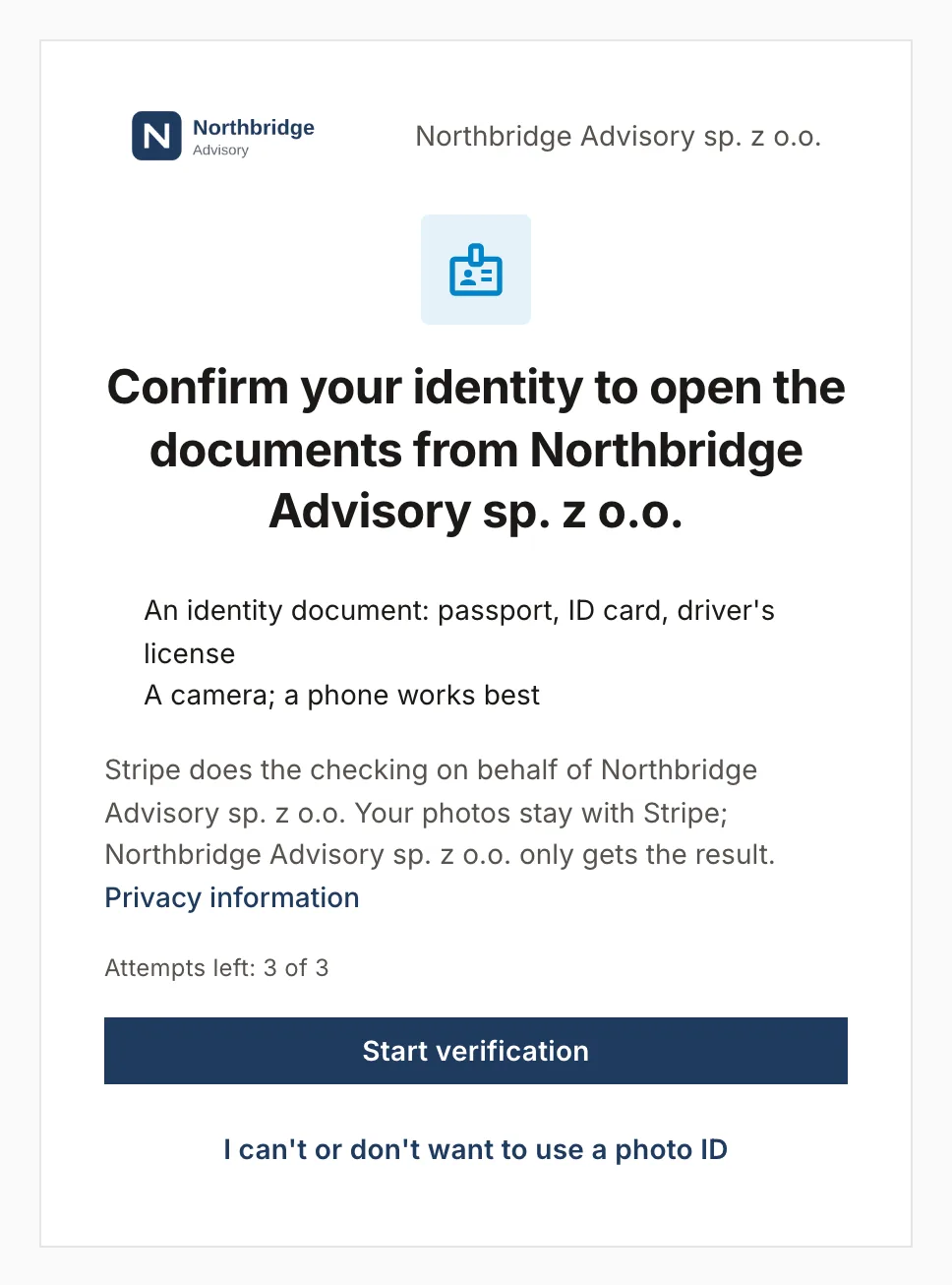
Section titled “What the party sees”- The link opens on a short page saying who is asking, which documents are accepted and that a camera is needed (a phone works best), with Privacy information and the attempts left, such as
Attempts left: 3 of 3. Nothing of the package shows. - They press Start verification and go to Stripe in the same tab, which asks for their document and a selfie.
- Back on Doxtly the page says Checking your document…, usually for under a minute, and then opens the package.
If they finish on a phone after scanning a code on a computer, the phone says Done. Go back to the first window. and the computer carries on.
The check holds in that browser for 24 hours, or until the party has nothing left to do. A forwarded link opened somewhere else goes back to the check. Coming back later in the same browser, after the session ended, needs no second check and costs nothing.
Parties who can’t or don’t want to use a photo document can press I can’t or don’t want to use a photo ID. You are told, and can change the method.
When a check doesn’t pass
Section titled “When a check doesn’t pass”Each failed attempt tells the party in one sentence why it failed, and how many attempts are left (3 by default). A check somebody abandons, or never agrees to, doesn’t count as an attempt and isn’t billed. After the last attempt the party is told you have been notified.
The Parties tab of each document in the package shows how each party’s check went and what you can do:
| Action | When | What it does |
|---|---|---|
| Allow another attempt | An attempt failed | Gives one attempt back. |
| Accept the verification | The document was genuine, but the name on it differs | Accepts the difference. The certificate records who accepted it. |
| Change verification method | Any time before the party is done | Moves the party to another method: a code, a password or none. |
The name match ignores capital letters, Polish and other diacritics and punctuation, and a second given name on the document is no difference. Łukasz Żółć matches LUKASZ ZOLC.
What it costs
Section titled “What it costs”Each check that reaches a result is billed once, in the billing period the result arrived in, at the price shown under Costs per use. Turning this on and setting a limit is done on the Subscription page, separately from overage. Above the limit the party sees Identity verification is temporarily unavailable and you are told. Checks also stop while an invoice is unpaid.
What is recorded
Section titled “What is recorded”The certificate records that the identity was checked, who checked it, when, and a line such as Passport · GB · Grace Holloway · selfie and liveness · name matches, with the reference of the Stripe session.
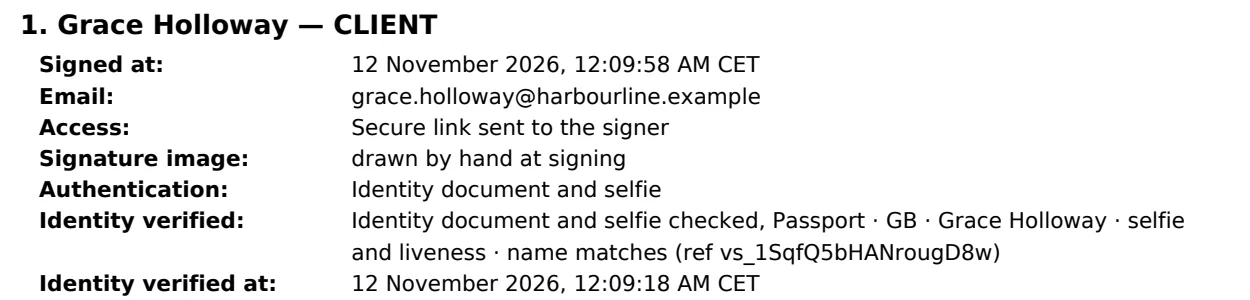
Your organization receives only the result: the name, the kind and country of the document, and whether it matched. Stripe keeps the photos. Doxtly never receives them, a date of birth or a document number, and never stores an address. Stripe asks for the party’s own consent to use biometric data, and you remain the controller of the signing process.
Under Organization settings → Configuration, the Identity document checks card lets you choose which documents are accepted, how many attempts a party has (1 to 5), and when Stripe deletes what it holds: 90 days after the package ends (the default), as soon as it ends, or when the documents are deleted. After deletion the reference on the certificate still proves the check took place. An attempt that was refused or never finished is deleted from Stripe straight away, whichever you chose: nothing relies on it.