

Payment trigger
This trigger starts a run when something happens to a payment taken through one of your forms: it is paid, the time to pay runs out, or money is given back. Use it to let your accounting team know about every payment, to remind someone who didn’t pay, or to cancel a participant’s place when their fee is refunded.
Available when: your plan includes payments; setting it up takes View payments
For what follows the submission itself, such as a confirmation or the documents for the participant, use the Form submission trigger: on a form that takes a payment, it already waits until the payment is made.
Settings
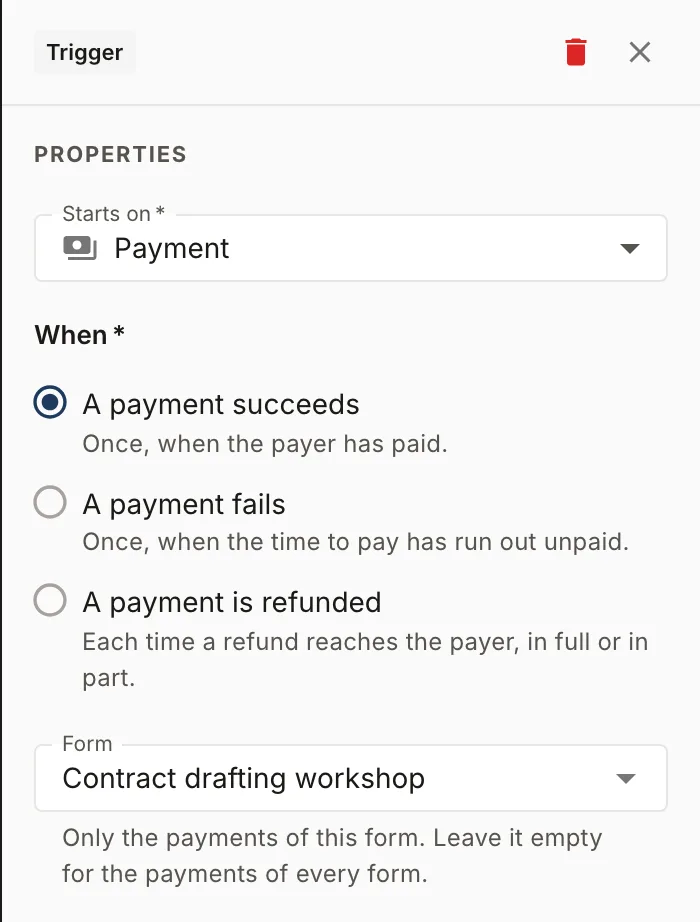
Section titled “Settings”Under Starts on choose Payment, then under When one of its three events.
| Setting | What it does |
|---|---|
| When | A payment succeeds, A payment fails or A payment is refunded. |
| Form | “Only the payments of this form. Leave it empty for the payments of every form.” |
On a plan without payments, Payment under Starts on is greyed out with “Payments are not in your plan”. Without View payments it is greyed out with “Requires the permission View payments”.
A payment succeeds
Section titled “A payment succeeds”“Once, when the payer has paid.” The provider has confirmed the payment within the time to pay. It starts once, however often the provider reports the payment. A late payment, which is refunded at once, doesn’t start it.
A payment fails
Section titled “A payment fails”“Once, when the time to pay has run out unpaid.” The 24 hours ended without a payment, or the provider couldn’t be asked whether it was paid. One payment starts it once, however many attempts the payer made. The submission is then Unpaid (expired) and never starts the form’s own workflows, so this is the place to follow it up, such as a message to the person who filled in the form, if your form asked for their address.
A payment is refunded
Section titled “A payment is refunded”“Each time a refund reaches the payer, in full or in part.” It starts when the provider confirms the refund, not when it was asked for, and once for each refund: two partial refunds start two runs. An automatic refund of a late payment starts it too, with _refund.reason set to late_payment.
What it hands to your steps
Section titled “What it hands to your steps”The run gets the payment as it is when the event is delivered. It doesn’t get the form’s answers; _payment.subject.id is the submission, should a step need it.
| Variable | Label in the picker | Contents |
|---|---|---|
_payment.id |
Payment ID | The payment’s identifier. |
_payment.amount, .amountMinor |
Amount (decimal), Amount in minor units (cents, grosze) | Such as 490.00 and 49000. |
_payment.currency |
Currency | Such as PLN. |
_payment.status |
Payment status | succeeded, expired, partially_refunded or refunded. |
_payment.provider |
Payment provider | przelewy24 or stripe. |
_payment.testMode |
Test mode | true for a payment through an integration in test mode. |
_payment.description |
Description | What the provider showed the payer. |
_payment.payerEmail |
Payer’s email | The address the provider sent its receipt to, if the form named one. |
_payment.refundedAmount, .refundedAmountMinor |
Refunded (decimal), Refunded in minor units | All given back so far. |
_payment.paidAt, .endedAt, .createdAt |
Paid at, Ended at, Created at (date and time) | When it was paid, when it ended (paid or unpaid), and when it started. |
_payment.integrationId, .integrationName |
Integration ID, Integration name | The integration it went through; empty if it was deleted. |
_payment.subject.type |
Paid for (type) | form_submission. |
_payment.subject.id, .title |
Submission ID, Form name at payment | The submission it paid for, empty if the submission was deleted, and the form’s name as it was when the payment was made. |
_payment.subject.formId, .formTitle |
Form ID, Form name | Its form; empty if the submission was deleted. |
For A payment is refunded, also:
| Variable | Label in the picker | Contents |
|---|---|---|
_refund.id |
Refund ID | The refund’s identifier. |
_refund.amount, .amountMinor |
Amount refunded (decimal), Amount refunded in minor units | This refund only. |
_refund.reason |
Reason (manual or late_payment) | manual for a refund someone asked for, late_payment for an automatic one. |
_refund.note |
Note | The note added to the refund, if any. |
_refund.requestedAt, .refundedAt |
Requested at, Refunded at (date and time) | When it was asked for, and when the provider confirmed it. |
Times are in your organization’s time zone. Nothing the provider knows of the payer’s card or bank account ever reaches a run.
Example: tell accounting about refunds
Section titled “Example: tell accounting about refunds”Northbridge Advisory’s office issues a correction to the invoice whenever a workshop fee is given back. A workflow listens for refunds of the workshop form:
| Setting | Value |
|---|---|
| Starts on | Payment |
| When | A payment is refunded |
| Form | Workshop registration |
Its Send email step writes to accounting: “Refunded {{ _refund.amount }} {{ _payment.currency }} of {{ _payment.amount }} for {{ _payment.subject.title }}, reason {{ _refund.reason }}, note: {{ _refund.note }}.”
The same events reach outgoing webhooks that take them, for an accounting system that should hear about payments by itself.