

Plans and limits
Every organization has its own plan, which decides what it can use and how much. A new organization starts with 14 days of Starter, free and with no card needed, then moves to Free unless you choose a plan. That holds even if you chose a paid plan on the pricing page: you confirm and pay for that plan once you are in. This page explains the plans in general and what happens when you reach a limit. For buying, changing and cancelling a plan, see subscription.
The plans
Section titled “The plans”Prices are below in US dollars; you can also pay in euro, Polish zloty or pounds sterling, each at its own price (see Currency). You pay every month, or for a year in advance at the price of ten months. Tax is worked out at checkout from your billing details. If you buy as a private person, the plan cards say (+ VAT).
| Free | Starter | Pro | Business | |
|---|---|---|---|---|
| Price per month | $0 | $29 | $79 | $199 |
| Price per year | $290 | $790 | $1,990 | |
| Good for | Trying out the service | Small businesses | Growing teams | High-volume work |
| Per month | ||||
| Document generation | 20 | 1,500 | 5,000 | 20,000 |
| Form submissions | 10 | 750 | 2,500 | 10,000 |
| Interactive document submissions | 10 | 250 | 1,250 | 5,000 |
| Quiz attempts | 10 | 750 | 2,500 | 10,000 |
| Survey responses | 10 | 750 | 2,500 | 10,000 |
| Sent emails | 15 | 1,000 | 4,000 | 15,000 |
| Emails from Doxtly’s mailbox | 10 | 200 | 1,000 | 3,000 |
| Packages sent for signature | 3 | 250 | 1,000 | 5,000 |
| Workflow executions | 10 | 1,000 | 4,000 | 15,000 |
| Doxtly AI | Own AI integration only | Included | Included | Included |
| In total | ||||
| File templates | 5 | 50 | 120 | 300 |
| Forms | 1 | 15 | 40 | 100 |
| Interactive documents | 2 | 15 | 40 | 100 |
| Quizzes | 1 | 15 | 40 | 100 |
| Surveys | 1 | 15 | 40 | 100 |
| Email templates | 4 | 30 | 80 | 200 |
| Workflows | 1 | 15 | 40 | 100 |
| Webhooks | 2 | 15 | 40 | 100 |
| Outgoing webhooks | 3 | 25 | 100 | 300 |
| Contacts | 50 | 1,000 | 5,000 | 25,000 |
| Portals | 1 | 3 | 10 | 30 |
| Data sources | 1 | 5 | 25 | 100 |
| SMS and WhatsApp templates | 4 | 30 | 80 | 200 |
| Disk space | 50 MB | 2 GB | 6 GB | 20 GB |
| Data space | 50 MB | 2 GB | 6 GB | 20 GB |
| Included | ||||
| Word templates | Yes | Yes | Yes | Yes |
| PDF templates | Yes | Yes | Yes | Yes |
| SVG templates | No | Yes | Yes | Yes |
| API access | Yes | Yes | Yes | Yes |
| Automation access | Yes | Yes | Yes | Yes |
| Two-factor authentication | Yes | Yes | Yes | Yes |
| PDF editor | No | Yes | Yes | Yes |
| AI agents | No | Yes | Yes | Yes |
| Doxie AI assistant | Own AI integration only | Yes | Yes | Yes |
| Doxie’s Advanced AI Mode | No | No | Yes | Yes |
| CRM integrations | No | No | Yes | Yes |
| Payments | No | Yes | Yes | Yes |
| Single sign-on (SSO) | No | No | No | Yes |
| Document numbering | No | Yes | Yes | Yes |
| Advanced quiz analytics | No | No | Yes | Yes |
| Advanced survey analytics | No | No | Yes | Yes |
| Your own themes for public pages | Yes | Yes | Yes | Yes |
No plan limits how many people you invite.
A package sent for signature counts once, however many documents and parties it holds. It counts when the workflow step that makes it finishes. A package that failed on the way uses nothing.
Contracts come with every plan. An annex or a notice ending a contract is a package you send like any other, and counts once. A document added as signed outside Doxtly, one at a time or imported from a sheet, was never sent for signature here and counts nothing towards Packages sent for signature. Its files take disk space like any other.
The limits are monthly on yearly payment too: they start again every month of the paid year. See paying for a year for what else differs.
The paid plans also include the AI buttons on other pages, such as matching the accent color to the logo, importing a form from a link and turning a Word file into a template. AI agents run on your own AI provider’s account, connected through an integration, so what the provider charges is separate from your Doxtly plan. Doxie, the AI assistant, and those buttons run on Doxtly AI on a paid plan, unless an administrator assigns Doxie your own AI integration. On the Free plan Doxie works only through your own AI integration. See Which AI runs Doxie. Sending emails, texts and WhatsApp messages works the same way, through your own integrations, apart from the messages of a package, which can go from Doxtly’s mailbox instead.
Identity verifications and qualified signatures are counted per month too. Doxtly pays an outside provider for each identity verification, so the Free plan doesn’t include them. A paid plan includes none in its price: each one is billed at its price, and only after someone who manages your subscription has agreed to that cost and set a limit on it for each billing period. Overage and its cap don’t apply to them, and the paid plans give their price, such as $2.00 each, rather than a limit. Doxtly offers no qualified signatures or qualified seals through a trust service provider, so no plan lists them. The seal Doxtly puts on every signed document isn’t counted at all: it is an advanced electronic seal, included on every plan.
Doxtly AI
Section titled “Doxtly AI”Each paid plan includes a monthly Doxtly AI limit for Doxie and the AI buttons, larger on higher plans. It starts again on the 1st of every month, and what isn’t used doesn’t carry over. You see it as a share used, such as 42%, never as an amount: it is what your plan includes, Doxtly’s own cost limit for the plan, rather than money of yours. Free includes no limit; there Doxie works through your own AI integration.
Once the monthly limit is used up, Doxie and the buttons go on with your Doxtly balance. That is money you pay in advance, so it is shown in US dollars. You can top it up at any time from 10 USD on a paid plan; it carries over from month to month and expires 12 months after your last top-up, so each top-up keeps all of it for another year. With neither left, the AI waits for the limit to start again or for a top-up, and everything else keeps working. Doxtly AI has no overage. Both are shown on the Balance tab of the subscription.
From the Pro plan up, an administrator can also switch Doxie to AI Mode Advanced, where stronger models write her answers. The limit and the balance stay the same, but each answer uses more of them.
The Starter trial
Section titled “The Starter trial”A new organization gets 14 days of Starter, free and without a card: Starter’s limits and features, with a smaller monthly Doxtly AI limit than the paid plan’s. The Overview tab of the subscription shows the day it ends. Whoever can see the subscription is told 3 days and 1 day before, and when it has ended, in the app and by email.
Choose a plan at any time during the trial and it carries on without a break. Otherwise the organization moves to Free on the day the trial ends. Nothing is deleted: forms, templates, contacts and files above Free’s limits all stay and keep working, and you cannot add more of them until you are under the limit again or choose a plan. Monthly limits count with Free’s from that day.
An organization gets one trial. A second organization you found yourself starts on Free, and so does a company whose address has already had its trials.
Which plan fits
Section titled “Which plan fits”Count what one job uses, then multiply by how many jobs you do in a month. Say Northbridge onboards a client with one form, one workflow that generates two documents and sends two emails, and a second workflow that runs once the package is signed. Each client then uses 1 form submission, 2 workflow executions, 2 document generations and 2 sent emails.
At 40 new clients a month that makes 40 submissions, 80 executions, 80 documents and 80 emails. The Free plan stops at 10, 10, 20 and 15, so it will not do. Starter, at 750, 1,000, 1,500 and 1,000, has room to spare. Free is enough for trying the service out, and for an office with a few jobs a month.
How usage is counted
Section titled “How usage is counted”Limits come in three kinds. The Usage tab of the subscription page writes per month beside the first kind and in total beside the other two.
Per month limits count what you do. They start again from zero at each new billing period, which the subscription page shows under Limits reset on or Renews on. On the Free plan a period is a month from when the organization was created.
In total limits count what you keep. Deleting a form frees a place for another.
Size limits count the space taken. Disk space covers every file stored for your organization: templates, generated and signed documents, including those added as signed outside Doxtly, files people submit or attach, pictures in forms, emails and packages, your logo, contact photos, and your users’ signatures and initials. The sheet and files of an import of signed documents count while the import waits or runs, and are removed once it finishes. Exported ZIP files do not count, as they are deleted after a few days, and neither do files in your connected drives, which stay there. Data space covers what is stored apart from files: submissions, sent emails, workflow runs, generated documents and webhook requests. The two are separate allowances.
A document that failed to generate or an email that was not sent uses nothing from your limit. A workflow run counts once a step after its trigger has finished, however the run ends, because that step has done its work. A run that fails on its first step, or that your limit stops, uses nothing. A few details:
- An email counts once per message, including anyone copied in.
- A form submission kept aside as spam does not count. It counts if you release it.
- Rerunning a workflow run is a new run, counted by the same rule.
- An interactive document submission whose documents could not be produced gives its use back. If someone edits it and the documents are produced, it counts again.
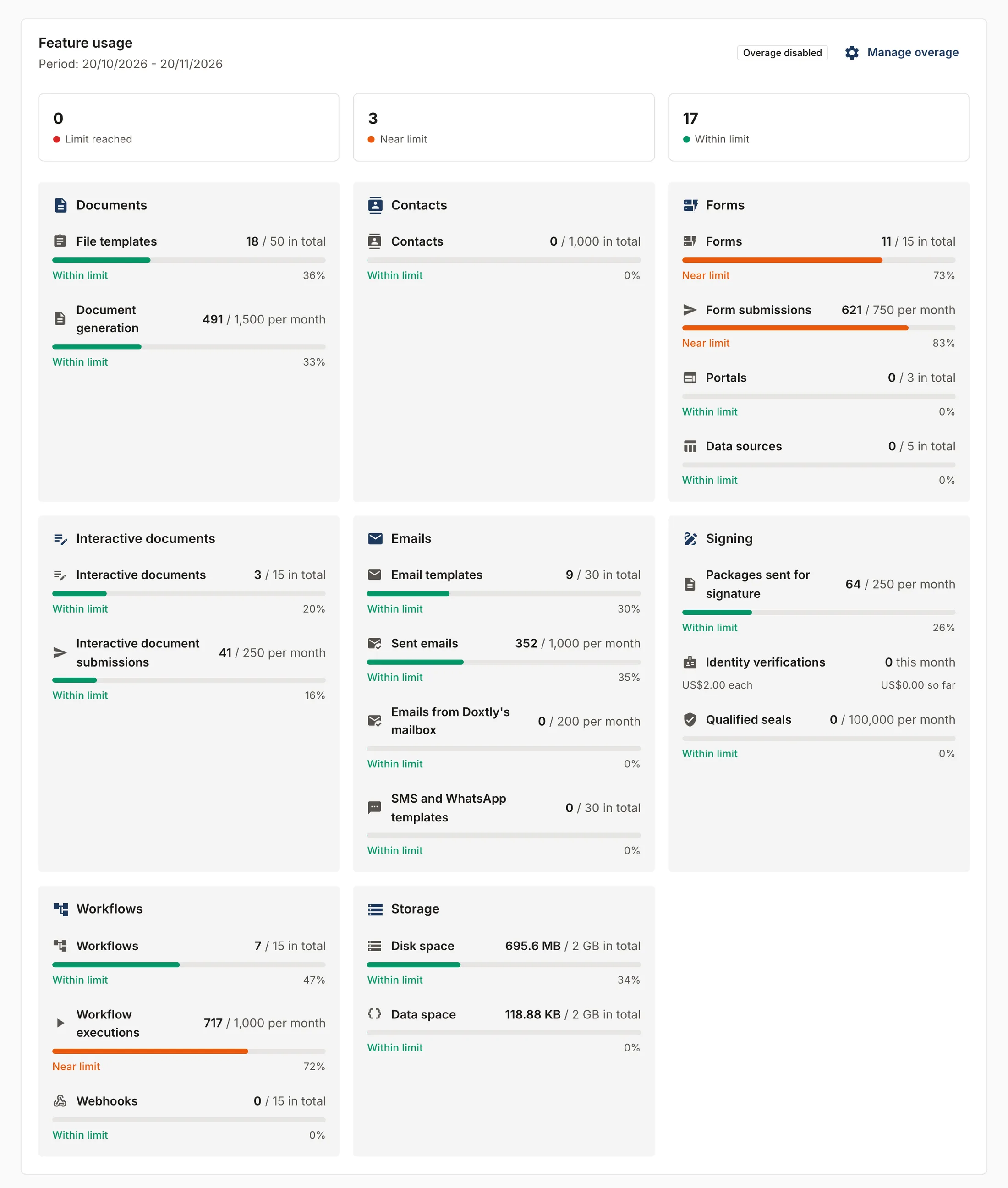
Each bar has a label: Within limit, Near limit from 70% on, Limit reached, or Limit exceeded when you are past it, with how far over beside it. The Overview tab shows the four limits closest to running out, and warns you once any is reached. Only people who hold View subscription and invoices see these figures. For everyone else, the app stops offering what no longer fits.
What happens at a limit
Section titled “What happens at a limit”| Limit | What happens |
|---|---|
| Document generation | New documents are refused, and a workflow step that needs one fails |
| Form submissions | New submissions are refused |
| Interactive document submissions | New submissions are refused. Overage does not apply here. |
| Quiz attempts, survey responses | Starting a new attempt or response is refused. One already started can still be sent. |
| Sent emails | Sending is refused |
| Emails from Doxtly’s mailbox | Sending from it is refused; messages from your own mailbox carry on |
| Packages sent for signature | The workflow step that makes the package fails before anything is created |
| Workflow executions | New runs stop before their first step. Rerun is disabled, with the reason beside it. A webhook that would start a workflow is refused. |
| Templates, forms, interactive documents, quizzes, surveys, email templates, workflows, webhooks, outgoing webhooks | The button for adding one is disabled, with a note that the limit is reached. Everything you already have keeps working. |
| Disk space | Documents are still generated and can still be sent, but they are not saved in your account. Files someone adds in the application, such as a contact photo, a logo, a template, a picture in a form or a document signed outside Doxtly, are refused with a message saying there is no room. A signature is never blocked: what signers and people filling in your forms send is still kept |
| Data space | Webhook requests are still received and their workflows run, but what they bring is no longer kept |
| Doxtly AI | Doxie and the AI buttons go on with the Doxtly balance. With no balance left, they pause until the limit starts again or the balance is topped up |
The monthly limits matter most, because a client filling in your form on the 28th can be refused. Whoever manages the subscription gets a notification: Critical for monthly limits, a warning for the rest.
You have three ways out:
- Wait. Monthly limits reset with the next billing period.
- Upgrade. A bigger plan raises the limits for the current period too.
- Turn on overage, if you are on a paid plan.
For limits on what you keep, you can also delete what you no longer need. For data space, shorten how long data is kept in the organization settings.
Overage: carrying on past a limit
Section titled “Overage: carrying on past a limit”Overage lets work continue past a monthly limit and bills it per use on your next invoice, so a busy month does not stop your forms.
| Past the limit | Price per use |
|---|---|
| Document generation | $0.05 |
| Form submissions | $0.02 |
| Quiz attempts | $0.02 |
| Survey responses | $0.02 |
| Sent emails | $0.01 |
| Packages sent for signature | $0.10 |
| Workflow executions | $0.03 |
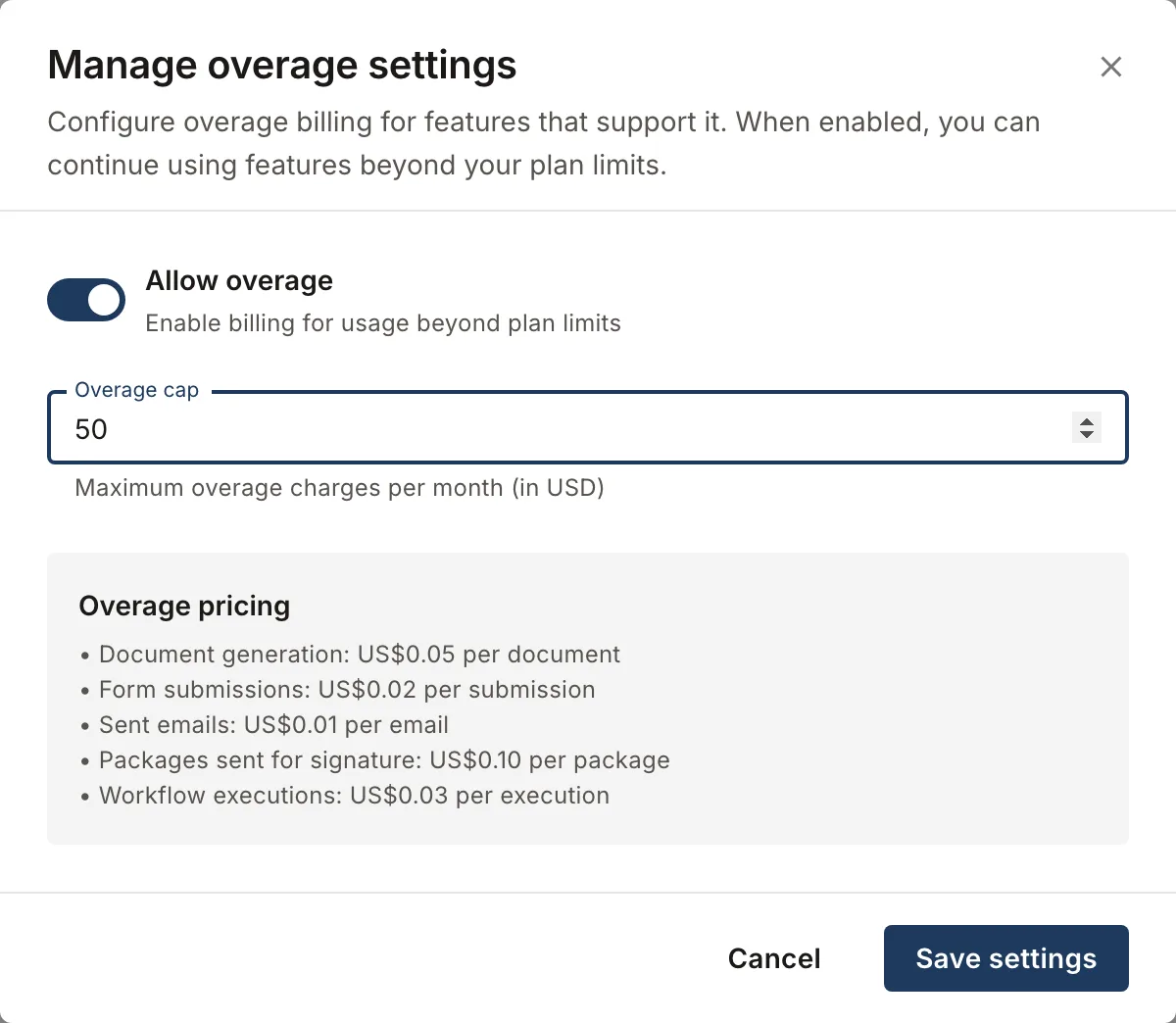
Overage is off until you turn it on, and it needs a paid plan and a valid payment method. To set it, open Organization → Subscription → Usage, click Manage overage, switch on Allow overage and set an Overage cap between $1 and $10,000. The cap is the most you can be charged for overage in a month. Interactive document submissions, the in-total limits and the two spaces have no overage.
The chip beside Manage overage says Overage enabled and how much of the cap is used, or Overage disabled. It is worth turning on before a busy spell: a training company that goes 300 certificates past its limit in one week pays 300 × $0.05 = $15 for the documents, rather than finding that half its attendees got nothing.
Features your plan does not include
Section titled “Features your plan does not include”Something outside your plan either disappears or tells you so. The PDF editor and AI agents entries are left out of the sidebar, Pipedrive, HubSpot and Copper aren’t offered among the integrations and the workflow designer’s CRM steps and trigger are greyed out. Without payments, Przelewy24, Stripe, PayU and PayPal aren’t offered, a form with a payment element can’t be saved or sent, the Payments entry is left out of the sidebar and the Payment trigger is greyed out. The PDF editor’s page explains that it is part of the paid plans, and the SVG template type says Upgrade your plan to use this template type. Without advanced quiz or survey analytics, the results of a quiz or a survey compare at most two segments, the cross-tab shows no significance test and says Significance testing is part of the higher plans., and the AI analysis says The AI analysis is not in your plan.
Changing your plan
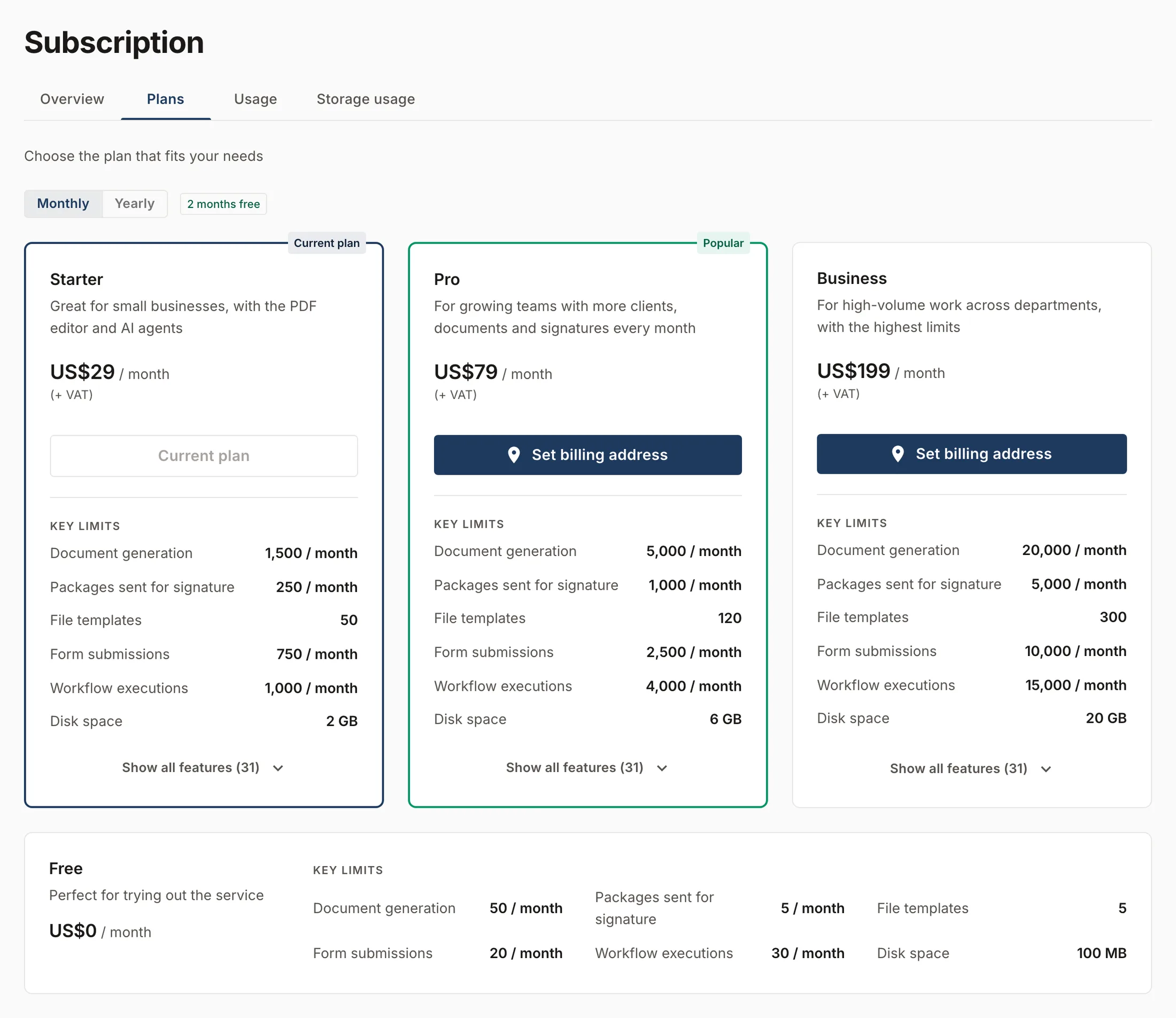
Section titled “Changing your plan”Under Organization → Subscription → Plans, the plan cards show Upgrade or Downgrade. Paid plans go through Stripe’s payment page. The organization needs a billing address first, and until it has one the button says Set billing address. This takes the Manage subscription permission, which only Administrators have by default. If you leave the payment page without paying, the app says No changes were made and your plan stays as it was.
After a move to a smaller plan, nothing is deleted. If you keep more than the new limit allows, the bar says Limit exceeded and you cannot add more until you are back under it. Webhooks and outgoing webhooks above the limit keep working: incoming ones still take requests, and outgoing ones still receive events. The limit on outgoing webhooks counts the webhooks, not what they deliver.
If a subscription stops
Section titled “If a subscription stops”If a card is refused, Stripe tries again and your plan keeps working in the meantime, with the status Past due. Someone who manages the subscription gets a Payment failed notification with a link to the invoice.
Cancelling a paid plan keeps it working until the end of the billing period, and you can resume it until then. When a paid subscription ends, is left unpaid or is paused, features that belong to a plan stop, and the Overview and Usage tabs say Your plan has stopped, so its features are unavailable and there is no usage to show. The notification says what happened and what brings it back: paying the invoice, adding a payment method, or choosing a plan again. Once a subscription has ended, the Plans tab marks no plan as current, so you can buy the same plan again or another. See subscription for each status.