

Document package trigger
This trigger starts a run at a moment in the life of a package: when a party’s turn begins or they open the documents, when an approver decides, when a party signs or declines, when every party has signed, when the deadline passes, or when the package is voided. For a contract, it also starts a run when the contract changes, when its end is near and once it has ended. You choose Document package under Starts on, then the moment under When. Use it to move a contract along, to find out quickly when one is refused, to chase someone who has not opened it yet, to file it once it’s done, and to offer a renewal before it runs out.
Always available
Settings
Section titled “Settings”| Setting | What it does |
|---|---|
| Starts on | Document package. |
| When | The event to wait for: A party’s turn begins, A party opens the documents, An approver approves the package, An approver rejects the package, A party signs, A party pays, A party’s payment fails, A party declines to sign, The package is fully signed, The package expires, The package is voided, A contract changes, A contract is ending soon or A contract ends. Each choice says when it comes. |
| Trigger source | The package type to wait for. Required. You listen to a type rather than to one package, because packages are made anew each time. This field doesn’t create types, so add the type first. For the three contract events, the list holds only the types that keep contracts with a term. |
| Party indicator (optional) | Shown for the events of one party: its turn, opening the documents, an approver’s answer, a signature, a payment and a refusal. Any party (the default) runs for each party. Choose one to run only for theirs. |
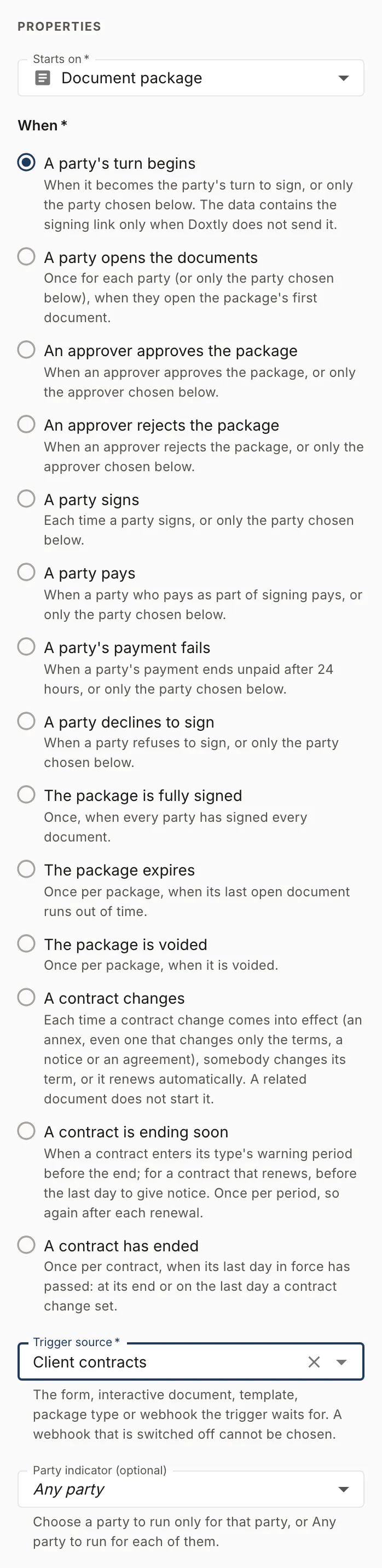
The party list offers the party indicators known for the chosen package type, so pick the source first. An indicator is the short uppercase name a party has in the package, such as CLIENT or LANDLORD. The list holds only the people the event can happen to: the approvers for an approver’s answer, the parties who sign for a signature and a refusal, and both for a turn and for opening the documents. Changing When to an approver’s answer, or to a signature or a refusal, clears the choice, unless the event before was of the same kind.
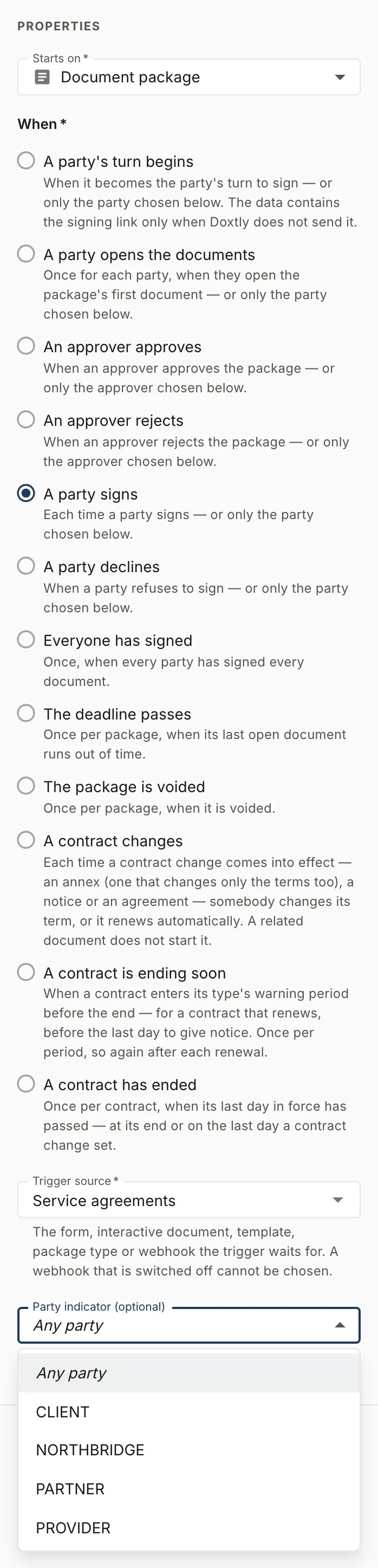
Changing When keeps the package type and the party. Choosing something else under Starts on empties both, because a form can’t stand in for a package type.
What every event hands over
Section titled “What every event hands over”Values
Section titled “Values”The data of the run that created the package, plus every value typed into its documents while signing. A package created after a form submission still carries that form’s answers, and its _submission block too. The results of that run’s earlier steps come along as well. A run sees what had been typed up to its event.
The picker lists these under Package data. It works them out from the workflows that create packages of this type, and warns you about two gaps:
- No workflow creates packages of this type yet. Their data appears once a Create documents step with this package type is added.
- Results of steps run earlier in the workflow supplying this data are available too. They aren’t listed, so type their path by hand.
The _package block
Section titled “The _package block”| Variable | Label in the picker | Contents |
|---|---|---|
_package.id |
Package ID | The package’s identifier. |
_package.title |
Package title | Its title. |
_package.description |
Package description | Its description, if any. |
_package.type |
Package type | The type’s name. |
_package.number |
Package number | Its number, where the type numbers its packages. Otherwise an empty text, as for a change of a contract, which takes no number. |
The contract: _package.contract and _package.annex
Section titled “The contract: _package.contract and _package.annex”Every event also says which contract the package is, or which contract it changes. _package.contract describes a package that is a contract itself, and _package.annex a package that is a change of a contract: an annex, a notice, a termination agreement or a related document. A package that is no contract has every value of _package.contract empty, and one that changes no contract every value of _package.annex. Days are written like 2026-11-30, by your organization’s calendar.
| Variable | Label in the picker | Contents |
|---|---|---|
_package.contract.state |
Contract state | upcoming (signed, its term starts later), in_force, ending_soon, ended or terminated. Empty while the contract is still being signed. See contract states. |
_package.contract.startsOn |
Contract start (date) | The first day in force. |
_package.contract.endsOn |
Contract end (date) | The last day in force. Empty for a contract with no end. |
_package.contract.noticeDeadline |
Notice deadline (date) | The last day to give notice. Empty without a notice period or an end. |
_package.contract.renews |
Contract renews automatically | true or false. A contract a change has ended renews no more. |
_package.contract.terminatedOn |
Last day in force set by a contract change (date) | The day a notice or a termination agreement ended it on. Empty otherwise. |
_package.contract.parties |
Contract’s parties (list) | The contract’s parties, each with indicator, fullName, email and contactId, the ID of the contact the party is linked to. Approvers are not among them. For a contract signed outside Doxtly, the parties recorded with it, with an empty indicator. A workflow value only: a template rendering the contract’s documents reads it empty. |
Before everybody has signed, the days are the ones the term names. Once the contract is signed, they are the days as they work out, with every renewal and every change in effect counted.
| Variable | Label in the picker | Contents |
|---|---|---|
_package.annex.kind |
Kind of contract change | amends_terms, extends, ends_by_notice, ends_by_agreement or related. |
_package.annex.number |
Annex number | The annex’s number within its contract. Only an annex has one: a change that changes the terms or extends the contract. |
_package.annex.effectiveOn |
Annex applies from (date) | For an annex that changes the terms, the day they apply from. Empty: once everybody has signed. |
_package.annex.newEndsOn |
New contract end set by the annex (date) | For an extension, the new end. |
_package.annex.indefinite |
Annex extends the contract indefinitely | true for an extension with no end. |
_package.annex.lastDay |
Last day in force set by the change (date) | For a notice or a termination agreement, the contract’s last day. |
_package.annex.contract.id, .title, .number |
Amended contract ID, Amended contract title, Amended contract number | The contract it changes. |
_package.annex.contract.signedOn |
Amended contract signed on (date) | When that contract was signed. |
_package.annex.contract.startsOn, .endsOn, .noticeDeadline, .renews |
Amended contract start (date), Amended contract end (date), Amended contract’s notice deadline (date), Amended contract renews automatically | That contract’s days, as they stand. |
_package.annex.contract.notice |
Amended contract’s notice period | Its notice period in words, in your organization’s language: 3 months. |
_package.annex.contract.fields |
Amended contract’s custom fields | The contract’s own custom fields, by key, except sensitive ones. |
A list item is read by its number from 0, so {{ _package.contract.parties[0].email }} is the first party’s address. The samples on this page leave both blocks out where they are empty.
The _party block
Section titled “The _party block”The events of one party add that party, in one block the picker calls Party. Its first variables are the same for all of them, so a step that reads {{ _party.email }} keeps working when you change When from one to another:
| Variable | Label in the picker | Contents |
|---|---|---|
_party.recipientIndicator |
Party indicator | The party, such as CLIENT. |
_party.fullName |
Full name | Their name. |
_party.email |
Email address | Their email, if the package has one. |
_party.phone |
Phone number | Their phone, if the package has one. |
_party.channel |
How they sign | secure_link, or in_person for a party set to sign in person (Signs in person – do not send an invitation). |
_party.identityVerification.method |
Identity verification method | The party’s verification: email_otp, sms_otp, whatsapp_otp, access_code or id_document. Empty without one. |
_party.identityVerification.country |
Country of the identity document | The country of the document a passed identity check saw. Empty otherwise. |
Each event adds its own variables to the block, listed in its section below.
Metadata and link parameters
Section titled “Metadata and link parameters”_metadata and _params are those of the run that created the package, so they read the same in the signing workflow as in the workflow that sent the documents. Nothing typed at signing can replace them. In the picker they are under Package source metadata and Link parameters.
_execution always describes this run, not the one that created the package. The same goes for _recipients and _nodes: they don’t carry over.
Events
Section titled “Events”A party’s turn begins
Section titled “A party’s turn begins”The first step’s parties when the package is sent, and each following step’s as the one before it finishes; every party at once where the package has no order. The run gets _party with signingOrder, language and deliveredBy: doxtly when Doxtly writes to the party, in_person when the party signs on a device you hand them, none when nobody asks them. Only in that last case does _party.signingUrl hold the party’s link, so your workflow can deliver it, for example through a webhook to your client portal. A link handed over this way is recorded in the audit log. No other event carries a link.
A party opens the documents
Section titled “A party opens the documents”Once for each party, when they open the first document of the package. Opening the other documents, or the same one again, doesn’t start it. The run gets _party with viewedAt. It carries no signing link and no files.
An approver approves the package
Section titled “An approver approves the package”When an approver approves the package. The run gets _party, the approver, with approvedAt. It carries no files.
An approver rejects the package
Section titled “An approver rejects the package”When an approver rejects the package. The run gets _party, the approver, with approvalRejectedAt and approvalRejectionReason. It carries no files.
A party signs
Section titled “A party signs”A party of a package of the chosen type signs, without waiting for the others. A person signing several documents of the package in one go starts one run. Use it to act halfway through: tell the partner the client has signed so they can countersign, or update your CRM at every step.
The last signature counts too. It starts this event as well as The package is fully signed, so if you use both, don’t do the same job in each.
_party adds:
| Variable | Label in the picker | Contents |
|---|---|---|
_party.documentTitle |
Signed document title | The document signed. If they signed several at once, the last of them. |
_party.signedAt |
Signed at (date and time) | When they signed. |
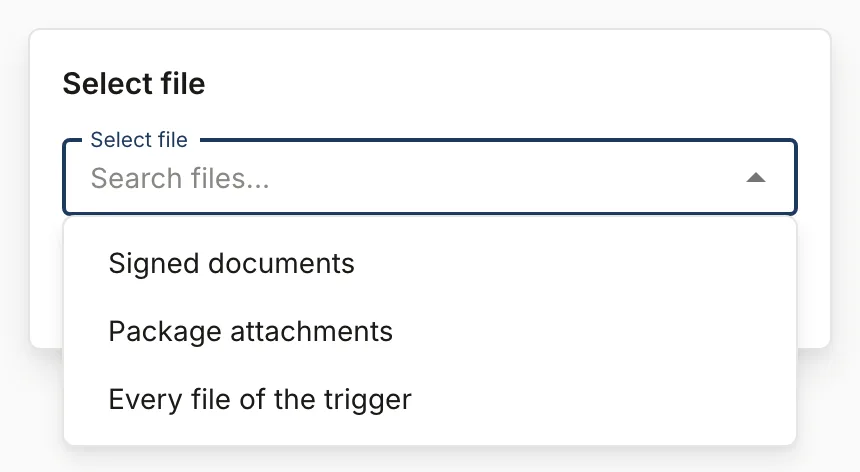
| Group of files in the picker | What it holds |
|---|---|
| Signed documents | Every document of the package, as it stands when the step reads it, each named after its title: Agreement for Harbor Mills.pdf. |
| Package attachments | Documents attached to be read, which nobody signs. |
| Every file of the trigger | All files together, pictures uploaded at signing so far included. |
{ "company": { "name": "Halden Logistics" }, "signingPlace": "Gothenburg", "_package": { "id": "019a5031-e4c7-7b20-91ad-2c06f8e3b1d4", "title": "Service agreement – Halden Logistics", "description": null, "type": "Service agreements", "number": "" }, "_party": { "recipientIndicator": "CLIENT", "fullName": "Marta Lindqvist", "email": "marta@haldenlogistics.example", "phone": null, "channel": "secure_link", "identityVerification": { "method": "email_otp", "country": null }, "documentTitle": "Service agreement", "signedAt": "2026-11-06T14:05:00+01:00" }, "_execution": { "id": "…", "eventId": "…", "workflowId": "…", "triggeredAt": "…", "date": "2026-11-06" }}Example: nudge the partner. Set Party indicator (optional) to CLIENT. One Send email step goes to the partner, with an email template that says {{ _party.fullName }} has signed {{ _party.documentTitle }} and that their signature is next.
A party pays
Section titled “A party pays”A party who pays as part of signing pays, once the provider has confirmed it. It comes once per payment, however often the provider reports it. When it was the last thing the package waited for, The package is fully signed follows it.
_party adds:
| Variable | Label in the picker | Contents |
|---|---|---|
_party.payment.id |
Payment ID | The payment, as on the Payments page. |
_party.payment.amount |
Amount paid or owed | The amount, such as 49.90. |
_party.payment.currency |
Payment currency | Such as PLN. |
_party.payment.provider |
Payment provider | przelewy24, stripe, payu or paypal. |
_party.paidAt |
Paid at (date and time) | When the payment came in. |
A party’s payment fails
Section titled “A party’s payment fails”A party’s payment ends unpaid after its 24 hours. Their signature stands and they can pay again from their link, so the package goes on waiting. _party adds the same _party.payment variables as A party pays, without _party.paidAt.
A party declines to sign
Section titled “A party declines to sign”A party of a package of the chosen type refuses to sign, themselves or through someone acting for them. See declining and delegations. A declined contract usually needs a person quickly. Doxtly tells the package’s responsible person, and the parties who signed or were asked to get its Package refused message; this event is how the rest of your team, and your other systems, find out.
Only a refusal counts. A signing period that runs out starts nothing, and neither does a package your own team voids.
_party adds:
| Variable | Label in the picker | Contents |
|---|---|---|
_party.declinedAt |
Declined at (date and time) | When they declined. |
_party.declineReason |
Reason for declining | The reason given. Can be empty. |
_party.onBehalf |
Whether declined on the party’s behalf | true when someone acted for them. |
_party.actedByName |
Full name of the person acting for the party | Who acted. Empty otherwise. |
_party.actedByEmail |
Email address of the person acting for the party | Their email. Empty otherwise. |
The last three let your emails name who really acted: “Anna declined” is wrong when Jan did it in her name. A declined package brings no files to the run.
{ "company": { "name": "Halden Logistics" }, "_package": { "id": "019a5031-e4c7-7b20-91ad-2c06f8e3b1d4", "title": "Service agreement – Halden Logistics", "description": null, "type": "Service agreements", "number": "" }, "_party": { "recipientIndicator": "CLIENT", "fullName": "Marta Lindqvist", "email": "marta@haldenlogistics.example", "phone": null, "channel": "secure_link", "identityVerification": { "method": "email_otp", "country": null }, "declinedAt": "2026-11-06T16:40:00+01:00", "declineReason": "The payment term in section 4 differs from what we agreed.", "onBehalf": false, "actedByName": null, "actedByEmail": null }, "_execution": { "id": "…", "eventId": "…", "workflowId": "…", "triggeredAt": "…", "date": "2026-11-06" }}Example: alert the account manager. Send email goes to the account manager, with an email template that prints {{ _package.title }}, {{ _party.fullName }} and {{ _party.declineReason }}. Add a Condition on _party.onBehalf to send a different wording when someone acted for the party. To wait for one party’s refusal only, set Party indicator (optional).
The package is fully signed
Section titled “The package is fully signed”The signature that finishes a package of the chosen type: every party has signed every document. It’s the moment a contract is done, so it’s the right place to file it, tell the team and start the work the contract was for.
You don’t need this event to tell the parties. When a package is complete, Doxtly sends its parties and viewers the Everyone signed message, by the channel set for it under Notifications, unless that message is off or the package was made with Send Doxtly’s notifications off. Use the workflow for what comes after: filing, your team, the next system.
This event has no party, so it adds no _party block.
| Group of files in the picker | What it holds |
|---|---|
| Signed documents | The finished documents, sealed, each named after its title as in Doxtly’s own Everyone signed message: Agreement for Harbor Mills.pdf. |
| Package attachments | Documents attached to be read, which nobody signs. |
| Every file of the trigger | All files together, pictures uploaded at signing included. |
{ "contact": { "fullName": "Marta Lindqvist", "email": "marta@haldenlogistics.example" }, "company": { "name": "Halden Logistics" }, "fee": 18500, "signingPlace": "Gothenburg", "_submission": { "id": "…", "title": "Halden Logistics", "submittedAt": "2026-11-05T10:15:00+01:00", "submittedDate": "2026-11-05", "revision": 0, "editedAt": null, "editedBy": null }, "_package": { "id": "019a5031-e4c7-7b20-91ad-2c06f8e3b1d4", "title": "Service agreement – Halden Logistics", "description": null, "type": "Service agreements", "number": "" }, "_metadata": { "team": "onboarding" }, "_execution": { "id": "…", "eventId": "…", "workflowId": "…", "triggeredAt": "…", "date": "2026-11-07" }}Example: file the signed agreement. When a service agreement is finished, an upload step stores Signed documents in Google Drive under Clients/{{ company.name }}/, and Send email tells the account manager, with {{ _package.title }} in the email template. company.name comes from the original onboarding form.
The package expires
Section titled “The package expires”Once per package, when the last document still open runs out of time. A package that already ended, signed, declined or voided, does not start it. The run gets _package with expiredAt. If the runs can’t be started at that moment, Doxtly tries again by itself, and a workflow that has already run for the package doesn’t run a second time.
The package is voided
Section titled “The package is voided”Once per package, when you void it, whether from the package’s page, as a bulk action, or because an edited form submission withdrew it. The run gets _package with voidedAt and voidReason. It carries no files.
A contract changes
Section titled “A contract changes”Something changed what a signed contract says or how long it runs. That happens when:
- a change takes effect, once everybody has signed it or it is added as signed outside Doxtly: an annex that changes the terms, an extension, a notice or a termination agreement. An annex that changes only the terms counts too, though it moves no day
- somebody changes the term in the contract file, even when the days the contract is in force for stay the same. Saving the term unchanged starts nothing
- the contract renews itself at its end
- somebody deletes a change that was in effect, and the days go back to what they were without it. Deleting a change that moved no day starts nothing
A related document changes nothing in the contract, so it starts nothing. Neither does the contract’s first signature; for that, use The package is fully signed. Compare the days under before and after to tell whether this change moved them.
_package is the contract’s, not the change’s, so {{ _package.id }} is the contract’s ID. Its contract block adds change:
| Variable | Label in the picker | Contents |
|---|---|---|
_package.contract.change.cause |
Cause of the change (annex, manual, renewal, removed) | annex for a change that took effect, manual for a term changed by hand, renewal for a contract that renewed itself, or removed for a change deleted. |
_package.contract.change.before.endsOn |
Contract end before the change (date) | The last day in force before. |
_package.contract.change.before.terminatedOn |
Termination day before the change (date) | The day a change had ended it on, if any. |
_package.contract.change.before.noticeDeadline |
Notice deadline before the change (date) | The last day to give notice before. |
_package.contract.change.before.renews |
Renews automatically before the change | true or false. |
_package.contract.change.after.endsOn, .terminatedOn, .noticeDeadline, .renews |
Contract end after the change (date), Termination day after the change (date), Notice deadline after the change (date), Renews automatically after the change | The same, after. |
_package.contract.change.annex.id, .title |
ID of the change that took effect, Title of the change that took effect | The change, with the cause annex. Empty otherwise. |
_package.contract.change.annex.number |
Number of the annex that took effect | Its number, for an annex. |
_package.contract.change.annex.kind |
Kind of the change that took effect | amends_terms, extends, ends_by_notice or ends_by_agreement. |
The run carries no files and no _party.
{ "company": { "name": "Harbourline Logistics" }, "_package": { "id": "019a5031-e4c7-7b20-91ad-2c06f8e3b1d4", "title": "Advisory retainer – Harbourline Logistics", "description": null, "type": "Client contracts", "number": "NA/2025/014", "contract": { "state": "in_force", "startsOn": "2025-12-01", "endsOn": "2027-11-30", "noticeDeadline": null, "renews": false, "terminatedOn": null, "parties": [ { "indicator": "CLIENT", "fullName": "Daniel Hart", "email": "daniel.hart@harbourline.example", "contactId": "019a4e10-7c2b-7d41-9e8a-3f51b0c6d2e4" }, { "indicator": "PARTNER", "fullName": "Anna Kowalska", "email": "anna.kowalska@northbridge.example", "contactId": null } ], "change": { "cause": "annex", "before": { "endsOn": "2026-11-30", "terminatedOn": null, "noticeDeadline": null, "renews": false }, "after": { "endsOn": "2027-11-30", "terminatedOn": null, "noticeDeadline": null, "renews": false }, "annex": { "id": "019a7c42-0b1d-7e55-a3f0-6d2e9c41b8a7", "title": "Annex 1 to Advisory retainer – Harbourline Logistics", "number": 1, "kind": "extends" } } } }, "_execution": { "id": "…", "eventId": "…", "workflowId": "…", "triggeredAt": "…", "date": "2026-11-13" }}Example: tell the account manager the new end. Send email goes to the account manager, with an email template that prints {{ _package.title }} and {{ _package.contract.change.after.endsOn | formatdate("d MMMM yyyy") }}. To write only when the end really moved, put a Condition _package.contract.change.before.endsOn != _package.contract.change.after.endsOn before it, and to leave renewals out, _package.contract.change.cause != "renewal".
A contract is ending soon
Section titled “A contract is ending soon”A contract in force enters its warning period: the days its document type sets under Warn this many days before, 30 for a new type, counted back from its end. For a contract that renews, they count back from the last day to give notice instead, since that is the last chance to stop it running on; a contract that renews with no notice period never comes to this. Doxtly also tells the contract’s responsible person, as Alerts before the end describes, and the run is how you act on it: offer a renewal, ask the client, put it on the team’s list.
It starts once in each warning period, for the day it is about. Doxtly looks at contracts every hour, so the run comes early on the first day of the period, by your organization’s calendar, or on the day a contract signed within its period comes into force. When the contract renews, or an extension moves its end, the new end or notice deadline brings the next warning period, and the event starts again.
_package adds contractAlert:
| Variable | Label in the picker | Contents |
|---|---|---|
_package.contractAlert.kind |
Alert kind (ending_soon, notice_deadline_soon, ended) | ending_soon for a contract that doesn’t renew, notice_deadline_soon for one that does. |
_package.contractAlert.forDate |
Day the alert is about (date) | Its end, or its last day to give notice. |
The run carries no files and no _party.
{ "contact": { "fullName": "Daniel Hart", "email": "daniel.hart@harbourline.example" }, "company": { "name": "Harbourline Logistics" }, "_package": { "id": "019a5031-e4c7-7b20-91ad-2c06f8e3b1d4", "title": "Advisory retainer – Harbourline Logistics", "description": null, "type": "Client contracts", "number": "NA/2025/014", "contract": { "state": "ending_soon", "startsOn": "2025-12-01", "endsOn": "2026-11-30", "noticeDeadline": null, "renews": false, "terminatedOn": null, "parties": [ { "indicator": "CLIENT", "fullName": "Daniel Hart", "email": "daniel.hart@harbourline.example", "contactId": "019a4e10-7c2b-7d41-9e8a-3f51b0c6d2e4" }, { "indicator": "PARTNER", "fullName": "Anna Kowalska", "email": "anna.kowalska@northbridge.example", "contactId": null } ] }, "contractAlert": { "kind": "ending_soon", "forDate": "2026-11-30" } }, "_execution": { "id": "…", "eventId": "…", "workflowId": "…", "triggeredAt": "…", "date": "2026-10-31" }}Example: offer an extension. A Create documents step makes an annex that extends the contract {{ _package.id }} by a year and sends it for signature. Renew a contract before it ends builds it step by step.
A contract ends
Section titled “A contract ends”The day after a contract’s last day in force: the end of its term, or the last day a notice or a termination agreement set. Once per contract and end. A contract that renews doesn’t end at its term but runs on, which is A contract changes. An end that lies more than seven days back when Doxtly learns of it, such as a contract added as signed outside Doxtly long after it ended, is recorded in the contract’s history and starts nothing.
The run gets _package.contractAlert with the kind ended and, as forDate, the last day in force. _package.contract.state is ended, or terminated when a change ended it early. The run carries no files and no _party.
Example: close the account. A Webhook step tells your billing system to stop invoicing {{ _package.number }} from {{ _package.contractAlert.forDate }}.
The three contract events are recorded with what made them happen. If the runs can’t be started at that moment, Doxtly tries again by itself, and a workflow that has already run for the event doesn’t run a second time.