
An AI assistant who knows Doxtly and asks before she changes anything
Doxie answers questions about Doxtly on this website and in the app, and shows where she found each answer. Once you are signed in, she also prepares the work: a form, the areas of a PDF template, a workflow step. You see it first, and nothing changes until you apply it.
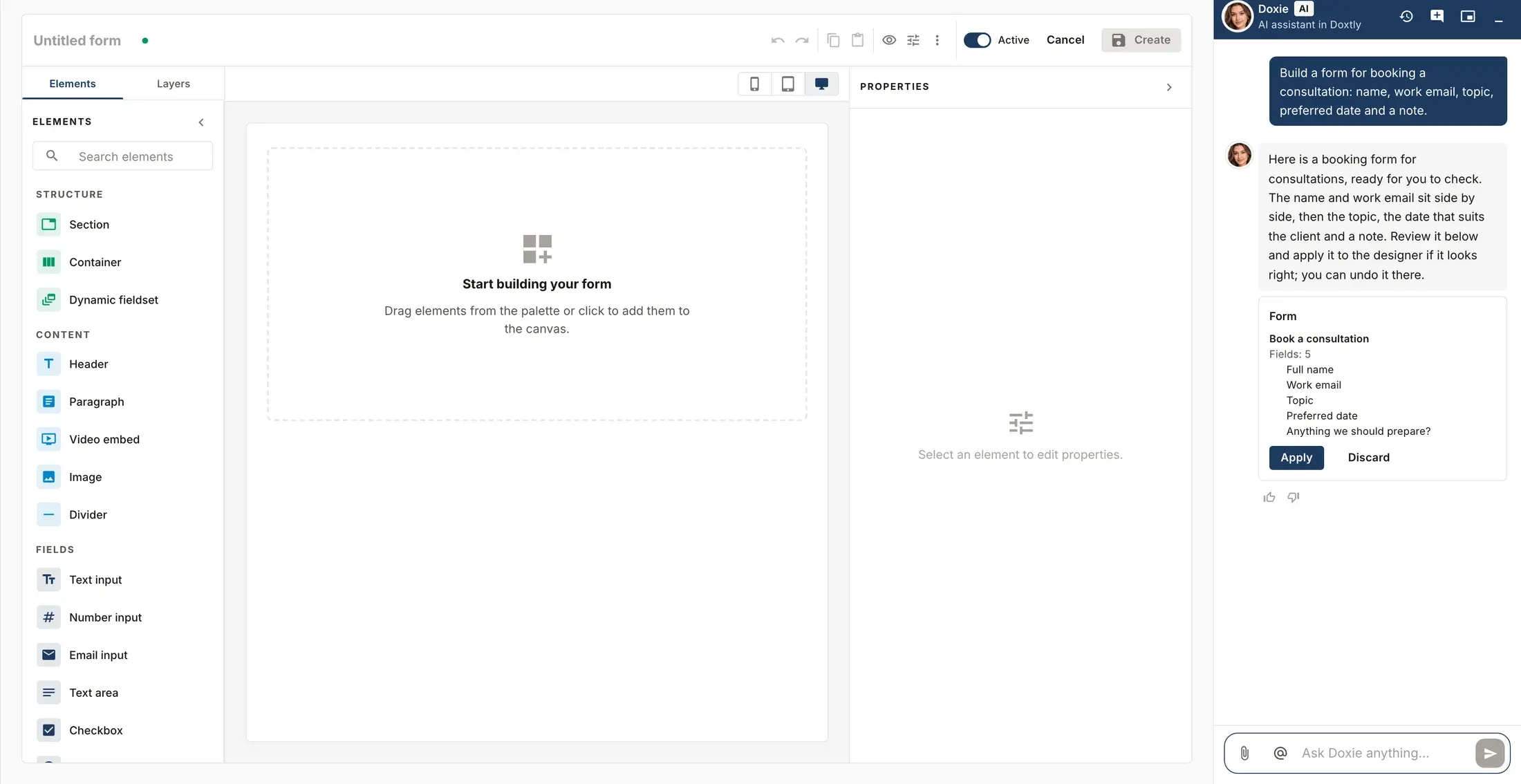
Answers from the manual, with their sources
Ask the way you would ask a colleague: how do I send one contract to two people for signature, can a form take a payment, what does the Free plan include. Doxie answers from Doxtly’s own documentation, the manual and the pages of this website, and lists her sources under the reply, so you can read the page yourself.
When the documentation doesn’t say, she tells you so and offers to put you in touch with our team instead of guessing. She is an AI, always labelled as one, and she can still be wrong, so check what matters to you.
On doxtly.com she is there for anybody, with no account: ask before you sign up, and if a question is for a person, she can draft a message to our team for you to send.
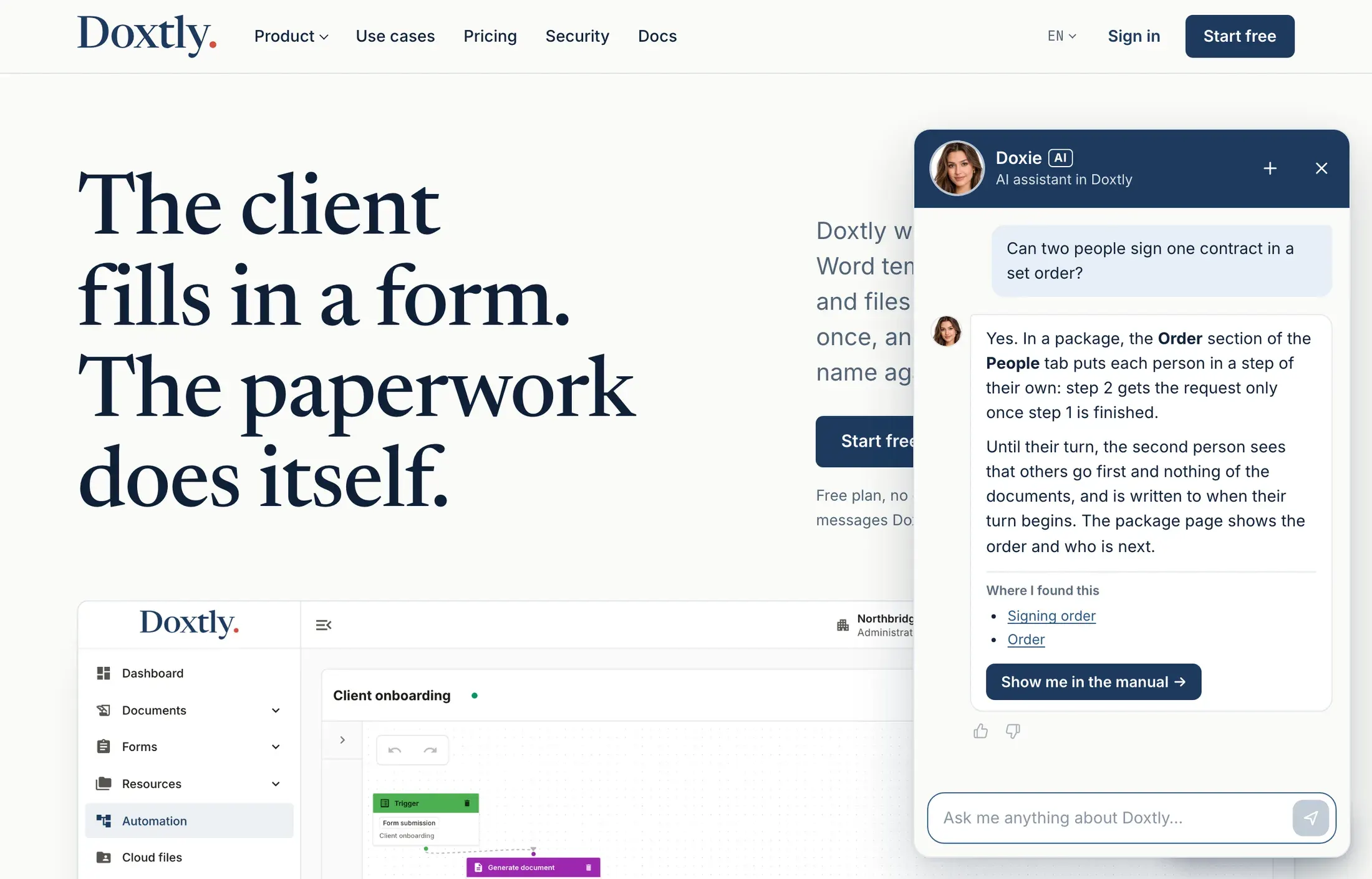
She prepares the work, you apply it
In the app, Doxie works on the page you have open. Describe a form and she builds it in the designer, or checks the open form against a contract template so that it asks for every value the document needs. She can place the areas on a PDF template, write an AI agent’s instructions or a skill, the code of a Data transformation step, or the settings of the step you selected in a workflow.
Each proposal arrives as a card in the conversation. Nothing changes until you click Apply or Create, and Undo takes an applied change back. A spreadsheet step is first tried on the real file, so you read something like “Matches 12 of 340 rows.” before you apply it, and nothing is written to the sheet.
She works within your own permissions: what you may not change, she does not prepare.
- A form from a description, or one that asks for everything a template needs
- A quiz or a survey from a description or a Word file, its settings changed by name, and answers about its results
- The areas of a PDF template, placed on the open file
- An AI agent’s instructions, and skills for it or for the library
- The code of a Data transformation step
- The settings of a workflow step, such as reading or writing a spreadsheet
- A custom role with the permissions a job needs
What is waiting for you
Ask what needs your attention and Doxie looks for you: documents waiting for your signature or approval, unread notifications, and, depending on your role, contracts ending soon and what failed in the last week. Each comes with a link to its page.
She sees only what you may see. If an administrator switches on Let Doxie read the organization’s records in the organization settings, she can also look through your forms, templates, workflows, contacts and other records, and sum up a form’s answers. Until then, she answers from the manual, the page you are on and what is yours.
A memory you can read and clear
Doxie remembers a few things that help her help you, such as your role, what you are working on and how you like your answers, so you don’t have to repeat them. Everything she remembers is listed in your profile, where you can correct a note, delete it, or switch Let Doxie remember off.
What she learns about your work stays in that organization, and your colleagues never see it. How you like your answers follows you to every organization you belong to.
Which AI she runs on
On a paid plan, Doxie runs on Doxtly AI, with a monthly limit included in your plan. Once it is used up, she can go on from your Doxtly balance: money your organization pays in advance and tops up on the Balance tab of the subscription. What is left carries over, and stays usable for a year after the last top-up. Nothing is ever billed as overage: with both used up, she pauses until the next month or the next top-up. The monthly limit shows as a percentage, the balance in US dollars.
An administrator can run her on one of your organization’s own AI integrations instead, with its key and its monthly budget. When that budget runs out, she moves to Doxtly AI if your plan includes it or your organization has a Doxtly balance. On the Free plan, Doxie works through an AI integration of your own.
On the Pro and Business plans, an administrator picks the AI Mode: Normal, quick and economical, or Advanced, where stronger models write her answers and do better with complex questions. An answer in Advanced costs more, so the limit and the balance run out sooner, and when too little is left she answers in Normal.
The AI buttons elsewhere in the app run on the same AI on a paid plan: the accent colour suggested from your logo, a form from a link, a template from a Word file, a schedule described in words. If one fails, it offers to ask Doxie, who already knows what was tried. AI agents in your workflows are separate: they run on your own Anthropic or OpenAI key.
Your conversations
Conversations are kept for 30 days after the last message on the website and for 90 days in the app, and you can delete any of yours from the list of conversations at any time. What you write goes to the AI provider Doxie runs on: Doxtly’s, or your own integration’s.
Rate an answer with a thumb up or down, and tell us what went wrong if you like. It helps us make her better.
Worth knowing before you start
- Doxie answers about Doxtly from its documentation. When it doesn’t cover something, she says so rather than guess.
- She never acts on her own: she prepares, and you apply. A form or a workflow she changed in an open designer is saved when you save it.
- On a PDF template she places areas; for a Word or SVG template she gives advice only.
- Building AI agents and skills, and the AI buttons, need a plan with AI agents. On the Free plan Doxie needs an AI integration of your own, and she is the only thing it serves.
- The chat on the website cannot see your account. Sign in to the app for anything about your own work.
Questions people ask
Is Doxie a person?
No. Doxie is the AI assistant in Doxtly, and she is labelled as AI wherever she appears. When you need a person, she offers to put you in touch with our team.
Can Doxie change my forms or workflows without asking?
No. She shows each change as a proposal first. It happens only when you apply it, and Undo takes it back.
Does Doxie cost extra?
No. On a paid plan she runs on Doxtly AI within a monthly limit included in your plan, and nothing is billed as overage. If you want more, top up the prepaid Doxtly balance, and she goes on from it once the limit is used up. On the Free plan she works through an AI integration of your own, billed by your provider.
Can Doxie see my clients’ data?
Only what you yourself may see, and your organization’s records only if an administrator allows it in the organization settings. It is off until they do.
Can I use Doxie without an account?
Yes, on doxtly.com and in the manual, for questions about Doxtly. Doxie in the app, which prepares work and knows what is waiting for you, needs you to be signed in.
Start with one document.
Take the contract you retype most often and turn it into a template. The Free plan is enough, and you need no card.