
Ask what people think, and see what it adds up to
A survey is a set of questions without right or wrong answers, answered through a link. Its results count every answer for you, work out your NPS, CSAT and CES, show how two answers go together and sort the comments into themes with AI.
One question per screen
A new survey shows one question at a time, in large type, and can move on by itself once a choice is picked, so it reads well on a phone. A page per section, or everything on one page, is a setting away.
Ready NPS, CSAT and CES questions come with their wording and their scale. Every other answer type of a quiz is there too, from a grid of statements on one scale to a ranking, with “Other”, pictures, sections, logic that skips what does not apply, and language versions.
Start from one of six templates, from customer loyalty (NPS) to market research with quotas, or from your organization’s own. Reuse questions from the question library, import them from a file, or ask Doxie to write the survey from a sentence: she shows it on a card before anything is created.
- NPS, CSAT and CES, each with its score in the results
- Grid (matrix) and Ranking, as on forms
- Questions from a GIFT, Aiken or Moodle XML file, an Excel or CSV sheet, or a Word document
- Save as a template for the next survey of its kind
Send it to the people you want to hear from
Share the link or its QR code, or put the survey on your website with a script or a plugin for WordPress, Joomla, Drupal or Magento. For clients, send it from your contacts with Send to fill in: each gets a personal link. For a staff survey, keep an access list and send invitations now or at a set time, with a deadline and reminders.
A quota closes one group of respondents once it has enough of them, say 150 people aged 18 to 34, while the others go on answering. A schedule opens and closes the survey, and a limit stops it after a number of responses. The page takes its look from a theme, with your own CSS if you like, on every plan.
- Personal links that expire and can be revoked
- Up to five reminders, never to anyone who has answered
- A workflow for each person who has not answered by the deadline
- Up to 20 quotas, each with its own text for when it is full
Anonymous when it has to be
For an employee survey, switch on Anonymous responses: no name, email, IP address or device is kept, nothing ties a response to the person who gave it, and the results show nothing of a group of fewer than 5.
Every survey email lets the contact stop receiving surveys from you, and from then on none reaches them, whether sent by hand, to many at once or by a workflow.
Results that do the counting
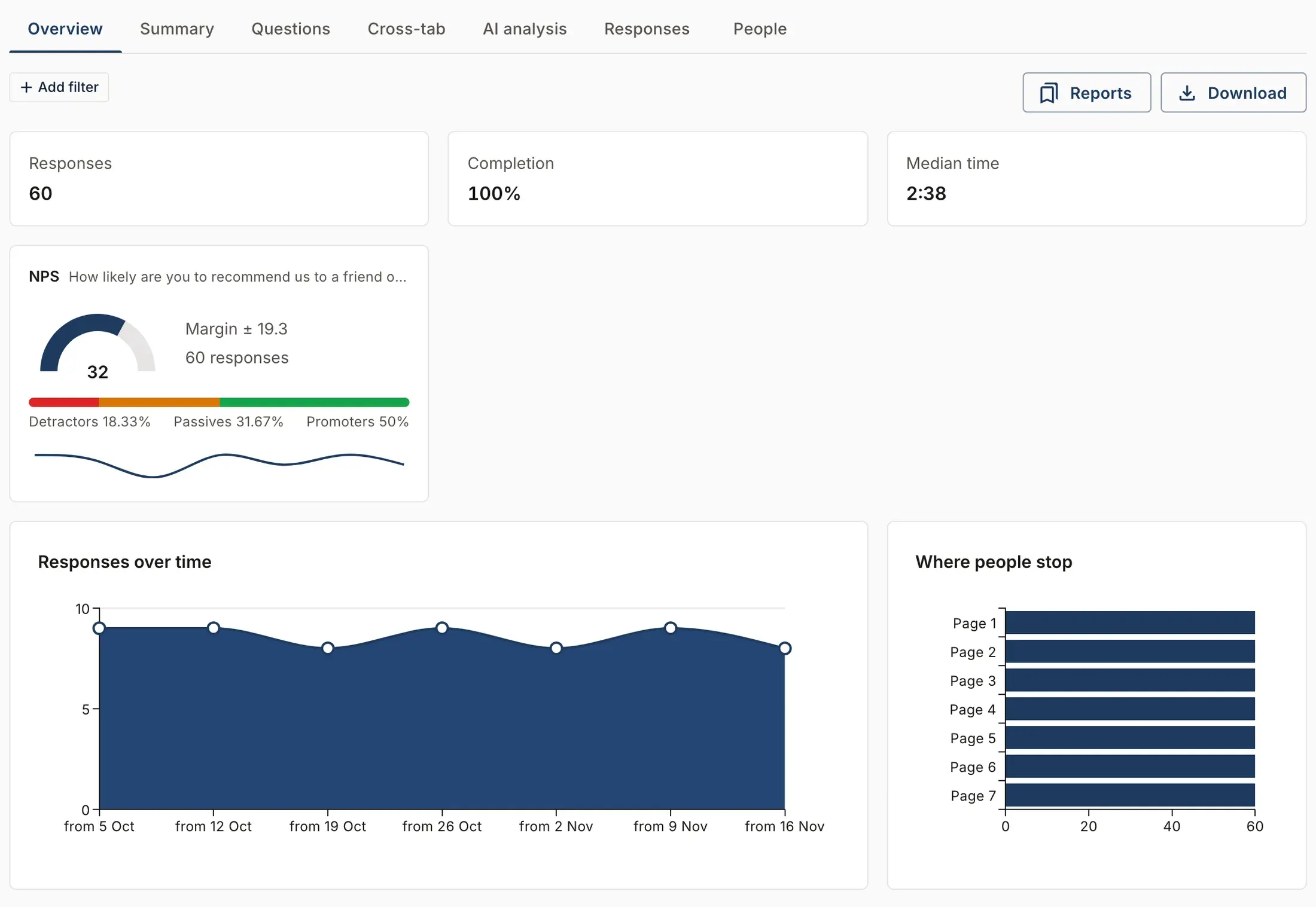
Northbridge Advisory, an example consulting firm, sends a short survey when each engagement ends. The Overview shows its NPS with the margin of error, the responses over time and where people stop, page by page. On Questions, a click on a bar filters every chart by that answer, and up to four segments sit side by side.
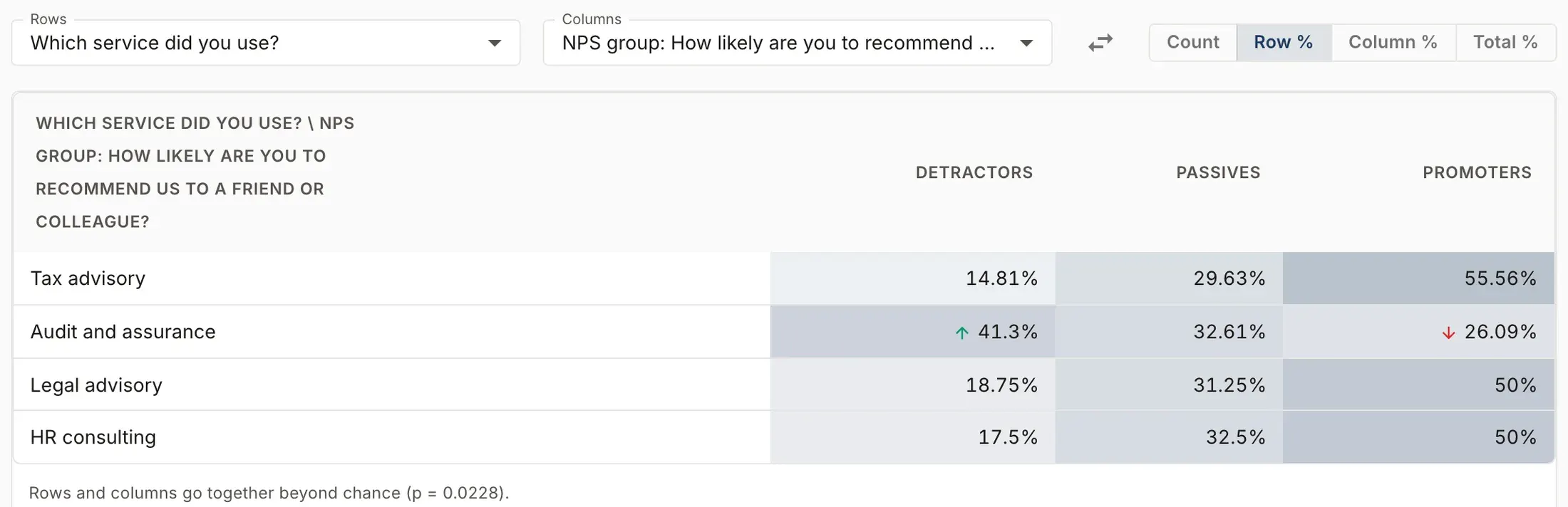
A Cross-tab sets one question against another, or against the language, the device or the group, and says whether the difference goes beyond chance, with an arrow on each cell that stands out. Summary lists every response as a row, and each one opens on its own, with a PDF response sheet.
- NPS with promoters, passives and detractors, CSAT and CES
- Bars, a donut or a table for each question, downloaded as an image or as numbers
- Filters by answer, language, device, group, link parameter or metadata
- Each quota’s progress as it fills
What the comments say
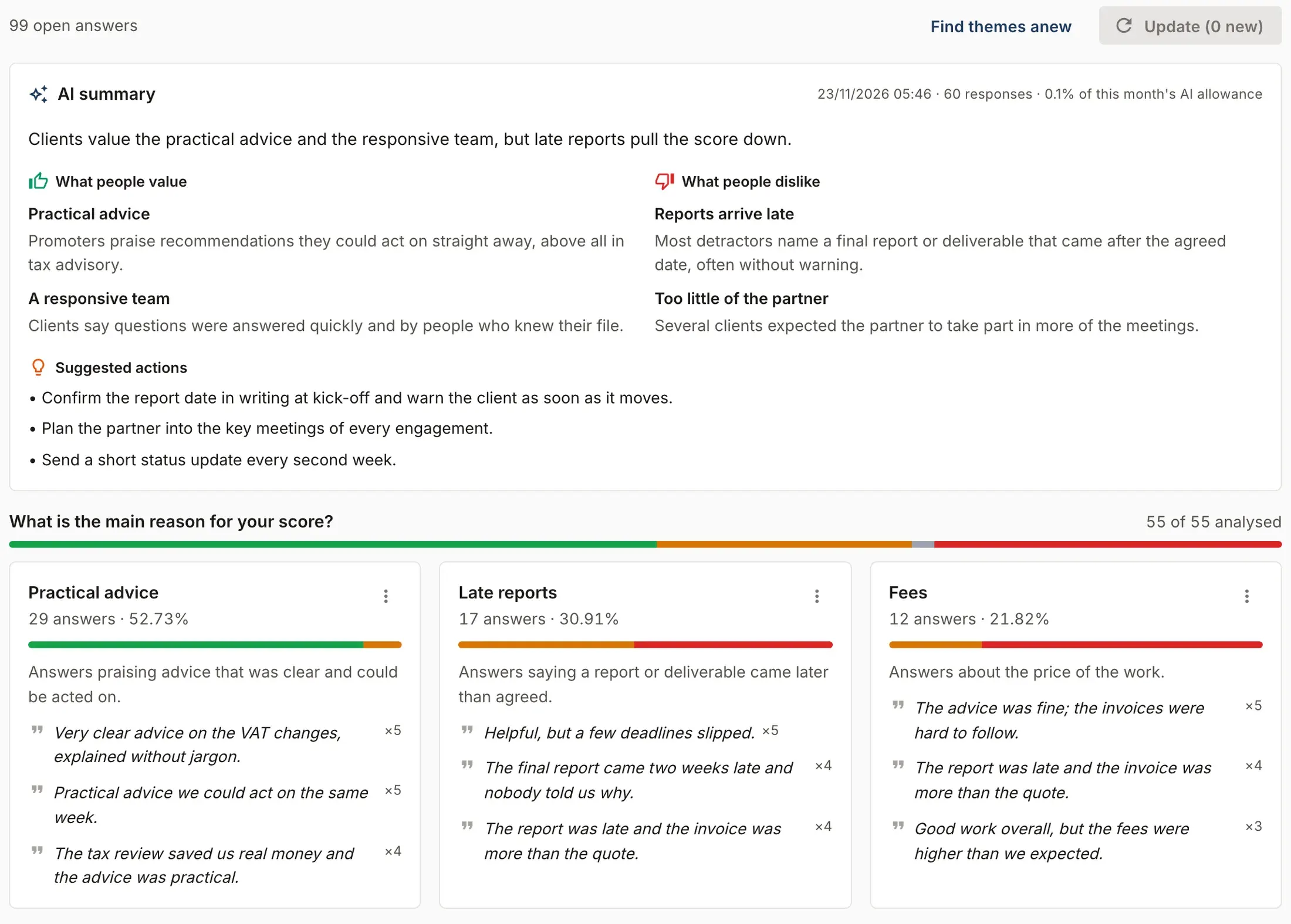
Two hundred answers to “What could we do better?” say a lot, but nobody has the afternoon to sort them. AI analysis finds the themes the answers speak of, puts every answer in its themes, shows how they feel and quotes people’s own words, with a short summary of strengths, problems and actions on top.
Before a run you see how many answers it reads and about what it costs; one run never costs more than 10 USD. Personal data such as email addresses and phone numbers is removed before the answers are sent, unless you switch that off. Update adds only the new answers, and the themes are yours to rename, merge and split.
Doxie answers from the same page: “What do people dislike?” or “What’s our NPS?”. She never names a respondent.
Reports, spreadsheets and workflows
Save a view as a report, with its filter, segments and charts, and share it with a board or a client by a link with a password and a date it stops opening. The link shows totals only, never a text answer or a group of fewer than 5. Download gives the results as a PDF report, and the responses as Excel or CSV.
Keep in a spreadsheet writes each response into a spreadsheet on your connected drive as it is sent. A workflow starts when a response is started or submitted, when somebody has not responded by the deadline, when the survey closes or when a quota is full: when a client gives an NPS of 6 or less, say, the account team hears at once.
Worth knowing before you start
- A survey has no correct answers, points, time limit, grades or certificates: for a test, use a quiz. A survey cannot be turned into a quiz.
- An anonymous survey cannot ask for a name, e-mail, group or ID number, and an answer written in someone’s own words can still say who wrote it.
- Plans limit how many surveys you keep and how many responses are started each billing period; the pricing page has the numbers.
- Comparing more than two segments, the significance test of a cross-tab and the AI analysis are part of the Pro and Business plans.
- A survey has no questions that upload a file, a photo, a drawing or a signature; for those, use a form.
Questions people ask
How is the NPS worked out?
From a 0 to 10 question: the per cent who answered 9 or 10 less the per cent who answered 0 to 6, from -100 to 100, with its margin of error at 95 % confidence.
Can I see who answered an anonymous survey?
You see who responded, so reminders stop, but not what they answered. Nobody, Doxtly included, can tell which response is whose.
Do people need an account to answer?
No. A link is enough, or a password, or a personal link sent to them.
Can every response land in a spreadsheet?
Yes. Keep in a spreadsheet on the Summary tab picks a spreadsheet on your connected drive, or makes a new one, and adds a workflow that writes each response as a row the moment it is sent.
What does the AI analysis send to the AI?
Only the open answers, with email addresses, phone numbers, account, card and ID numbers and the respondent’s own name replaced by placeholders, which is on by default. A name mentioned in passing may stay. An estimate of the cost comes before every run.
In the manual
Where it is used
Start with one document.
Take the contract you retype most often and turn it into a template. The Free plan is enough, and you need no card.