
An NPS survey that goes out when the project is delivered
A salesperson moves the deal to Delivered in Pipedrive, and the client gets a two-minute survey through their own link. A low score reaches the account team in Slack and lands as a note on the client in Pipedrive, and the results show the NPS with its margin of error and what the comments keep saying.
Feedback asked for when someone remembers
Northbridge Advisory, our example consulting firm, closes a few dozen projects a quarter. The partners agree that every client should be asked how it went. In practice someone sends a survey when they remember, the answers sit in a spreadsheet, and the yearly NPS rests on whichever clients happened to be asked.
The worst case is the quiet one. A client who is unhappy with a project gives a 4 out of 10, writes two sentences on why, and nobody at the firm reads them until the client has already gone to a competitor.
What the firm wants: every delivered project asked the same question, an unhappy client known to the account team the same day, and a score the partners can trust.
What Northbridge sets up, step by step
One short survey for every client
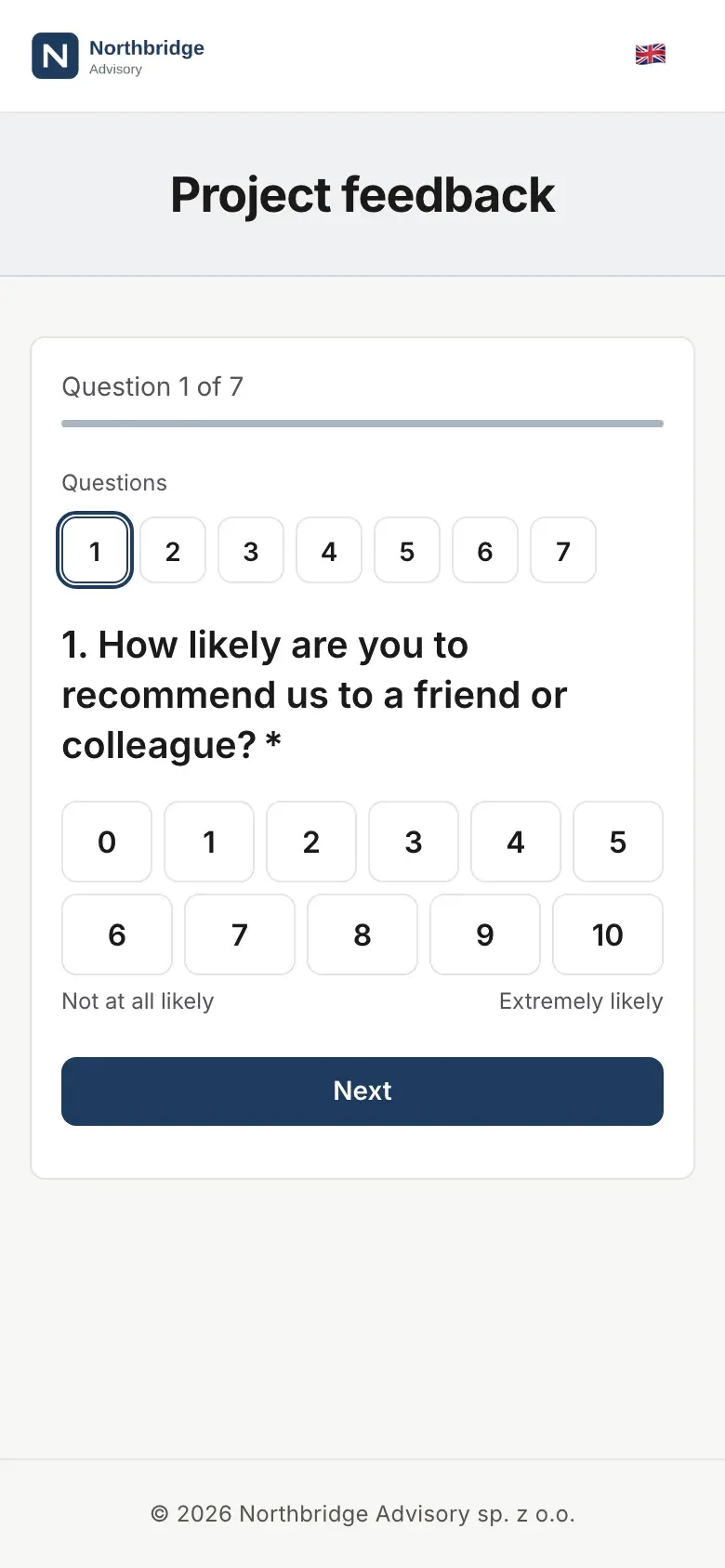
New survey → From a template → NPS – customer loyalty gives five questions, one per page. Northbridge calls it “Project feedback”. The first question, how likely the client is to recommend the firm from 0 to 10, keeps its data key
q_npsand measures the NPS; the second,q_reason, asks for the reason. There is no question about the client’s name: the survey knows who answered from their personal link.Pipedrive people are Doxtly contacts
Northbridge’s Pipedrive integration keeps each person’s ID in a text field of contacts,
pipedrivePersonId, chosen as Person ID (a field of contacts) under Pipedrive IDs. New clients already reach Pipedrive through the onboarding workflow, so the person on every deal is a contact, and a deal’s trigger names that contact in{{ _opportunity.contactId }}.
The survey leaves when the deal reaches Delivered
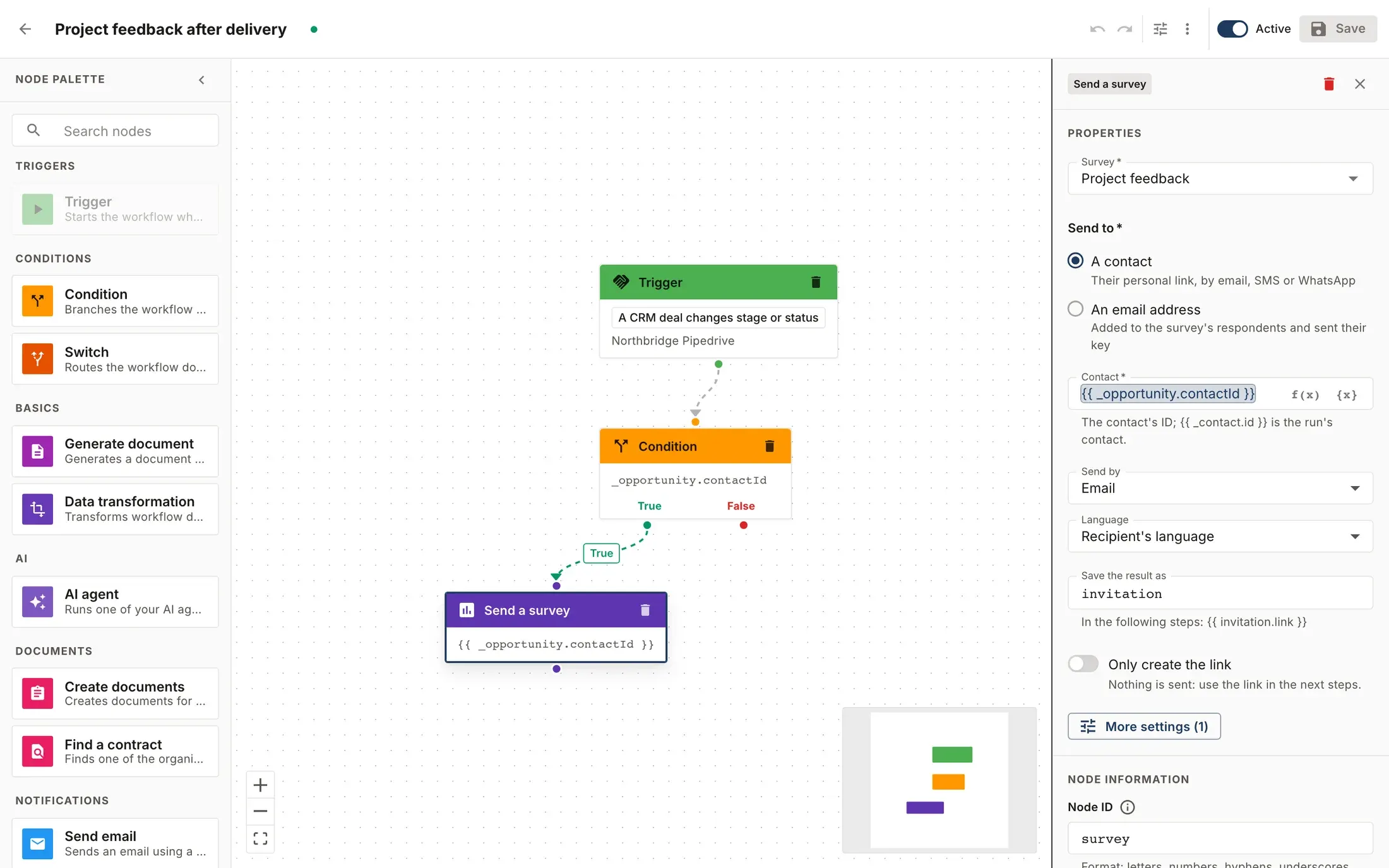
A workflow starts on CRM, A CRM deal changes stage or status, with the Stage Delivered of the Projects pipeline. A Condition with the bare expression
_opportunity.contactIdasks whether the deal has a contact, and on True a Send a survey step sends Project feedback to A contact,{{ _opportunity.contactId }}, by email in the Default (Survey link) message.The client answers in two minutes
The client gets an email with their personal link, opens it on a phone and answers one question per page. Like every survey email to a contact, it ends with a link to stop receiving surveys, and Doxtly respects it from then on, for this survey and every other.
A low score reaches the account team the same day
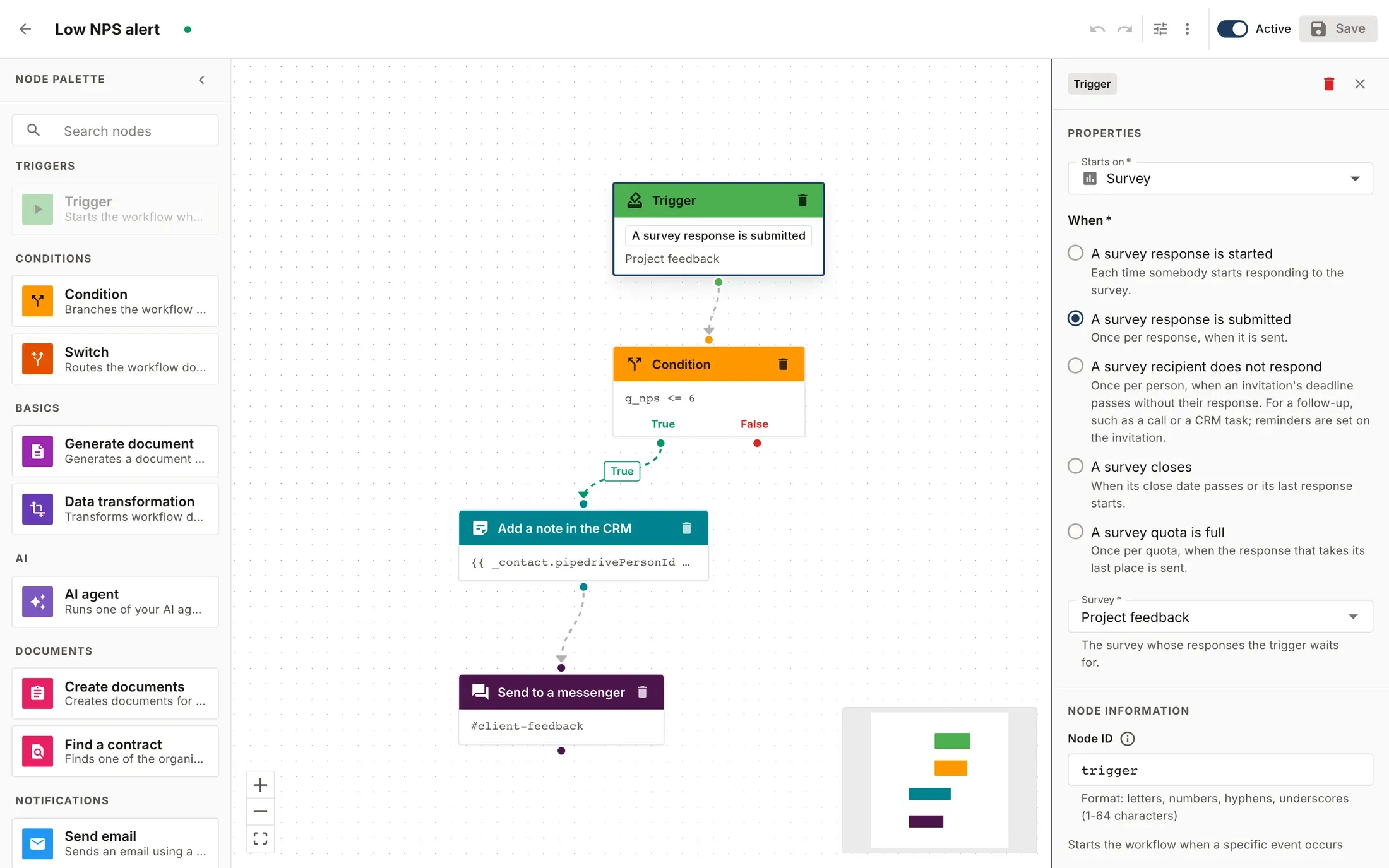
A second workflow starts on the survey’s A survey response is submitted, for Project feedback. A Condition checks
q_nps <= 6, a detractor’s score. On True, Add a note in the CRM writes on the Person{{ _contact.pipedrivePersonId }}:NPS {{ q_nps }}/10 after the project: {{ q_reason }}. Next to it, Send to a messenger posts to the channel#client-feedback.
Where the team already looks
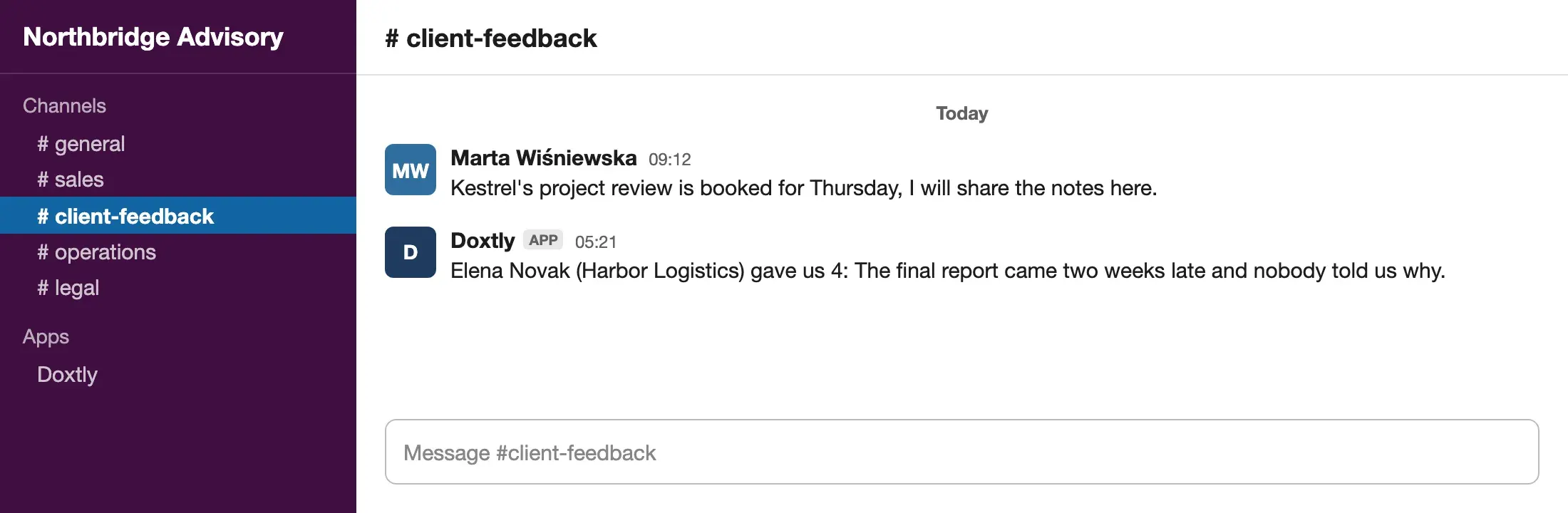
The Slack message reads like
Elena Novak (Harbor Logistics) gave us 4: The final report came two weeks late and nobody told us why.The partner reads it within the hour, and the same words are on the client in Pipedrive, among the person’s notes, for whoever opens them next.
What the score and the comments say
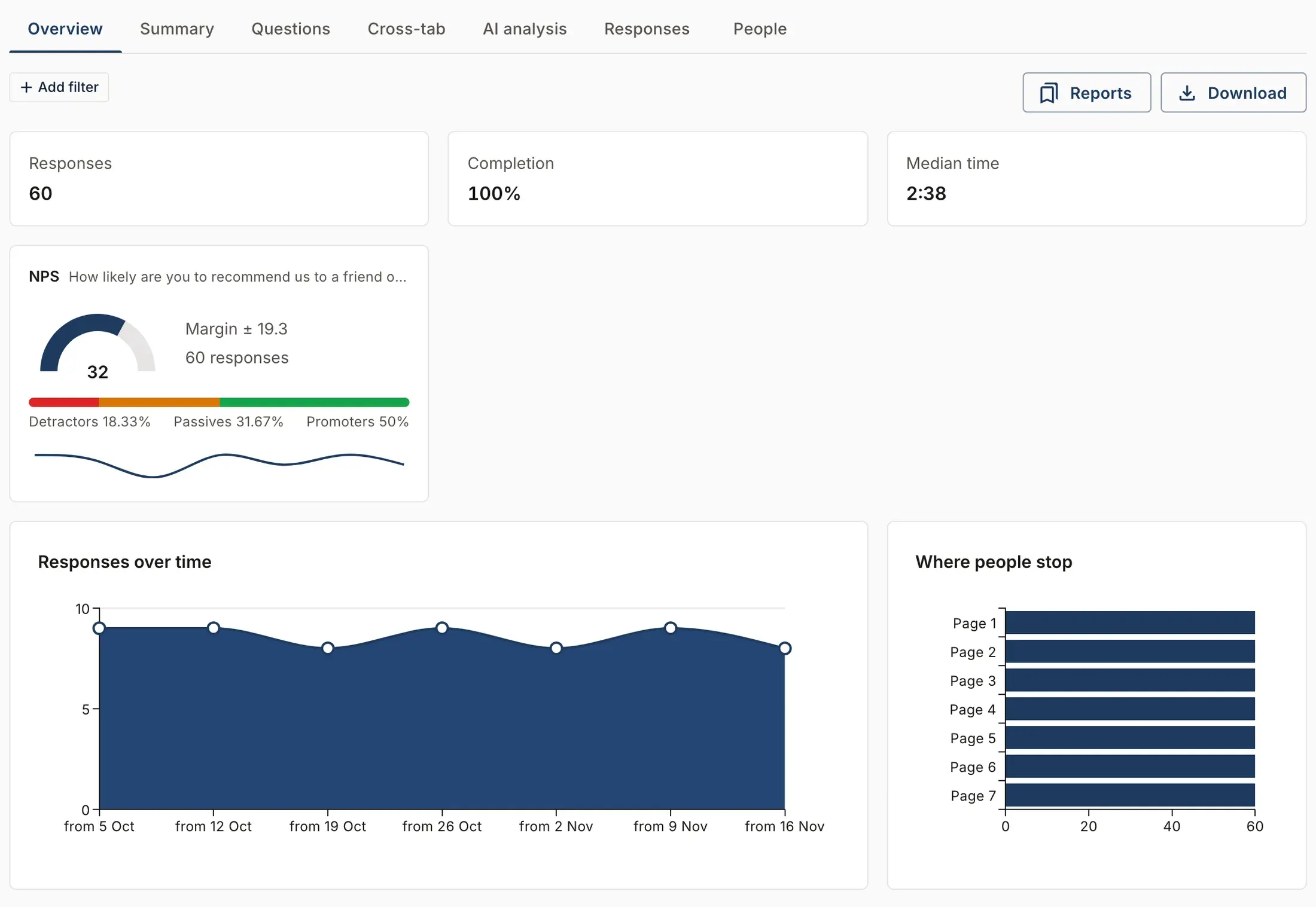
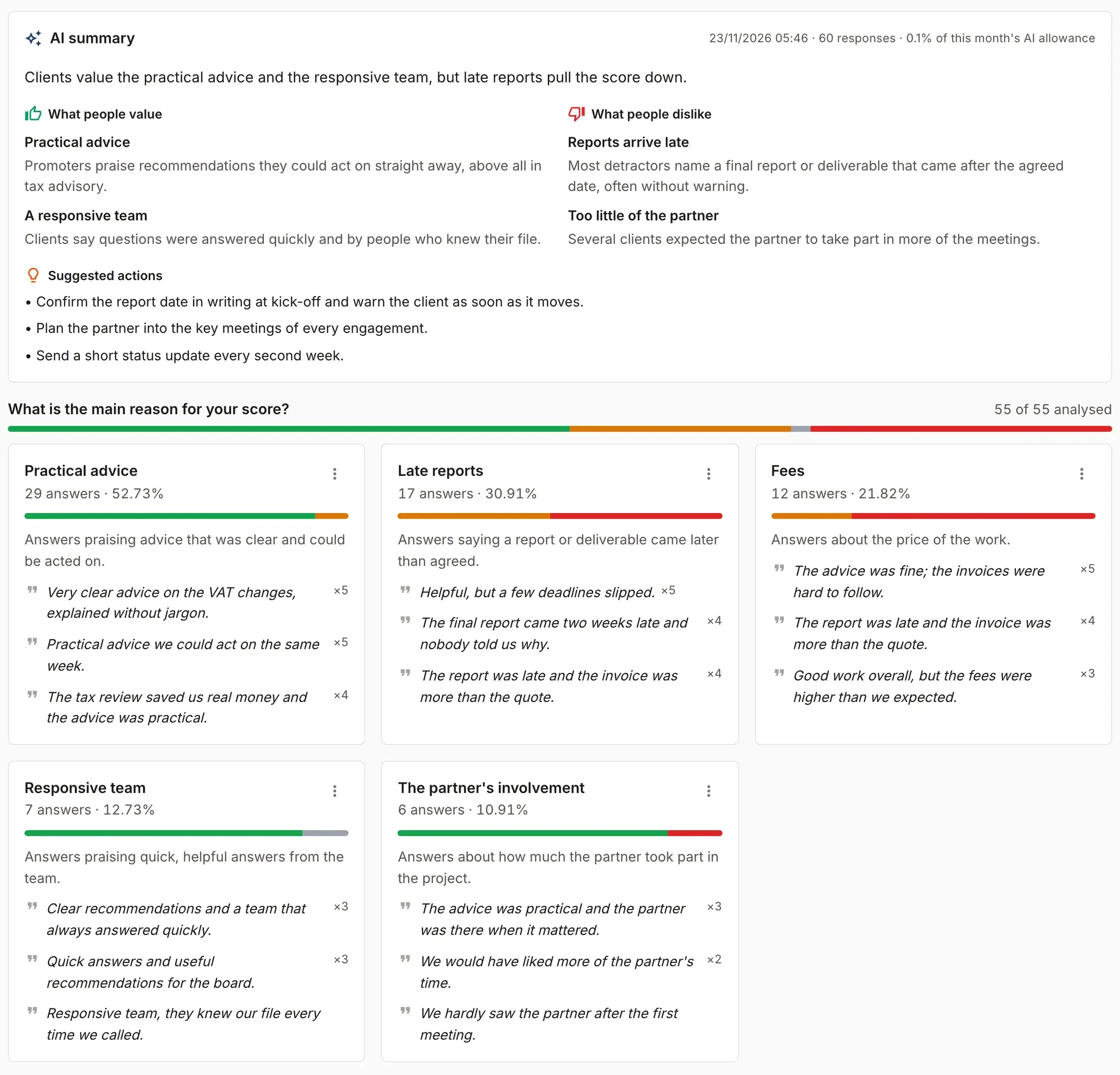
On the Overview tab, the NPS tile shows the score with its margin of error at 95 % confidence: 32 ± 19 from 60 responses means somewhere between 13 and 51, so a few points up or down from last quarter may be chance. On the AI analysis tab, Analyse with AI sorts the reasons into themes, such as late reports or the partner’s involvement, each with how many said it and quotes in the clients’ own words.
What you set up once
- A Pipedrive integration with a contacts field that keeps the Person ID
- A survey from the NPS template
- An email integration for the survey link
- A Slack or Microsoft Teams integration for the alert
- Two workflows: one on the deal’s stage, one on the survey’s responses
Ways to adapt it
- Microsoft Teams instead of Slack
- Connect Microsoft Teams and pick a channel such as
Clients › Feedbackin the same step. Or send the alert as a direct message to the account manager, by their email address. - HubSpot or Copper
- The same two workflows run on a HubSpot or Copper integration. HubSpot’s won and lost are stages, so choose the stage your team uses for delivered work.
- A report for each quarter
- Filter the results by Finished between two dates and Save view as a report. The partners open “Q4 2026” at the quarterly review and see the same view every time, with the newest responses in it.
- Ask Doxie
- In the app, ask Doxie What’s our NPS? or What do clients dislike?. She answers from the results page, themes included, and never names a respondent.
- What it is not good for
- A workflow can’t wait a week before a step, so the survey goes the moment the deal moves. If clients need time to see the result of a project first, move the deal to Delivered when that time has passed. And the score says how clients feel, not why one of them left: that still takes a phone call.
Questions people ask
Why does the note go on the person and not on the deal?
The response knows who answered, through the contact’s personal link, but not which deal the survey was sent for. The contact keeps the Pipedrive person’s ID, so the note goes there. A client with one project at a time is easy to match; for several, write the project into the note by hand or read the date of the response.
What if the person on a deal isn’t a Doxtly contact yet?
Then _opportunity.contactId is empty, the Condition sends nothing and the run ends there. Add the person as a contact with their Pipedrive ID in the Person ID field, or let your onboarding workflow sync them, and the next project reaches them.
What happens when a client has said they want no more surveys?
The survey isn’t sent. The Send a survey step fails and says the contact asked to be sent no surveys, so the run’s page shows exactly why that client got nothing.
Does a client who has two projects in a month get two surveys?
They get two emails. A contact who still has an open link to the survey is sent the same link again, and each response they send is counted, so the results show one response per project they answered for.
How reliable is an NPS from a few dozen responses?
Less than one number suggests, which is why the tile shows the margin of error beside it. With 60 responses it is about ±19 points. Compare quarters by their ranges, not by the score alone, and read the comments: they say more than a change of a few points.
Which plan do I need?
Surveys are in every plan, with their own limits of surveys and responses. The CRM trigger and the CRM steps, and the AI analysis, need the Pro or Business plan. Pricing shows the current limits.
Start with one document.
Take the contract you retype most often and turn it into a template. The Free plan is enough, and you need no card.