
A market study that stops each group at the number you need
Respondents come from a newsletter, a research panel and social ads, each through its own link. Quotas close every age group at its target, the team hears the moment one is full, and the results compare the channels and say which differences are more than chance.
Two hundred students and a dozen pensioners
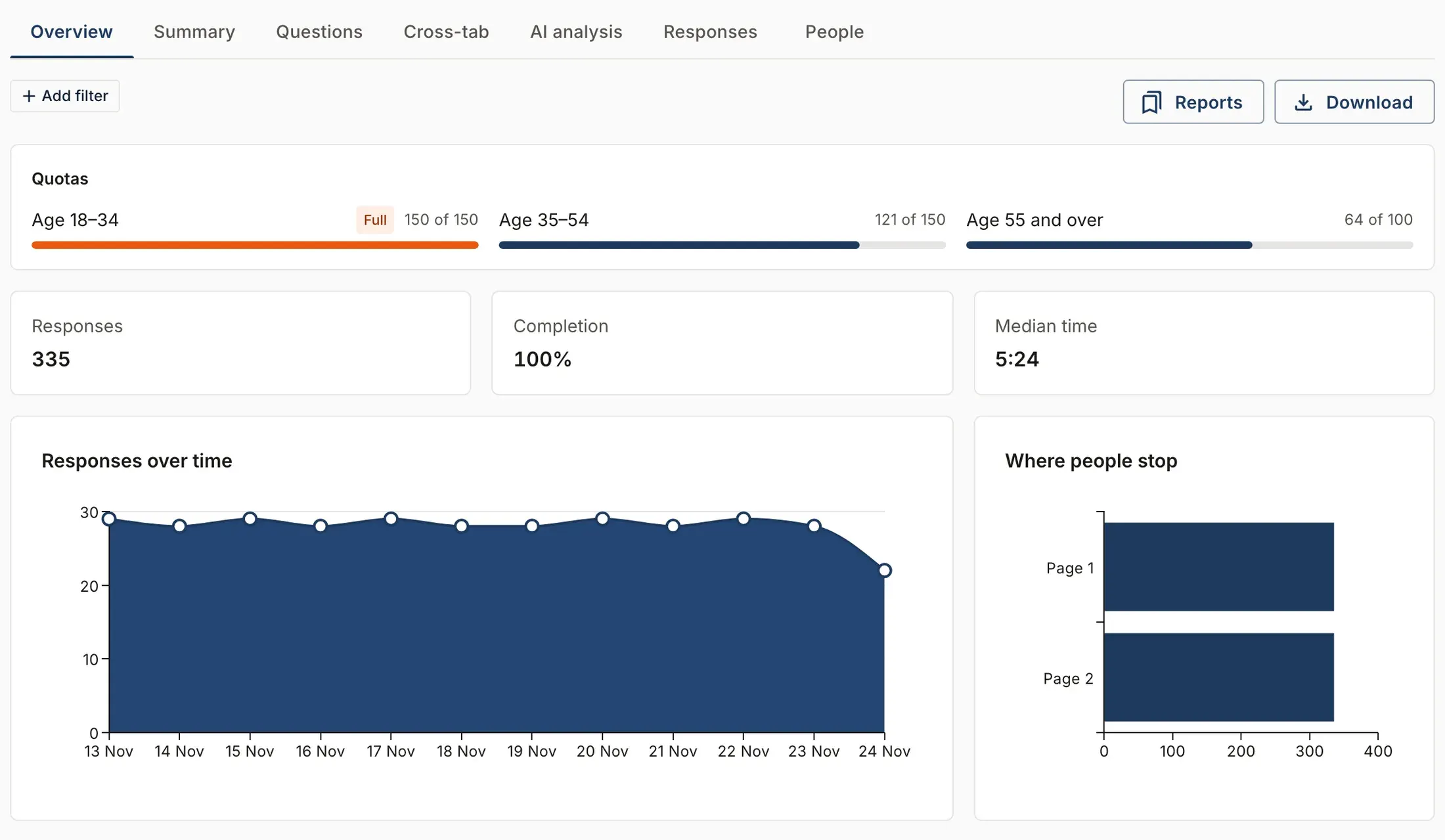
Fairway Hotels, a chain of city hotels, is weighing a cheaper brand for short breaks and asked Northbridge Advisory, our example consulting firm, who would book it. The study needs 400 answers that look like Fairway’s market: 150 people aged 18 to 34, 150 aged 35 to 54 and 100 aged 55 and over.
An open survey link doesn’t do that on its own. The social ads bring young people by the hundred within a day, the newsletter brings the regulars, and without limits the study ends up with far too many of one group and too few of another, or pays for ads long after a group was complete.
Northbridge wants each group to close at its number, to know at once when one does, and to tell Fairway whether a difference between groups or channels is real.
What Northbridge sets up, step by step
Screening first, quotas from the template
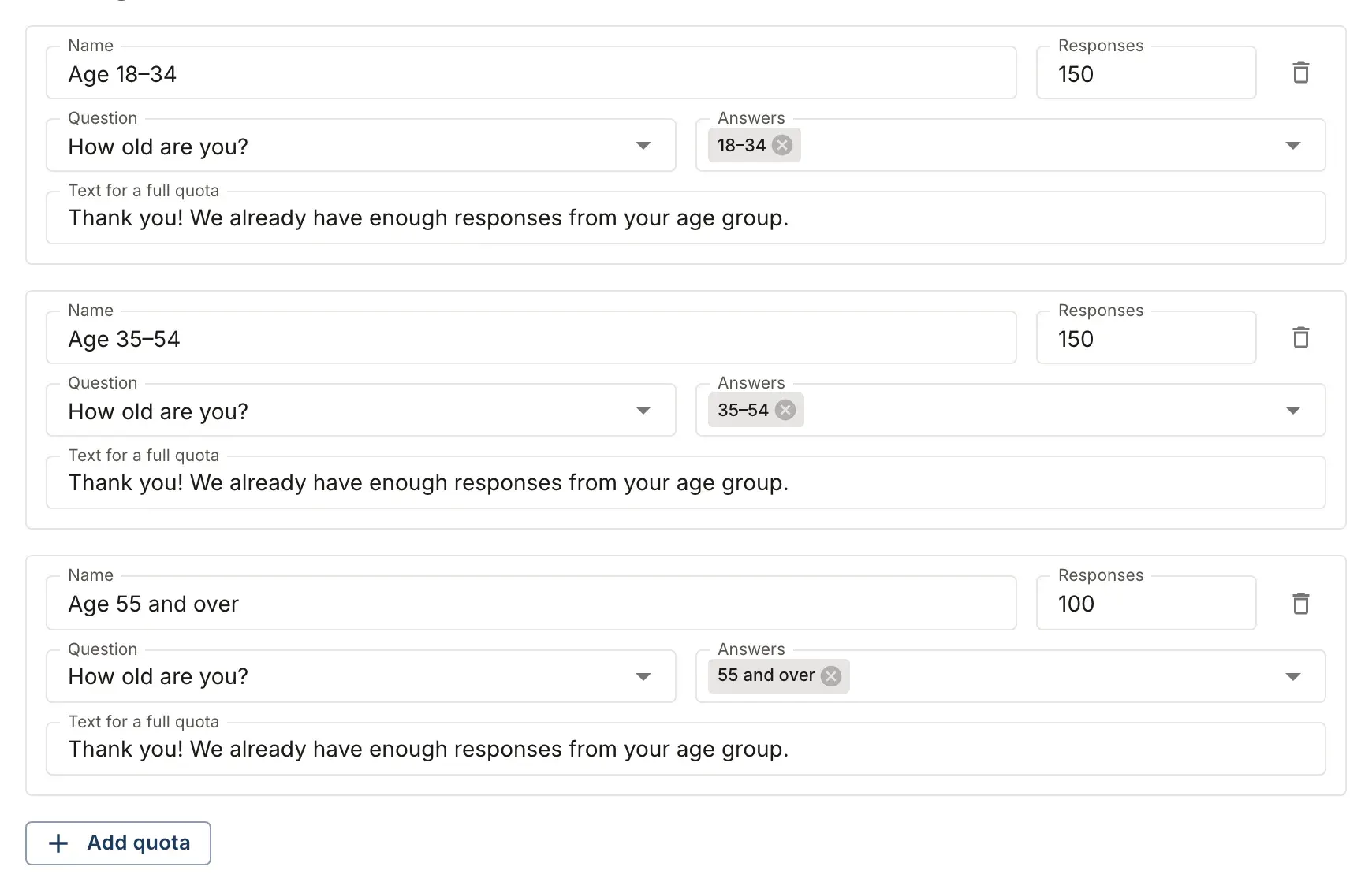
New survey → From a template → Market research with quotas opens with “How old are you?” and comes with three quotas on it, in the Schedule section of the settings: Age 18–34 with 150 responses, Age 35–54 with 150 and Age 55 and over with 100, each with its Text for a full quota. Northbridge keeps them and rewrites the buying questions for city breaks, among them “How willing would you be to try a new hotel brand offering a 10% lower price?” on a scale from 1 to 5.
One link per channel
Under Link parameters, Accept link parameters takes
channel. Fairway’s newsletter carries the survey’s link with?channel=newsletter, the research panel gets?channel=panel, and the social ads?channel=social. Each response keeps the channel it came through.A full group stops counting
A response is counted when it is sent, in every quota it meets. Once Age 18–34 has its 150, the next young respondent reads the quota’s text, Thank you! We already have enough responses from your age group., and their response is kept apart: listed as Quota full under Responses and left out of the results. Two responses sent at the same moment for the last place never both take it.
The team hears when a group is complete
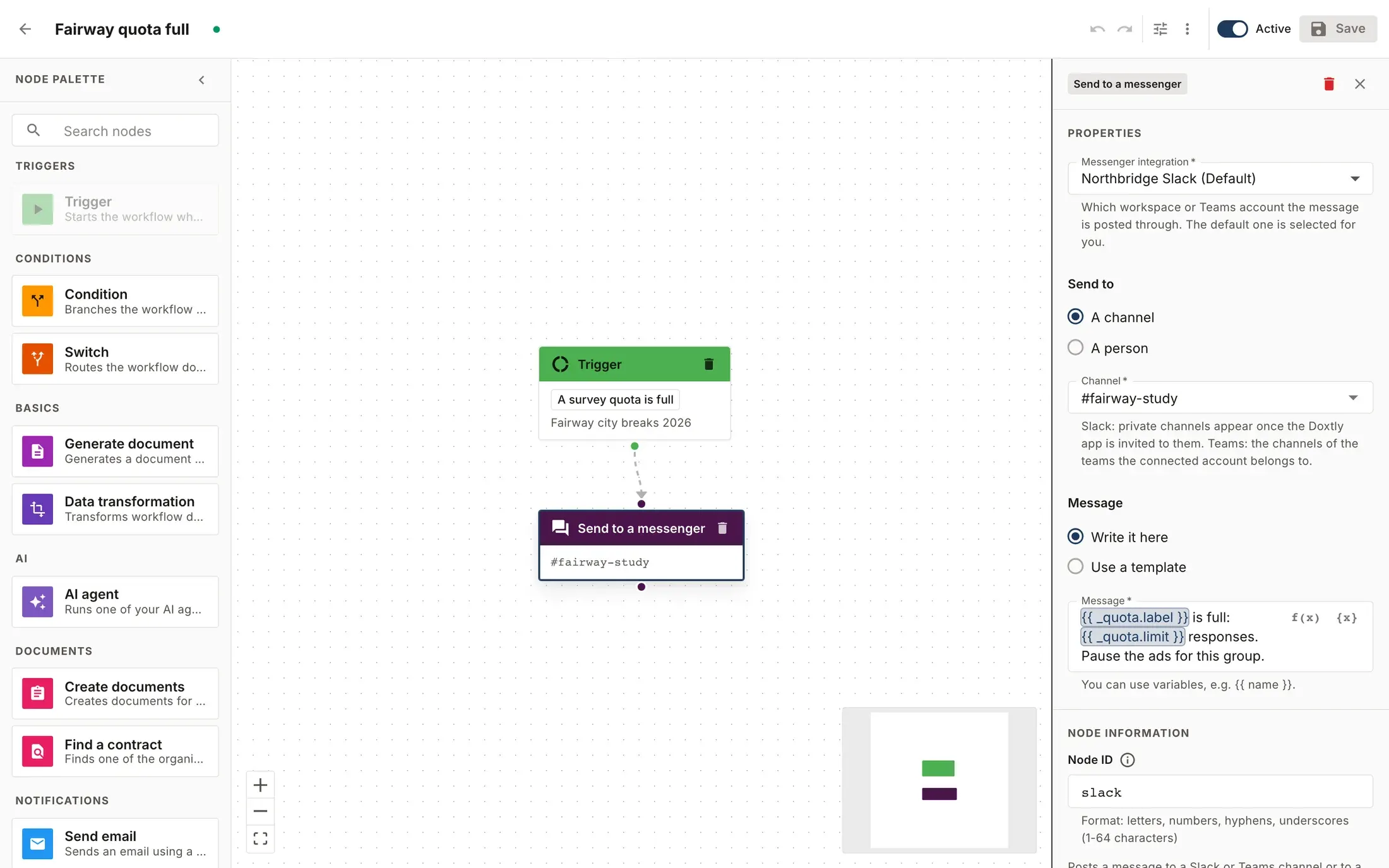
A workflow starts on the survey’s A survey quota is full, once per quota. Send to a messenger posts to
#fairway-study:{{ _quota.label }} is full: {{ _quota.limit }} responses. Pause the ads for this group.The media buyer stops the young audience’s ads the same afternoon, and no more money goes on answers the study can’t use.
The channels side by side
On the Questions tab, Add filter → Link parameter
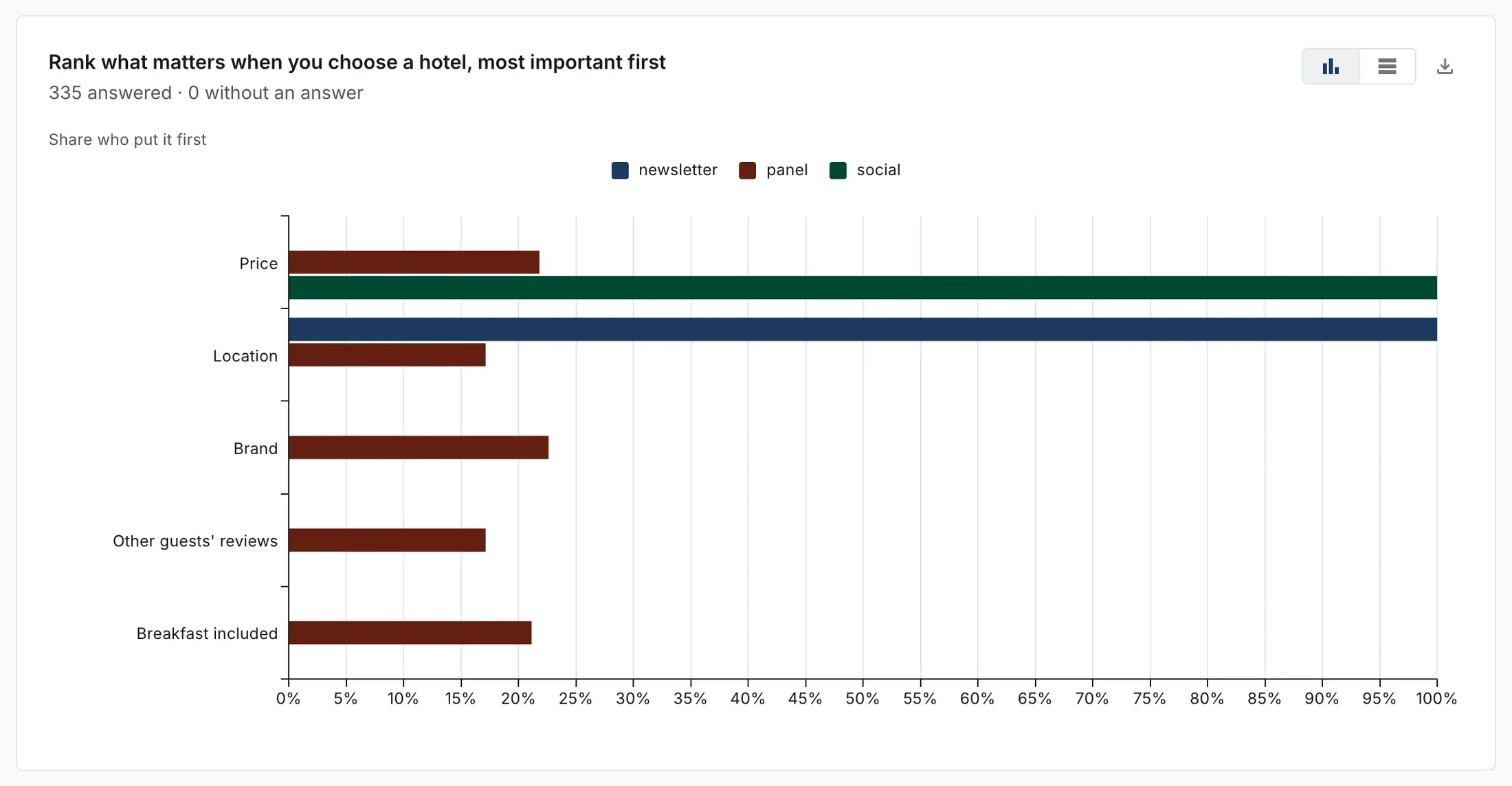
channelis one of newsletter, then Compare as a segment; the same for panel and social. Every bar now has a colour per channel, and it shows at once that the newsletter’s regulars care about the location first, while the social audience ranks the price first.
Is the difference real?
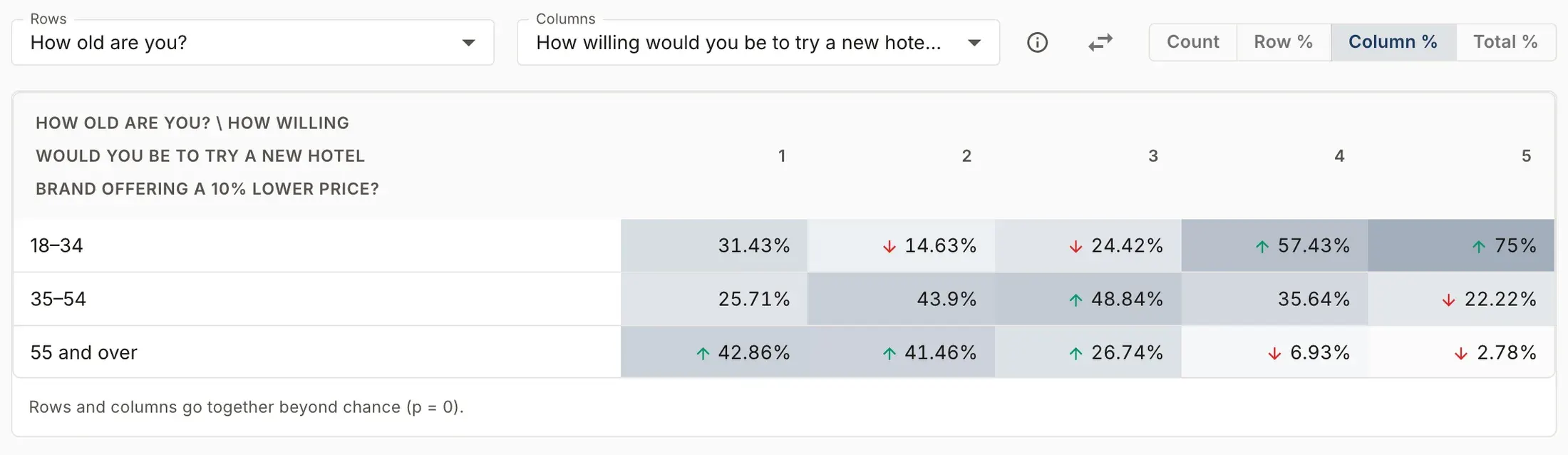
The Cross-tab puts “How old are you?” in the rows and the willingness to try a cheaper brand in the columns, as Column %. The line under the table says whether rows and columns go together beyond chance, with the p-value, and an arrow marks each cell with significantly more or fewer responses than expected. That is the sentence Fairway’s board needs: younger guests really are readier to switch.
A report for the client
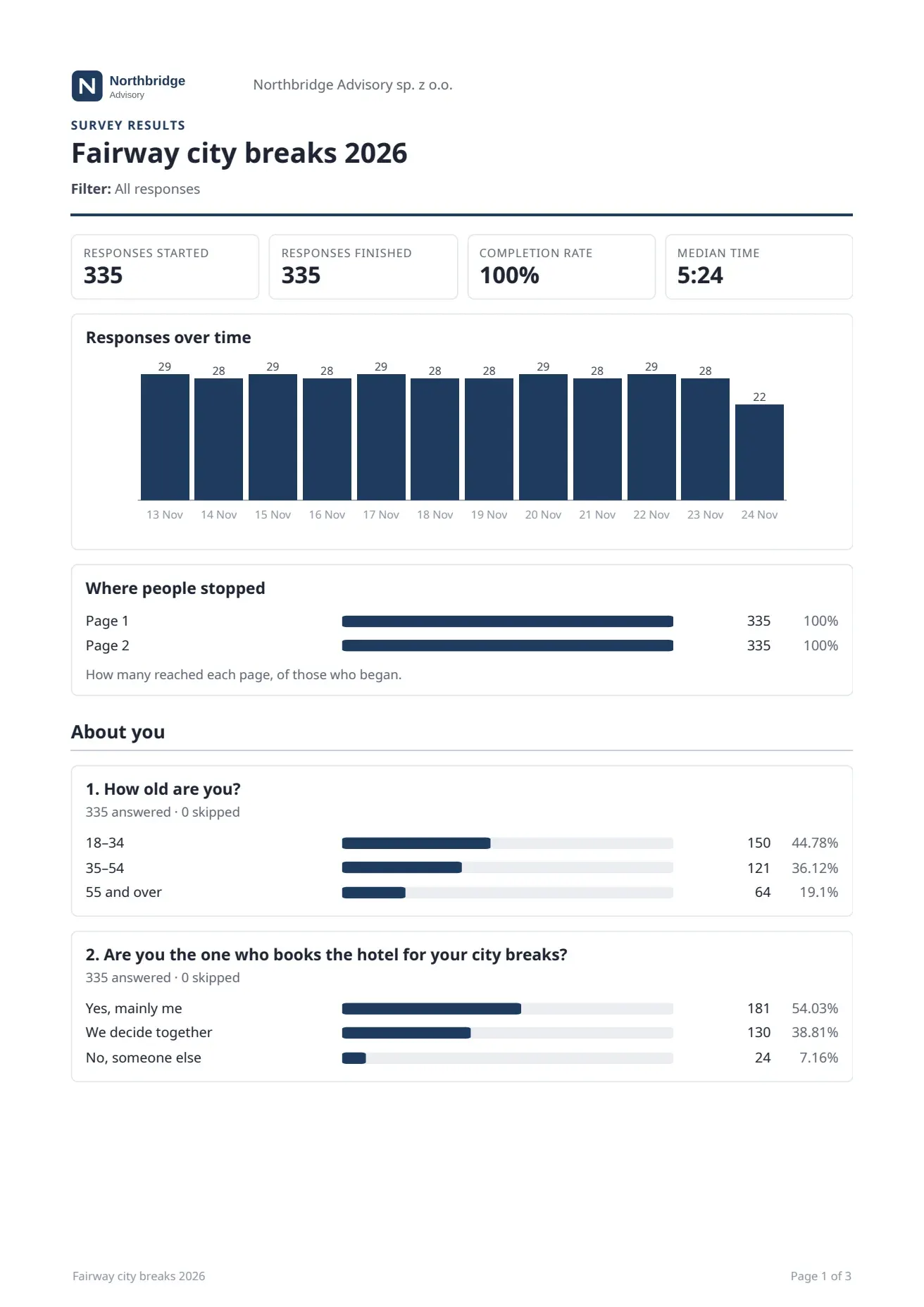
Northbridge saves the view as a report, “By channel”, and from Download takes the Results report (PDF): Northbridge’s logo, the filter in words, the headline figures and a card per question with its chart, counts and shares. Fairway’s analysts get Responses (Excel), a row per response with its answers in words.
What you set up once
- A survey from the market research template, with the quotas you need
- Link parameters, with one link per channel
- A Slack or Microsoft Teams integration, or email, for the quota message
- A saved report for the client’s presentation
Ways to adapt it
- Quotas by region as well
- Add a question on the region and a quota for each, up to 20 in all. A response that meets an age quota and a region quota is counted in both, and is turned away once either is full.
- A total as well as groups
- In the same section, Limit the responses closes the whole survey at a number. The A survey closes event then tells the team the study is complete, with how many responses were sent.
- A study among your own customers
- For a study among Fairway’s loyalty members, send the survey to them as contacts with Send to fill in. Each response then knows who answered, and the quotas work the same.
- What it is not good for
- Doxtly runs the survey and closes the groups; it doesn’t find respondents for you, so the panel and the ads are yours to buy. And a quota is checked when a response is sent, not after the screening question: someone in a full group answers to the end before they are told.
Questions people ask
When does a respondent learn their group is full?
When they send their response. The quota is checked then, so it can never be overfilled, but someone who arrives after it filled answers the whole survey first. That is why the quota workflow matters: stop the channel that brings that group as soon as it is full.
Do responses turned away by a quota use up my plan?
Yes. A response counts towards your plan when someone starts it, whatever happens after, so a full group that keeps arriving still costs responses. Pausing its ads saves money and your plan’s responses at once.
Can a quota combine two answers, such as age and region?
In the app a quota reads one choice question and the answers that put a respondent in it. Make one quota per age group and one per region; a response meeting both is counted in each.
Why can’t I cross-tab by channel?
The cross-tab takes the survey’s choice and scale questions, and the language, status, device and group of a response. Compare channels as segments instead, as above, on the Questions tab, or add a question on where people heard of the survey.
Can someone answer twice to get past a full group?
On an open link a person is one browser, so a determined respondent with a second browser can try again. Their age answer still decides which quota counts them, and a full group still turns them away.
Which plan do I need?
Surveys and quotas are in every plan. A study of 400 responses needs a paid plan. Comparing more than two segments and the significance test in the cross-tab are on the Pro and Business plans. Pricing shows the current limits.
Start with one document.
Take the contract you retype most often and turn it into a template. The Free plan is enough, and you need no card.