
Every contract gets its renewal reminder, with nobody watching the calendar
Northbridge Advisory, our example firm, kept its end dates in a spreadsheet that nobody opened. Now its contracts are in Doxtly, which warns the account manager 60 days before each one ends, and a workflow sends the client an annex that extends it by a year.
A date in a sheet warns nobody
Piotr Nowak runs sales at Northbridge Advisory, a consulting and training firm. Its retainers run for a year and then end quietly. The end dates sat in a register on the company drive, which everyone trusted and nobody opened.
One spring a retainer with a long-standing client ran out on a Friday. Nobody noticed until the client asked why the invoices had stopped, and by then they were talking to another firm. Piotr tried calendar reminders, but those left with the colleague who had set them up.
How Piotr set it up, step by step
A document type that knows contracts end
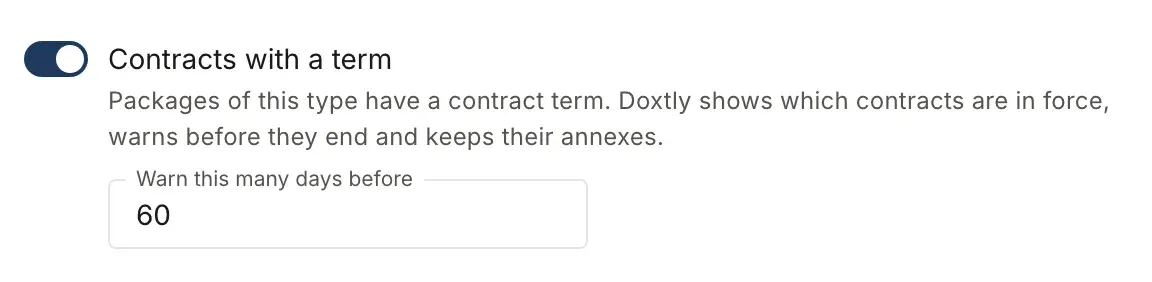
Northbridge’s retainers already had a document type, Advisory retainers. Piotr opened it, turned on Contracts with a term and set Warn this many days before to 60, the time Emily Carter, the account manager, needs to talk a renewal through.
The register goes in once
In Documents, Add signed document and then Import from a sheet took the old register,
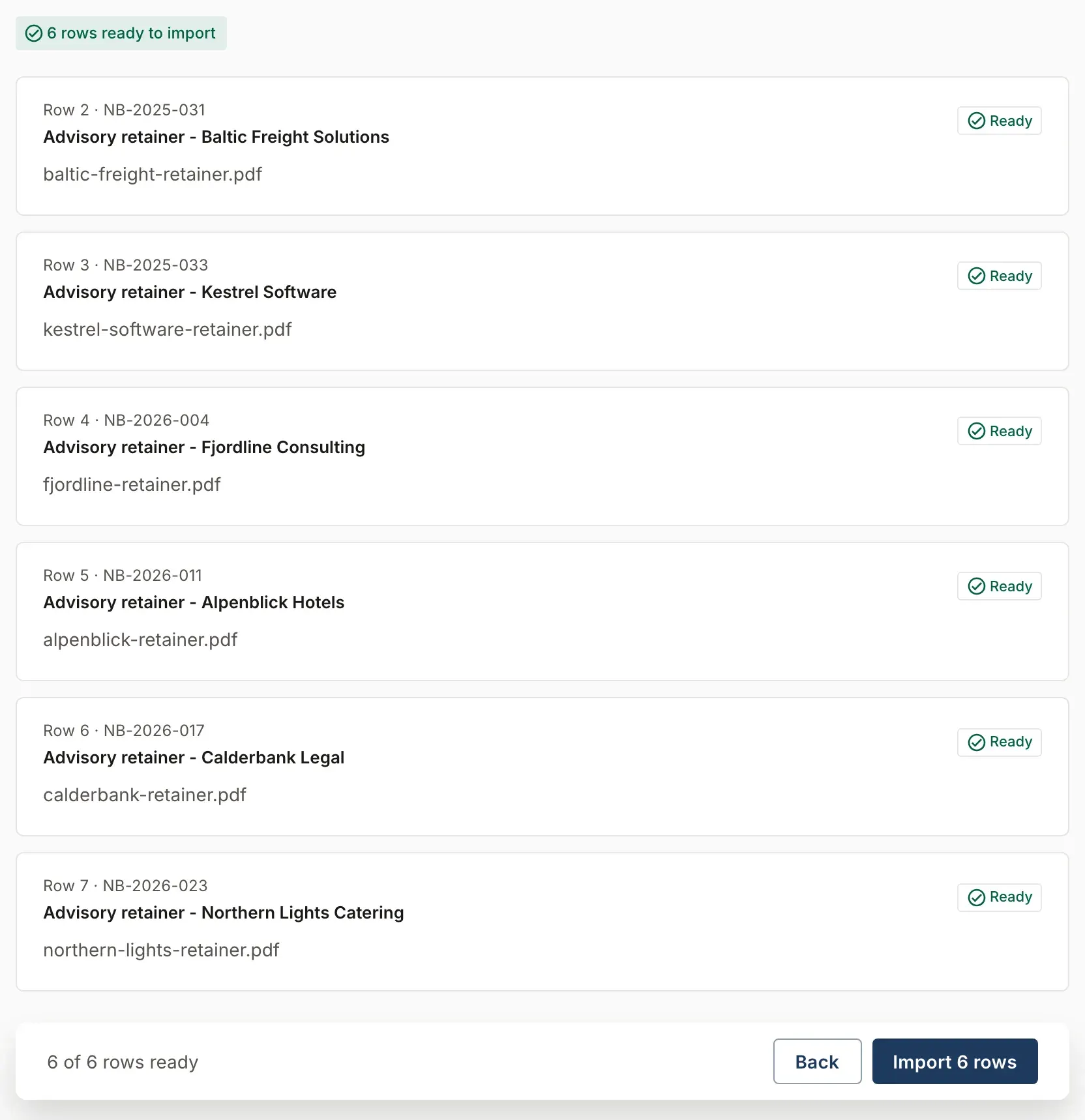
contract-register.xlsx, together with the signed PDF of each retainer. On the columns step Piotr pointed each field at its column: title, number, signing date, file name, In force until, the account manager’s email as Responsible person, and the client’s name, email and company as the first party. He chose Advisory retainers as Type of every row, and the check found all six rows ready. Nothing went to any client.
Doxtly keeps the dates from now on
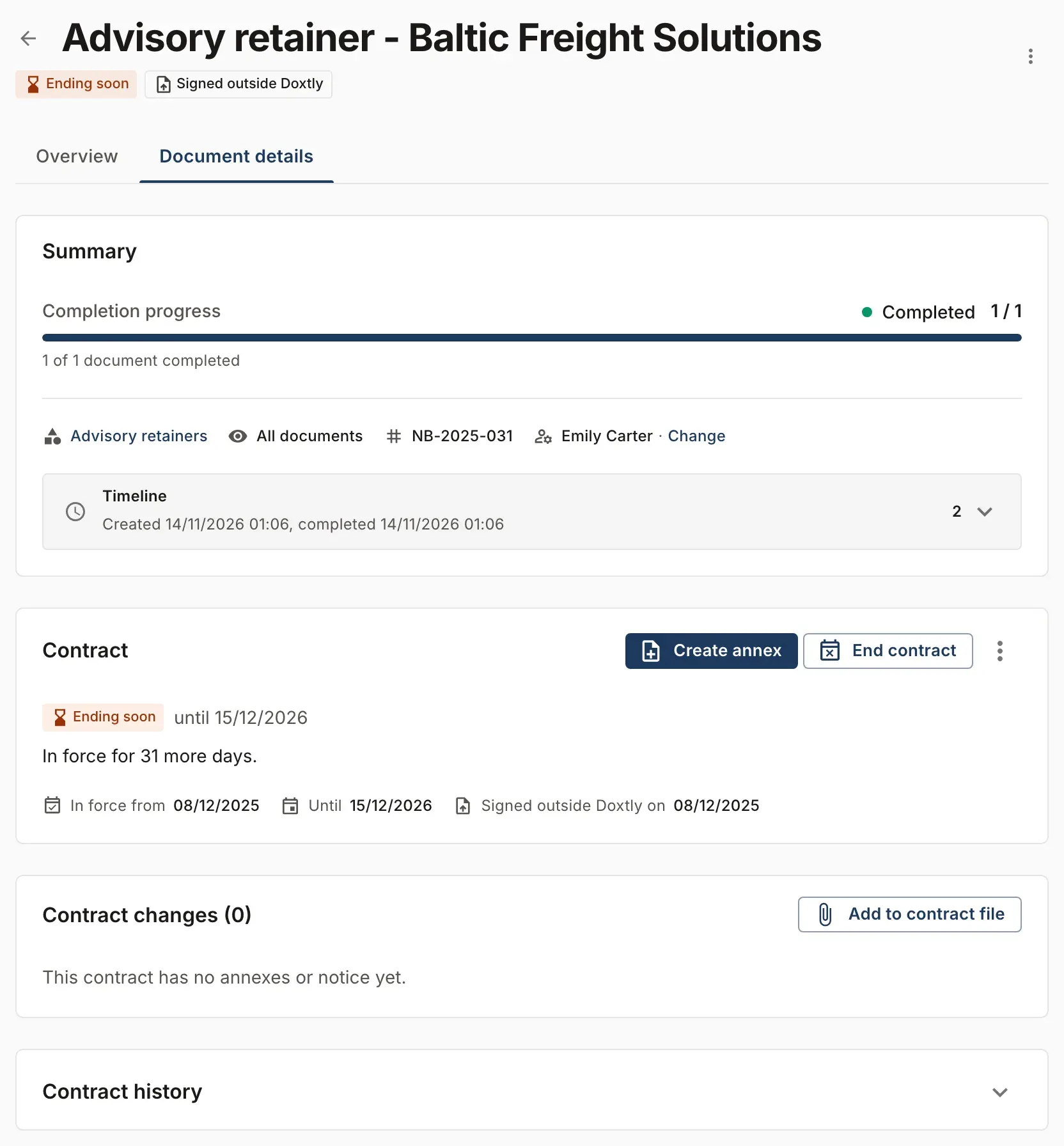
Each retainer now shows where it stands beside its signatures. Sixty days before its last day it turns Ending soon, Emily, as the person responsible for it, gets a notification, and the contract appears under Contracts ending soon on her dashboard. None of this needs a workflow.
A workflow takes it from there
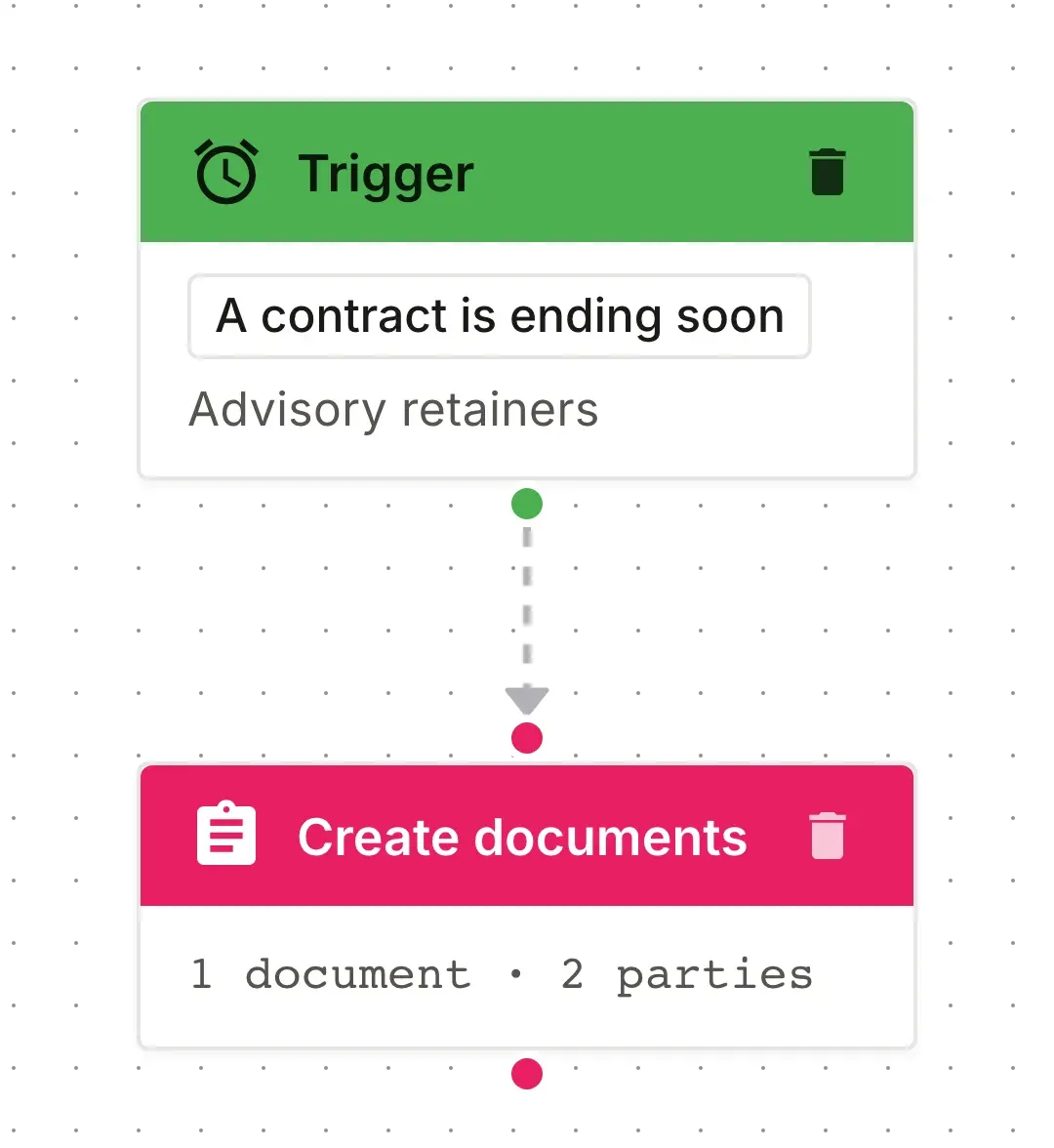
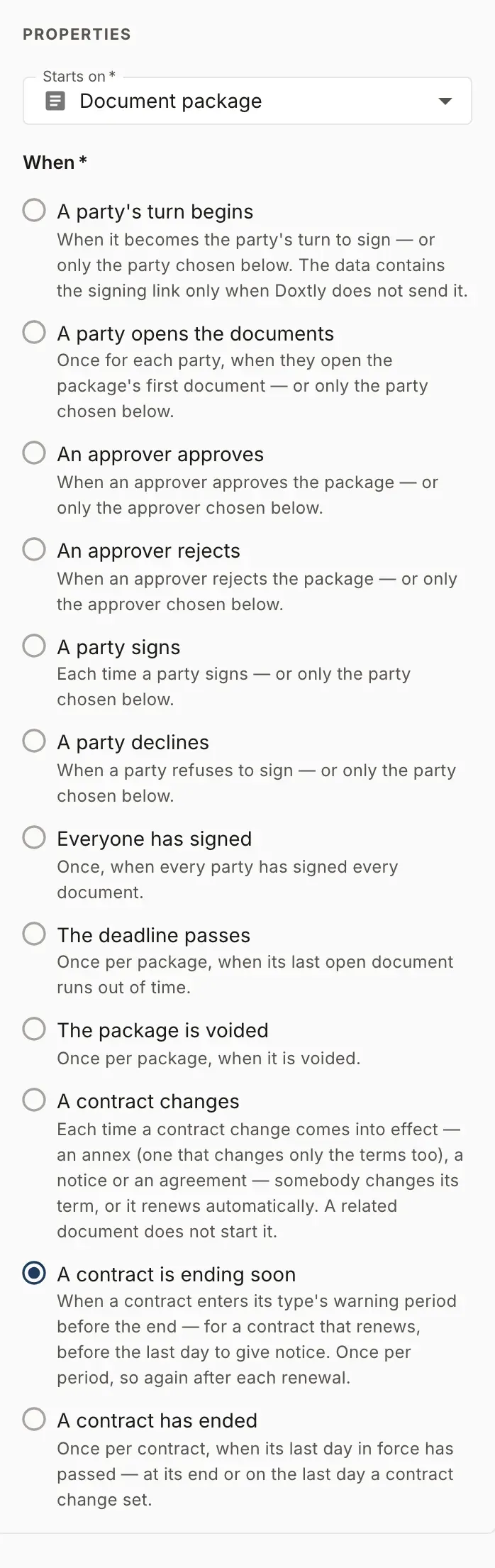
Piotr built a workflow on the Document package trigger, with When set to A contract is ending soon and Advisory retainers as Trigger source. It runs for each retainer on the day its warning comes. An imported retainer brings no form answers along, but the run knows the parties recorded on it, in the order of the sheet’s columns: the client, the register’s first party, is
{{ _package.contract.parties[0].fullName }}at{{ _package.contract.parties[0].email }}.
Create documents prepares the annex
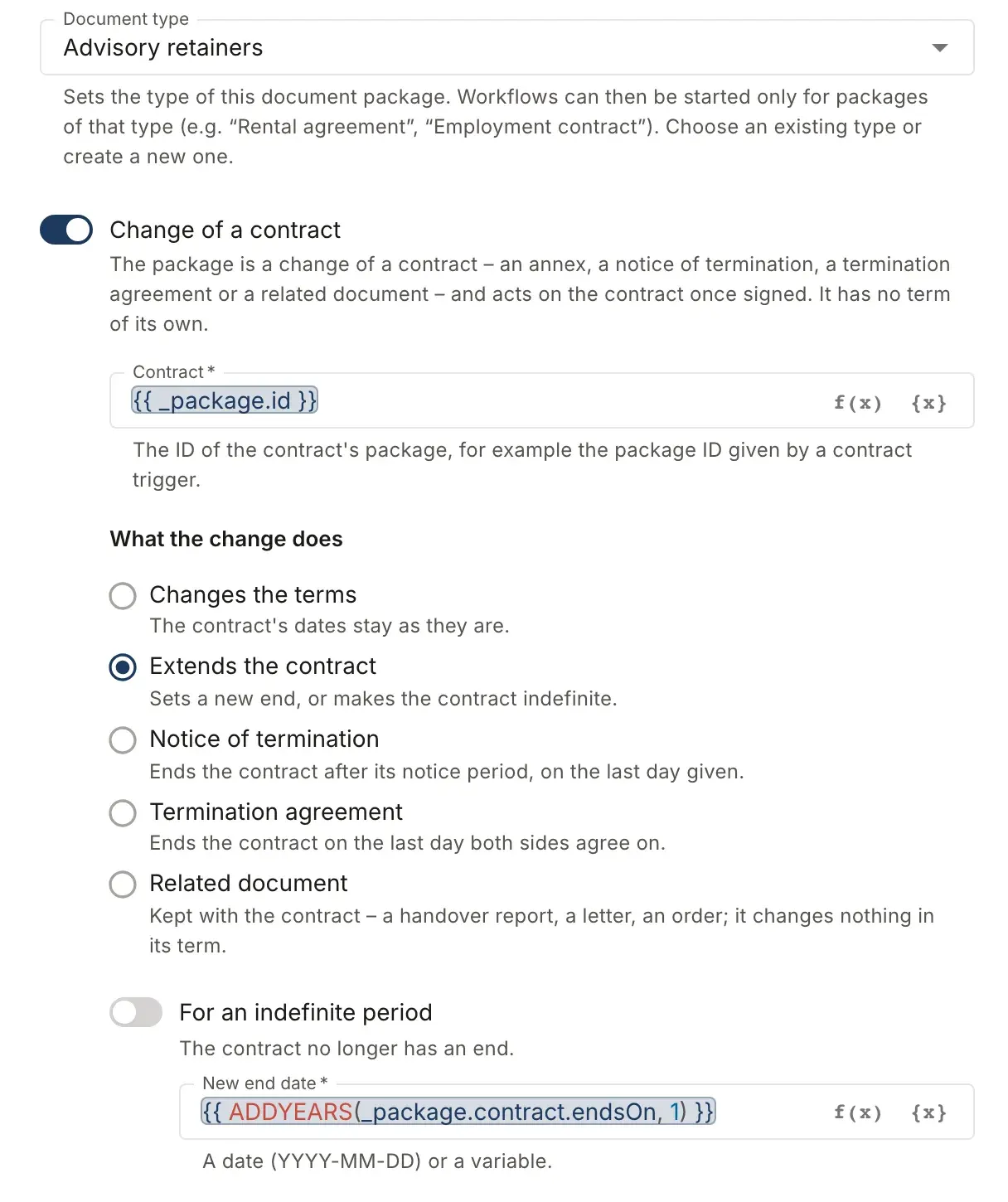
The one step after the trigger, Create documents, makes a Change of a contract: Contract is
{{ _package.id }}, What the change does is Extends the contract, and New end date is{{ ADDYEARS(_package.contract.endsOn, 1) }}. On Documents, its one document is the Word template Retainer extension annex, which prints the contract’s title, number and end, and the new end. On People,NORTHBRIDGEis Emily, chosen as A user of the application, andCLIENTis{{ _package.contract.parties[0].fullName }}at{{ _package.contract.parties[0].email }}. Under Order Emily comes first and the client after her, so she reads the annex before the client sees it.
The client signs, and the contract moves on
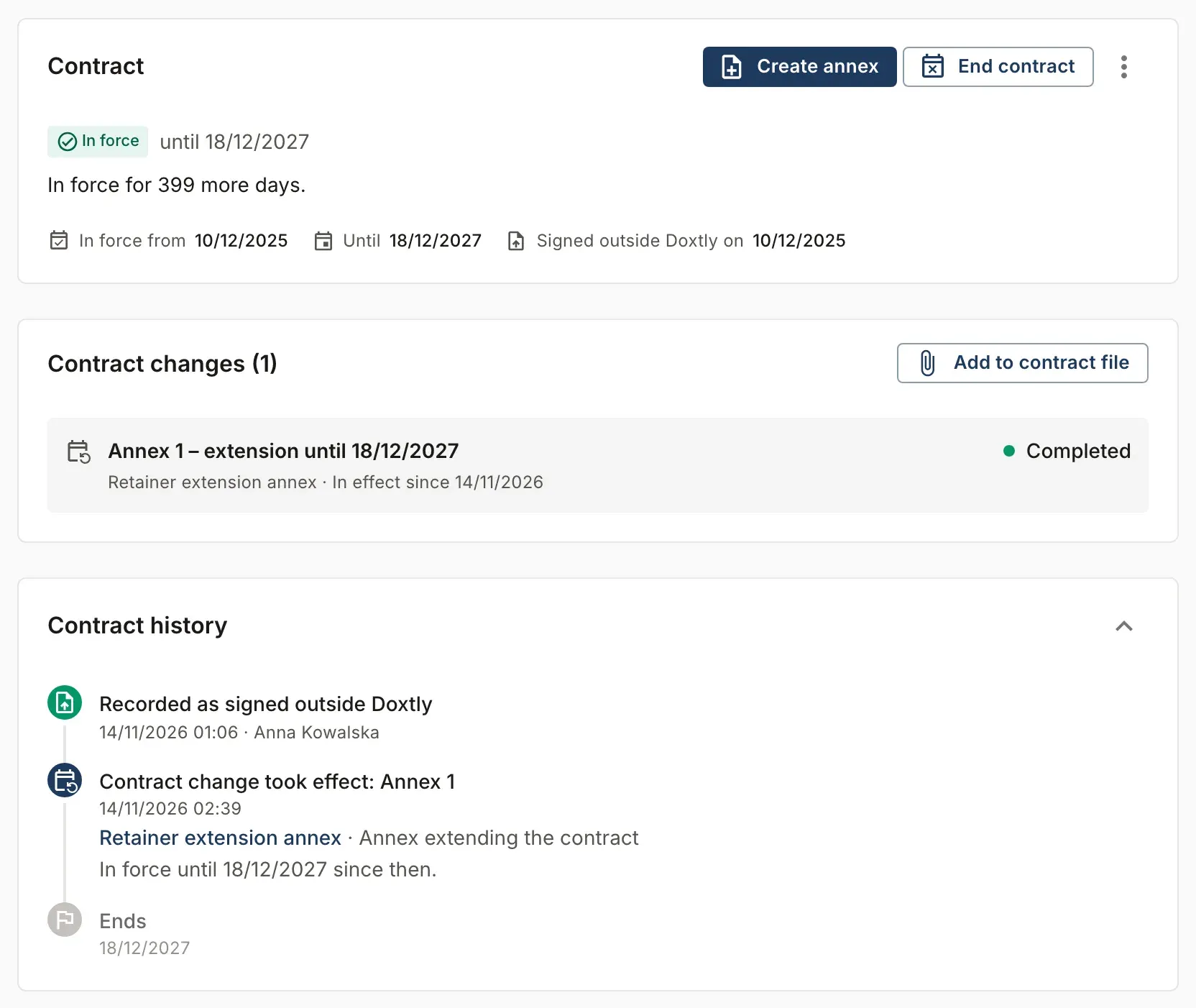
Emily signs first, then James Hollis at Kestrel Software signs the annex from his link. Once both have signed, the annex takes effect: the retainer is In force again, until the same day a year later, and Annex 1 sits under Contract changes with the day it took effect. Contract history records the change, and next year the warning comes round again for the new end.
What Piotr has at the end
Baltic Freight Solutions and Kestrel Software fell due in the same week. Emily heard about each on its own day, each client got an annex to sign, and both retainers now run to the end of next year. Piotr no longer keeps a register: the document list, filtered by Contract, is the register.
What you set up once
- A document type with Contracts with a term on and 60 warning days
- A Word template of the annex, with a signature place for Northbridge and one for the client
- The register as a sheet and the signed PDF of each contract, imported once
- One workflow on A contract is ending soon, switched on
Ways to adapt it
- No workflow at all
- The warning, the Ending soon state and the dashboard list come without one. On the dashboard, Extend beside a contract opens Create an annex set to an extension, and Emily checks the draft and sends it herself. Choose the annex template for Annex extending the contract under Documents for changes on the type, and the draft starts with it, filled in from the contract.
- A friendly email first
- Put a Send email step before Create documents, to
{{ _package.contract.parties[0].email }}with Emily’s address to reply to, so the client hears from a person before the annex arrives. This needs an email integration. - A contract that renews by itself
- For a retainer that renews automatically, give it Renews for and a Notice period in the sheet or in its term. The warning then comes before the last day to give notice, while there is still time to stop it, and the step can make a Notice of termination for the contracts you don’t want to keep.
- Contracts made in Doxtly
- A contract signed in Doxtly gets its term in the package editor, or from the Create documents step that makes it, and is watched the same way from the day everyone has signed. Its form answers travel with it, so the annex can use them too.
- Other contracts with an end
- Leases, maintenance agreements, software licences and NDAs with a term work the same way. Each document type has warning days of its own.
Questions people ask
Does the warning come only once?
Once for each end. When a contract is extended, its new end gets its own warning when the time comes. If you change Warn this many days before on the type, contracts not yet warned follow the new number.
What if the client doesn’t sign the annex?
Then nothing changes on the contract, because an annex acts only once it is signed. The retainer ends on its own last day and shows as Ended, and Emily, as the person responsible, is notified. If the annex package had a deadline that passed, it shows that it did not take effect.
What if the workflow fails?
The run stops at that step, and people who can view workflows get a Workflow failed notification. Once the cause is fixed, Rerun starts it again for the same contract. Emily’s own warning doesn’t depend on the workflow: it reaches her either way. See Executions.
Do I need the PDFs to import a register?
Yes. Each row names its signed files by file name, several separated by ;, and a row without a PDF is not imported. The check shows every row with a problem before anything is imported, so you can fix the sheet, load it again, or import the rows that are ready.
Is the warning a formal notice?
No. The warning is for your team, and the annex is a proposal the client signs or not. If your contract asks for notice in writing by a certain date, that stays your job: End contract prepares a notice of termination when you need one. Ask your lawyer if you’re unsure what your contracts require.
Which plan do I need?
Contracts with a term, their warnings and the import work on every plan, the Free one included. Imported PDFs take up storage, 50 MB on Free, and recording them uses none of your monthly packages. Each annex the workflow sends counts as one package for signature, one generated document and one run. Free allows three packages and 10 runs a month, enough to try it on a few contracts. Pricing shows the rest.
Start with one document.
Take the contract you retype most often and turn it into a template. The Free plan is enough, and you need no card.