
A product order form that adds up the order and takes the payment
A buyer picks products by their pictures, chooses how many, picks a colour by its photo and a size, and watches the total, delivery included, add itself up. They pay online the moment they send the order, and you get a paid order with everything you need to ship it.
Orders by email, payments by bank transfer
Northbridge Advisory, an example consulting firm, sells the materials from its workshops: a handbook, notebooks and a hoodie that course graduates keep asking about. Orders came by email, “two of the hoodies, the green one, a medium I think”, and someone wrote back with the price, the delivery cost and the bank details.
Half the orders needed a second email about a size or a colour, and a parcel left only once the transfer showed up in the bank, sometimes a week later. A shop platform would have been far too much for three products.
How Northbridge builds its order form
Each product is a picture and a few fields
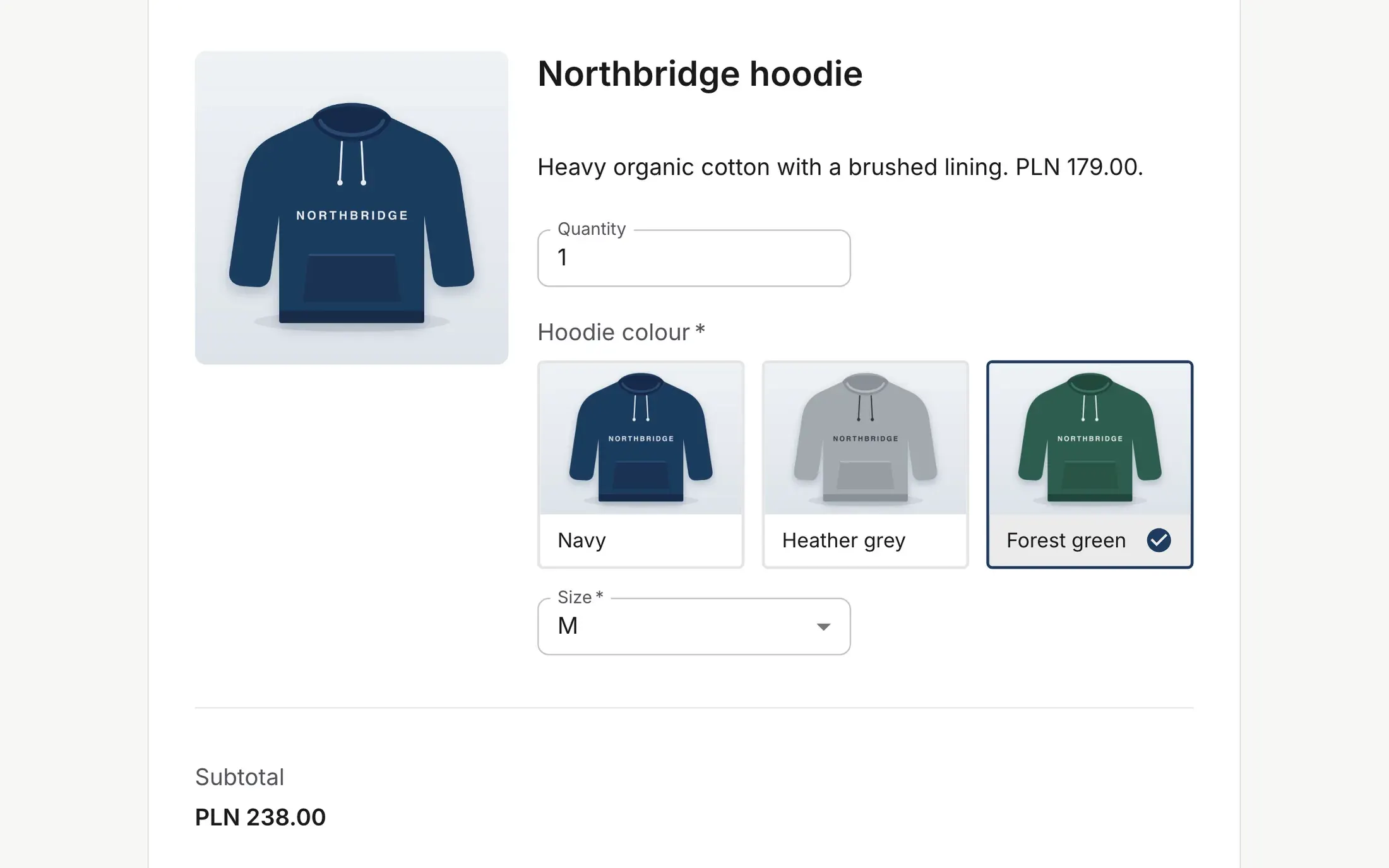
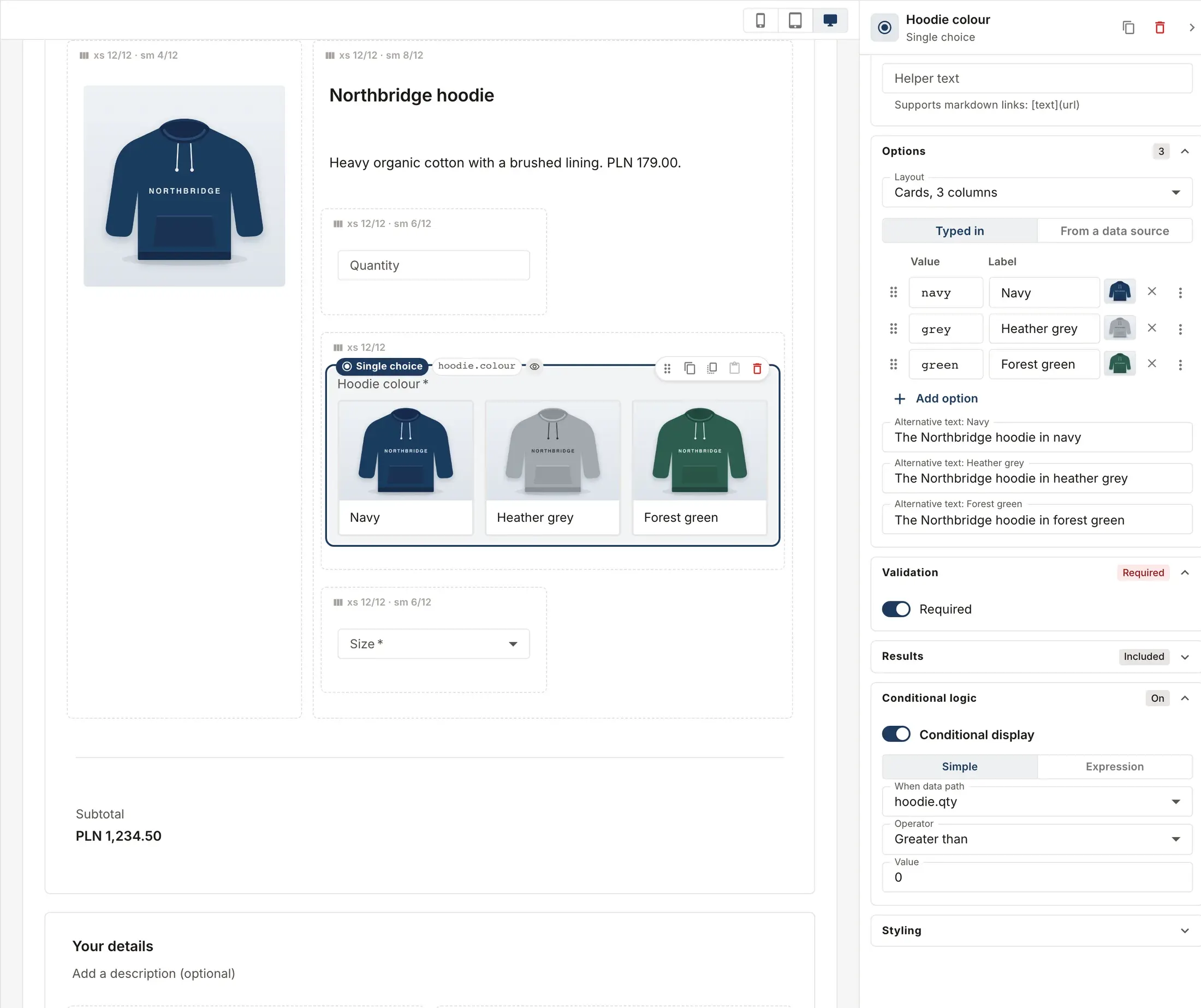
Anna builds the form in the form designer. A product takes two containers side by side: an Image on the left, and on the right a heading, a line with the price and a Number input for the quantity, from 0 to 10. The size, paper or format are Select fields under it. The hoodie’s colour is a Single choice shown as picture cards: with Layout set to Cards, 3 columns, each colour has a photo of the hoodie in it, so buyers pick the green they see instead of guessing what “Forest green” looks like. On a phone the picture stands above the fields, and the colour cards go two to a row.
Options appear when a product is in the order
Colour and size only matter for a hoodie someone is buying, so each has a condition:
hoodie.qtyGreater than 0. They are required, and a hidden field is never required, so a buyer who doesn’t want the hoodie isn’t asked its size, and one who does can’t forget it.
The total adds itself up
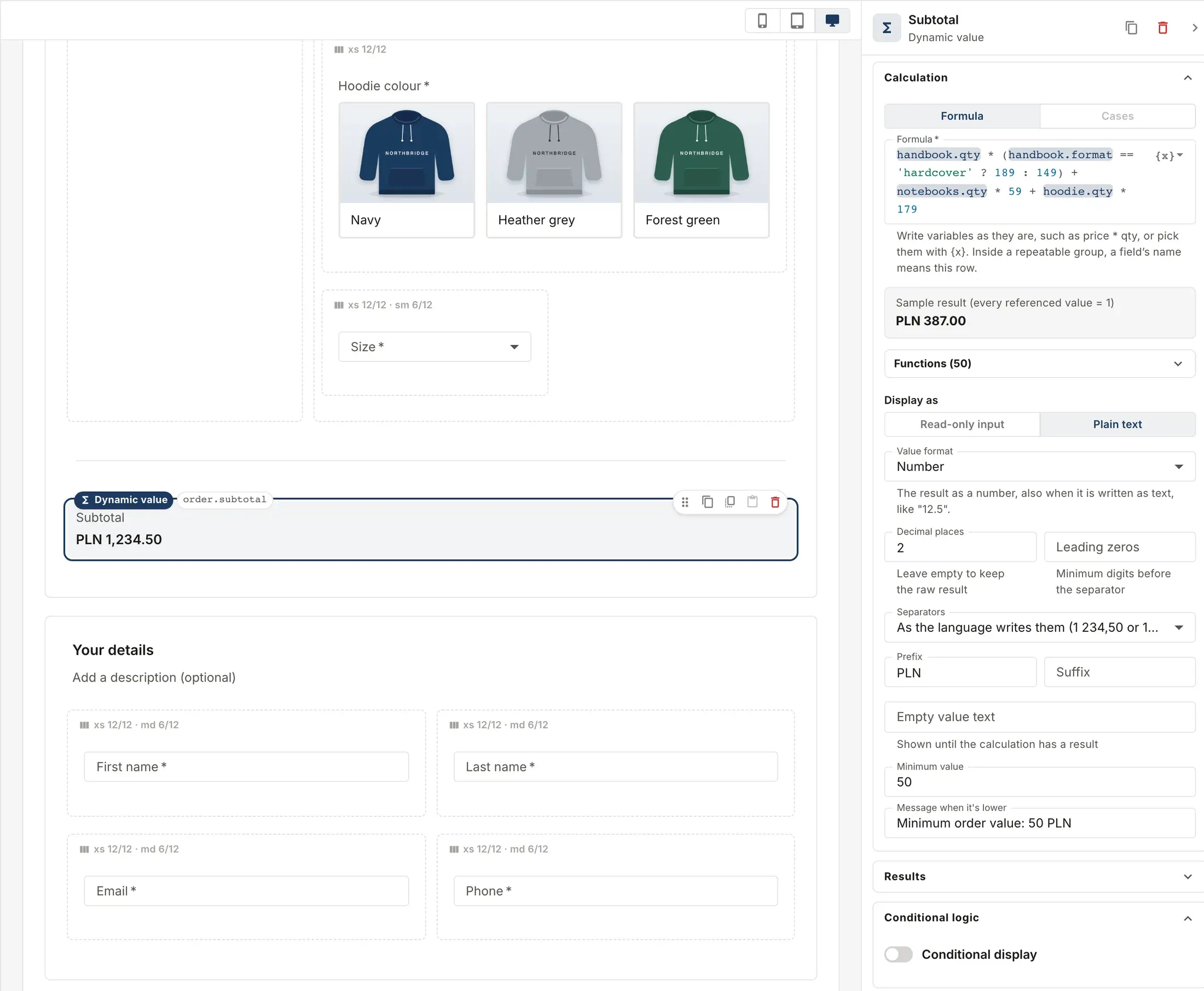
A Dynamic value under the products works out the subtotal from the quantities, with the hardcover handbook dearer than the paperback:
handbook.qty * (handbook.format == 'hardcover' ? 189 : 149) + notebooks.qty * 59 + hoodie.qty * 179. A second one gives the delivery, PLN 15.00 by courier and free from PLN 300.00 or for a pickup at the office, and a third adds them into the total. Each shows as Plain text with two decimal places and the prefixPLN. The subtotal has a Minimum value of 50 with the message “Minimum order value: 50 PLN”, so an order with nothing in it, or worth less than that, can’t be sent: the form shows the message under the subtotal, and Doxtly checks it again when the order arrives.
The payment takes the total
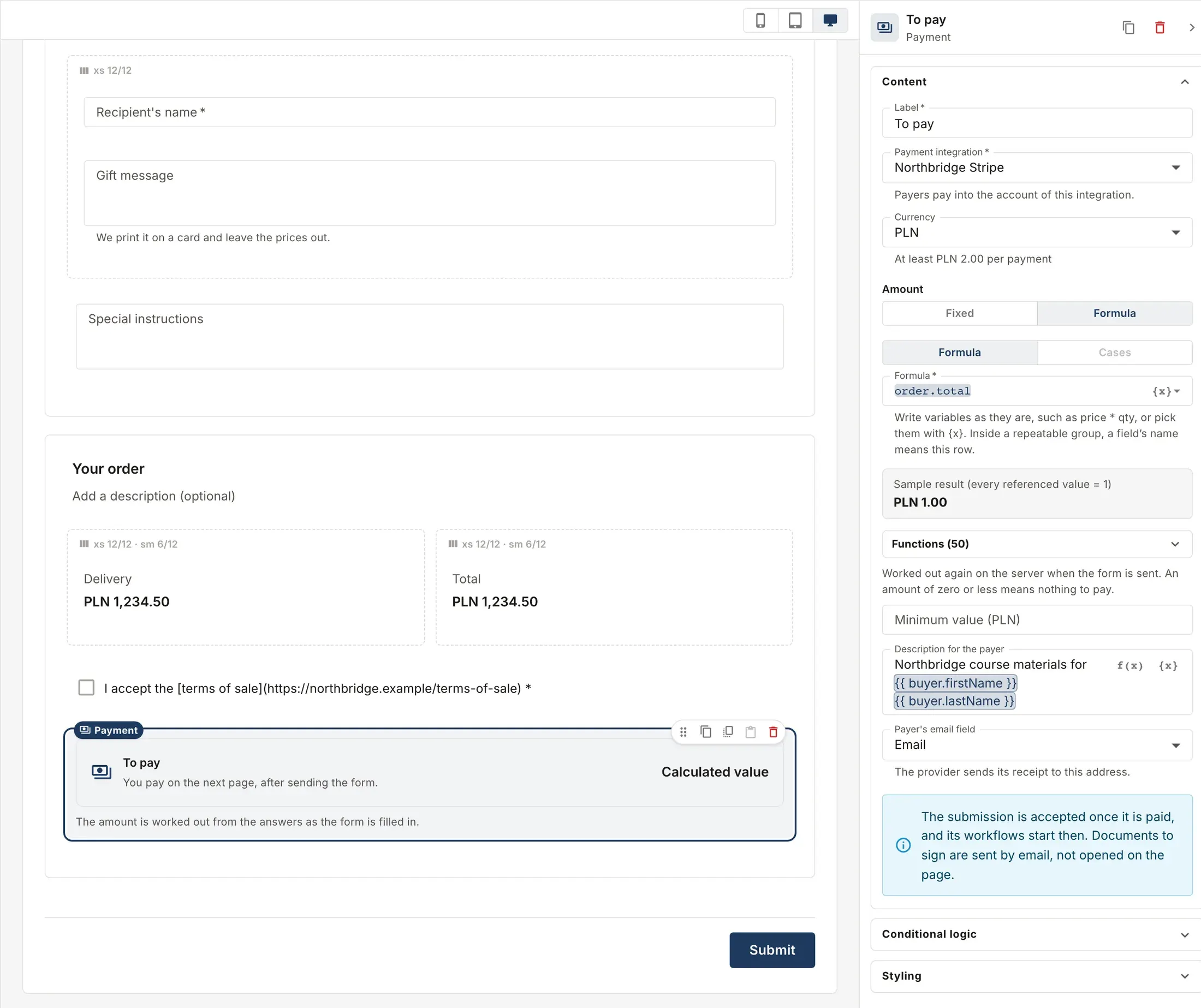
The order is paid online, in the same step as it is sent. A Payment element closes the form. It goes through Northbridge’s Stripe integration, in PLN; Przelewy24, PayU and PayPal work the same way, and with each of them the money goes straight to the shop’s own account with the provider, never through Doxtly. Its Amount is a Formula,
order.total, the dynamic value above it. The Description for the payer names the buyer, and the receipt goes to the address they type in Email. Doxtly works the amount out again from the answers when the form is sent, so what is paid is always the real total, whatever the browser showed. More on online payments, and in the manual, Taking payments.Contact, billing and delivery in the same form
Below the products the buyer gives their name, email and phone, a billing address, and how they want the order: by courier or collected from the Warsaw office. A courier order asks whether it goes to the billing address, and No, to another address opens the delivery address. This is a gift asks for the recipient and a message for the card, and a box takes special instructions.
The buyer orders and pays in one go
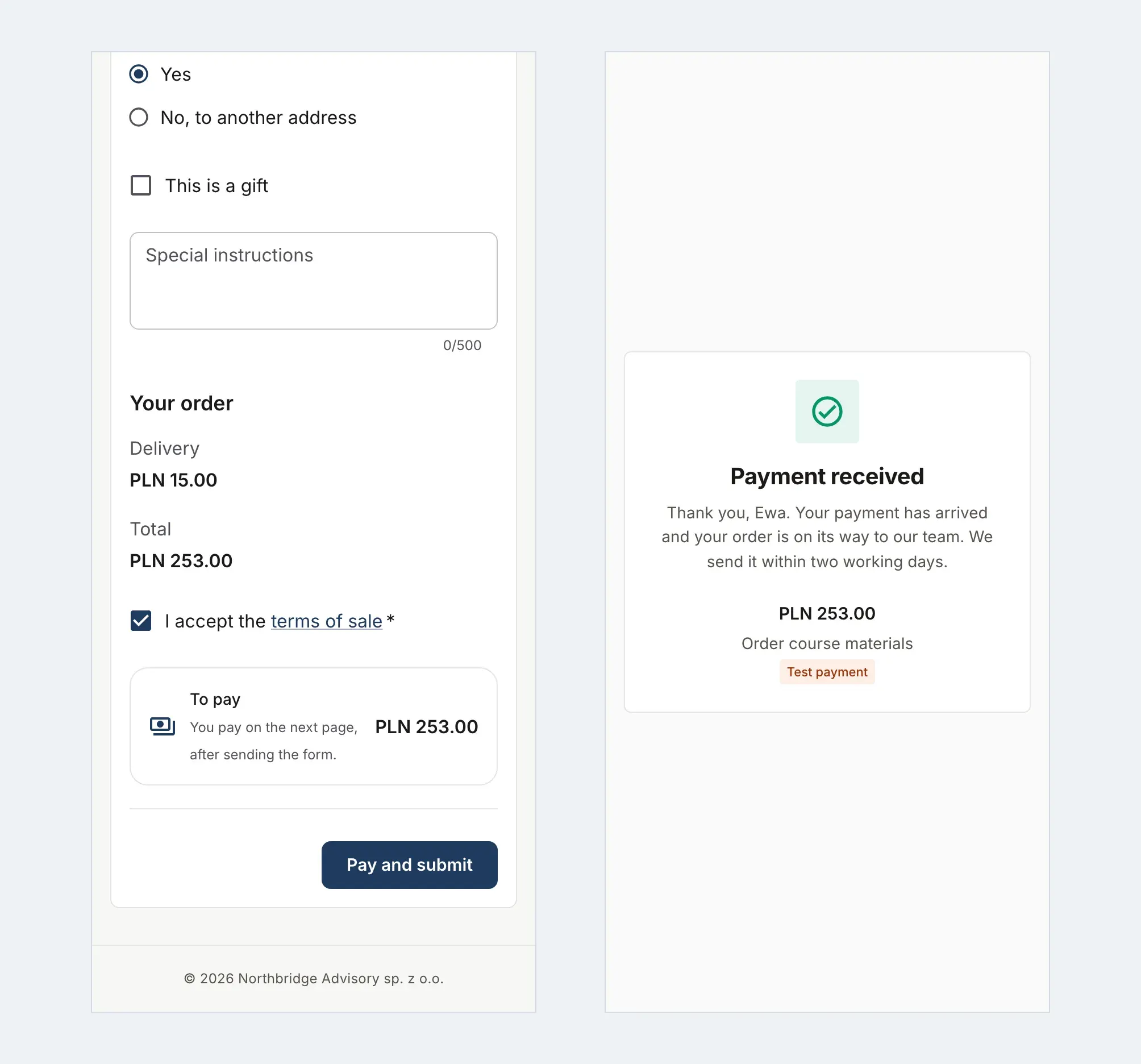
Ewa Sadowska picks one hoodie in Forest green, size M, and a set of notebooks with dotted paper. The form shows a subtotal of PLN 238.00, PLN 15.00 for the courier and PLN 253.00 to pay. She presses Pay and submit, pays by card on Stripe’s page and comes back to Doxtly’s payment page, which confirms it. She needs no account.
A paid order reaches the team
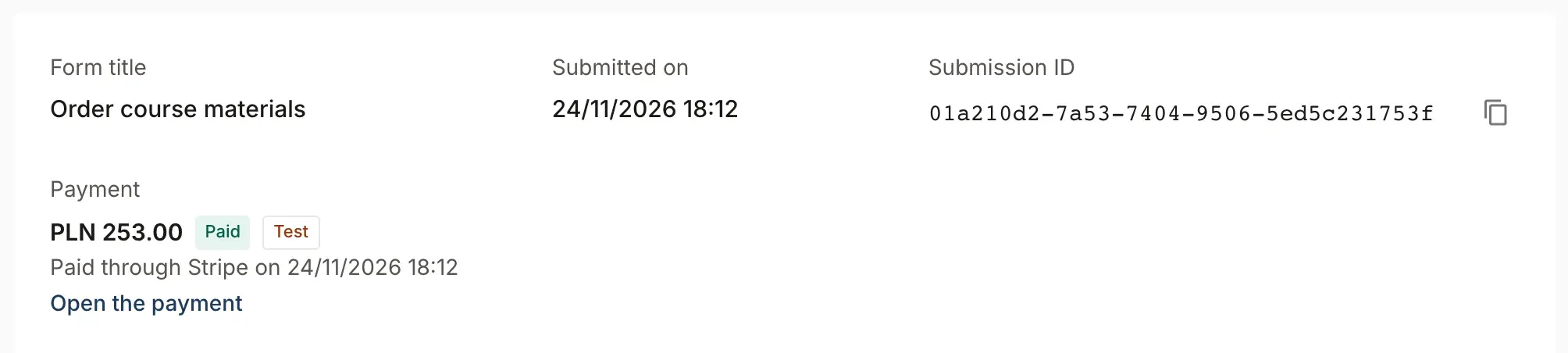
The submission counts once the money is in: until then it waits as Awaiting payment and starts nothing. The submission keeps every answer, the payment and its status, so the team packs the parcel from one page. A workflow started by the Form submission trigger can email the order to the warehouse, add a row to a sheet or send the buyer a confirmation.
What Northbridge set up once
- A Stripe integration for card payments (Przelewy24, PayU or PayPal work the same way)
- A picture of each product, and one of the hoodie in each colour
- The order form: products, contact and delivery fields, three dynamic values with a minimum on the subtotal, and the payment
Ways to adapt it
- A longer product list
- For more than a handful of products, keep them in a spreadsheet and let a data source fill a Select. A formula then finds the price of the chosen product with
LOOKUP, so a new price in the sheet reaches the form without editing it. Shown as a single or multiple choice with picture cards, the sheet can carry a picture column too: the web address of each product’s image, or the name of the image file in the sheet’s folder. Doxtly keeps its own copies and updates them when the sheet changes. - Free orders for members
- Give the payment element a condition, and a form that is free for members asks everyone else to pay. A payment hidden by its condition asks for nothing, and the order is sent as any other.
- Your own website
- Embed the form on your site. Stripe’s page then opens in the whole browser window, not inside the frame, and after paying the buyer sees Doxtly’s payment page and your success message.
- What it is not good for
- This is an order form, not a shop. There is no stock count, no discount codes and no basket that stays between visits. For a large catalogue, a shop platform suits better.
Questions people ask
Can a picture be one of the options, like a colour swatch?
Yes. A Single choice or a Multiple choice can show its options as cards with a picture each, in 2, 3 or 4 columns, two to a row on a phone. The buyer clicks or taps the picture, and the order keeps the option’s value and label as with words. A Select stays a list of words.
Can I require a minimum order, or at least one product?
Yes. Give the dynamic value that adds up the order a Minimum value: 50 with “Minimum order value: 50 PLN”, or 1 on the number of items with “Choose at least one product”. Below it the form can’t be sent, and the server refuses it too. A payment worked out by a formula can have its own minimum, so a total of zero is refused instead of going out free.
Does the buyer type their card details into the form?
No. After Pay and submit they pay on the provider’s own page, Stripe’s here, and Doxtly never sees the card. If they leave without paying, their answers are kept and they can pay for 24 hours.
Can someone change the price in their browser?
No. The dynamic values and the amount to pay are worked out again on the server from the answers when the form is sent, and only that amount is charged.
Which providers and currencies can I use?
Stripe, Przelewy24, PayU and PayPal, in the currencies your integration takes. You connect your own account, so the money is paid straight to you and Doxtly takes no fee. Each provider has a smallest amount per payment, PLN 2.00 for Stripe.
Which plan do I need?
Payments are in the Starter, Pro and Business plans. Pricing shows the current limits.
Start with one document.
Take the contract you retype most often and turn it into a template. The Free plan is enough, and you need no card.